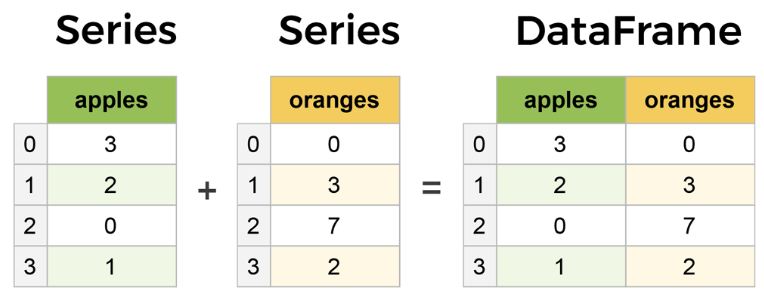
Series
- pandas의 1D data를 위한 핵심 데이터 구조
- 인덱스(index)와 값(value)으로 구성된 labeled 1차원 데이터 구조를 관리
Index: 각 데이터 포인트의 레이블- 흔히, 0부터 시작하는 정수 index로 접근:
.iloc - 또는 명시적으로 할당된 label을 통해 접근:
.loc
- 흔히, 0부터 시작하는 정수 index로 접근:
Value: 실제 데이터 값- 모든 값은 동일한 데이터 타입(dtype)을 가짐
- 선택적으로
Series는name속성을 가질 수 있음 (Series를 가리키는 이름임.)
참고로 DataFrame은 2D labeled tabular data structure로, 여러 개의 Series가 열(column)로 결합된 형태라고 볼 수 있음. 즉, DataFrame의 각 column은 하나의 Series임.
1. Series 생성.
참고: DataFrame 생성.
1-1. 리스트로 생성.
import pandas as pd
import numpy as np

# 리스트로 생성
s1 = pd.Series([10, 20, 30, 40, 50])
print("리스트로 생성:")
print(s1)
1-2. index를 지정하여 생성.
s2 = pd.Series([85, 92, 98],
               index=['김철수', '김영희', '김행근'],
               name='점수')
print(s2)
1-3. 딕셔너리로 생성
dict_data = {'서울': 9765, '부산': 3419, '인천': 2958, '대구': 2427}
s3 = pd.Series(dict_data, name='인구(천명)')
print(s3)
2. Series의 Attributes
print(f"값(values)  : {s2.values}") # ndarray
print(f"인덱스(index): {s2.index}")
print(f"이름(name)  : {s2.name}")
print(f"크기(size)  : {s2.size}")
print(f"데이터 타입(dtype): {s2.dtype}").values보다는.to_numpy(dtype='float64', copy='True')가 권장됨.- 값을 읽는 경우만
.values또는.to_numpy()를 사용하고 - 값을 바꿔야 하는 경우는 indexer를 사용하거나 filtering 또는 apply사용.
2025.08.21 - [Python/pandas] - [Pandas] DataFrame : Basic Attributes and Exploration Methods
[Pandas] DataFrame : Basic Attributes and Exploration Methods
pandas의 DataFrame객체는 2차원 데이터 구조(2D tabular structure)로, 데이터 분석에서 가장 자주 사용되는 객체임.일반적으로 데이터에서 수백 ~ 수십만의 row (case) 및 column (feature, attribute)이 존재일부 데
ds31x.tistory.com
3. Data접근
일반적으로 pandas에서는 데이터 접근을 위해서 indexer를 제공함.
indexer는 .iloc , .loc , .at , .iat 이 있음
3-1. index사용.
Indexer .loc을 사용하는 경우와 동일.
- 일반적인 square bracket을 사용하여 접근시 index를 이용한 접근임.
print("김철수의 점수:", s2['김철수'])
print("김영희의 점수:", s2['김영희'])
3-2. 위치(정수)로 접근
Indexer .iloc을 사용한 접근!
print("첫 번째 값:", s2.iloc[0])
print("두 번째와 세 번째 값:")
print(s2.iloc[1:3])
3-3. 여러 인덱스 선택
print("특정 인덱스들 선택:")
print(s2[['김철수', '김행근']])
4. 데이터 필터링
condition에 의해 boolean mask(Series객체)가 생성되며 이를 이용한 indexing임.
- 여러개의 condition을 사용시 각각을
()로 감싸야 함. &,|,~를 사용하여 condition 묶음: (and,or,not은 사용불가.)
print("점수가 85 이상인 학생:")
print(s2[s2 >= 85])
print("\n점수가 80~90 사이인 학생:")
print(s2[(s2 >= 80) & (s2 < 90)])
2025.08.28 - [Python/pandas] - [Pandas] Boolean Mask 와 where()/mask()
[Pandas] Boolean Mask 와 where()/mask()
Boolean Mask란:Boolean mask는 True 또는 False로 구성(=boolean)된 시퀀스(Series/DataFrame/ndarray/list) 객체를 이용하여 Pandas에서 특정 데이터를 선택하는 등의 마스킹(masking)을 하는 것을 가리킴.사용방식:Series
ds31x.tistory.com
5. 산술 연산
vectorized operation 으로 iteration을 이용하는 것보다 빠름.
print("모든 점수에 5점 추가:")
print(s2 + 5)
print("\n점수를 0.1배로 환산:")
print(s2 * 0.1)
print("\n두 Series 더하기:")
s4 = pd.Series([5, 3, 2], index=['김철수', '김영희', '김행근'])
print(s2 + s4)
2024.03.19 - [Python] - [Tensor] vectorized op. (or universal func)
[Tensor] vectorized op. (or universal func)
Numpy에서 제공하는 ufunc. (Universal Functions)은 homogeneous and contiguous tensor 에서 모든 elements에 같은 연산을 적용하여기존의 반복 loop에 기반한 연산에 비해 압도적인 속도를 보이면서 간편한 연산자
ds31x.tistory.com
6. 기술 통계
print(f"평균: {s2.mean():.2f}")
print(f"중앙값: {s2.median()}")
print(f"표준편차: {s2.std():.2f}")
print(f"최댓값: {s2.max()}")
print(f"최솟값: {s2.min()}")
print(f"합계: {s2.sum()}")
print("\n전체 통계 요약:")
print(s2.describe())
2025.08.21 - [Python/pandas] - [Pandas] Reduction 과 Aggregation
[Pandas] Reduction 과 Aggregation
0. Reduction 과 Aggregation — Pandas에서의 개념 차이Reduction (축소형 집계)여러 값을 하나의 값으로 줄이는 연산.예: sum, mean, min, max, std, median, skew, kurt, sem, quantile특징:단일 함수로 단일 결과 산출Aggrega
ds31x.tistory.com
7. sorting
print("값 기준 오름차순:")
print(s2.sort_values())
print("\n값 기준 내림차순:")
print(s2.sort_values(ascending=False))
print("\n인덱스 기준 정렬:")
print(s2.sort_index())
8. missing value 처리.
s5 = pd.Series([100, np.nan, 85, 90, np.nan, 78],
               index=['A', 'B', 'C', 'D', 'E', 'F'])
print("결측값이 있는 Series:")
print(s5)
print(f"\n결측값 개수: {s5.isnull().sum()}")
print("\n결측값 제거:")
print(s5.dropna())
print("\n결측값을 평균으로 채우기:")
print(s5.fillna(s5.mean()))
2025.08.24 - [Python/pandas] - [Pandas] missing value 확인: 결측치 확인
[Pandas] missing value 확인: 결측치 확인
Pandas 는 missing value (정확하게는 NA) 여부를 확인하는 다음의 메서드를 지원:isnull()isna()Note:isnull() 과 isna()는 기능적으로 동일함: NumPy의 ndarray가 지원하는 isnan() 기반.Pandas 0.20.0 버전부터 isnull()의
ds31x.tistory.com
2024.01.09 - [Python/pandas] - [pandas] dropna : missing value 처리 (삭제)
[pandas] dropna : missing value 처리 (삭제)
na 는 not available 로서 값이 비어있거나 숫자가 아니거나(nan: not a number) 등등으로특정 cell에 값이 유효하지 않아 사실상 비어있는 경우를 의미함.dropna는 na값을 가지고 있는 row나 column을 제거하는
ds31x.tistory.com
9. apply와 map 메서드
.apply() 메서드
- Series의 각 요소에 인자로 넘겨진 함수를 적용
- 해당 함수에 의해 각 요소가 변환된 새로운
Series를 반환. DataFrame객체에서도 지원.
map() 메서드
Series의 각 값을dict,Series, 또는callable객체를 사용하여 다른 값으로 매핑(치환)하는 메서드.Series에만 존재함.DataFrame에선 제거된 상태.callable의 경우엔.apply()와 기능적 차이가 없음.
print("등급 매기기 (apply 사용):")
grades = s2.apply(lambda x: 'A' if x >= 90 else 'B' if x >= 80 else 'C')
print(grades)
print("\n")
print("매핑 (map 사용):")
grade_map = {85: 'B+', 92: 'A', 78: 'C+', 95: 'A+', 88: 'B+'}
print(s2.map(grade_map))
2025.08.20 - [Python/pandas] - [Pandas] .map() 과 .apply() 메서드
[Pandas] .map() 과 .apply() 메서드
1) DataFrame.map() 메서드: element-wise(요소 단위) 적용목적:DataFrame의 각 스칼라 요소에 함수를 적용element-wise 변환.반환:입력과 동일한 shape의 DataFrame.주요 파라미터func: 각 요소에 적용할 함수(호출 가
ds31x.tistory.com
10. 고유값과 빈도수
.unique() 메서드:
Series에서 중복을 제거한 고유한 값들을numpy배열로 반환.
value_counts() 메서드:
Series에서 각 고유 값의 출현 빈도수를 계산- 이를 내림차순으로 정렬된
Series로 반환.
s6 = pd.Series(['서울', '부산', '서울', '대구', '부산', '서울', '인천', '부산'])
print("도시 데이터:")
print(s6)
print("\n고유값:")
print(s6.unique())
print("\n각 값의 빈도:")
print(s6.value_counts())
2025.08.23 - [Python/pandas] - [Pandas] unique(), value_counts(), nunique()
[Pandas] unique(), value_counts(), nunique()
범주형(categorical) 데이터 전처리 상황에서 많이 사용되는 메서드들임. 종류가 적은 값을 가지는 데이터들을 분석하는데 주로 이용됨.unique(): 고유값 배열 반환.value_counts(): 고유값과 빈도 를 확인
ds31x.tistory.com
11. String accessor: .str
Series 객체의 .str은 문자열 접근자(String Accessor).
문자열 데이터를 담고 있는 Series에서 문자열 메서드들을 벡터화된 방식으로 적용할 수 있게 해주는 특수한 attribute.
Series가 문자열 타입일 때만 사용할 수 있으며,
숫자 데이터에는 사용할 수 없음.
s7 = pd.Series(['apple', 'banana', 'cherry', 'date'])
print("원본:")
print(s7)
print("\n대문자 변환:")
print(s7.str.upper())
print("\n문자열 길이:")
print(s7.str.len())
print("\n특정 문자 포함 여부:")
print(s7.str.contains('a'))
숫자를 데이터로 가지는 경우, 이를 문자열로 변환후 처리할 수도 있음:
s = pd.Series([1, 2, 3, 4, 5])

# 방법 1: astype()으로 문자열 변환
s.astype(str).str.len()  # ['1', '2', '3', '4', '5'] 각각의 길이

# 방법 2: 숫자를 포맷팅
s.astype(str).str.zfill(3)  # ['001', '002', '003', '004', '005']
참고로 dtype별 accessor는 다음과 같음;
타입별 전용 접근자:
.str: 문자열 (string,object).dt: 날짜/시간 (datetime,timedelta).cat: 카테고리 (category)
참고로, Accessor (접근자)는 Indexer (데이터를 선택 및 접근하는데 사용)와 달리 특정 데이터 처리를 위한 메서드를 제공하는 속성을 가리킴
- 특정 데이터 타입에 특화된 메서드 모음을 제공
- 예:
.str,.dt,.cat - 데이터를 변환하거나 조작하는 메서드들를 가짐.
2025.08.22 - [Python/pandas] - [Pandas] Indexer - loc, iloc, at, iat
[Pandas] Indexer - loc, iloc, at, iat
Pandas의 Indexer란?Indexer(인덱서)는"값(value) 그 자체를 조건으로 삼아 접근하거나 필터링하는 방식"과는 달리,라벨(label)이나 정수 위치(index 번호)를 기반으로 해석하여 데이터를 선택하거나 필터링
ds31x.tistory.com
'Python > pandas' 카테고리의 다른 글
| Pandas - Iteration (0) | 2025.09.29 |
|---|---|
| DataFrame객체를 파일로 저장하기-csv-excel-json (0) | 2025.09.26 |
| pandas.read_excel() 함수: (0) | 2025.09.26 |
| [Pandas] 차트 그리기-plot (0) | 2025.09.05 |
| [Pandas] isin() 메서드: 가독성 높은 boolean mask 만들기. (2) | 2025.08.28 |


