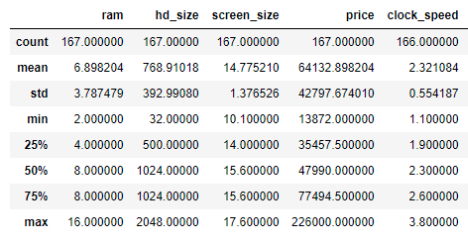
pandas의 DataFrame객체는 2차원 데이터 구조(2D tabular structure)로, 데이터 분석에서 가장 자주 사용되는 객체임.
- 일반적으로 데이터에서 수백 ~ 수십만의 row (case) 및 column (feature, attribute)이 존재
- 일부 데이터를 출력하거나 통계치로서 데이터를 살펴보는 과정 필요. ← Descriptive Statistics
이같은 DataFrame 객체의 구조 및 내용을 빠르게 파악하기 위한 주요 attributes와 exploration methods를 소개한다.
1. DataFrame 기본 속성 (Attributes)
DataFrame객체는 NumPy 배열처럼 몇 가지 기초 속성을 바로 확인할 수 있음shape,ndim,dtype등을 손쉽게 확인 가능
import pandas as pd

# 예제 DataFrame
data = {
    "Name": ["Alice", "Bob", "Charlie", "David"],
    "Age": [25, 30, 35, 40],
    "City": ["Seoul", "Busan", "Incheon", "Daegu"]
}
df = pd.DataFrame(data, dtype="string")

# 주요 속성 확인
print("Shape:", df.shape)        # (행, 열)
print("ndim:", df.ndim)          # 차원 수 (항상 2)
print("Size:", df.size)          # 전체 원소 개수
print("dtypes:\n", df.dtypes)    # 각 column의 dtype
print("Index:", df.index)        # 행 인덱스 객체
print("Columns:", df.columns)    # 열 이름
2. 구조 확인 메서드: info()
- 데이터의 전반적 구조 요약 제공
- 행 개수, 열 개수, 각 열의 데이터 타입, 결측치 여부 등을 확인 가능
df.info()출력은 다음과 같음:
<class 'pandas.core.frame.DataFrame'>
RangeIndex: 4 entries, 0 to 3
Data columns (total 3 columns):
 #   Column  Non-Null Count  Dtype
---  ------  --------------  -----
 0   Name    4 non-null      string
 1   Age     4 non-null      int64
 2   City    4 non-null      string
dtypes: int64(1), string(2)
<class 'pandas.core.frame.DataFrame'>- 현재 객체가
pandas.DataFrame클래스임을 의미
- 현재 객체가
RangeIndex: 4 entries, 0 to 3- 행 인덱스가
RangeIndex(0부터 시작하는 연속 정수) - 전체 행 개수는 4개 (0, 1, 2, 3)
- 행 인덱스가
Data columns (total 3 columns):- 총 3개의 열(column) 존재
- column(열)별 상세 정보
#: 열(column) 번호 (0부터 시작)Column: 열 이름Non-Null Count: 결측치가 아닌 값 개수Dtype: 열의 데이터 타입(dtype)- 예시 해석:
Name:4개 값 모두 non-null, dtype은stringAge:4개 값 모두 non-null, dtype은int64City:4개 값 모두 non-null, dtype은string
dtypes: int64(1), string(2)- 전체 열의
dtype종류 요약 int64타입 열 1개,string타입 열 2개
- 전체 열의
3. 통계 요약 메서드: describe()
- 수치형 데이터(numeric columns)의 기본 descriptive statistics (기술통계치) 요약
- 평균(mean), 표준편차(std), 최소/최대값(min/max), 사분위수(percentiles) 제공
include="all"옵션을 주면 문자열(and 범주형) 열까지 포함 가능- 문자열 또는 범주형에 대한 정보는 다음과 같음
unique: 고유 값 개수top: 가장 많이 등장하는 값 (최빈값)freq: 최빈값의 빈도
- 문자열 또는 범주형에 대한 정보는 다음과 같음
print(df.describe())                   # 기본: 수치형만
print(df.describe(include="all"))      # 모든 열 포함
print(df["Name", "City"].describe())   # 특정 단일 열만 살펴볼 수도 있음
print(df[["Name", "City"]].describe()) # 특정 여러 열들만 살펴볼 수도 있음df[]에서 square brakcets 안에는 column label을 item으로 가지는 list객체 또는 column label 만 들어가야 함.
[Math] 기본 Term: Statistics
기본 Term: Statistics기술 통계와 추론 통계의 주요 개념들, 그리고 관련 용어들에 대한 소개1. Statistics (통계)의 종류1-1. Descriptive Statistics (기술 통계)어떤 data set을 statistics(통계치)를 통해 "기술"해
dsaint31.tistory.com
4. 데이터 일부 확인: head(), tail()
head(n): 앞에서부터n개의 행 확인 (기본값 5)tail(n): 뒤에서부터n개의 행 확인 (기본값 5)
print(df.head(2))  # 앞 2개 행
print(df.tail(2))  # 뒤 2개 행
5. Iteration
2025.09.29 - [Python/pandas] - Pandas - Iteration
Pandas - Iteration
DataFrame의 record(or row)를 순회(iteration)하는 방법:1. iterrows()각 행을 (index, Series) 형태로 반환:import pandas as pddf = pd.DataFrame({ "name": ["Kim", "Lee", "Park"], "age": [28, 34, 29]})for idx, row in df.iterrows(): print(idx, row
ds31x.tistory.com
같이 보면 좋은 자료들
https://blog.naver.com/dsaint31/224030800002
Pandas의 DataFrame 사용법
DataFrame pandas의 핵심 데이터 구조 엑셀 시트처럼 행(row)과 열(column)으로 구성된 labeled 2차원 ta...
blog.naver.com
'Python > pandas' 카테고리의 다른 글
| [Pandas] Indexer - loc, iloc, at, iat (0) | 2025.08.22 |
|---|---|
| [Pandas] Reduction 과 Aggregation (0) | 2025.08.21 |
| [Pandas] DataFrame 생성-다른 데이터 타입의 객체로부터 (0) | 2025.08.21 |
| [Pandas] 중복 데이터 삭제-drop_duplicates() 메서드 (0) | 2025.08.21 |
| [Pandas] .map() 과 .apply() 메서드 (4) | 2025.08.20 |


