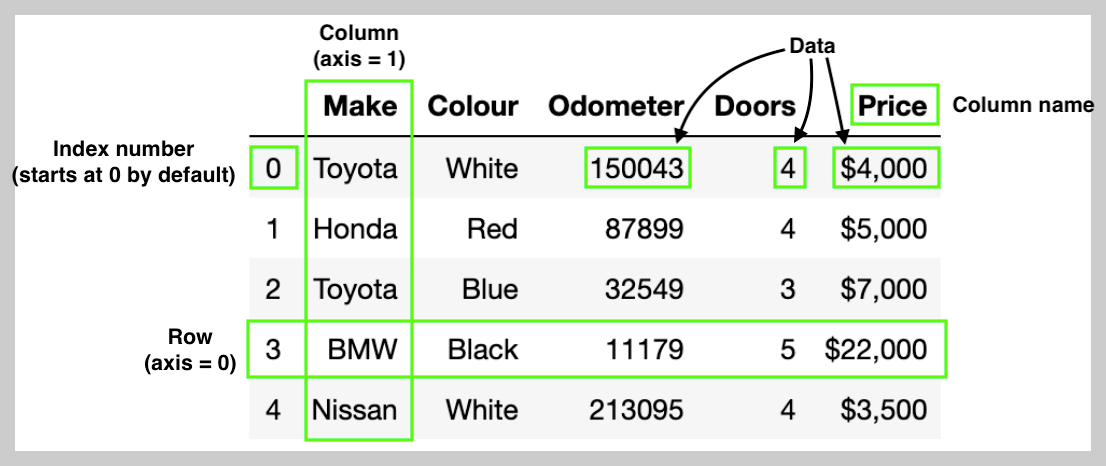
DataFrame
- pandas의 핵심 데이터 구조
- 엑셀 시트처럼 행(row)과 열(column)으로 구성된 labeled 2차원 tabular data를 관리
- Row : a case of sample (=single instance)
- 흔히, 0부터 시작하는 index를 통해 접근:
.iloc - 또는 index로 할당된 label을 통해 접근:
.loc
- 흔히, 0부터 시작하는 index를 통해 접근:
- Column : a feature(or attribute).
DataFrame에서 각각의Column은 문자열 이름을 가진Series라고 볼 수 있음.
- Row : a case of sample (=single instance)
참고로 Series 는 1D labeled data structure로 하나의 row 또는 하나의 column을 추상화하고 있는 클래스임.
참고사항 0 :
pandas 2.0부터는
DataFrame.append()와Series.append()메서드가 완전히 제거(deprecated)되어pd.concat()을 이용한 결합 방식이 표준이 됨.
참고사항 1 :
문자열 데이터(Python의 str)는 기본적으로 object dtype으로 생성됨:
- 결측값 처리와 타입 일관성을 위해서는
dtype="string"으로 명시적으로 지정하는 것이 권장됨.- 이는 Pandas 전용 nullable
string타입으로 Python의str과 다름.
Column을 직접 할당하여 DataFrame 생성
새로운 empty DataFrame 객체를 만든 뒤,
각 column에
list,- NumPy 배열(ndarray),
Series등을 직접 할당하여
DataFrame 객체를 만드는 방식.
참고로, 문자열 열은 기본적으로 object dtype 이나, 결측치(pd.NA) 처리와 타입 일관성을 위해 dtype="string"을 명시적으로 지정하는 것이 권장됨.
import pandas as pd
import numpy as np

df = pd.DataFrame()

# 문자열 열: dtype="string"으로 명시 (nullable)
df["Name"] = pd.Series(["Alice", "Bob", "Charlie"], dtype="string")

# 정수형 열: nullable 정수 dtype (Int64) 사용
df["Age"] = pd.Series([25, 30, 35], dtype="Int64")

# 실수형 열: NumPy 배열로 할당
df["Score"] = np.array([88.5, 92.0, 79.0])

# Series 할당 시 인덱스 레이블이 겹치는 위치에만 값이 채워짐
s_city = pd.Series(["Seoul", "Busan"], index=[0, 2], name="City", dtype="string")
df["City"] = s_city

print(df)
#        Name   Age  Score   City
# 0     Alice    25   88.5  Seoul
# 1       Bob    30   92.0   <NA>
# 2 Charlie 35 79.0 Busan- 결측치 표시는
<NA>으로 이루어짐 (출력용) - 코드에서 결측치는
pd.NA로 표현. ***
개별 Series를 기존 DataFrame에 새로운 column으로 추가하기.
Series 객체를 기존의 DataFrame에 새로운 column으로 합칠 때 (추가)는,
해당 Series 객체에서 .to_frame() 메서드를 통해 DataFrame 객체로 변환한 뒤 pd.concat(axis=1)으로 결합(axis=1 이어야 column으로 결합됨)시킬 수 있음.
- pandas는 인덱스 레이블을 기준으로 정합(label-based alignment)해 결합함.
pd.concat()함수의 기본 동작은 outer join 이나,join파라미터에"inner"를 할당해서 inner join 모드로 동작 가능함.pd.concat()함수는 left join과 right join은 지원 안함.- 이는 DataFrame의 메서드인
join(),merge()에서 지원.
import pandas as pd

# 기준 DataFrame
base = pd.DataFrame({"Name": pd.Series(["Alice", "Bob", "Charlie"], dtype="string",
                    index=[100, 101, 102])})

# 각각 일부 인덱스를 가진 Series
age_s  = pd.Series([25, 30], index=[100, 101], name="Age", dtype="Int64")
city_s = pd.Series(["Seoul", "Busan", "Incheon"], index=[100, 102, 103],
                   name="City", dtype="string")

# Series를 DataFrame으로 변환
df = pd.concat([base, age_s.to_frame(), city_s.to_frame()], axis=1)  # default outer join
print(df)
#         Name   Age     City
# 100    Alice    25    Seoul
# 101      Bob    30     <NA>
# 102  Charlie   <NA>  Incheon
# 103 <NA> <NA> Busan- outer join(기본 join 모드): 모든 index의 합집합을 유지하면서 없는 값은
<NA>로 채움.
2024.01.12 - [Python/pandas] - [pandas] DataFrame 합치기 : pd.concat()함수 와 .merge() 메서드
[pandas] DataFrame 합치기 : pd.concat()함수 와 .merge() 메서드
Pandas에서 merge()와 concat()은 DataFrame 를 합치는(결합하는) 데 사용되는 방법..merge()메서드:SQL join과 유사함.두 DataFrame 간의 공통 column이나 index를 기준 column ( on parameter)으로 삼아 결합inner, outer, left,
ds31x.tistory.com
개별 Series를 기존 DataFrame에 새로운 row로 추가하기 (append 대체).
row(행) 방향으로 추가하는 방식임: pd.concat()에서 axis=0은 기본값이라 생략 가능.
- 앞서 말한대로
pd.concat()은 outer join이 기본이라, column이 불일치할 경우 새로운 column이 추가되어 수많은 결측치가 발생할 수 있음. - 교집합만 남길려면
join="inner"를 할당해야 하나 이 경우 기존의DataFrame객체의 column중 일부가 없는 결과물이 나올 수 있으므로 주의해야 함.
기존의 deprecation이 이루어진 append()메서드를 대체하는 형태로 사용될 경우,ignore_index=True를 통해 모든 기존 index를 무시하고 0부터 시작하는 RangeIndex를 새로 만드는 것을 권함.
- 지정하지 않거나,
ignore_index=False로 명시적 지정시 기존 index를 유지하기 때문에 - 겹치는 index가 있을시 중복 index를 가지는 row들이 생길 수 있음.
- 중복 index는 조회·슬라이싱에서 혼란을 줄 수 있으므로 권하지 않음.
# 같은 스키마
df1 = pd.DataFrame({"Name": ["Alice", "Bob"], "Age": [25, 30]})
df2 = pd.DataFrame({"Name": ["Charlie"], "Age": [35]})

df_row = pd.concat([df1, df2], axis=0, ignore_index=True)
print(df_row)
#       Name  Age
# 0    Alice   25
# 1      Bob   30
# 2  Charlie   35

# 다른 스키마 (열 불일치)
df3 = pd.DataFrame({"Name": ["Dave"], "City": ["Seoul"]})

df_mixed_outer = pd.concat([df1, df3], axis=0, ignore_index=True)  # outer(기본)
print(df_mixed_outer)
#       Name   Age   City
# 0    Alice  25.0   <NA>
# 1      Bob  30.0   <NA>
# 2     Dave   NaN  Seoul

df_mixed_inner = pd.concat([df1, df3], axis=0, ignore_index=True, join="inner")  # 공통 열만
print(df_mixed_inner)
#     Name
# 0  Alice
# 1    Bob
# 2   Dave
다음은 ignore_index 파라미터의 동작을 이해하기 위한 예제임.
import pandas as pd

df1 = pd.DataFrame({"Name": ["Alice", "Bob"], "Age": [25, 30]}, index=[0, 1])
df2 = pd.DataFrame({"Name": ["Charlie"], "Age": [35]}, index=[5])  # 인덱스=5

res = pd.concat([df1, df2], axis=0, ignore_index=True)
print(res)

#       Name  Age
# 0    Alice   25
# 1      Bob   30
# 2  Charlie   35
ignore_index=False이면
res2 = pd.concat([df1, df2], axis=0)  # ignore_index=False 기본
print(res2)
#       Name  Age
# 0    Alice   25
# 1      Bob   30
# 5  Charlie   35

df3 = pd.DataFrame({"Name": ["Dan"], "Age": [40]}, index=[1])

res3 = pd.concat([df1, df3], axis=0)  # df1의 1과 df3의 1이 중복됨
print(res3)
#     Name  Age
# 0  Alice   25
# 1    Bob   30
# 1 Dan 40 # 인덱스 "1"이 두 번 등장- 다시 한번 언급하지만, 중복 인덱스는 추후 처리에서 문제를 일으키기 쉬우므로 권장하지 않음.
DataFrame.reset_index(drop=True)를 통해 새로RangeIndex를 부여하여 중복 인덱스를 해결할 수 있음.drop=True는 기존의 index를 column으로 복원하지 않고 그냥 삭제함 (기존 인덱스가RangeIndex라면 지우는게 나음).- 기존의 다른 column을 index로 쓰고 있었다면,
drop=True를 빼고 호출해야 해당 column은 일반 column이 되고RangeIndex가 새로 부여됨. - 만약
drop=True를 입력하여 호출시 기존의 index로 사용되던 column이 완전히 삭제되기 때문에 주의할 것.
import pandas as pd

df = pd.DataFrame({"Name": ["Alice", "Bob"], "Age": [25, 30]}).set_index("Name")

print(df.reset_index())          # "Name" 열 복원됨
#     Name  Age
# 0  Alice   25
# 1    Bob   30

print(df.reset_index(drop=True)) # "Name" 완전히 삭제됨
#    Age
# 0   25
# 1   30
NumPy의 ndarray로 DataFrame 생성
다음과 같이 코드를 이용함:
df = pd.DataFrame(ndarray, columns=..., index=...)- pandas는 2차원 NumPy 배열을 바로 DataFrame으로 만들 수 있음.
- ndarray의 columnt의 갯수와 파라미터
columns에 keyward argument로 넘겨지는 리스트의 길이가 일치해야 함. - 문자열을 포함하는 혼합형 ndarray 의 경우, 해당 문자열 열은
objectdtype으로 처리됨.- 필요하면 이후에
.astype("string")으로 pandas의 nullable string으로 casting할 것.
- 필요하면 이후에
import numpy as np

arr = np.array([[1, 25, 88.5],
                [2, 30, 92.0],
                [3, 35, 79.0]])

df_np = pd.DataFrame(arr, columns=["ID", "Age", "Score"], index=["a", "b", "c"])
print(df_np)
#    ID   Age  Score
# a   1  25.0   88.5
# b   2  30.0   92.0
# c   3  35.0   79.0
다음은 문자열을 포함하는 mixed ndarray의 경우에 대한 예제 코드임.
# 문자열 포함 시 object dtype → 필요 시 astype("string")
mixed = np.array([["Alice", 25], ["Bob", None]], dtype=object)
df_mixed = pd.DataFrame(mixed, columns=["Name", "Age"])
df_mixed["Name"] = df_mixed["Name"].astype("string")
df_mixed["Age"] = df_mixed["Age"].astype("Int64")
list와 dict 기반 생성 (연습용 코드에서 많이 애용됨)
작은 크기의 DataFrame객체를 생성하는 가장 기본적인 방법.
- 바깥쪽 데이터 구조가 list이면 해당 list의 각 item은 row에 해당함.
- 바깥쪽 데이터 구조가 dict이면 key는 column name이고 value는 column에 해당함.
dict of list (column 위주)
- 가장 흔한 패턴; key는 column name, values는 모두 동일 길이(=row의 갯수)의 시퀀스(보통
list객체). - 생성 후
.astype()으로dtype을 명시적으로 정해주는 것을 권장함.
data = {
    "Name": ["Alice", "Bob", "Charlie"],
    "Age":  [25, 30, 35],
    "City": ["Seoul", "Busan", "Incheon"],
}

df_dict = pd.DataFrame(data)
df_dict = df_dict.astype({"Name": "string", "City": "string", "Age": "Int64"})
list of dict (row 위주)
list의 각 item이dict객체이며 이는 한 row에 해당함.- 일부
key가 없는 경우 해당 칼럼에는<NA>가 채워짐.
rows = [
    {"Name": "Alice",   "Age": 25, "City": "Seoul"},
    {"Name": "Bob",     "Age": 30},                 # City 누락 → <NA>
    {"Name": "Charlie", "City": "Incheon"},         # Age  누락 → <NA>
]

df_rows = pd.DataFrame(rows).astype({"Name": "string", "City": "string", "Age": "Int64"})
list of list (row 위주) + columns
- 2중 리스트로 row 순으로 list객체가 놓여진 데이터를 제공
columns파라미터에 열 이름을 지정함 (row순으로 놓인 list객체의 길이는 이 columns의 길이와 같아야 함).
data_rows = [["Alice", 25, "Seoul"],
             ["Bob", 30, "Busan"],
             ["Charlie", 35, "Incheon"]]
df_ll = pd.DataFrame(data_rows, columns=["Name", "Age", "City"])\
         .astype({"Name": "string", "City": "string", "Age": "Int64"})
dict of Series (열 지향 + 인덱스 정합)
- 서로 다른 인덱스를 가진 Series로 구성된
dict객체로 DataFrame을 만드는 방식. - 각
Series객체가 column에 해당함. - 각
Series객체의 index들을 기준으로 합집합이 만들어지고 이 합집합이 DataFrame의 index가 됨.
name_s = pd.Series(["Alice", "Bob", "Charlie"], index=[0, 1, 2], name="Name", dtype="string")
age_s  = pd.Series([25, 30], index=[0, 2], name="Age", dtype="Int64")
city_s = pd.Series(["Seoul", "Busan"], index=[0, 1], name="City", dtype="string")

df_series_dict = pd.DataFrame({"Name": name_s, "Age": age_s, "City": city_s})
같이 보면 좋은 자료들
2025.08.21 - [Python/pandas] - [Pandas] DataFrame : Basic Attributes and Exploration Methods
[Pandas] DataFrame : Basic Attributes and Exploration Methods
pandas의 DataFrame은 2차원 데이터 구조(2D tabular structure)로, 데이터 분석에서 가장 자주 사용되는 객체임.일반적으로 데이터에서 수백 ~ 수십만의 row (case) 및 column (feature, attribute)이 존재일부 데이터
ds31x.tistory.com
2024.01.12 - [Python/pandas] - [pandas] merge 예제.
[pandas] merge 예제.
merge와 concat의 차이점:2024.01.12 - [Python] - [pandas] DataFrame 합치기 : concat 과 merge [pandas] DataFrame 합치기 : concat 과 mergePandas에서 merge와 concat은 DataFrame 를 합치는(결합하는) 데 사용되는 방법.merge:SQL join
ds31x.tistory.com
'Python > pandas' 카테고리의 다른 글
| [Pandas] Reduction 과 Aggregation (0) | 2025.08.21 |
|---|---|
| [Pandas] DataFrame : Basic Attributes and Exploration Methods (0) | 2025.08.21 |
| [Pandas] 중복 데이터 삭제-drop_duplicates() 메서드 (0) | 2025.08.21 |
| [Pandas] .map() 과 .apply() 메서드 (4) | 2025.08.20 |
| [Pandas] groupby() 메서드 (0) | 2025.08.20 |


