
groupby() 메서드는 DataFrame의 데이터를 하나 이상의 키를 기준으로 그룹화(grouping) 하여, 각 그룹에 대해 집계(aggregation)·변환(transform)·필터(filter) 연산을 적용할 수 있게 해주는 도구임.
- Split–Apply–Combine 패턴: 데이터를 나누고(split) → 그룹별 연산을 적용(apply) → 결과를 결합(combine)
groupby자체는DataFrameGroupBy또는SeriesGroupBy객체를 반환하며, 집계(aggregation), 변환(transform), 필터(filter) 같은 후속 연산(주로 aggregate function임)이 필요- 참고로, DataFrameGroupBy의 obj 속성은 대상이 되었던 원본 데이터프레임을 가리킴.
- 비슷하게, SeriesGroupBy의 obj 속성은 대상이 되었던 원본 시리즈를 가리킴.
참고로,
- aggregate function을 통과하면 나면 DataFrame 객체가 됨.
- groupby() 이후에 "대상변수"로 특정 column을 지정하고 aggregate function (mean())을 수행하면 Series객체가 됨.
Signature
DataFrame.groupby(
    by=None,               # labels/column names/arrays/dict/callable
    axis=0,                # 0 = index (행 기준), 1 = columns (열 기준): deprecated예정.
    level=None,            # MultiIndex 레벨
    as_index=True,         # 그룹 키를 인덱스로 반환할지 여부
    sort=True,             # 그룹 키 정렬 여부
    # group_keys=True,       # apply 결과에 그룹 키 포함 여부: deprecated예정
    observed=False,        # categorical 그룹 시, 미등장 카테고리 포함 여부
    dropna=True            # NA 그룹 제거 여부
) -> DataFrameGroupBy | SeriesGroupBy
by 파라메터
- 설명: 그룹핑 기준으로 컬럼명, 리스트, 배열, dict, callable(함수) 모두 가능.
주로, column name (str)과 여러 column names로 구성된 list객체, list형태로 그룹을 나타내는 배열을 넘겨주는 방식이 사용됨.
- column name과 column names를 주로 사용.
list객체를 이용한 배열을 사용할 때는axis=0이면 배열의 item의 수가 DataFrame의 row수와 같아야 함: 배열의 각 item이 그룹키임.axis=1이면 배열의 item의 수가 DataFrame의 column수와 같아야 함: 배열의 각 item이 그룹키임.- 단,
axis는 Pandas2.3.1에서groupby()에서 할당한 경우,FutureWarning이 발생함:
"deprecated" 예정임.
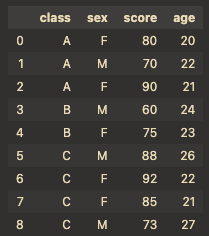
다음은 예제를 위한 기본 DataFrame임.
import pandas as pd

# 1) 기본 예제 데이터
df = pd.DataFrame({
    "class": ["A","A","A","B","B","C","C","C","C"],
    "sex":   ["F","M","F","M","F","M","F","F","M"],
    "score": [80, 70, 90, 60, 75, 88, 92, 85, 73],
    "age":   [20, 22, 21, 24, 23, 26, 22, 21, 27],
})
by의 기본사용
가장 기본적인 그룹별 평균을 보는 예제로서 class별로 평균을 구함.
단, numeric_only=True를 해줘야만 동작함: categorical column sex 를 평균계산에서 제외해야 하므로.
print(df.groupby("class").mean(numeric_only=True))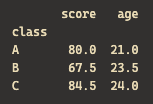
그룹별로 처리하면서 결과물 중 특정 column의 값을 지정하여 확인 가능함.
다음은 "score"에 대해 "class"별로 평균을 보여줌.
# 단일 컬럼명
print(df.groupby("class")["score"].mean())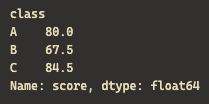
subgrouping
다음과 같이 "class"로 그룹을 짓고 이후 "sex"로 다시 그룹(sub-group)을 짓는 처리도 가능: multiple column grouping.
# 다중 컬럼명
print(df.groupby(["class","sex"])["score"].mean())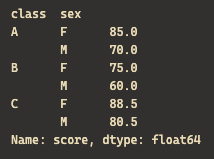
배열로 그룹지정
다음은 index 별로 그룹을 할당하는 배열을 list객체를 이용하여 그룹핑하는 예제임.
홀수번째 row와 짝수번째 row별 "score" 평균을 보여줌:
# 배열
row_groups = [i % 2 for i in range(len(df))]
print(df.groupby(row_groups)["score"].mean())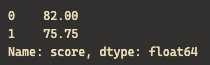
dict 객체
dict 객체를 사용하는 경우엔 axis와 같이 주어지는 경우도 가끔 있음.
- axis=0:
dict의 key는 인덱스 라벨, value는 그룹 키 - axis=1:
dict의 key는 컬럼 라벨, value는 그룹 키
axis=1인 경우는 많이 쓰이지 않으나
column을 합쳐 처리해야 하는 경우 일부 사용되었음.
deprecated 예정이니 주의할 것.
다음은 index 들에 대해 그룹을 "A","B"로 할당한 후, 각 그룹별 합을 구함:
# dict + axis=0 (index 매핑)
df_idx = pd.DataFrame({"val":[10,20,30]}, index=["row1","row2","row3"])
map_idx = {"row1":"A","row2":"A","row3":"B"}
print(df_idx.groupby(map_idx, axis=0).sum())
다음은 자주 쓰이진 않으나 column들을 그룹짓는 방법임.
column중, "score"와 "age"를 "metrics"라는 그룹으로, "height"는 "size"로 그룹지어 각각의 평균을 구함.
row의 수는 보존되나 column의 수는 2개로 줄어들게 됨: height는 단일 column이 하나의 그룹이니 값은 그대로임.
# dict + axis=1 (column 매핑)
df_cols = pd.DataFrame({
    "score":[80,70,90],
    "age":[20,22,21],
    "height":[170,180,160]
})
map_cols = {"score":"metrics","age":"metrics","height":"size"}
print(df_cols.groupby(map_cols, axis=1).mean())
Callable 객체
callable 객체(함수)도 사용가능함.
아주 복잡한 처리등이 필요할 때 사용 가능함.
다음은 index 라벨 길이에 따라 행들이 그룹화되고, 각 그룹별로 합을 값으로 가짐.
# 예제 DataFrame (인덱스 라벨이 길이가 서로 다름)
df_callable = pd.DataFrame(
    {"val":[1,2,3,4]},
    index=["aa", "bbb", "cccc", "aa"]
)

# callable 함수: index 라벨(x)의 길이를 그룹 키로 사용
out_callable = df_callable.groupby(lambda x: len(x)).sum()

print(out_callable)
axis 파라메터: deprecated 예정.
- 설명: 그룹핑 방향 선택.
axis=0(default): 행 기준 그룹핑 (가장 일반적)axis=1: 열 기준 그룹핑 (dict 및 배열로 열 이름을 매핑할 때 사용)
앞서의 기본적 by 파라메터 설명의 예제에서 axis=0이 기본이므로 생략된 것임.
# axis=0
print(df.groupby("class", axis=0).mean(numeric_only=True))
- 위의 예는
FutureWarning이 발생함.
앞서의 dict 객체를 by 파라메터로 사용한 예제도 확인할 것.
level 파라메터
- 설명: MultiIndex에서 특정 level(레벨)로 그룹핑.
- 이름 또는 정수 인덱스 둘 다 사용가능.
- index가
list객체로 할당되어 다중 인덱스인 경우에 사용가능.
다음과 같이 .set_index()를 통해 다중 인덱스 설정된 DataFrame객체에서 사용가능.
df = pd.DataFrame({
    "class": ["A","A","A","B","B","C","C","C","C"],
    "sex":   ["F","M","F","M","F","M","F","F","M"],
    "score": [80, 70, 90, 60, 75, 88, 92, 85, 73],
    "age":   [20, 22, 21, 24, 23, 26, 22, 21, 27],
})

# MultiIndex 예제
df_mi = df.set_index(["class", "sex"]).sort_index()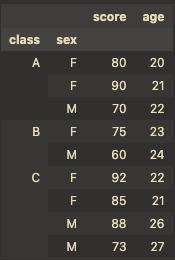
다음은 정수 인덱스로 사용한 경우:
print(df_mi.groupby(level=0)["score"].mean()) # class 레벨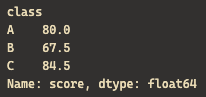
다음은 index 라벨 값으로 사용한 경우:
print(df_mi.groupby(level="sex")["score"].mean()) # class 레벨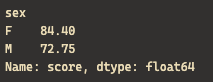
as_index 파라메터
- 설명: 그룹에 사용된 키 (
by로 지정된)를 결과 반환 객체의 인덱스로 사용할지 여부
기본적으로는 as_index=True임:
print(df.groupby("class", as_index=True).mean(numeric_only=True))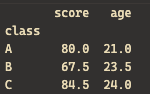
as_index=False를 하는 경우는 중간결과물을 얻어 merge등을 할 때 사용하기 위해서임.
print(df.groupby("class", as_index=False).mean(numeric_only=True)) # as_index=False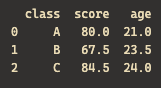
sort 파라메터
- 설명: 반환되는 객체의 row들을 그룹 키로 정렬할지 여부
기본적으로 sort=True임
print(df.groupby("class", sort=True)["score"].mean())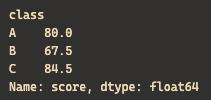
sort=False 인 경우 (그룹 키로 정렬임):
print(df.groupby("class", sort=False)["score"].mean()) group_keys 파라메터: deprecated 예정.
deprecated 될 예정이므로 자세한 설명은 생략
- 설명: apply 결과에 그룹 키 포함 여부
observed 파라메터
- 설명: categorical 그룹에서 미등장 카테고리 포함 여부
일반적으로 등장하지 않는 cateogory는 빼고 처리함: observed=True
df_cat = df.copy()
df_cat["sex"] = pd.Categorical(df_cat["sex"], categories=["F","M","X"])  # X는 미등장

print(df_cat.groupby("sex", observed=True)["score"].mean())   # F, M
다음은 sex 열을 categorical column으로 만들고, 가질 수 있는 카테고리를 F,M,X 3가지로 만듬
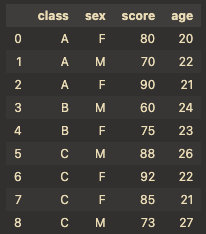
여기서 결과는 다음과 같음

observed=False인 경우 등장하지 않는 category까지 다 보여줌:
print(df_cat.groupby("sex", observed=False)["score"].mean()) # F, M, X
dropna 파라메터
- 설명: NA (Not Available) 그룹 제거 여부
- 그룹키로 지정한 column의 데이터가 NA/NaN인 경우 해당 row를 그룹핑에서 제거.
dropna=False이면NaN그룹이 하나 추가됨.
다음과 같이 그룹핑의 기준이 되는 "class"가 None인 row를 추가.
# DataFrame 복사 후, 특정 행(class 컬럼)을 None(=NA)으로 변경
df_na = df.copy()
df_na.loc[2, "class"] = None   # 3번째 행의 class 값 → NA
df_na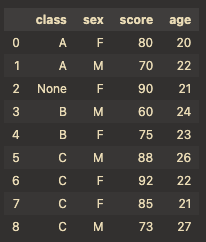
기본적으로 dropna=True임:
# dropna=True (기본값)
# - NA 값이 그룹 키일 경우, 해당 행은 그룹핑에서 제외
out_dropna_true = df_na.groupby("class", dropna=True)["score"].mean()
print(out_dropna_true)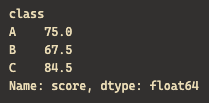
다음은 dropna=False인 경우:
# dropna=False
# - NA 값도 하나의 그룹으로 취급
# - 즉, "class=None"인 행들이 모여 별도의 그룹으로 결과에 포함됨
out_dropna_false = df_na.groupby("class", dropna=False)["score"].mean()
print(out_dropna_false)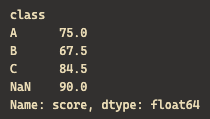
pivot_table과의 관계
pivot_table()은 groupby + agg + unstack 과정을 한 번에 처리하는 구문 설탕(syntactic sugar)
groupby()의 그룹핑 결과는 보통 MultiIndex 형태로 반환됨- MultiIndex는 예를 들어 class와 sex의 조합으로 구성됨.
- 이를 사람이 읽기 좋은 가로 방향(wide form) 으로 변환할 때
unstack()을 사용. - 예를 들어
df.groupby(["class","sex"])["score"].mean().unstack("sex")는 class를 행, sex를 열로 하는 표 형태를 만들어 줌.- 표에서의 item의 값은
score에 기반하며 class와 sex의 조합에 여러 score 가 있다면 평균을 취함.
- 표에서의 item의 값은
다음 예제를 잘 살펴볼 것:
import pandas as pd

# 예제 데이터
df = pd.DataFrame({
    "class": ["A","A","B","B"],
    "sex":   ["F","M","F","M"],
    "score": [80, 70, 90, 60]
})

# 1) groupby 결과 (MultiIndex)
mean_long = df.groupby(["class", "sex"])["score"].mean()
print("=== groupby 결과 (long form, MultiIndex) ===")
print(mean_long)
print()

# 2) unstack으로 wide form 변환
mean_wide = mean_long.unstack("sex")
print("=== unstack 결과 (wide form) ===")
print(mean_wide)
출력은 다음과 같음:
=== groupby 결과 (long form, MultiIndex) ===
class  sex
A      F      80
       M      70
B      F      90
       M      60
Name: score, dtype: int64

=== unstack 결과 (wide form) ===
sex     F   M
class
A      80  70
B 90 60unstack()는 stacked 인 long form을 wide form으로 변경시킴.
같이보면 좋은 자료들
2025.08.20 - [Python] - [Term] pivot 이란?
[Term] pivot 이란?
1. pivot 이란?Pandas에서 pivot은 데이터의 모양(shape)을 바꾸는 기능 을 가리킴: reshaping특정 column의 값들을 row 인덱스(index)로,또 다른 column의 값들을 열(columns)로지정하는 테이블을 만들고, 해당 조합
ds31x.tistory.com
2025.08.19 - [Python] - [Pandas] pivot_table 메서드
[Pandas] pivot_table 메서드
.pivot()과 같이 reshaping이 가능한 메서드.차이점은 .pivot()은 행-열 조합에 중복되는 요소가 있는 경우 에러가 발생하나,.pivot_table()은 aggregation을 통한 하나의 대표값으로 처리가 가능함.groupby+aggrega
ds31x.tistory.com
2025.05.16 - [Python] - [ML] pandas.DataFrame 에서 EDA에 적합한 메서드 요약
[ML] pandas.DataFrame 에서 EDA에 적합한 메서드 요약
Pandas DataFrame에서 탐색적 데이터 분석(EDA)에 사용할 수 있는 주요 메서드들은 다음과 같음:2024.05.18 - [분류 전체보기] - [ML] Exploratory Data Analysis (EDA) [ML] Exploratory Data Analysis (EDA)Exploratory Data Analysis (
ds31x.tistory.com
'Python > pandas' 카테고리의 다른 글
| [Pandas] 중복 데이터 삭제-drop_duplicates() 메서드 (0) | 2025.08.21 |
|---|---|
| [Pandas] .map() 과 .apply() 메서드 (4) | 2025.08.20 |
| [Term] pivot 이란? (0) | 2025.08.20 |
| [Pandas] pivot_table() 메서드 (0) | 2025.08.19 |
| [ML] pandas.DataFrame 에서 EDA에 적합한 메서드 요약 (0) | 2025.05.16 |


