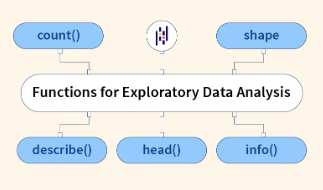
Pandas DataFrame에서 탐색적 데이터 분석(EDA)에 사용할 수 있는 주요 메서드들은 다음과 같음:
2024.05.18 - [분류 전체보기] - [ML] Exploratory Data Analysis (EDA)
[ML] Exploratory Data Analysis (EDA)
Exploratory Data Analysis (탐색적 데이터 분석, EDA)EDA(탐색적 데이터 분석)은 실험 또는 데이터 프로젝트에서 데이터를 분석하는 첫 번째 단계임.EDA를 통해 분석가들은 데이터를 이해하고, 가설을 세
ds31x.tistory.com
1. 기본 정보 확인
df.head(),df.tail()- 데이터의 처음/끝 부분 보기df.shape- 행과 열의 수 확인df.info()- 데이터 타입과 결측치 정보 요약df.describe()- 수치형 데이터의 통계 요약 (평균, 표준편차, 최소/최대값 등)df.dtypes- 각 열의 데이터 타입 확인
2025.08.21 - [Python/pandas] - [Pandas] DataFrame : Basic Attributes and Exploration Methods
[Pandas] DataFrame : Basic Attributes and Exploration Methods
pandas의 DataFrame은 2차원 데이터 구조(2D tabular structure)로, 데이터 분석에서 가장 자주 사용되는 객체임.일반적으로 데이터에서 수백 ~ 수십만의 row (case) 및 column (feature, attribute)이 존재일부 데이터
ds31x.tistory.com
2. 결측치 확인 및 삭제
df.isnull().sum()- 열별 결측치 개수 확인. isnull()은 isna()라는 alias를 가짐.df.isna().mean()- 결측치 비율 확인- isna()는 boolean mask를 얻어내고
- 이를 평균으로 처리하면 True=1, False=0 이므로 비율이 나옴
- df.dropna - 결측치 제거
2025.08.24 - [Python/pandas] - [Pandas] missing value 확인: 결측치 확인
[Pandas] missing value 확인: 결측치 확인
Pandas 는 missing value (정확하게는 NA) 여부를 확인하는 다음의 메서드를 지원:isnull()isna()Note:isnull() 과 isna()는 기능적으로 동일함: NumPy의 ndarray가 지원하는 isnan() 기반.Pandas 0.20.0 버전부터 isnull()의
ds31x.tistory.com
2024.01.09 - [Python/pandas] - [pandas] dropna : missing value 처리 (삭제)
[pandas] dropna : missing value 처리 (삭제)
na 는 not available 로서 값이 비어있거나 숫자가 아니거나(nan: not a number) 등등으로특정 cell에 값이 유효하지 않아 사실상 비어있는 경우를 의미함.dropna는 na값을 가지고 있는 row나 column을 제거하는
ds31x.tistory.com
3. 데이터 분포 분석
df.value_counts()- categorical data(범주형 데이터)의 빈도 확인df.nunique()- 고유값 개수 확인df['column'].unique()- 고유값 확인 (NumPy의 ndarray와 유사)
4. 통계 분석
df.corr()- 상관관계 분석df.cov()- 공분산 분석df.mean(),df.median(),df.mode()- 평균, 중앙값, 최빈값df.std(),df.var()- 표준편차, 분산 (sample statistics)df.quantile()- 분위수 확인df.skew()- 왜도 확인 (분포의 비대칭성)df.kurt()- 첨도 확인 (분포의 뾰족함)
2025.08.21 - [Python/pandas] - [Pandas] Reduction 과 Aggregation
[Pandas] Reduction 과 Aggregation
0. Reduction 과 Aggregation — Pandas에서의 개념 차이Reduction (축소형 집계)여러 값을 하나의 값으로 줄이는 연산.예: sum, mean, min, max, std, median, skew, kurt, sem, quantile특징:단일 함수로 단일 결과 산출Aggrega
ds31x.tistory.com
https://dsaint31.tistory.com/256
[Statistics] Moment (Probability Moment)
1. Moment (Probability Moment) : Statistics💡 statistics에서 moment는 probability distribution에서 계산되어진 특징값확률 분포를 이용하여 구해지는 random variable의 대표값(or 통계량)을 일반화(generalization)시킨 것
dsaint31.tistory.com
https://dsaint31.tistory.com/818
[Statistics] Tail, Head, and Distribution (w/ Moment)
확률 분포 등에서 헷갈리기 쉬운 tail, head 와 heavy tailed와 light tailed, 그리고 Right skewed 와 Left skewed를 정리.1. Head데이터 분포에서 중심부주로 중앙값(median)의 위치라고 보면 거의 맞음. mean을 사용
dsaint31.tistory.com
5. 그룹화 및 집계
df.groupby()- 데이터 그룹화df.pivot_table()- 피벗 테이블 생성 (사실상 groupby()에 대한 syntatic sugar임)df.crosstab()- 교차 테이블 생성
2025.08.20 - [Python] - [Pandas] groupby() 메서드
[Pandas] groupby() 메서드
groupby() 메서드는 DataFrame의 데이터를 하나 이상의 키를 기준으로 그룹화(grouping) 하여, 각 그룹에 대해 집계(aggregation)·변환(transform)·필터(filter) 연산을 적용할 수 있게 해주는 도구임.Split–Apply
ds31x.tistory.com
2025.08.19 - [Python] - [Pandas] pivot_table 메서드
[Pandas] pivot_table 메서드
.pivot()과 같이 reshaping이 가능한 메서드.차이점은 .pivot()은 행-열 조합에 중복되는 요소가 있는 경우 에러가 발생하나,.pivot_table()은 aggregation을 통한 하나의 대표값으로 처리가 가능함.groupby+aggrega
ds31x.tistory.com
6. 시각화 연동 메서드
df.plot()- 다양한 유형의 차트 생성df.plot.hist()- 히스토그램df.plot.box()- 박스플롯df.plot.scatter()- 산점도df.plot.kde()- 커널 밀도 추정
2025.09.05 - [Python/pandas] - [Pandas] 차트 그리기-plot
[Pandas] 차트 그리기-plot
DataFrame Plot 주요 차트Line/Bar/Area : trend & 비교Hist/Box : 분포Scatter : 상관관계Pie : 비율DataFrame.plot.* 과 Series.plot.*는 같은 백엔드(matplotlib)를 사용.line, bar, barh, hist, box, area, pie는 Series에도 동일하게 사
ds31x.tistory.com
7. 데이터 필터링 및 선택
df.query()- 조건 기반 필터링df.nlargest(),df.nsmallest()- 상위/하위 값 선택
좀 더 정교한 filtering 및 선택은 indexing 이 들어가는 square bracket에 condition을 집어넣는 방식이 애용됨(NumPy와 유사)
8. 데이터 구조 변환 (reshaping)
df.melt()- 넓은 형식에서 긴 형식으로 변환 (stack() 참고)df.pivot()- 긴 형식에서 넓은 형식으로 변환 (pivot_table() 로 대체하는 것을 권함)
2025.08.24 - [Python/pandas] - [Pandas] melt() 메서드
[Pandas] melt() 메서드
DataFrame.melt()란?melt() 메서드는 스프레드시트와 같이 wide-form (or wide format) 로 정리된 데이터를 통계 분석이나 시각화에 적합한 long-form (or long format) 로 변환하는 데 사용.이 과정은마치 넓게 펼쳐
ds31x.tistory.com
pivot()은 pivot_table과 함수 사용이 유사함
2025.08.19 - [Python/pandas] - [Pandas] pivot_table() 메서드
[Pandas] pivot_table() 메서드
.pivot()과 같이 reshaping이 가능한 메서드.차이점은 .pivot()은 행-열 조합에 중복되는 요소가 있는 경우 에러가 발생하나,.pivot_table()은 aggregation을 통한 하나의 대표값으로 처리가 가능함.groupby+aggrega
ds31x.tistory.com
Example
scikit-learn의 Wisconsin Breast Cancer 데이터셋(WBCD)을 사용한 예제
# 필요한 라이브러리 임포트
import pandas as pd
import numpy as np
import matplotlib.pyplot as plt
import seaborn as sns
from sklearn.datasets import load_breast_cancer

# 데이터셋 로드
cancer = load_breast_cancer()

# 데이터프레임 생성
df = pd.DataFrame(data=cancer.data, columns=cancer.feature_names)
df['target'] = cancer.target

# 타겟 열을 범주형 레이블로 변환
df['diagnosis'] = df['target'].map({0: 'malignant', 1: 'benign'})

# 1. 기본 정보 확인
# 처음 5개 행 보기
print("첫 5개 행:")
print(df.head())

# 데이터프레임의 크기 확인
print("\n데이터프레임 크기:")
print(df.shape)  # (569, 32) - 569개 샘플, 32개 열(특징 30개 + target + diagnosis)

# 데이터 정보 요약
print("\n데이터 정보:")
print(df.info())

# 수치형 데이터 통계 요약
print("\n기술 통계:")
print(df.describe())

# 2. 결측치 확인
print("\n결측치 개수:")
print(df.isnull().sum())  # WBCD 데이터셋은 결측치가 없음

print("\n결측치 비율:")
print(df.isna().mean())   # 모두 0.0 (결측치 없음)

# 3. 데이터 분포 분석
# 진단 결과 빈도 확인
print("\n진단 결과 빈도:")
print(df['diagnosis'].value_counts())

# 고유값 개수 확인
print("\n각 열의 고유값 개수:")
print(df.nunique())

# 4. 통계 분석
# 상관관계 분석 (처음 5개 특징만)
print("\n상관관계 (처음 5개 특징):")
correlation = df.iloc[:, 0:5].corr()
print(correlation)

# 공분산 분석 (처음 5개 특징만)
print("\n공분산 (처음 5개 특징):")
covariance = df.iloc[:, 0:5].cov()
print(covariance)

# 첫 5개 특징의 평균, 중앙값, 표준편차
print("\n평균값:")
print(df.iloc[:, 0:5].mean())

print("\n중앙값:")
print(df.iloc[:, 0:5].median())

print("\n표준편차:")
print(df.iloc[:, 0:5].std())

# 분위수 확인 (처음 5개 특징만)
print("\n분위수 (25%, 50%, 75%):")
print(df.iloc[:, 0:5].quantile([0.25, 0.5, 0.75]))

# 왜도와 첨도 확인 (처음 5개 특징만)
print("\n왜도:")
print(df.iloc[:, 0:5].skew())

print("\n첨도:")
print(df.iloc[:, 0:5].kurt())

# 5. 그룹화 및 집계
# 진단 결과별 평균값 비교 (처음 5개 특징만)
print("\n진단 결과별 평균값:")
print(df.groupby('diagnosis')[df.columns[0:5]].mean())

# 피벗 테이블 만들기 (예: 첫 번째 특징에 대한 진단별 통계)
print("\n피벗 테이블:")
pivot_table = pd.pivot_table(df,
                           values=df.columns[0],
                           index='diagnosis',
                           aggfunc=['mean', 'median', 'std'])
print(pivot_table)

# 6. 시각화 예제 (실행 시 주석 해제)
# 히스토그램 (첫 번째 특징)
# plt.figure(figsize=(10, 6))
# df[df.columns[0]].plot.hist(bins=30)
# plt.title(f'Histogram of {df.columns[0]}')
# plt.show()

# 박스플롯 (진단 결과별 첫 번째 특징)
# plt.figure(figsize=(10, 6))
# df.boxplot(column=df.columns[0], by='diagnosis')
# plt.title(f'Boxplot of {df.columns[0]} by Diagnosis')
# plt.suptitle('')  # 기본 제목 제거
# plt.show()

# 산점도 (첫 번째 vs 두 번째 특징)
# plt.figure(figsize=(10, 6))
# sns.scatterplot(x=df.columns[0], y=df.columns[1], hue='diagnosis', data=df)
# plt.title(f'Scatter plot: {df.columns[0]} vs {df.columns[1]}')
# plt.show()

# 7. 데이터 필터링 및 선택
# 쿼리를 사용한 필터링
print("\n필터링 (mean radius > 15):")
filtered_df = df.query('`mean radius` > 15')
print(filtered_df.shape)

# 가장 큰 반지름을 가진 5개의 샘플
print("\n가장 큰 반지름을 가진 5개 샘플:")
print(df.nlargest(5, 'mean radius'))

# 8. 데이터 구조 변환
# 처음 5개 행과 3개 특징을 선택하여 melt 예시
print("\nMelt 예시:")
melted_df = pd.melt(df.iloc[0:5, 0:3], var_name='Feature', value_name='Value')
print(melted_df)
주요 결과는 다음을 의미함:
- WBCD 데이터셋은 569개의 샘플과 30개의 특징을 포함함.
- 결측치가 없는 깨끗한 데이터셋.
- 데이터는 양성(benign)과 악성(malignant) 두 클래스로 나누어짐.
- 각 특징들 간에 상관관계가 존재하며, 이는 암 진단에 유용할 수 있음.
- 양성과 악성 종양은 여러 특성에서 통계적으로 유의한 차이를 보임.
2024.05.18 - [Python] - [ML] Dataset: Wisconsin Breast Cancer Dataset
[ML] Dataset: Wisconsin Breast Cancer Dataset
Wisconsin Breast Cancer Dataset (WBCD):Wisconsin Breast Cancer Dataset (WBCD)은오늘날 Machine Learning 및 Data Science 분야에서binary classification 교육용으로 자주 사용되는 Dataset임. Wisconsin 대학의 병리학자인 Dr. William H.
ds31x.tistory.com
'Python > pandas' 카테고리의 다른 글
| [Term] pivot 이란? (0) | 2025.08.20 |
|---|---|
| [Pandas] pivot_table() 메서드 (0) | 2025.08.19 |
| [DL] Pandas 로 csv 읽기: read_csv() (0) | 2024.04.13 |
| [pandas] 데이터 타입에 따른 column 추출: select_dtypes() (0) | 2024.01.12 |
| [pandas] merge 예제. (0) | 2024.01.12 |


