Hammerspoon은
- Lua 스크립팅을 통해
- macOS의 윈도우 관리, 키보드 단축키, 애플리케이션 제어 등을 자동화할 수 있는
- 강력한 macOS 전용 도구임.
필요한 내용만 간단히 정리해놓은 것으로 제대로 배우고 싶다면 이종립님의 블로그를 참고하라.
https://johngrib.github.io/wiki/hammerspoon-tutorial-00/
Hammerspoon 튜토리얼 00 - 시작하기
일단 맥이 있어야 한다
johngrib.github.io
Install
brew install --cask hammerspoonconfiguration
Hammerspoon.app 를 spotlight(CMD+SPACE)에서 실행하면 다음의 다이알로그 창이 뜸.
여기서 login할 때마다 시작되도록 Launch Hammerspoon at login 을 선택하고,
실행권한을 위해서 Enable Accessibility 를 클릭한다.

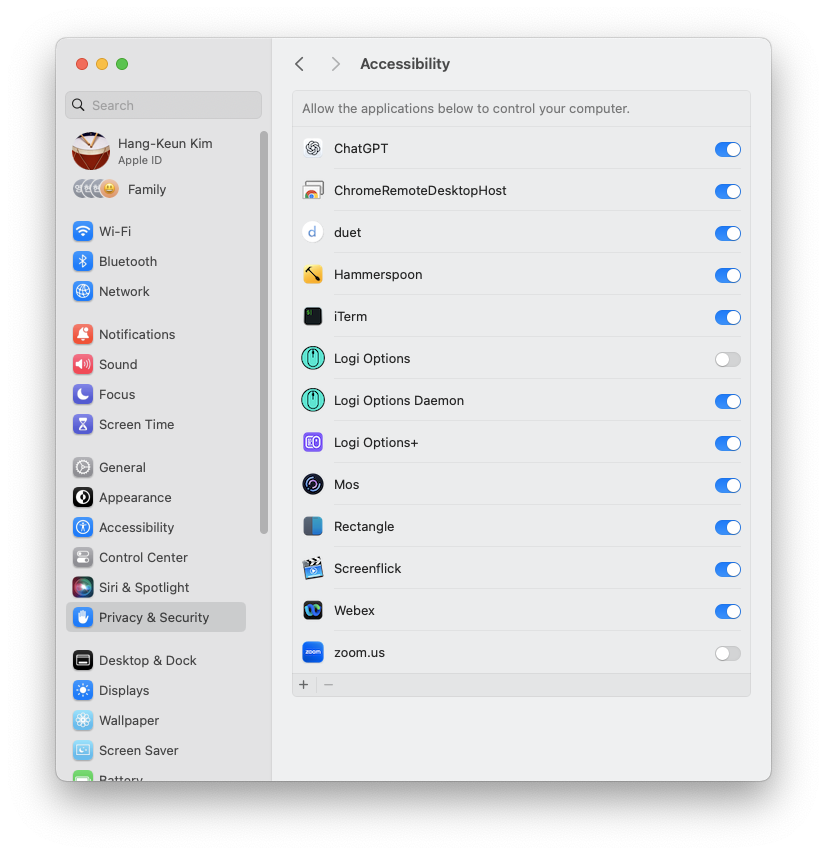
macOS에서 System Settings > Privacy & Security > Accessibility (접근성) 에서 Hammerspoon 의 권한을 활성화.
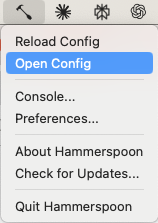
이제 Hammerspoon의 실행을 macOS의 상단메뉴바에서 망치 아이콘으로 확인 가능함

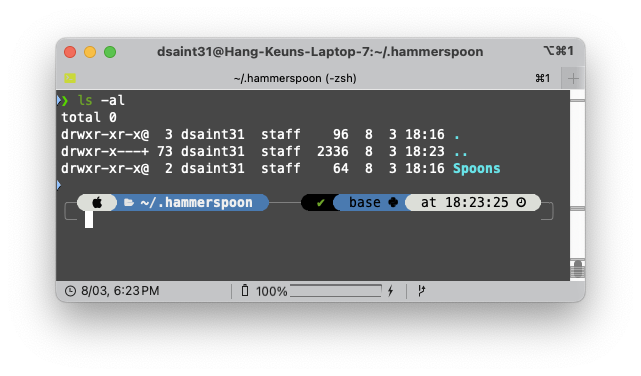
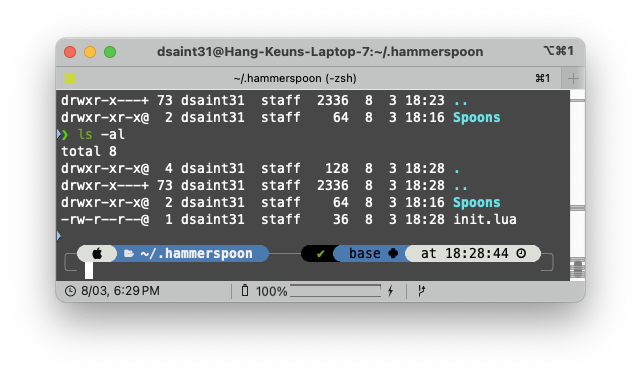
설치가 다 되고 나면 다음과 같이 home 디렉토리(~/)에 .hammerspoon 디렉토리가 만들어짐.
동작 테스트를 위해서 간단한 예제의 lua 스크립트를 작성한다.
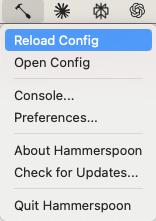
상단메뉴바에서 Open Config를 클릭.
~/.hammerspoon/init.lua 를 다음과 같이 작성.
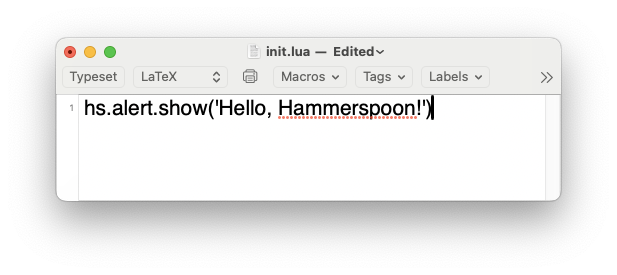
저장하고 나면 다음과 같이 init.lua 가 생긴 것을 확인 가능함.
다음처럼 Reload Config를 클릭하면 init.lua 의 스크립트가 실행되면서 Hello, Hammerspoon! 이라는 알림창이 뜸.
Hammerspoon 을 이용사례를 보여주는 사이트
Hammerspoon의 사용법을 익히는데 최고의 사이트는 이종립님의 블로그와 github임.
물론 official url도 보긴 해야하지만, 이 이상의 실용적인 예제는 없음.
https://johngrib.github.io/wiki/hammerspoon/
Hammerspoon
macOS용 자동화 도구
johngrib.github.io
그 중 에서도
- "인풋소스 오로라"와
- vim에서 한글입력모드에서 esc를 입력해도 자동으로 esc 이후 영문입력이 되도록 하는 예제를
나름 다시 작성한 것을 아래에 기재한다.
사실 Hammerspoon과 lua를 살펴본 이유가 vim 과 vim extension에서 한글입력모드 문제였다.
esc키 누르고 나서 자동으로 영문입력이 되지 않아서 정말 귀찮았던 터라...
이와 관련된 문제는 humblego 님의 블로그를 참고하라.
https://humblego.tistory.com/10
예제01
한영 전환하여 한글 모드시 상단 메뉴바에 magenta 색의 overlay box를 표시해주는 lua 스크립트 예제
이종립님의 코드를 보고 lua와 Hammerspoon의 이해를 하기 위해 재작성해봄(거의 로직은 같음.)
~/.hammerspoon/modules/inputsource_aurora.lua 파일
--[[
MIT License

Copyright (c) 2017 이종립
Copyright (c) 2025 dsaint31 (modifications)

Permission is hereby granted, free of charge, to any person obtaining a copy
of this software and associated documentation files (the "Software"), to deal
in the Software without restriction, including without limitation the rights
to use, copy, modify, merge, publish, distribute, sublicense, and/or sell
copies of the Software, and to permit persons to whom the Software is
furnished to do so, subject to the following conditions:

The above copyright notice and this permission notice shall be included in all
copies or substantial portions of the Software.

THE SOFTWARE IS PROVIDED "AS IS", WITHOUT WARRANTY OF ANY KIND, EXPRESS OR
IMPLIED, INCLUDING BUT NOT LIMITED TO THE WARRANTIES OF MERCHANTABILITY,
FITNESS FOR A PARTICULAR PURPOSE AND NONINFRINGEMENT. IN NO EVENT SHALL THE
AUTHORS OR COPYRIGHT HOLDERS BE LIABLE FOR ANY CLAIM, DAMAGES OR OTHER
LIABILITY, WHETHER IN AN ACTION OF CONTRACT, TORT OR OTHERWISE, ARISING FROM,
OUT OF OR IN CONNECTION WITH THE SOFTWARE OR THE USE OR OTHER DEALINGS IN THE
SOFTWARE.
]]--

-- 원본 코드 기반으로 일부 코드만 아주 약간 수정됨 (원본이나 다름 없음)
-- Original code by 이종립, modified by dsaint31

local boxes = {}

local box_height = 23
local box_alpha = 0.35
local FILL_COLOR = hs.drawing.color.osx_megenta
local screenCount = #hs.screen.allScreens()
local ds_flag = false

function on_input_src_changed()
    -- hs.alert.show("InputSourceChanged")
    hide_overlay_rect()
    ds_flag = false
    if not ENGLISH_INPUTS[hs.keycodes.currentSourceID()] then
        show_overlay_rect()
        ds_flag = true
    end
end


-- 1초 간격으로 깜빡이도록 표시하는 기능.
-- function on_timer()
--     if ds_flag == true then
--         hide_overlay_rect()
--         ds_flag = false
--     else
--         if not ENGLISH_INPUTS[hs.keycodes.currentSourceID()] then
--             show_overlay_rect()
--             ds_flag = true
--         end
--     end
-- end
-- hs.timer.doEvery(1, on_timer)


function show_overlay_rect()
    boxes = {}
    hs.fnutils.each(hs.screen.allScreens(), function(screen)

        local frame = screen:fullFrame()

        -- 상단 overlay rectangle
        local top_box = gen_box(frame.x, frame.y, frame.w, box_height)
        draw_rectangle(top_box)
        table.insert(boxes, top_box)

        -- 하단 overlay rectangle
        local bottom_box = gen_box(frame.x, frame.y +frame.h - box_height, frame.w, box_height)
        draw_rectangle(bottom_box)
        table.insert(boxes, bottom_box)
    end)
end

function hide_overlay_rect()
    hs.fnutils.each(boxes, function(box)
        if box ~= nil then
            box:delete() --lua에서의 method call. (화면에서 제거)
            -- 화면에서 제거되고 이후로 box는 메모리 해제되어 삭제된 객체를 가리킴.
            -- 즉 유효한 참조가 아니므로 이를 가리키고 있는 boxes에서 아예 제거해야함.
        end
    end)
    -- 여기서 boxes를 다 비워줌.
    boxes = {}
end

function gen_box(x, y, w, h)
    return hs.drawing.rectangle(
        hs.geometry.rect(x,y,w,h)
    )
end


function draw_rectangle(target_draw)
  -- print("INFO:", target_draw)
  -- multi-desktop을 위한 처리: 모든 desktop에서 표시.
  target_draw:setBehavior(hs.drawing.windowBehaviors.canJoinAllSpaces)
  target_draw:setFillColor(FILL_COLOR)
  target_draw:setFill(true)
  target_draw:setAlpha(box_alpha)
  target_draw:setLevel(hs.drawing.windowLevels.overlay)
  -- 사각형 테두리 표시 안함: false
  target_draw:setStroke(false)
  target_draw:show()
end

-- 입력소스 변경 이벤트에 이벤트 리스너를 달아준다
hs.keycodes.inputSourceChanged(on_input_src_changed)- Hammerspoon의 사용법을 익히고 싶다면Hammerspoon의 Console을 활용해서 여기저기 고쳐보길 권함
- 원본과 위의 코드의 차이를 보면서 자신의 표현으로 조금씩 수정해보면서 동작을 보면 좋은 공부가 된다.
단, init.lua에서 ENGLISH_INPUTS 라는 table객체를 설정해야한다.
다음의 init.lua를 참고하라.
hs.alert.show('Hello, Hammerspoon!')

ENGLISH_INPUTS = {
    ["com.apple.keylayout.ABC"] = true,
}
KOREAN_INPUTS = {
    ["com.apple.inputmethod.Korean.2SetKorean"] = true
}

-- 한글 입력시 상단과 하단에 overlay rectangle표시.
require("modules.inputsource_aurora")
예제02
다음은 이종립님 코드보다는
humblEog 님의 블로그 내용을 보다 참고한 vim에서 esc누르면 자동으로 영문입력모드가 되도록 해주는 lua 스크립트임.
https://humblego.tistory.com/10
[Hammerspoon] esc 키로 편하게 한영 변환하기 for vim
hammerspoon으로 esc키에 한영변환 기능을 맵핑한 과정을 소개합니다. 들어가며 이 글을 읽으시는 분과 마찬가지로 저도 vim을 참 좋아하는데요, vim으로 한글을 입력하다보면 종종 불편한 상황과 마
humblego.tistory.com
vim 을 사용하고 있을 때에만 현재의 앱의 정보 확인이 필요함.
다음 코드를 Hammerspoon Console에서 실행하면, CMD+SHIFT+A 를 누르면 현재 활성화된 앱의 정보를 확인할 수 있음.
vim에 해당하는 앱을 활성화하고 CMD+SHIFT+A로 확인해서 VIM_APPS 테이블의 아이템(bundleID)을 추가할 것.
-- Cmd+Shift+A 누르면 현재 앱 정보 표시
hs.hotkey.bind({"cmd", "shift"}, "a", function()
    local app = hs.application.frontmostApplication()
    if app then
        hs.alert.show(string.format("App: %s\nBundle: %s",
                     app:name(), app:bundleID()))
    end
end)
~/.hammerspoon/modules/vim_noimd.lua 파일
--[[

author:   humblEog (2020) https://humblego.tistory.com/10
modifier: dsaint31 (2025)


original

- key mapping for vim
- Convert input soruce as English and sends 'escape' if inputSource is not English.
- Sends 'escape' if inputSource is English.
- key bindding reference --> https://www.hammerspoon.org/docs/hs.hotkey.html

modification

- VIM_APPS 를 추가.
- 적용되는 APP를 제한함.

]]--

local english_input_src = "com.apple.keylayout.ABC"
local esc_bind

-- 대상 앱 설정
local VIM_APPS = {
    "com.apple.Terminal",
    "com.microsoft.VSCode",
    "org.vim.MacVim",
    "com.googlecode.iterm2"
}

function isVimApp()
    local frontApp = hs.application.frontmostApplication()
    if not frontApp then return false end

    local bundleID = frontApp:bundleID()
    for _, appID in ipairs(VIM_APPS) do
        if bundleID == appID then
            return true
        end
    end
    return false
end

function convert_to_eng_with_esc()
	esc_bind:disable()

    if isVimApp() then
        -- Vim 계열 앱에서만 input source변경.
        local input_src = hs.keycodes.currentSourceID()

        if not ENGLISH_INPUTS[input_src] then
            hs.eventtap.keyStroke({}, 'right')
            hs.keycodes.currentSourceID(english_input_src)
        end
    end
    -- 모든 경우 esc 전송.
	hs.eventtap.keyStroke({}, 'escape')
	esc_bind:enable()
end

esc_bind = hs.hotkey.new({}, 'escape', convert_to_eng_with_esc):enable()
당연히 init.lua에 위 소스를 실행하기 위한 코드 라인 필요 (맨 아래)
hs.alert.show('Hello, Hammerspoon!')

ENGLISH_INPUTS = {
    ["com.apple.keylayout.ABC"] = true,
}
KOREAN_INPUTS = {
    ["com.apple.inputmethod.Korean.2SetKorean"] = true
}

-- 한글 입력시 상단과 하단에 overlay rectangle표시.
require("modules.inputsource_aurora")

-- vim에서 esc 를 입력할 경우, 자동으로 영어 입력으로 변경.
require("modules.vim_noimd")
같이보면 좋은 URLs
https://www.hammerspoon.org/go/
Getting Started
Getting Started with Hammerspoon What is Hammerspoon? Hammerspoon is a desktop automation tool for macOS. It bridges various system level APIs into a Lua scripting engine, allowing you to have powerful effects on your system by writing Lua scripts. What is
www.hammerspoon.org
https://johngrib.github.io/wiki/hammerspoon-tutorial-00/
Hammerspoon 튜토리얼 00 - 시작하기
일단 맥이 있어야 한다
johngrib.github.io
2025.08.02 - [분류 전체보기] - Lua - DataType
Lua - DataType
Lua는 5.3+ 부터 변화가 있고, 파편화라고 할 정도로 차이가 존재함. 간단히 쓰는 경우는 5.1 을 권함.기본 데이터 타입nil, boolean, number, string, function, table 정도가 초보자 수준의 코딩에서 많이 이용
ds31x.tistory.com
2024.01.01 - [개발환경] - [vscode] neovim extension : vscode에서 vi 로 편집하기.
[vscode] neovim extension : vscode에서 vi 로 편집하기.
vscode의 기존 vim extension를 잘 쓰고 있었는데...갑자기 한글 입력 오류 등이 발생을 하면서 다른 대체재를 찾아야 하는 상황이 되었다.2023.09.18 - [Errors] - [Error] vscode extension : Vim : 한글 입력 에러. [E
ds31x.tistory.com
'Mac' 카테고리의 다른 글
| macOS 키보드 관련 설정: Add period with double-space (0) | 2026.02.10 |
|---|---|
| iterm2 설치 및 설정 (3) | 2025.08.04 |
| Rectangle: 창 배치 프로그램-macOS (2) | 2025.07.28 |
| [macOS] diskutil: CLI tool for Disk (0) | 2024.09.24 |
| [macOS] fn키 표준으로 동작하게 설정 (0) | 2024.09.19 |


