728x90
반응형
Lua는 5.3+ 부터 변화가 있고, 파편화라고 할 정도로 차이가 존재함.
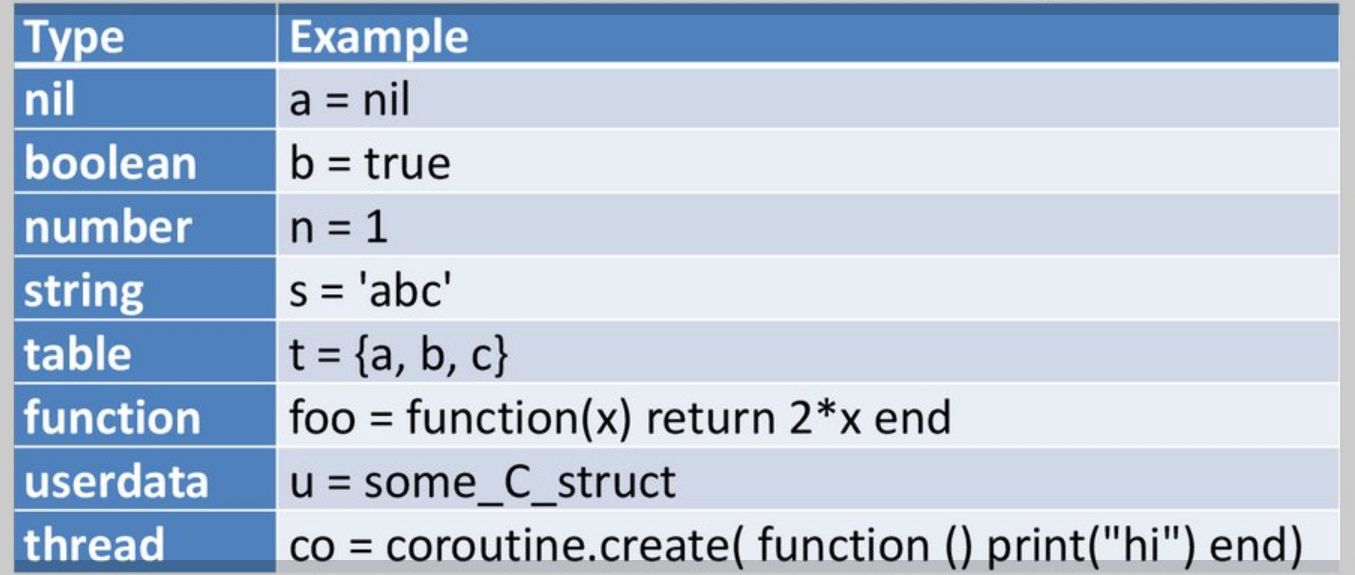
간단히 쓰는 경우는 5.1 을 권함.
기본 데이터 타입
nil, boolean, number, string, function, table 정도가 초보자 수준의 코딩에서 많이 이용됨.
thread와 userdata는 실무 수준에서 접한다.
type()함수를 통해 확인 가능.
nil:- nihil 에서 유래.
- 다른 언어들의 None, Null 에 해당하며 해당 값을 가진 변수는 gc의 대상이 됨.
boolean:true,false의 값을 가짐.- Lua에선 재밌게도
nil과false만이 거짓임 - 다루는 언어 중에서 0이 참인 유일한 언어
number:- 5.3+ 부터
integer와float로 구분이 됨. - 두 경우 모두 64비트
- 5.3+에서도
math.type()함수로 체크해야 차이가 남. type()에선 여전히number로 반환됨.- 5.3 이전 버전에선 64비트 double이라고 생각하면 됨. (52비트 mantissa)
- 5.3+ 부터
string:- 문자열이며 UTF-8 지원.
- immutable.
table:- Lua의 복합 데이터 구조로
- array, hash-table, object 등으로 사용가능한 유연한 데이터형.
- 주의할 점은 indexing이 1부터라는 점임.
function:- Lua에서
function은 first class object임.
- Lua에서
thread:- 이름과 달리 coroutine 을 나타냄
- os thread가 아닌 점 주의.
userdata:- C 데이터구조를 Lua에서 사용할 수 있게 해주는 타입.
- file handle 등.
예제 코드.
--는 주석임.local: local variable
– ================
– Lua 데이터 타입 예제
– ================

– ================
– 1. nil (라틴어 “nihil”에서 유래)
– ================
print(”=== nil 타입 ===”)
local x = nil
print(x)           – nil
print(type(x))     – nil

– 정의되지 않은 변수는 nil이 됨
local y
print(y)           – nil (정의되지 않은 변수)

– nil로 설정하면 가비지 컬렉션 대상이 됨
local table1 = {1, 2, 3}
table1 = nil       – 이제 GC 대상

– ================
– 2. boolean
– ================
print(”\n=== boolean 타입 ===”)
local isTrue = true
local isFalse = false
print(type(isTrue))    – boolean

– Lua의 독특한 참/거짓 값: nil과 false만 거짓
print(“Lua의 참/거짓 값:”)
print(not nil)         – true (nil은 거짓)
print(not false)       – true (false는 거짓)
print(not 0)           – false (0은 참! Lua만의 특징)
print(not “”)          – false (빈 문자열도 참)
print(not {})          – false (빈 테이블도 참)

– ================
– 3. number
– ================
print(”\n=== number 타입 ===”)

– Lua 5.1: 모든 숫자는 64비트 double (52비트 mantissa)
local num1 = 42
local num2 = 3.14
local num3 = 1e6      – 과학적 표기법
local num4 = 0xFF     – 16진수

print(type(num1))     – number
print(type(num2))     – number

– Lua 5.3+에서는 integer와 float 구분
– math.type()으로 세부 타입 확인 (가능한 경우)
if math.type then
    print(“Lua 5.3+ 감지됨:”)
    print(math.type(42))      – integer
    print(math.type(42.0))    – float
    print(type(42))           – 여전히 “number” 반환
else
    print(“Lua 5.1/5.2: 모든 숫자는 double”)
end

– ================
– 4. string
– ================
print(”\n=== string 타입 ===”)
local str1 = “Hello World”
local str2 = ‘작은따옴표도 가능’
local str3 = [[multi-line
string은
square bracket 두 개로]]

print(type(str1))     – string
print(#str1)          – 11 (길이)

– 문자열은 불변(immutable)
local original = “Hello”
local modified = original .. “ World”  – 새 문자열 생성
print(original)       – “Hello” (변경되지 않음)
print(modified)       – “Hello World”

– UTF-8 지원
local korean = “안녕하세요”
print(korean)
print(#korean)        – 바이트 길이, 문자 개수 아님

– ============
– 5. function (일급 객체)
– ============
print(”\n=== function 타입 ===”)

– 함수는 값이며, 변수에 할당 가능
local function greet(name)
    return “안녕, “ .. name
end

print(type(greet))    – function

– 함수를 인자로 전달 가능
local function apply(func, arg)
    return func(arg)
end

print(apply(greet, “Lua”))  – “안녕, Lua”

– anonymous function
local square = function(x) return x * x end
print(square(5))      – 25

– 함수는 여러 값을 반환 가능
local function minmax(a, b)
    if a < b then
        return a, b
    else
        return b, a
    end
end

local min, max = minmax(10, 5)
print(min, max)       – 5, 10

– =========
– 6. table (Lua의 유일한 복합 데이터 구조)
– =========
print(”\n=== table 타입 ===”)

– 배열처럼 사용
local array = {10, 20, 30, 40}
print(type(array))    – table
print(#array)         – 4
print(array[1])       – 10 (1부터 시작하는 index!)

– 해시 테이블처럼 사용
local person = {
    name = “홍길동”,
    age = 30,
    city = “서울”
}

print(person.name)    – “홍길동”
print(person[“age”])  – 30

– 혼합 사용
local mixed = {
    “첫번째”,         – [1]
    “두번째”,         – [2]
    name = “혼합”,    – [“name”]
    [100] = “백”      – [100]
}

print(mixed[1])       – “첫번째”
print(mixed.name)     – “혼합”
print(mixed[100])     – “백”

– 테이블을 객체로 사용 (간단한 OOP)
local rectangle = {
    width = 10,
    height = 5
}

function rectangle:area()
    return self.width * self.height
end

print(rectangle:area())  – 50

– ============================================================================
– 7. thread (코루틴, OS 스레드가 아님)
– ============================================================================
print(”\n=== thread 타입 ===”)

local function counter()
    local i = 0
    while true
    do
        i = i + 1
        coroutine.yield(i)
    end
end

local co = coroutine.create(counter)
print(type(co))       – thread

local success, value = coroutine.resume(co)
print(value)          – 1
success, value = coroutine.resume(co)
print(value)          – 2

– ============================================================================
– 8. userdata (C 연동용)
– ============================================================================
print(”\n=== userdata 타입 ===”)
– userdata는 보통 C 코드에서 생성됨
– 예시: 파일 핸들은 userdata
local file = io.open(“temp.txt”, “w”)
if file then
    print(type(file))  – userdata
    file:close()
end
Operators
Arithmetic Op.
+,-,*,/의 기본 사칙연산자 지원. (-는 단항연산자일 때 negation)%(modulo) 연산으로 나머지 연산.^는 exponentiation임.//floor division (or integer divsion)이 5.3+에서 도입.
Bitwise Op.
5.3+에 도입된 연산자들.
&,|,~가 bw-and, bw-or, bw-xor임.- 참고로
~는 단항연산자로 사용시 not 연산자
- 참고로
<<,>>left, right shifting
Relational Op.
==: equal to~=: not equal to (흔히 사용되는 != 이 아님에 유의)<,>: less than, greater than<=,>=: less than or equal to, grater than or equal to
Boolean Op.
and, or, not : 이름 그대로...
- Lua 에서도 short-circuit evaluation 적용됨.
String Op.
..: string concatenation
Length Op.
#: table 이나 문자열의 길이를 구함.
Assignment Op.
=: 할당 연산자.
Etc.
...: variable argument.: table 필드 접근 (table field access)[ ]: table 인덱스 접근(): 함수 호출, 그룹핑
Operator Precedence (from highest to lowest)
^(right associative)- unary ops. (
not,#,-,~) *,/,//,%+,-..(right associative)<<,>>&~|<,>,<=,>=,~=,==andor
보통은 left associative인데 ^와 ..는 right associative 임.
– =============
– Arithmetic Operators
– =============
print(”=== Arithmetic Ops. ===”)
local a, b = 10, 3

print(“a + b =”, a + b)    – 13 (덧셈, addition)
print(“a - b =”, a - b)    – 7 (뺄셈, subtraction)
print(“a * b =”, a * b)    – 30 (곱셈. multiplication)
print(“a / b =”, a / b)    – 3.333… (division, 항상 float 결과)
print(“a % b =”, a % b)    – 1 (나머지 연산, modulo)
print(“a ^ b =”, a ^ b)    – 1000 (거듭제곱, exponentiation)
print(”-a =”, -a)          – -10 (단항 마이너스, unary minus)

– Floor Division (Lua 5.3+)
if _VERSION >= “Lua 5.3” then
    print(“a // b =”, a // b)  – 3 (정수 나눗셈, floor division)
else
    print(“Floor division(//)은 Lua 5.3+에서만 지원”)
end

– =====================
– Bitwise Ops. (Lua 5.3+)
– =====================
print(”\n=== Bitwise Ops. (Lua 5.3+) ===”)
if _VERSION >= “Lua 5.3” then
    local x, y = 5, 3  – 이진수로 101, 011

    print("x & y =", x & y)    -- 1 (AND: 001)
    print("x | y =", x | y)    -- 7 (OR:  111)
    print("x ~ y =", x ~ y)    -- 6 (XOR: 110)
    print("~x =", ~x)          -- -6 (NOT)
    print("x << 1 =", x << 1)  -- 10 (왼쪽 시프트)
    print("x >> 1 =", x >> 1)  -- 2 (오른쪽 시프트)
else
    print(“Bitwise Ops 는 “ .. _VERSION .. “에서 지원되지 않음”)
end

– ====================
– Relational Operators
– ====================
print(”\n=== Relational Ops. (관계 연산자) ===”)
local p, q = 5, 3

print(“p == q:”, p == q)    – false (같음)
print(“p ~= q:”, p ~= q)    – true (다름, != 이 아님에 주의!)
print(“p < q:”, p < q)      – false (작음)
print(“p > q:”, p > q)      – true (큼)
print(“p <= q:”, p <= q)    – false (작거나 같음)
print(“p >= q:”, p >= q)    – true (크거나 같음)

– =================
– Boolean Operators
– =================
print(”\n=== Boolean Ops. ===”)
print(“true and false:”, true and false)    – false (논리 AND)
print(“true or false:”, true or false)      – true (논리 OR)
print(“not true:”, not true)                – false (논리 NOT)

– Short-circuit evaluation
print(”\nShort-circuit evaluation:”)
local function getTrue()
    print(“getTrue 호출됨”)
    return true
end

local function getFalse()
    print(“getFalse 호출됨”)
    return false
end

print(“Result:”, getFalse() and getTrue())  – getFalse 호출됨, getTrue는 호출 안됨
print(“Result:”, getTrue() or getFalse())   – getTrue 호출됨, getFalse는 호출 안됨

– Lua idiom: default values(기본값) 설정
local config = nil
local default_config = config or “기본값”
print(“config(설정):”, default_config)  – “기본값”

– ================
– String Operator
– ================
print(”\n=== String Op. ===”)
local first = “Hello”
local second = “Lua”
local result = first .. “ “ .. second
print(result)  – “Hello Lua”

– 숫자와의 연결 (automatic conversion)
print(“값: “ .. 42)  – “값: 42”

– 여러 문자열 연결
local greeting = “안녕” .. “하세요” .. “!”
print(greeting)  – “안녕하세요!”

– ===============
– Length Operator
– ===============
print(”\n=== Length Op. ===”)
local text = “안녕하세요”
local numbers = {1, 2, 3, 4, 5}

print(”#text =”, #text)      – 15 (바이트 길이)
print(”#numbers =”, #numbers) – 5

– 주의: nil holes 있는 table의 길이
local sparse = {1, 2, nil, 4}
print(”#sparse =”, #sparse)   – undefined behavior (2 또는 4일 수 있음)

– 연속된 배열 부분만 카운트
local proper_array = {1, 2, 3, 4, 5}
print(”#proper_array =”, #proper_array)  – 5 (확실함)

– ===========
– Assignment Operator
– ===========
print(”\n=== Assignment Ops. ===”)
local var1 = 10
local var2 = var1
print(“var1 =”, var1)  – 10
print(“var2 =”, var2)  – 10

– Multiple assignment (다중 할당)
local x, y, z = 1, 2, 3
print(“x, y, z =”, x, y, z)  – 1, 2, 3

– Swapping variables (변수 교환)
x, y = y, x
print(“After swap: x, y =”, x, y)  – 2, 1

– 부족한 값은 nil로
local a, b, c = 1, 2
print(“a, b, c =”, a, b, c)  – 1, 2, nil

– 초과하는 값은 무시됨
local d, e = 1, 2, 3, 4
print(“d, e =”, d, e)  – 1, 2

– ==========
– Other Operators
– ==========
print(”\n=== Other Ops ===”)

– variable arguments (…)
local function sum(…)
    local args = {…}  – 가변 인자를 테이블로 변환
    local total = 0
    for i = 1, #args do
        total = total + args[i]
    end
    return total
end

print(“sum(1,2,3,4,5) =”, sum(1,2,3,4,5))  – 15

– table field access (.)
local obj = {name = “테스트”, value = 42}
print(“obj.name =”, obj.name)    – “테스트”

– table index access ([])
print(“obj[‘value’] =”, obj[‘value’])  – 42

– dynamic field access (동적 필드 접근)
local field = “name”
print(“obj[field] =”, obj[field])  – “테스트”

– 함수 호출과 grouping: ()
print(“결과:”, (5 + 3) * 2)    – 16

– ===================
– Operator Precedence
– ===================
print(”\n=== Precedence ===”)

– 거듭제곱 (right associative)
print(“2 ^ 3 ^ 2 =”, 2 ^ 3 ^ 2)    – 512 (64가 아님)
print(“즉: 2 ^ (3 ^ 2) =”, 2 ^ (3 ^ 2))  – 512
print(“만약 좌결합이라면: (2 ^ 3) ^ 2 =”, (2 ^ 3) ^ 2)  – 64

– 문자열 연결 (right associative)
print(”‘가’ .. ‘나’ .. ‘다’ =”, ‘가’ .. ‘나’ .. ‘다’)  – “가나다”

– 혼합 연산
print(“2 + 3 * 4 =”, 2 + 3 * 4)    – 14 (20이 아님)
print(”(2 + 3) * 4 =”, (2 + 3) * 4)  – 20

– 논리 연산
print(“true or false and false =”, true or false and false)  – true
print(”(true or false) and false =”, (true or false) and false)  – false

– 복잡한 예제
local result1 = 2 + 3 * 4 ^ 2
print(“2 + 3 * 4 ^ 2 =”, result1)  – 50 (=2 + 3 * 16)

local result2 = “값” .. 10 + 5
– Error! Precedence 문자열 ""과 숫자5를 더할(+) 수 없음
– print(“값” .. 10 + 5)  – 주석 처리됨

– 올바른 방법
local result3 = “값” .. (10 + 5)
print(“값” .. (10 + 5) .. “ =”, result3)  – “값15”

– ===============
– 연산자 결합성 비교 (Associativity Comparison)
– ===============
print(”\n=== 연산자 결합성 비교 ===”)

– left associative Ops.
print(“좌결합 예제:”)
print(“10 - 5 - 2 =”, 10 - 5 - 2)    – 3 ((10-5)-2)
print(“10 / 5 / 2 =”, 10 / 5 / 2)    – 1.0 ((10/5)/2)

– right associative Ops.
print(”\n우결합 예제:”)
print(“2 ^ 3 ^ 2 =”, 2 ^ 3 ^ 2)      – 512 (2^(3^2))

– string concatenation : right associative
local long_string = “첫” .. “번” .. “째” .. “문” .. “자” .. “열”
print(“긴 문자열:”, long_string)
같이 보면 좋은 자료들
The Programming Language Lua
designed and developed at
www.lua.org
https://learnxinyminutes.com/lua/
Learn Lua in Y Minutes
-- Two dashes start a one-line comment. --[[ Adding two ['s and ]'s makes it a multi-line comment. --]] ---------------------------------------------------- -- 1. Variables and flow control. ---------------------------------------------------- num = 42 --
learnxinyminutes.com
728x90