Low Pass Filter (LPF)
1. Filter란?
- Filter란 입력 영상으로부터
- 원하지 않는 성분을 걸러내고,
- 필요한 성분만을 통과시켜 추출하는 방법 또는 연산(컴포넌트)을 의미함.
2. Low Pass Filter란?
- Low Pass Filter는 영상의 저주파 성분(low frequency) 을 통과시키고,
- 고주파 성분(high frequency) — 즉 급격한 밝기 변화나 에지(edge), 노이즈 — 를 억제하는 필터임.
결과적으로 영상이 부드럽게(blurred) 되고, 노이즈가 감소함.
대표적인 예로,
- Blurring / Smoothing (영상 평활화)
- Noise Reduction (노이즈 제거)
과 같은 연산들이 있으며,
이는 영상 내 세부(high-frequency) 정보를 줄이는 대신 전체적인 형태를 보존함.
본 문서에서는 spatial domain filter (공간 영역 필터) 중 이러한 Low Pass Filter(LPF) 를 scikit-image 라이브러리를 중심으로 다룸.
https://gist.github.com/dsaint31x/7cf955738a43b01c4710af58888f8d71
scikit-image Low Pass Filter.ipynb
scikit-image Low Pass Filter.ipynb. GitHub Gist: instantly share code, notes, and snippets.
gist.github.com
OpenCV의 경우는 다음을 참고:
https://dsaint31.me/mkdocs_site/DIP/cv2/ch02/dip_low_pass_filter/
BME
Low Pass Filter filter란 입력이미지에서 원하지 않는 값들은 걸러내고 원하는 값들을 추출하여 결과로 얻는 방법 또는 컴포넌트를 지칭. 대표적인 예로 edge 의 위치와 방향을 검출하여 Image Analysis 및
dsaint31.me
참고: Noise
LPF로 제거하는 Noise는 다음을 참고:
https://dsaint31.me/mkdocs_site/DIP/cv2/ch02/dip_low_pass_filter/#noises
BME
Low Pass Filter filter란 입력이미지에서 원하지 않는 값들은 걸러내고 원하는 값들을 추출하여 결과로 얻는 방법 또는 컴포넌트를 지칭. 대표적인 예로 edge 의 위치와 방향을 검출하여 Image Analysis 및
dsaint31.me
참고: Spatial domain filter and Frequency domain filter
Spatial domain filter
결과 영상의 pixel값을 계산하는데, 입력 영상 해당 위치의 픽셀 하나만을 이용하기보다는 주변의 pixel들 을 값을 이용하는 Filter.
- mask 혹은 kernel과의 convolution연산을 통해 수행됨.
https://dsaint31.me/mkdocs_site/DIP/cv2/etc/dip_convolution/
BME
convolution filter kernel Convolution 이 문서에서의 convolution은 digital image processing등에서의 convolution을 다루고 있음. signal processing의 discrete convolution에 대한 건 다음 문서를 참고할 것: Discrete Convolution, Cir
dsaint31.me
https://dsaint31.me/mkdocs_site/ML/ch14_cnn/CNN_convolutional_layer/
BME
CNN Convolution Stride Convolutional Layer (Locality of Pixel Dependency 와 Stationarity of Statistics 에 기반한) CNN의 주요 구성 요소. CNN은 convolutional layer를 통해 feature(특징)을 추출함. Convolutional layer의 출력인 feature
dsaint31.me
Frequency domain filter
Spatial domain의 입력 영상을 Fourier Transform(FT)등을 통해 freq. domain 으로 변환하여 처리가 이루어지는 filter
3. 대표적인 LPFs
3-1. Box Filter
- Box Filter는 가장 단순한 형태의 Low Pass Filter (LPF) 로,
- 필터 윈도우(커널, kernel) 내의 모든 픽셀 값에 동일한 가중치를 부여하여
- 그 영역의 평균(mean) 을 계산하는 방식의 평균 필터(average filter) 임.
예를 들어, 3×3 Box Filter의 경우의 커널은 다음과 같음:
$$
K = \frac{1}{9}
\begin{bmatrix}
1 & 1 & 1 \\
1 & 1 & 1 \\
1 & 1 & 1
\end{bmatrix}
$$
즉, 위의 식의 경우에는 주변 9픽셀의 평균을 취해 중심 픽셀을 갱신함.
다음 예제는 $5\times 5$ 커널을 사용하는 예제임.
scikit-image 에선 skimage.filters.rank.mean() 함수를 통해 box filter를 제공하지만,
이는 uint8를 dtype으로 가지는 ndarray (NumPy's array 클래스의 객체)에서만 동작하기 때문에
scipy.ndimage의 uniform_filter() 함수를 사용하는 예제코드로 대신한다.
scipy.ndimage 패키지는 임의 차원의 NumPy 배열(이미지 포함)에 대해
선형·비선형 필터링, 이진 형태학, B-스플라인 보간, 객체 측정 등의 연산을 수행하도록 설계된
다차원 이미지 처리 및 분석용 도구를 제공함.
scikit-image에 비해서 저수준의 영상처리 모듈로서 주로 local pixel operation 기반임.
import numpy as np
from scipy.ndimage import uniform_filter
import matplotlib.pyplot as plt
from skimage import data, color, img_as_float

img = color.rgb2gray(img_as_float(data.astronaut()))
blurred = uniform_filter(img, size=5)  # 5×5 box filter

fig, ax = plt.subplots(1, 2, figsize=(10, 4))
ax[0].imshow(img, cmap='gray')
ax[0].set_title("Original")
ax[0].axis('off')
ax[1].imshow(blurred, cmap='gray')
ax[1].set_title("Box Filter (5×5 mean)")
ax[1].axis('off')
plt.tight_layout()
plt.show()
uniform_filter() 함수의 기본 패딩은 "reflect" 방식으로 다음과 같음:
입력: [1, 2, 3]
반사: [2, 1 | 1, 2, 3 | 3, 2]
결과: [2, 1, 1, 2, 3, 3, 2]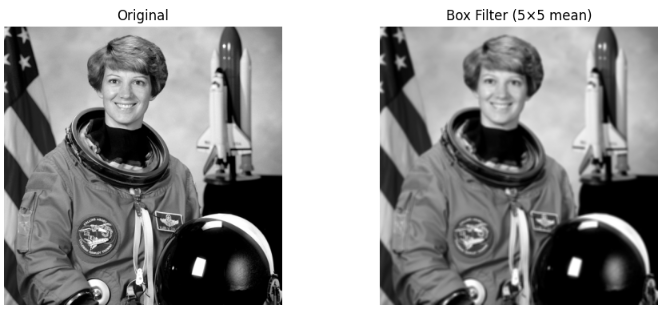
3-2. Median Filter
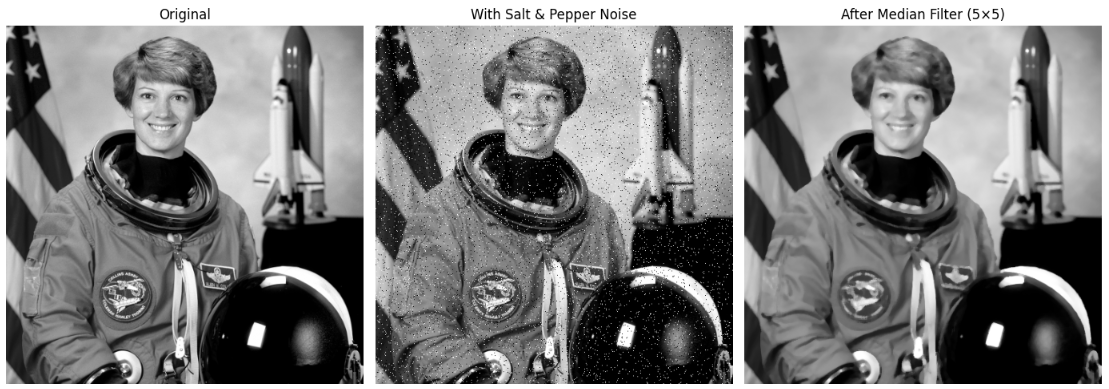
Median Filter는 대표적인 비선형(Non-linear) Low Pass Filter로,
영상 내 노이즈(특히 salt-and-pepper noise)를 제거하면서
에지(Edge)를 잘 보존하는 특성을 가짐.
kernel 범위의 pixel intensity 들의 median으로 output image 의 대상 pixel intensity를 바꿈.
단, sorting은 꽤 많은 연산량을 가짐(Box filter 나 Gaussian Filter 보다 큰 연산량)
import numpy as np
import matplotlib.pyplot as plt
from skimage import data, color, img_as_float
from skimage.filters import median
from skimage.morphology import square
from skimage.util import random_noise

# 1. 원본 이미지 (float [0,1])
img = color.rgb2gray(img_as_float(data.astronaut()))

# 2. salt & pepper 노이즈 추가
noisy = random_noise(img, mode='s&p', amount=0.05)  # 5% 정도의 노이즈 추가

# 3. Median Filter 적용 (5×5 커널)
median_filtered = median(noisy, square(5))

# 4. 시각화
fig, ax = plt.subplots(1, 3, figsize=(14, 5))

ax[0].imshow(img, cmap='gray')
ax[0].set_title("Original")
ax[0].axis('off')

ax[1].imshow(noisy, cmap='gray')
ax[1].set_title("With Salt & Pepper Noise")
ax[1].axis('off')

ax[2].imshow(median_filtered, cmap='gray')
ax[2].set_title("After Median Filter (5×5)")
ax[2].axis('off')

plt.tight_layout()
plt.show()
median() 함수의 경우, 기본 padding은 mode="reflect" 로 지정됨.
3-3. Gaussian Filter (가우시안 필터)
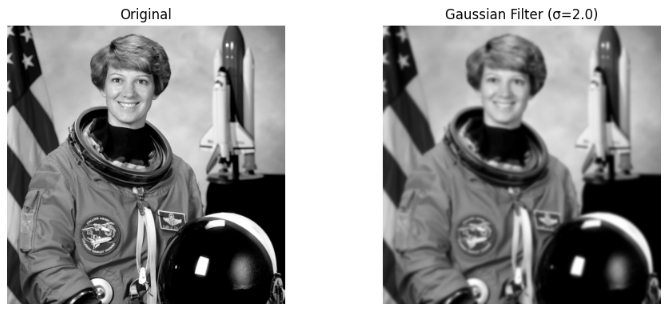
Gaussian Filter는 영상의 노이즈를 줄이고 부드럽게(smoothing) 만드는
가장 대표적인 Low Pass Filter (LPF) .
- 단순 평균(Box) 필터와 달리, 가중 평균(weighted average) 형태로
- 중심 픽셀에 더 높은 가중치를 주는 것이 핵심 특징
$$G(x, y) = \frac{1}{2\pi\sigma^2} e^{-\frac{x^2 + y^2}{2\sigma^2}}$$
where
- $\sigma$ : 표준편차 (standard deviation)
- 커널 크기(kernel size)는 일반적으로 $6\sigma + 1$
참고로 OpenCV에선 표준편차 $\sigma$를 커널 크기(ksize)에 기반한 다음의 경험식으로 근사함.
$$
\sigma = 0.3 \times \left( 0.5 \times (k_{size,x} - 1) - 1 \right) + 0.8
$$
import matplotlib.pyplot as plt
from skimage import data, color, img_as_float
from skimage.filters import gaussian

img = color.rgb2gray(img_as_float(data.astronaut()))

# σ=2.0 의 Gaussian Blur
gauss_blur = gaussian(
    img,
    sigma=2.0,
    preserve_range=True,
    )
# skimage에서는 관례적으로 float이미지를 [0.0, 1.0] range로 다룸.
# preserve_range=False인 경우는 입력값을 [0.0, 1.0] 으로 scaling후 연산(결과도 float)
# preserve_range=True인 경우는 입력값 range를 유지하여 처리(결과는 float임.)
# dtype은 유지되지 않고 범위만 유지됨.

fig, ax = plt.subplots(1, 2, figsize=(10, 4))
ax[0].imshow(img, cmap='gray')
ax[0].set_title("Original")
ax[0].axis('off')

ax[1].imshow(gauss_blur, cmap='gray')
ax[1].set_title("Gaussian Filter (σ=2.0)")
ax[1].axis('off')

plt.tight_layout()
plt.show()
gaussian() 함수의 경우, 기본 padding은 mode="nearest" 로 지정됨 (경계값으로 패딩.)
3-4. Bilateral Filter (양방향 필터)
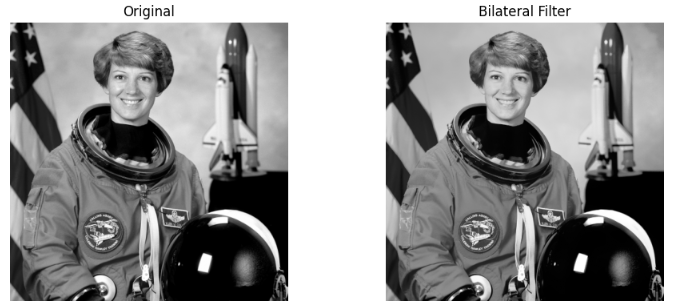
Bilateral Filter는 엣지를 보존하면서 노이즈를 제거하는 고급형 비선형(Non-linear) Low Pass Filter.
- Gaussian Filter처럼 평활화(smoothing)를 수행하지만,
- 공간적 거리(spatial distance) 뿐 아니라 픽셀 값의 차이(intensity difference) 도 함께 고려한다는 점이 핵심.
Bilateral 필터는 픽셀 $p$ 주변의 이웃 픽셀 $q$들에 대해
두 가지 가우시안 가중치를 곱하여 평균을 계산.
$$
I_\text{filtered}(p) = \frac{1}{W_p} \sum_{q \in \Omega}
I(q) \cdot g_s(|p - q|) \cdot g_r(|I(p) - I(q)|)
$$
where
- $g_s(|p - q|)$: 공간적 거리(spatial distance)에 대한 가우시안
- $g_r(|I(p) - I(q)|)$: 명암차(intensity difference) 에 대한 가우시안
- $W_p$: 정규화 상수 (가중치의 총합)
특징은 다음과 같음:
| 항목 | 설명 |
| 유형 | 비선형 Low Pass Filter |
| 입력 고려 요소 | (1) 공간 거리, (2) 픽셀 값 차이 |
| 주요 효과 | 노이즈 제거 + 엣지 보존(Edge-preserving) |
| 장점 | Gaussian보다 경계(edge) 가 잘 유지됨 |
| 단점 | 연산량이 많음 (비선형 연산) |
| 응용 예 | Edge-preserving smoothing, Depth map denoising, HDR tonemapping 등 |
scikit-image는 Bilateral Filter를 restoration.denoise_bilateral()로 제공.
import matplotlib.pyplot as plt
from skimage import data, color, img_as_float
from skimage.restoration import denoise_bilateral

# 예제 이미지
img = color.rgb2gray(img_as_float(data.astronaut()))

# Bilateral Filter 적용
# sigma_color: 명암차 가우시안 폭, sigma_spatial: 공간 거리 가우시안 폭
bilateral = denoise_bilateral(img, sigma_color=0.05, sigma_spatial=15, channel_axis=None)

# 시각화
fig, ax = plt.subplots(1, 2, figsize=(10, 4))
ax[0].imshow(img, cmap='gray')
ax[0].set_title("Original")
ax[0].axis('off')

ax[1].imshow(bilateral, cmap='gray')
ax[1].set_title("Bilateral Filter")
ax[1].axis('off')

plt.tight_layout()
plt.show()
denoise_bilateral() 함수의 경우, 기본 padding은 mode="constant", cval=0 로 지정됨 (상수값 0으로 패딩).
같이보면 좋은 자료
2025.10.21 - [Python] - scikit-image: High Pass Filter
scikit-image: High Pass Filter
이 문서에선 convolution기반의 High Pass Filter를 scikit-image 로 사용하는 방법을 다룬다. opencv버전은 다음을 참고:https://dsaint31.me/mkdocs_site/DIP/cv2/ch02/dip_edge_detection_high_pass_filter/ BMEHigh Pass Filter and Edge Det
ds31x.tistory.com
2025.10.20 - [Python] - scikit-image: Image Load, Save, Display
scikit-image: Image Load, Save, Display
이 문서는 scikit-image (skimage) 를 사용해이미지를 읽고(imread), 저장(imsave)하고, 표시(plt.imshow)하는 방법을 설명함.https://gist.github.com/dsaint31x/9c2c9d9cf91594a0180bdd222373820b scikit-image Image Load, Save, Display.ipyn
ds31x.tistory.com
https://docs.scipy.org/doc/scipy/tutorial/ndimage.html
Multidimensional Image Processing (scipy.ndimage) — SciPy v1.16.2 Manual
The functions described in this section all perform some type of spatial filtering of the input array: the elements in the output are some function of the values in the neighborhood of the corresponding input element. We refer to this neighborhood of eleme
docs.scipy.org
https://scikit-image.org/docs/0.25.x/api/skimage.filters.html
skimage.filters — skimage 0.25.2 documentation
Sharpening, edge finding, rank filters, thresholding, etc. skimage.filters.apply_hysteresis_threshold(image, low, high)[source] Apply hysteresis thresholding to image. This algorithm finds regions where image is greater than high OR image is greater than l
scikit-image.org
'Python' 카테고리의 다른 글
| Python의 함수에서 return 의 이해 (0) | 2025.12.07 |
|---|---|
| Recursive Function and Recurrence Relation (1) | 2025.12.05 |
| scikit-image: High Pass Filter (0) | 2025.10.21 |
| scikit-image: Image Load, Save, Display (0) | 2025.10.20 |
| skimage 에서 image 정보, color space 변경 및 histogram 생성. (0) | 2025.10.20 |


