이 문서는 scikit-image (skimage) 를 사용해
- 이미지를 읽고(
imread), - 저장(
imsave)하고, - 표시(
plt.imshow)하는 방법을 설명함.
https://gist.github.com/dsaint31x/9c2c9d9cf91594a0180bdd222373820b
scikit-image Image Load, Save, Display.ipynb
scikit-image Image Load, Save, Display.ipynb. GitHub Gist: instantly share code, notes, and snippets.
gist.github.com
1. 관련 module
skimage.io 모듈은 내부적으로 imageio 라이브러리를 사용하여 PNG, JPG, BMP, TIFF, GIF 등 다양한 이미지 포맷을 지원.
from skimage import io
skimage.data 모듈은 scikit-image 패키지 내부에 포함된 예제 이미지 데이터셋을 제공하는 모듈임.
from skimage import data

#from skimage.color import rgb2gray
#from skimage import img_as_ubyte,img_as_float

cat_img = data.chelsea()     # take the test image of cat!
astro_img = data.astronaut() # take the test image of astronaut!
image에 대한 정보 확인하는 법은 다음을 참고:
2025.10.20 - [Python] - skimage 에서 image 정보, color space 변경 및 histogram 생성.
skimage 에서 image 정보, color space 변경 및 histogram 생성.
Pillow(PIL)에서는 Image 클래스 객체를 통해 다루는 이미지를 추상화하지만, scikit‑image(이하 skimage)는OpenCV와 마찬가지로NumPy의 ndarray를 통해이미지를 int 또는 float의 요소들로 구성된 다차원배열로
ds31x.tistory.com
2. 이미지 저장하기 (Saving)
skimage.io 모듈의 .imsave()함수를 이용함.
기본 사용법은 다음과 같음:
from skimage import io

io.imsave(
    "output.png",
    cat_img,
)
- PNG 와 JPEG의 경우 uint8과 [0,255]로 범위를 맞추는 처리를 해준 array 객체를 저장가능함.
- TIFF의 경우 float도 가능하나 범용적인 이미지뷰어에서 안 보일 수 있으므로 역시 uint8과 [0,255]로 범위 조정을 해주는게 좋다.
다음의 skimage.img_as_ubyte() 와 skimage.img_as_float() 함수를 통해 형변환을 지원함.
img_as_ubyte()
- [0, 1] 범위의 float 이미지를 입력받아, [0, 255] 범위의 8비트 부호 없는 정수(uint8) 이미지로 변환.
- 사전에 해당 range로 범위를 조정하고 나서 사용하는게 좋음.
- 주로 시각화나 파일 저장 시(일반 24bit RGB 포맷 호환용) 사용됨.
skimage.img_as_ubyte(
    image: np.ndarray,
    force_copy: bool = False,
) -> np.ndarray- 입력:
float,uint16등 다양한dtype의 NumPy 이미지 배열 - 출력:
uint8타입 이미지 (dtype=np.uint8) - 동작: [0, 1] 범위 를 [0, 255]로 스케일링 (값 범위 초과 시 클리핑)
img_as_float()
- [0,255] 범위(or [0,65535])의 정수형(
uint8,uint16) 이미지를 [0, 1] 범위의 부동소수(float64) 이미지로 변환.- 사전에 해당 range로 범위를 조정하고 나서 사용하는게 좋음.
- 주로 이미지 처리 계산(정규화 기반 연산, convolution 등)에 사용됨.
skimage.img_as_float(
    image: np.ndarray,
    force_copy: bool = False,
) -> np.ndarray- 입력:
uint8,uint16등 - 출력:
float64타입 이미지 (dtype=np.float64) - 동작: [0, 255] 또는 [0, 65535] 값을 [0, 1]로 정규화
앞서 두 함수의 parameter 인 force_copy의 동작은 다음과 같음:
- False시
- 변환 과정에서 dtype이 이미 uint8 이고 값 범위가 올바르면
- 원본 배열을 그대로 반환
- True시
- 항상 입력과 출력이 같은 데이터를 공유하지 않도록 강제 복사.
- 변환이 불필요해도 항상 새 배열을 만들어 반환.
예제1
from skimage import data, img_as_float, img_as_ubyte

image_uint8 = data.camera()                # uint8
image_float = img_as_float(image_uint8)    # [0,1] float
image_back  = img_as_ubyte(image_float)    # 다시 [0,255] uint8

print(f"{image_uint8.dtype = }")
print(f"{image_float.dtype = }")
print(f"{image_back.dtype = }")

# image_uint8.dtype = dtype('uint8')
# image_float.dtype = dtype('float64')
# image_back.dtype = dtype('uint8')
예제2
from skimage import img_as_ubyte, img_as_float

# [0.0, 1.0] float -> uint8 변환
image_uint8 = img_as_ubyte(cat_img / 255.0)
io.imsave("flower_uint8.png", image_uint8)

# 반대로 uint8 -> float64 [0.0,1.0]
image_float = img_as_float(cat_img)

print(f"{cat_img.dtype = }")
print(f"{image_uint8.dtype = }")
print(f"{image_float.dtype = }")

# cat_img.dtype = dtype('uint8')
# image_uint8.dtype = dtype('uint8')
# image_float.dtype = dtype('float64')- 위와 같이
skimage.img_as_ubyte()를 사용하면 항상 일반 뷰어에서 정상 표시되는 24bit 이미지를 얻을 수 있음.
NumPy의 기본 dtype이
float64 인 점을 기억할 것.
꼭 이들을 사용하지 않고, NumPy 의 dtype를 변환하는 처리로 구현해도 됨.
2024.03.15 - [Python] - [DL] Tensor: dtype 변경(casting) 및 shape 변경.
[DL] Tensor: dtype 변경(casting) 및 shape 변경.
Tensor를 추상화하고 있는 class로는numpy.array: numpy의 ndarraytorch.tensortensorflow.constant: (or tensorflow.Variable)이 있음. 이들은 Python의 sequence types과 달리 일반적으로 다음과 같은 특징을 지님.데이터들이 연
ds31x.tistory.com
참고: 고정밀 포맷 저장 예시 (TIFF)
io.imsave(
    "float_image.tif",
    image_float,
    # plugin='tifffile', # deprecated 0.25+
)- 이 경우 float 그대로 저장(float32면 32bit float이고, float64면 64bit float)되며,
- ImageJ, Photoshop, GIMP 등에서는 정상적으로 보이지만
- 일반 뷰어에서는 검은 이미지로만 보일 수 있음.
https://dsaint31.tistory.com/402#TIFF-1-5
[DIP] Image Format (summary)
Digital Image 들의 대표적인 encoding 방식들은 다음과 같음:더보기encoding 과 decoding에 대한 일반적 정의:https://dsaint31.me/mkdocs_site/CE/ch01/code_for_character/#code-encoding BMECodes for Characters Code 란 특정 형태의 i
dsaint31.tistory.com
3. 이미지 불러오기 (Loading)
skimage.io 모듈의 .imread()함수를 이용함.
기본 사용법은 다음과 같음:
from skimage import io

# 로컬 파일 또는 URL에서 이미지 읽기
url = "https://raw.githubusercontent.com/dsaint31x/OpenCV_Python_Tutorial/master/images/lena.png"
image_rgb = io.imread(url)
print(f"{type(image_rgb) = }")
print(f"{image_rgb.shape = }")
print(f"{image_rgb.dtype = }")- 주로 반환 타입은
numpy.ndarray임. .shape는 Grayscale Image에선 channel축이 없이(H, W)형태로 나옴.
4. 이미지 디스플레이 (Display)
maplotlib 라이브러리를 주로 사용함 (그중에서도 pyplot이 애용됨)
import matplotlib.pyplot as plt

plt.imshow(image_rgb)
plt.title("Original RGB Image")
plt.axis("off")
plt.show()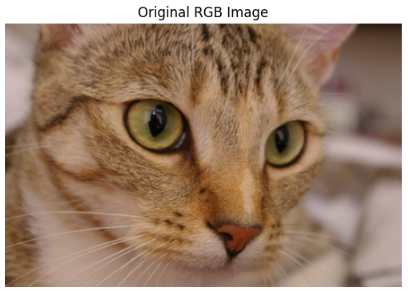
2024.06.03 - [Python/matplotlib] - [matplotlib] Tutorial: Scripting Style
[matplotlib] Tutorial: Scripting Style
Tutorial: Scripting Style 이 문서는 matplotlib.pyplot의 script 방식에 대한 간단한 튜토리얼임. scripting style에 대해서 잘 모르면 다음을 읽어볼 것.2024.06.02 - [Python/matplotlib] - [matplotlib] Scripting Layer vs. Artist La
ds31x.tistory.com
의학영상에서 많이 사용되는 gray-scale image는 cmap='gray'를 사용할 것.
from skimage import color

gray = color.rgb2gray(image_rgb)
plt.imshow(gray, cmap='gray')
plt.title("Grayscale Image")
plt.axis("off")
plt.show()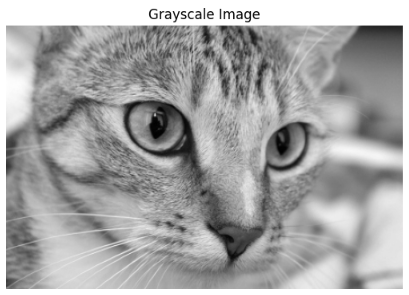
matplotlib.pyplot에서 제공하는 subplot 기능을 사용하면 여러 이미지를 하나의 이미지로 쉽게 비교가능함.
plt.figure(figsize=(12, 5))

plt.subplot(1, 2, 1)
plt.imshow(image_rgb)
plt.title("Original RGB")
plt.axis("off")
plt.subplot(1, 2, 2)
plt.imshow(gray, cmap='gray')
plt.title("Grayscale")
plt.axis("off")
plt.tight_layout()
plt.show()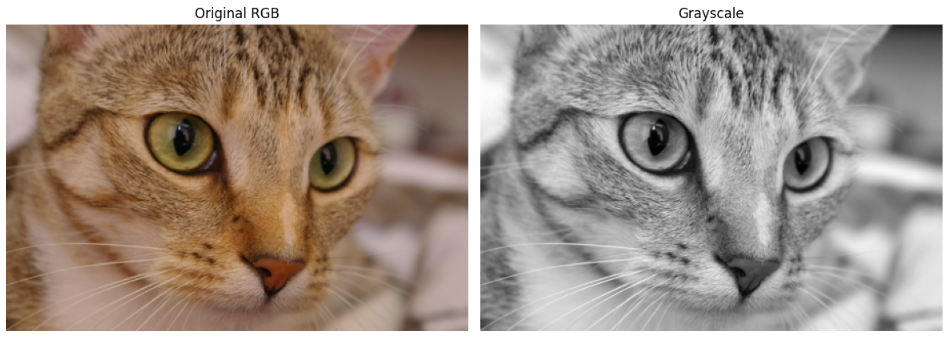
개인적으론 axes를 통한 처리를 선호함:
import matplotlib.pyplot as plt

fig, axes = plt.subplots(1,2)
fig.set_size_inches(12,5)
axes[0].imshow(image_rgb)
axes[0].set_title("Original RGB")
axes[0].set_axis_off()
axes[1].imshow(gray, cmap='gray')
axes[1].set_title("Grayscale")
axes[1].set_axis_off()
fig.tight_layout()
plt.show()
2024.06.03 - [Python/matplotlib] - [matplotlib] Object Oriented Style Tutorial
[matplotlib] Object Oriented Style Tutorial
Matplotlib Object Oriented Style Tutorial1. IntroductionMatplotlib은 Python의 2D plotting library로, 다양한 그래프와 플롯을 생성하는 데 사용됨.2024.03.04 - [Python/matplotlib] - [matplotlib] matplotlib란 [matplotlib] matplotlib란Matp
ds31x.tistory.com
6. 간단 예제
일반 RGB이미지를 float 이미지로 변경하고, 이를 Grayscale Image로 변환 후 저장하는 예제임.
from skimage import data, color, io, img_as_float, img_as_ubyte

# 1. RGB → float 변환 ([0,1])
image = img_as_float(data.astronaut())

# 2. Grayscale 변환
gray = color.rgb2gray(image)
print(f"{gray.dtype = }")
print(f"{gray.min() = }")
print(f"{gray.max() = }")

# 3. 저장 (형변환 잊지 말 것.)
tmp = img_as_ubyte(gray)
io.imsave("astronaut_gray.png", tmp)

# 4. 시각화
import matplotlib.pyplot as plt
plt.imshow(gray, cmap='gray')
plt.title("Grayscale (0–1 float)")
plt.show()
같이 보면 좋은 자료
pillow에서의 동일 내용: 2025.06.30 - [Python] - Pillow 사용법 - Basic 01
Pillow 사용법 - Basic 01
Pillow 라이브러리의 기본적인 사용법을 다룬다. 2024.06.03 - [Python] - [Python] PIL, Pillow, OpenCV, and Scikit-image [Python] PIL, Pillow, OpenCV, and Scikit-imagePIL, Pillow, OpenCV, and Scikit-imagePython에서 이미지를 다룰 때
ds31x.tistory.com
cv2에서의 동일 내용: https://dsaint31.me/mkdocs_site/DIP/cv2/ch00/dip_0_00/
BME
color space cv2.imread cv2.imshow cv2.imwrite 1. OpenCV를 통한 Image 다루기 (읽고 쓰기) 기본적으로 cv2를 이용하여 이미지를 읽어들이고, 저장하는 방법을 다룬다. 구체적인 함수는 다음과 같다. cv2.imread cv2.im
dsaint31.me
matplotlib 사용법: 2024.06.03 - [Python/matplotlib] - [matplotlib] Summary : 작성중
[matplotlib] Summary : 작성중
Introduction2024.03.04 - [Python/matplotlib] - [matplotlib] matplotlib란 [matplotlib] matplotlib란Matplotlib은 Python에서 가장 널리 사용되는 Data Visualization Library임. matplotlib를 통해 chart(차트),image(이미지) 및,다양한 visua
ds31x.tistory.com
torchvision사용법:
2025.06.17 - [Python] - [torchvision] image로부터 torch.tensor 객체 얻기
[torchvision] image로부터 torch.tensor 객체 얻기
1. torchvision.io.decode_imagetorchvision.io.decode_image 함수는 이미지 파일(경로 또는 raw 바이트 데이터)을 PyTorch 텐서로 디코딩하는 함수.torchvision에서 실제 이미지를 로딩하여 PyTorch Tensor 객체를 얻는 데
ds31x.tistory.com
[torchvision] torchvision.utils.save_image and torchvision.io.encode_jpeg, torchvision.io.encode_png
주로 다음의 3가지를 개인적으로 사용함.save_image: 파일 직접 저장, 배치 그리드 배열, 정규화/시각화 기능 내장encode_jpeg: 손실 압축, 더 작은 파일 크기, RGB/Grayscale만 지원encode_png: 무손실 압축, 더
ds31x.tistory.com
'Python' 카테고리의 다른 글
| scikit-image: Low Pass Filter (0) | 2025.10.21 |
|---|---|
| scikit-image: High Pass Filter (0) | 2025.10.21 |
| skimage 에서 image 정보, color space 변경 및 histogram 생성. (0) | 2025.10.20 |
| zip import 튜토리얼-__init__.py 와 __main__.py (0) | 2025.10.17 |
| random 모듈 사용법 (0) | 2025.10.02 |


