728x90
반응형
1-1. 실행 전 준비
특별한 창이나 환경 필요 없음
1-2. 예제 코드
import pyautogui

# Alert
response1 = pyautogui.alert(text='자동화 시작 전에 준비되었나요?', title='알림', button='확인')
print('alert 응답:', response1)

# Confirm
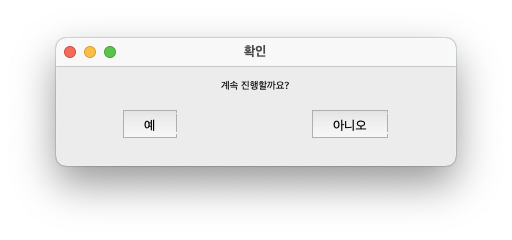
response2 = pyautogui.confirm(text='계속 진행할까요?', title='확인', buttons=['예','아니오'])
print('confirm 응답:', response2)

# Prompt
name = pyautogui.prompt(text='이름을 입력하세요', title='입력 요청', default='홍길동')
print('prompt 입력값:', name)

# Password
pwd = pyautogui.password(text='비밀번호 입력', title='보안 입력', mask='*')
print('password 입력값:', pwd)- interactive shell에서는 사용가능하나, IPython 계열에서는 사용하지 말 것.
728x90
'Python' 카테고리의 다른 글
| [Py] double asterisk 사용법-packing and unpacking (1) | 2025.07.16 |
|---|---|
| Pillow에서 Image 객체의 주요 attribute. (1) | 2025.07.15 |
| [Ex] PyAutoGUI - hotkey 조합 입력하기 (0) | 2025.07.15 |
| [Ex] PyAutoGUI - 화면 캡처 및 이미지 인식 (0) | 2025.07.15 |
| [Ex] PyAutoGUI - 키보드 입력 (2) | 2025.07.14 |


