가급적 opencv를 설치하고 하길 권함. Pillow 만으로는 거의 locateOnScreen이 잘 동작하지 않음.
1-2. 실습 코드
import pyautogui
import time
from pyautogui import ImageNotFoundException

time.sleep(3)

# 전체 화면 캡처
im = pyautogui.screenshot()
im.save('full_screen.png')
time.sleep(1)

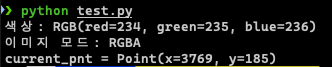
# 색상 확인
color = pyautogui.pixel(100, 100)
print("색상:", color)

# 영역 저장
im = pyautogui.screenshot(region=(3723, 138, 92, 96))
print(f"이미지 모드: {im.mode}")
im.save('target.png')

# 이미지 탐색 및 클릭
try:
    location = pyautogui.locateOnScreen('target.png', confidence=0.8)
    center = pyautogui.center(location)
    pyautogui.moveTo(center, duration=0.5)
    current_pnt = pyautogui.position()
    print(f"{current_pnt = }")
except ImageNotFoundException:
    print("이미지를 찾지 못했습니다.")