관련자료: https://huggingface.co/docs/transformers/ko/custom_models
사용자 정의 모델 공유하기
(번역중) 효율적인 학습 기술들
huggingface.co
관련 gist파일
https://gist.github.com/dsaint31x/8a49b5d50dac707873af1ef901859e10
dl_custom_img_classifier_hf_deploy.ipynb
dl_custom_img_classifier_hf_deploy.ipynb. GitHub Gist: instantly share code, notes, and snippets.
gist.github.com
Intro.
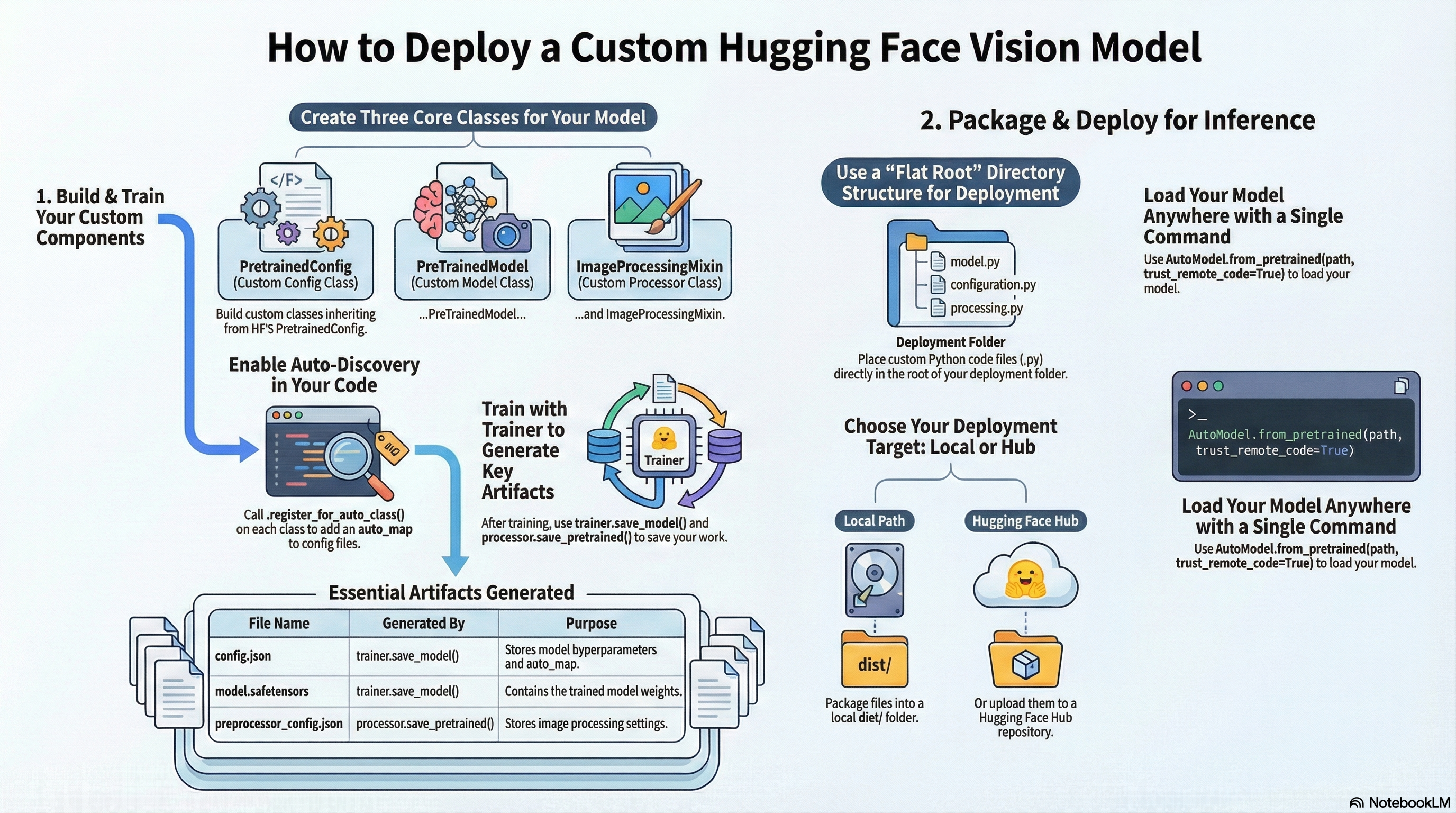
Hugging Face (HF)에서의 deploy(배포)는
- 모델을 특정 폴더(또는 Hub 레포) 형태로 저장해 두고,
- 나중에
.from_pretrained(...)메서드/함수 호출 한 줄로 다시 불러 쓸 수 있게 만드는 것을 의미함.
최근 권장되는 방식은
AutoClass가 config / model / processor 클래스를 자동으로 찾도록auto_map을 저장 파일에 남기는 방식(=register_for_auto_class)으로 배포하는 것임.
HF Custom Model이란
PreTrainedModel을 상속하고forward(pixel_values, labels)에서 (labels가 주어진 경우)loss를 반환하며AutoModel.from_pretrained()로 다시 불러올 수 있는 모델이다.
이 배포는 다음의 두가지가 있음:
- 로컬 배포 (Local deployment)
- 같은 파이썬 환경
- 커스텀 모델 코드가 이미 import 가능
- 연구/실험 단계에서 가장 흔함
- 완전 배포형 (Portable / Hub deployment)
- 다른 PC, 다른 환경
- 커스텀 코드가 없음
- 따라서 HF Hub repo 안에 custom code가 포함되어있어야 하고,
trust_remote_code=True로 로드 가능해야 함.
Deployment(배포)을 위해 알고 있어야 하는 주요 내용은 다음과 같음:
| 클래스 | 역할 |
PretrainedConfig |
하이퍼파라미터 저장 + config.json 직렬화 |
PreTrainedModel |
모델 본체 + 저장/로드 규약 (모델 parameters 포함) |
ImageProcessor |
이미지 => pixel_values 변환 + preprocessor_config.json 직렬화 |
Auto* |
자동 로더 |
Trainer |
학습 루프 |
(중요) auto_map 은 여러 파일에 존재.
실제 동작에서 가장 많이 헷갈리는 부분:
- 모델/Config의
auto_map=>config.json에 기록됨- (
trainer.save_model()=> 내부적으로model.save_pretrained()호출 => config 저장)
- (
ImageProcessor의auto_map=>preprocessor_config.json에 기록됨- (
processor.save_pretrained()로 저장)
- (
즉, 다음은 정상임:
config.json에AutoImageProcessor키가 없어도 됨- (
ImageProcessor정보는 원래preprocessor_config.json쪽)
- (
- 대신
preprocessor_config.json에AutoImageProcessor가 있어야 함
배포 가능한 모델을 위한 프로젝트 디렉토리 구조
핵심:
- 개발 프로젝트는
src/레이아웃을 유지할 수 있음 - 하지만 배포 산출물
dist/my-mnist-hf/는 HF dynamic module 로딩 규칙에 적절하게 “flat 루트 구조” 로 만드는게 배포에 편리함.
hf_custom_proj/                       # 프로젝트 루트
├─ pyproject.toml                     # 패키징/개발 메타데이터(권장)
├─ README.md                          # 모델 카드/사용법(필수급)
├─ LICENSE                            # 권장
├─ .gitignore                         # 권장
│
├─ src/                               # 커스텀 코드(원격 로드 대상): dist의 root dir로 이동됨.
│  └─ my_mnist_hf/
│     ├─ __init__.py                  # AutoConfig/ AutoModel/ AutoImageProcessor 등록
│     │                               # (+export)
│     ├─ configuration_my_mnist.py    # Custom Config(MyMNISTConfig)
│     ├─ modeling_my_mnist.py         # Custom Model(MyMNISTForImageClassification)
│     └─ image_processing_my_mnist.py # Custom ImageProcessor(MyMNISTImageProcessor)
│
├─ examples/                          # 재현/데모(학습·추론 전용)  ※ -m 실행 기준: 패키지로 취급
│  ├─ __init__.py                     # -m 실행을 위한 패키지 마커(필수)
│  ├─ dataset_mnist.py                # MNISTWithProcessor (학습 전용 Dataset)
│  ├─ metrics.py                      # compute_metrics (Trainer용)
│  ├─ train_local.py                  # 학습 + artifacts로 저장
│  │                                  # (trainer.save_model + processor.save_pretrained)
│  └─ infer.py                        # dist 또는 hub 로드 추론 (통합)
│
├─ scripts/                           # 배포 자동화 스크립트
│  └─ export_to_hub.py                # artifacts -> dist 구성 + (선택) Hub 업로드
│
├─ data/                              # (선택) 로컬 캐시/다운로드 경로
│
├─ artifacts/                         # 학습 산출물 디렉토리(스테이징; export_to_hub.py 입력)
│  └─ my_mnist/                       # 기본 산출물 폴더 (기본값: artifacts/my_mnist)
│     ├─ config.json                  # trainer.save_model() 산출물
│     ├─ model.safetensors            # 또는 pytorch_model.bin
│     └─ preprocessor_config.json     # processor.save_pretrained() 산출물
│
└─ dist/                              # 배포 산출물 디렉토리
   └─ my-mnist-hf/                    # 이 폴더가 그대로 Hub repo 루트
      ├─ README.md                    # 배포용 README (Model Card)
      ├─ LICENSE
      ├─ .gitignore
      ├─ requirements.txt
      │
      │ # artifacts copy
      ├─ config.json                  # artifacts에서 복사됨 (trainer.save_model() 산출물)
      ├─ model.safetensors            # 또는 pytorch_model.bin (artifacts에서 복사됨)
      ├─ preprocessor_config.json     # artifacts에서 복사됨
      │                               # (processor.save_pretrained() 산출물)
      │
      │ # 커스텀 코드 copy (trust_remote_code 대상): flat 루트 구조
      ├─ __init__.py
      ├─ configuration_my_mnist.py
      ├─ modeling_my_mnist.py
      ├─ image_processing_my_mnist.py
      │
      ├─ examples/                    # 재현 코드 복사본
      │  ├─ __init__.py               # -m 실행을 위한 패키지 마커(권장)
      │  ├─ dataset_mnist.py
      │  ├─ metrics.py
      │  ├─ train_local.py
      │  └─ infer.py
      │
      └─ scripts/                    # 업로드 스크립트 복사본(선택)
└─ export_to_hub.pydist/my_mnist_hf/: 이 디렉토리로 배포를 위한 Hub에 올릴 수 있음.dataset.py,train_local.py등: 로컬 실험 / 연구 코드- 다음 3개는 배포에 필수임 (훈련 후 생성되는 3좀):
- config.json,
- model.safetensors(or pytorch_model.bin),
- preprocessor_config.json
주의:
dist에서 커스텀 코드는dist/my-mnist-hf/src/my_mnist_hf/...가 아니라dist/my-mnist-hf/루트에 flat하게 위치해야 함- 현재 저장시 생성되는 auto_map/로더 규약 을 처리하는
.json을 그대로 사용키 위한 부분.
HF Hub에선 README를 Model Card라고 부르는 경우가 많음:
실제적으로 README.md 임.
-m 모듈 실행을 전제로 작성
examples/를 패키지처럼 실행하기 위해 다음이 필요함:
examples/__init__.py존재- 프로젝트 루트에서 실행
학습:
cd /content/hf_custom_proj
python -m examples.train_local
추론 (local dist 패스 이용)
python -m examples.infer --source local --path dist/my-mnist-hf추론 (HF Hub dist 이용)
python -m examples.infer --source hub --path YOUR_ID/my-mnist-hfCustom Config 클래스 만들기
모델의 설정(config) 과 하이퍼파라미터(hyper-parameters) 를 담는 객체
- 모델의 config 를 수행.
- 모델의 Hyper-parameters 를 포함하고 있는 객체임.
- 실제
config.json으로 직렬화되어 저장되고 해당 파일도 복원됨:save_pretrained()으로 직렬화되어 저장.to_json_string()메서드to_dict()메서드
from_pretrained()으로 복원.from_json_string(json_str)클래스메서드from_dict()클래스메서드AutoConfig.from_pretrained(...)또는MyMNISTConfig.from_pretrained(...)로 복원됨.
1.Custom Config의 직렬화 파일인 config.json에 실제로 저장되는 값
__init__에서self.xxx = ...로 넣은 필드들(예:num_labels,image_size, …)PretrainedConfig가 공통으로 관리하는 필드들(예:id2label,label2id,torch_dtype등)- 특히
model_type은 Auto 계열이 어떤 Config/Model을 선택할지 결정하는 핵심 필드(속성)임. - 클래스 정의 파일 끝 부분에서
.register_for_auto_class("AutoConfig")를 호출하면trainer.save_model()시점에config.json에auto_map기록이 반영
2.Custom Config 구현시 주의사항:
PretrainedConfig를 상속해야 함.PretrainedConfig의__init__메서드를 오버라이드하면서kwargs를 허용해야 함.super().__init__(**kwargs)를__init__에서 반드시 호출해야함.model_type속성을 정의해야 함 (AutoConfig에서 식별하기 위해서):AutoConfig.register(key, class)와key와 일치 필요)
%%writefile /content/hf_custom_proj/src/my_mnist_hf/configuration_my_mnist.py
# hf_custom_proj/src/my_mnist_hf/configuration_my_mnist.py

from transformers import PretrainedConfig  # HF에서 제공하는 Config 베이스 클래스

class MyMNISTConfig(PretrainedConfig):
    """
    MNIST용 Custom Config 예제.

    - save_pretrained() 시 config.json으로 저장됨
    - from_pretrained() 시 config.json으로부터 복원됨
    - AutoConfig가 model_type을 보고 어떤 Config를 쓸지 결정하므로,
      model_type은 AutoConfig.register(...)에서 사용한 키와 반드시 일치해야 함.
    """

    # AutoConfig가 이 모델을 식별하기 위한 문자열 ID
    model_type = "my_mnist"

    def __init__(
        self,
        num_labels=10,     # 분류 클래스 개수 (MNIST → 0~9)
        image_size=28,     # 입력 이미지 크기
        in_channels=1,     # 흑백 이미지 → 채널 1
        hidden_dim=64,     # Conv layer 내부 채널 수
        **kwargs           # HF 공통 옵션(버전별 확장 필드 포함)
    ):
        # HF가 정의한 공통 필드(예: label2id, id2label 등)를 처리하기 위해 필수
        super().__init__(**kwargs)

        # ---- 모델에서 사용할 하이퍼파라미터(직렬화 대상) ----
        # 저장/복원 과정에서 타입이 흔들리지 않도록 명시적으로 변환해 두는 편이 안전함
        self.num_labels  = num_labels
        self.image_size  = image_size
        self.in_channels = in_channels
        self.hidden_dim  = hidden_dim

        # ---- (선택) 라벨 매핑 기본값 보강 ----
        # pipeline 출력 가독성 / Trainer 로그에서 유용
        # 사용자가 kwargs로 id2label/label2id를 줬다면, 그 값을 존중함
        if self.id2label is None or len(self.id2label) == 0:
            self.id2label = {i: str(i) for i in range(self.num_labels)}
        if self.label2id is None or len(self.label2id) == 0:
            self.label2id = {str(i): i for i in range(self.num_labels)}

        if self.architectures is None:
            self.architectures = ["MyMNISTForImageClassification"]

# --- auto class registration (for Hub/local trust_remote_code) ---
try:
    MyMNISTConfig.register_for_auto_class("AutoConfig")
except Exception:
    pass
Custom Model 클래스 만들기 (Trainer 에서 학습가능)
1.HF스타일의 Custom Model의 핵심 목표
- Hugging Face의 Trainer가
model(**batch)를 알아서 호출하고- 반환값 중
outputs.loss를 사용해 학습을 자연스럽게 수행할 수 있도록 - HF 표준 인터페이스를 따르는 모델을 만드는 것
2.Custom Model 클래스의 필수 요건
transformers.PreTrainedModel클래스를 상속.config_class속성을 정의해야 함:- 모델 클래스 내부에 어떤 설정 클래스(
PretrainedConfig의 자식 클래스)를 사용할지config_class필드에 설정. AutoModel을 지원하기 위해.- Auto 계열이 Config 기반으로 모델 클래스를 찾기 위한 연결고리
- 모델 클래스 내부에 어떤 설정 클래스(
- 생성자에서
config를 인자로 받아야 하며, 반드시super().__init__(config)를 호출하여 부모 클래스를 초기화.- 앞서
config_class에 정의된 클래스의 인스턴스가 넘겨짐.
- 앞서
- Hugging Face의
Trainer나Pipeline과 원활하게 호환되려면,forward메서드가 단순히 텐서를 반환하기보다ModelOutput(예:BaseModelOutput,ImageClassifierOutput등) 객체를 반환하는 것이 좋음.label이 주어진 경우, loss도 포함되어야 함:Trainer는 loss를 계산하지 않음.- 이미지 분류의 경우,
loss,logits으로ImageClassifierOutput객체를forward에서 반환:ImageClassifierOutput(loss=..., logits=...)
- 클래스 정의 이후 해당 클래스로부터
register_for_auto_class("AutoModelForImageClassification")를 호출하면trainer.save_model()시점에config.json에 auto_map기록이 이루어짐: 배포용auto_map기록을 위해 필요.
다음은 추가적으로 해주면 좋은 것들임:
- 재귀적으로 호출되는
def _init_weights(self, module):를 통해 가중치 초기화 구현- PyTorch의
nn.Module.apply함수를 통해 모델의 최상위 모듈부터 가장 하위의 리프(leaf) 모듈까지 모든 모듈을 재귀적으로 방문됨.
- PyTorch의
_init_weights(self, module)구현 +self.post_init()호출 패턴PreTrainedModel의 관례에 맞춰 가중치 초기화 흐름을 정리하기 좋음get_input_embeddings()/set_input_embeddings()같은 건 비전 모델에서는 보통 불필요
base_model_prefix를 설정하여 모델의 기본 접두사를 지정.- 체크포인트 저장/로드 시 내부 모듈 네이밍 규칙에 도움
config.num_labels와 분류 head 출력 차원 일치id2label,label2id를Config에 넣어두면 pipeline/출력 해석에 도움이 됨(선택)
%%writefile /content/hf_custom_proj/src/my_mnist_hf/modeling_my_mnist.py
# hf_custom_proj/src/my_mnist_hf/modeling_my_mnist.py

import torch.nn as nn                      # PyTorch 신경망 모듈
import torch.nn.functional as F            # 활성화 함수 등
from transformers import PreTrainedModel   # HF 모델 베이스 클래스
from transformers.modeling_outputs import ImageClassifierOutput
from .configuration_my_mnist import MyMNISTConfig

class MyMNISTForImageClassification(PreTrainedModel):
    """
    MNIST용 간단한 CNN 기반 Image Classification 모델 예제.

    - Hugging Face Trainer와 호환되는 Custom Model 구조
    - forward()에서 loss + logits을 ImageClassifierOutput으로 반환
    - AutoModelForImageClassification 연동 가능
    """

    # 이 모델이 사용할 Config 클래스 (AutoModel 연결용)
    config_class = MyMNISTConfig

    # state_dict 저장 시 사용되는 기본 prefix
    base_model_prefix = "my_mnist"

    # Trainer / AutoModel이 입력 키를 추론할 때 사용하는 힌트
    main_input_name = "pixel_values"

    def __init__(self, config: MyMNISTConfig):
        # HF 내부 초기화 (config 연결, weight tying 등)
        super().__init__(config)

        # -------- Feature Extractor (CNN) --------
        # 첫 번째 Conv: (B, 1, 28, 28) → (B, hidden_dim, 28, 28)
        self.conv1 = nn.Conv2d(
            config.in_channels,    # 입력 채널 수
            config.hidden_dim,     # 출력 채널 수
            kernel_size=3,
            padding=1
        )

        # 두 번째 Conv: 채널 수 증가
        # (B, hidden_dim, 28, 28) -> (B, hidden_dim*2, 28, 28)
        self.conv2 = nn.Conv2d(
            config.hidden_dim,
            config.hidden_dim * 2,
            kernel_size=3,
            padding=1
        )

        # 공간 해상도 감소 (28 -> 14)
        self.pool = nn.MaxPool2d(2)

        # Conv 결과를 펼친 후 들어갈 feature 수 계산
        feat_dim = (config.hidden_dim * 2) * (config.image_size // 2) ** 2

        # -------- Classification Head --------
        # 최종 분류기 (logits 출력)
        # (B, feat_dim) -> (B, num_labels)
        self.classifier = nn.Linear(
            feat_dim,
            config.num_labels
        )

        # Trainer가 사용할 loss 함수
        # labels: (B,), dtype=torch.long
        self.loss_fn = nn.CrossEntropyLoss()

        # HF가 권장하는 후처리 (weight 초기화 등)
        self.post_init()

    # -------------------------------------------------
    # Weight initialization (선택이지만 권장)
    # -------------------------------------------------
    def _init_weights(self, module):
        """
        HF 관례에 따른 가중치 초기화 함수.
        post_init()에서 재귀적으로 호출됨.
        """
        if isinstance(module, nn.Conv2d):
            nn.init.kaiming_normal_(module.weight, mode="fan_out", nonlinearity="relu")
            if module.bias is not None:
                nn.init.zeros_(module.bias)

        elif isinstance(module, nn.Linear):
            nn.init.xavier_uniform_(module.weight)
            if module.bias is not None:
                nn.init.zeros_(module.bias)

    def forward(
        self,
        pixel_values=None,   # Dataset이 전달하는 이미지 텐서
        labels=None,         # Trainer가 전달하는 정답 레이블
        **kwargs             # 향후 확장을 위한 여유 인자
    ):
        """
        Args:
            pixel_values (torch.Tensor):
                shape = (B, 1, H, W)
                ImageProcessor가 생성한 입력 텐서
            labels (torch.Tensor, optional):
                shape = (B,)
                dtype = torch.long
                Trainer가 전달하는 정답 레이블

        Returns:
            ImageClassifierOutput:
                - loss: 학습 시 사용
                - logits: 평가 / 추론 시 사용
        """
        if pixel_values is None:
            raise ValueError("pixel_values must be provided")

        # -------- Forward pass --------
        # 첫 번째 Conv + ReLU
        x = F.relu(self.conv1(pixel_values))

        # 두 번째 Conv + ReLU
        x = F.relu(self.conv2(x))

        # Pooling: 공간 크기 줄이기
        x = self.pool(x)

        # (B, C, H, W) → (B, C*H*W)
        x = x.flatten(1)

        # Classification head
        # 분류 점수(logits) 계산
        logits = self.classifier(x)

        # Trainer용 loss 초기화
        loss = None

        # labels가 주어지면 loss 계산
        if labels is not None:
            loss = self.loss_fn(logits, labels)

        # HF 표준 출력 형태로 반환
        return ImageClassifierOutput(
            loss=loss,      # 학습 시 사용
            logits=logits   # 평가/추론 시 사용
        )

# --- auto class registration (for Hub/local trust_remote_code) ---
try:
    MyMNISTForImageClassification.register_for_auto_class("AutoModelForImageClassification")
except Exception:
    pass
ImageProcessor: Image => pixel_values
ImageProcessor는
이미지를 모델 입력용pixel_values텐서로 표준화하는
전처리 전담 클래스임.
- 특정 모델에 특화된 특정 이미지 프로세서(Specific Image Processor) 클래스의 인스턴스
BaseImageProcessor가 이들 ImageProcessor 의 최상위 추상 클래스임.
참고: https://huggingface.co/docs/transformers/ko/image_processors
1.ImageProcessor 역할 개요
- 입력 데이터 표준화
- 다양한 크기, 비율, 채널 구성(RGB/RGBA 등)을 가진 원본 이미지를
- 모델이 요구하는 고정된 입력 규격으로 변환
- 전처리 파이프라인 수행
- 이미지 리사이징(resizing), 중앙 크롭(center crop), 정규화(normalization: 평균/표준편차 적용) 등의 작업을 일괄 처리
- 데이터 증강(data augmentation)은
torchvision.transforms/transforms.v2등을 활용하여 외부에서 선택적으로 적용하는 것이 일반적으로 권장됨
- 텐서 변환 및 배치 처리
- 이미지를 모델 입력에 적합한 수치 형태로 변환
- NumPy ndarray 또는 PyTorch / TensorFlow Tensor
- 배치 처리를 위해
shape을 조정- 일반적으로 모델 입력 이미지 크기가 고정되어 있으므로 이에 맞춰 처리
- 이미지를 모델 입력에 적합한 수치 형태로 변환
- 설정 공유 및 재현성
- 학습 시 사용된 전처리 설정을
preprocessor_config.json으로 저장 - 추론 시에도 동일한 전처리가 자동으로 적용되도록 보장
- 학습 시 사용된 전처리 설정을
2.Custom ImageProcessor 구현 시 지켜야 할 사항
ImageProcessingMixin상속 필수PretrainedConfig와 유사한 방식으로save_pretrained()/from_pretrained()사용 가능
- 인스턴스를 JSON으로 직렬화 가능
save_pretrained()는 내부 설정을 저장하므로__init__인자는 JSON으로 직렬화 가능한 값이어야 안전함- 예:
np.ndarray는 그대로 저장 불가 →list[float]등으로 변환 후 저장
- 예:
model_input_names = ["pixel_values"]정의 필요Trainer및 모델forward()호출 시 전달되는 key를 일관되게 맞추기 위한 필수 항목
__call__메서드 오버라이드images- 단일 이미지 또는 이미지 리스트 허용
- 반환값
BatchFeature객체- 내부 텐서는
return_tensors에 지정된 타입을 따름 - 기본 shape:
(B, C, H, W) - dtype: float32 권장
- key 이름
- 반드시
"pixel_values"사용
- 반드시
__call__(self, images, return_tensors="pt", **kwargs) -> BatchFeature- 내부 처리 권장 방식
- 구현 단계에서는 NumPy ndarray로 처리한 뒤
BatchFeature({"pixel_values": pixel_values}, tensor_type=return_tensors)형태로 반환- 이 경우
return_tensors값에 따라- PyTorch Tensor / TensorFlow Tensor / NumPy ndarray로 자동 변환됨
2-1.입력 타입 및 shape 정책 명시 필요
JAX와 TensorFlow의 Tensor 도 지원하도록 구현할 수도 있으나,
HF의 기본 전제 입력 타입은 PIL.Image.Image 객체와 np.ndarray 객체임.
선택적으로 torch.Tensor 입력을 지원하는데, torchvision.v2를 통한 DataAugmentation을 고려한다면 torch.Tensor입력을 구현해 줘야 함.
- 지원 입력 타입
PIL.Image.Imagenp.ndarraytorch.Tensor(선택 사항)
- 허용 shape
(H, W): grayscale(H, W, C):표준적인 입력 shape(C, H, W):Tensor 기반 입력 shape
이들 객체들의 단일 입력 뿐 아니라 list도 보통 입력으로 받아들이도로 구현.
2-2.값 범위(rescale / normalize) 정책 명확화
- 입력 값의 범위 명시 필요
0~255정수 이미지인지0~1float 이미지인지
- 처리 순서 명확화 필요
do_rescalerescale_factordo_normalize- 평균(mean) / 표준편차(std) 적용 순서
- 이중 정규화(double normalization) 방지에 대한 고려 필요
2-3.AutoClass 등록
register_for_auto_class("AutoImageProcessor")등록 필요AutoImageProcessor.from_pretrained()호출 시- 커스텀 ImageProcessor 클래스를 자동으로 역직렬화하여 찾기 위한 절차
- 배포용
auto_map을 config 용preprocessor_config.json파일에 남기기 위해서 필요.
2-4.Custom ImageProcessor 구현
보다 자세한 CustomImageProcessor의 구현 및 동작 테스트는 다음의 gist URL참고:
https://gist.github.com/dsaint31x/42760ec22345341468d7bfb2946752da
다음은 MNIST데이터에 대해 아주 최소한으로 구현한 예제 Image Processor 클래스임:
%%writefile /content/hf_custom_proj/src/my_mnist_hf/image_processing_my_mnist.py
# hf_custom_proj/src/my_mnist_hf/image_processing_my_mnist.py

import numpy as np
import torch
from PIL import Image

from transformers import ImageProcessingMixin
from transformers.feature_extraction_utils import BatchFeature


class MyMNISTImageProcessor(ImageProcessingMixin):
    """
    MNIST 전용 단순 커스텀 ImageProcessor 예제.

    목적:
      - Hugging Face custom ImageProcessor 구현 구조 설명
      - Trainer / AutoImageProcessor 연동 방식 설명

    처리 흐름:
      1) 입력을 (H,W) grayscale로 통일
      2) 선택적 resize 수행
      3) [0,1] 스케일 변환
      4) 선택적 MNIST normalize
      5) (B,1,H,W) 형태로 BatchFeature 반환

    예제의 의도적 한계:
      - MNIST 단일 채널만 가정
      - np.ndarray 입력 제외함.
      - RGB 및 다채널 입력 미지원
      - torch.Tensor 입력은 (H,W) 또는 (1,H,W)만 허용
         - uint8 인 경우 [0,255], float인 경우 [0,1]
      - 입력 스케일 판정 로직 단순화
      - 이중 normalize 방지 로직 미포함
      - PIL 특수 모드(F 등) 미지원

    Custom ImageProcessor 구현 시 핵심 이슈:
      - model_input_names 정의 필요
      - __call__ API contract 준수 필요
      - BatchFeature 반환 필수
      - return_tensors 변환 책임 위임
      - (B,C,H,W) shape convention 유지
      - AutoImageProcessor 연동을 위한 등록 필요
    """

    # 모델 입력 키 이름 정의
    model_input_names = ["pixel_values"]

    def __init__(
        self,
        size={"height": 28, "width": 28},
        do_resize=True,
        do_normalize=True,
        image_mean=0.1307,
        image_std=0.3081,
        **kwargs
    ):
        # ImageProcessingMixin 초기화
        super().__init__(**kwargs)

        # size 파라미터 검증 및 저장
        if not isinstance(size, dict):
            raise TypeError("size must be a dict with keys {'height', 'width'}")
        if "height" not in size or "width" not in size:
            raise ValueError("size dict must contain 'height' and 'width'")

        self.size = {
            "height": int(size["height"]),
            "width": int(size["width"]),
        }

        # resize 수행 여부 설정
        self.do_resize = bool(do_resize)

        # normalize 수행 여부 설정
        self.do_normalize = bool(do_normalize)

        # MNIST mean/std 설정
        self.image_mean = float(image_mean)
        self.image_std = float(image_std)

        # Pillow bilinear 보간 상수 호환 처리
        try:
            self._bilinear = Image.Resampling.BILINEAR
        except AttributeError:
            self._bilinear = Image.BILINEAR

    @staticmethod
    def _tensor_to_pil_grayscale(t: torch.Tensor) -> Image.Image:
        """
        Tensor -> PIL grayscale 변환 (계약 기반).

        허용 입력
        ---------
        - shape: (H,W) 또는 (1,H,W)
        - dtype/범위:
            * uint8  : [0,255]
            * float* : [0,1]  (float16/float32/float64)

        비허용 예
        ---------
        - normalize된 텐서 (예: mean/std 적용되어 음수 포함)
        - 범위가 [0,1]도 [0,255]도 아닌 float 텐서
        """
        if not torch.is_tensor(t):
            raise TypeError(f"Expected torch.Tensor, got {type(t)}")

        tt = t.detach().to("cpu")

        # shape 계약: (H,W) or (1,H,W)
        if tt.ndim == 3 and tt.shape[0] == 1:
            tt = tt[0]
        if tt.ndim != 2:
            raise ValueError(
                f"MNIST processor expects Tensor shape (H,W) or (1,H,W), got {tuple(tt.shape)}"
            )

        # dtype/범위 계약
        if tt.dtype == torch.uint8:
            # uint8은 그대로 [0,255]로 해석
            a = tt.numpy()
            return Image.fromarray(a, mode="L")

        if tt.dtype.is_floating_point:
            vmin = float(tt.min().item())
            vmax = float(tt.max().item())

            # float은 [0,1]만 허용
            eps = 1e-6
            if vmin < -eps or vmax > 1.0 + eps:
                raise ValueError(
                    "Float tensor input must be in [0,1]. "
                    f"Got range [{vmin:.6f}, {vmax:.6f}]. "
                    "If your tensor is already normalized (e.g., mean/std), "
                    "disable that normalization before calling the processor "
                    "or disable processor normalization (do_normalize=False)."
                )
            # ----------------------
            # float를 [0,255를 허용하는 구현.
            # # float 범위가 (대략) [0,255]면 [0,1]로 자동 변환 버전
            # if vmin < -eps:
            #     raise ValueError(...)
            # if vmax > 1.0 + eps:
            #     if vmax <= 255.0 + eps:
            #         tt = tt / 255.0
            #         vmin = float(tt.min().item())
            #         vmax = float(tt.max().item())
            #     else:
            #         raise ValueError(...)


            # [0,1] -> uint8 [0,255]
            a = (tt.clamp(0.0, 1.0) * 255.0).round().to(torch.uint8).numpy()
            return Image.fromarray(a, mode="L")

        raise TypeError(
            f"Unsupported tensor dtype: {tt.dtype}. Use uint8 [0,255] or float [0,1]."
        )

    def __call__(self, images, return_tensors="pt", **kwargs):
        """
        __call__ API contract 정의.

        입력:
          - images: 단일 이미지 또는 이미지 리스트
          - return_tensors: 출력 텐서 타입 지정

        출력:
          - BatchFeature({"pixel_values": ...}, tensor_type=return_tensors)

        역할:
          - processor callable interface 제공
          - Trainer / Pipeline과의 연동 지점
        """
        # 단일 입력을 리스트로 통일
        if not isinstance(images, (list, tuple)):
            images = [images]

        batch = []
        do_resize = kwargs.pop("do_resize", self.do_resize)
        do_normalize = kwargs.pop("do_normalize", self.do_normalize)
        size = kwargs.pop("size", self.size)

        target_h = self.size["height"]
        target_w = self.size["width"]

        for im in images:
            # 입력 타입 분기 처리
            # 1) PIL 입력
            if isinstance(im, Image.Image):
                pil = im.convert("L")

            # 2) torch.Tensor 입력 (tv_tensors.Image 포함)
            elif torch.is_tensor(im):
                pil = self._tensor_to_pil_grayscale(im)

            # 3) 그 외는 미지원(의도적 단순화)
            else:
                raise TypeError(f"Unsupported input type: {type(im)}")

            # resize 수행
            if self.do_resize:
                pil = pil.resize((target_w, target_h), resample=self._bilinear)

            # numpy float32 및 [0,1] 스케일 변환
            a = np.array(pil, dtype=np.float32) / 255.0

            # MNIST normalize 수행
            if self.do_normalize:
                a = (a - self.image_mean) / self.image_std

            # (H,W) -> (1,H,W) 변환
            a = a[None, :, :]
            batch.append(a)

        # 배치 스택 생성 (B,1,H,W)
        pixel_values = np.stack(batch).astype(np.float32, copy=False)

        # BatchFeature 반환
        if return_tensors is None:
            return BatchFeature({"pixel_values": pixel_values})
        return BatchFeature({"pixel_values": pixel_values}, tensor_type=return_tensors)


# AutoImageProcessor 연동을 위한 클래스 등록
# HF Hub에서의 배포를 가능하기 위해서
# 커스텀 Processor를 찾을 수 있도록(auto_map 기록을 위해) 등록해 둠
# --- auto class registration (for Hub/local trust_remote_code) ---
try:
    MyMNISTImageProcessor.register_for_auto_class("AutoImageProcessor")
except Exception:
    pass
Auto계열 클래스에 custom class component 등록(register)하기.
이는 Hugging Face의 Auto 계열 클래스가 커스텀 컴포넌트를 “자동으로” 찾아 연결(register)하는 과정.
my_mnist_hf/__init__.py 에서의:
AutoConfig.register(...)AutoModel...register(...)AutoImageProcessor.register(...)
.register(...)를 이용한 등록은 호출이 이루어진 Process에서만 유효함..register_for_auto_class(...)는 설정 관련.json파일들에auto_map을 남기는 것과 달리,
이 방식은import my_mnist_hf와 같은 import 를 통해 이루어짐: 로컬 학습단계에서 이루어짐.
사용자가 다음의 간단한 코드만으로 Cusomt Config/ Custom Model / Custom Processor 가 자동으로 로드되기 위해 필요함:
AutoConfig.from_pretrained(...)
AutoModelForImageClassification.from_pretrained(...)
AutoImageProcessor.from_pretrained(...)
다음의 간단한 예임.
%%writefile /content/hf_custom_proj/src/my_mnist_hf/__init__.py
# hf_custom_proj/src/my_mnist_hf/__init__.py

from transformers import AutoConfig, AutoModelForImageClassification, AutoImageProcessor
from .configuration_my_mnist import MyMNISTConfig
from .modeling_my_mnist import MyMNISTForImageClassification
from .image_processing_my_mnist import MyMNISTImageProcessor

# AutoConfig가 "my_mnist"를 만나면 이 Config를 사용
AutoConfig.register("my_mnist", MyMNISTConfig)

# AutoModelForImageClassification이 이 Config를 만나면 이 Model을 사용
AutoModelForImageClassification.register(
    MyMNISTConfig,
    MyMNISTForImageClassification
)

# ImageProcessor도 Config와 연결
try:
    AutoImageProcessor.register(
        MyMNISTConfig,
        MyMNISTImageProcessor,
        exist_ok=True
    )
except TypeError:
    # 버전 차이로 시그니처가 다를 수 있어 안전 처리
    pass
다시 한번 애기하지만, 이 등록 방식은 해당 모듈이 import되어 등록 코드가 실행된 프로세스에서만 유효함:
from_pretrained가 올바르게 매핑되려면config.json에 저장되는model_type(Custom Config클래스에서 속성으로 정의)과AutoConfig.register(model_type, ...)의 키가 일치해야 함.
“import 없이 자동 로드”까지 가능하게 하려면,
register_for_auto_class("AutoImageProcessor")등을 통해- AutoClass 매핑 정보(
auto_map)를 저장하는 방식도 함께 고려해야 함.
Dataset (Trainer에서 사용되기 위한 구조)
1.Trainer에서 사용되기 위한 Dataset 구현 주의사항
__getitem__은 Model/Trainer가 기대하는dict형태로 반환하는 것이 가장 표준적임:- 예:
{"pixel_values": Tensor, "labels": Tensor} - 분류 문제에서
labels는 보통torch.long(또는 collate 가능한int)임.
- 예:
- torchvision의
transform,target_transform,transforms훅(Hook)을 쓰려면 VisionDataset 상속을 고려할 수 있음(권장 사항).- transforms는 일반적으로
(image, label)을 처리하는 형태의 callabe 객체이나, - 사용자가 v2.Compose처럼 이미지 전용 변환을 넣는 경우도 있으므로,
(image, label)로 먼저 호출하되 필요 시image만 변환하는 방어적 구현이 유용함.
- transforms는 일반적으로
- 데이터 증강/기하 변환은 torchvision.transforms.v2로 처리하고, 최종 모델 입력 규약(크기/정규화/채널/배치 형태)은
ImageProcessor에서 표준화하는 구성이 HF 워크플로에서 흔히 권장됨. ImageProcessor(..., return_tensors="pt")의 출력이 단일 입력에서도(1, C, H, W)가 될 수 있으므로,Dataset에서는 보통 더미 배치 차원을 제거해(C, H, W)로 반환하는 것이 안정적임.
2.Dataset 간단 예제
다음은 간단한 예제 Dataset으로, Processor가 Tensor입력을 확실히 지원한다는 가정 아래에서 구현된 것임.
Processor가 내부에서 PIL.resize() 같은 PIL 처리만을 수행 하는 구현이라면 Processor로 Tensor를 넘기는 아래와 같은 구현은 적절치 않음.
%%writefile /content/hf_custom_proj/examples/dataset_mnist.py
# hf_custom_proj/examples/dataset_mnist.py

import numpy as np
from PIL import Image

import torch
from torchvision.datasets import MNIST
from torchvision.datasets.vision import VisionDataset

class MNISTWithProcessor(VisionDataset):
    """
    Hugging Face Trainer에서 바로 사용할 수 있는 MNIST Dataset 예제.

    핵심 목표
    ----------
    - __getitem__에서 HF Trainer가 기대하는 dict 반환:
        {"pixel_values": Tensor(C,H,W), "labels": Tensor(long)}
    - torchvision 스타일 변환 훅 지원:
        - transforms      : (img, y) -> (img, y)  (VisionDataset 관례)
        - transform       : img -> img
        - target_transform: y -> y

    transforms(v2 포함)와 tv_tensors.Image 관련
    ------------------------------------------
    - torchvision.transforms.v2는 변환 결과로 tv_tensors.Image를 반환할 수 있음.
      tv_tensors.Image는 torch.Tensor의 서브클래스이므로, "Dataset 단계" 자체는 보통 문제 없음.
    - 문제는 processor가 입력 타입을 무엇까지 지원하느냐임.
        * processor가 torch.Tensor 입력을 지원하면: tv_tensors.Image도 그대로 처리 가능(권장)
        * processor가 PIL / np.ndarray만 지원하면: tv_tensors.Image에서 TypeError 가능
    - 본 예제는 processor 호출 직전에 image를 "안전하게" torch.Tensor로 고정하여
      입력 타입이 흔들리지 않도록 한다.
      (PIL -> np.ndarray -> torch.from_numpy 경로를 사용하여 확실히 변환)
    - 반드시, 이 구현은 processor가 torch.Tensor 입력을 지원해야 안전하게 처리 가능함

    전처리(Processor) 정책
    -----------------------
    - 최종 모델 입력 규약(크기/정규화/채널/배치 형태)은 ImageProcessor에서 표준화하는 것을 전제로 함.
    - processor(..., return_tensors="pt")는 단일 입력에도 (1,C,H,W)로 반환할 수 있으므로,
      Dataset에서는 더미 배치 차원을 제거해 항상 (C,H,W)만 반환하도록 강제함.
    - 이같이 해야 DataLoader에서 (B,C,H,W)로 쌓이게 됨.
    """

    def __init__(
        self,
        root: str,
        train: bool,
        processor,
        transforms=None,         # (img,y)->(img,y) 또는 img->img 모두 가능
        transform=None,          # img->img
        target_transform=None,   # y->y
        download: bool = True,
    ):
        # VisionDataset 훅 설정
        # (자체적으로 self.transforms/self.transform/self.target_transform을 관리)
        super().__init__(
            root=root,
            transforms=transforms,
            transform=transform,
            target_transform=target_transform,
        )

        # 내부 MNIST (PIL.Image.Image, int) 반환
        self.ds = MNIST(root=root, train=train, download=download)

        # HF ImageProcessor(또는 커스텀 Processor)
        self.processor = processor

    def __len__(self) -> int:
        return len(self.ds)

    def _apply_transforms(self, image, label):
        """
        torchvision 스타일 변환 적용 유틸.

        - self.transforms가 있으면 (img, y)로 먼저 호출(정석).
        - 만약 사용자가 img->img만 처리하는 callable(v2.Compose 등)을 넣었다면 TypeError가 날 수 있어
          그 경우 image만 변환하고 label은 통과시키는 방어 구현.
        1) self.transforms가 있으면 우선 사용:
           - 원칙적으로 (img, y)로 호출을 시도
           - img->img 형태면 TypeError가 날 수 있으므로, 그 경우 image만 변환하고 label은 통과
        2) self.transforms가 없으면 transform / target_transform을 각각 적용
        """
        if self.transforms is not None:
            try:
                image, label = self.transforms(image, label)
            except TypeError:
                image = self.transforms(image)
            return image, label

        # transforms가 없으면 각각 적용
        if self.transform is not None:
            image = self.transform(image)
        if self.target_transform is not None:
            label = self.target_transform(label)

        return image, label

    @staticmethod
    def _to_torch_tensor_image(image) -> torch.Tensor:
        """
        image를 "확실하게" torch.Tensor로 변환.

        지원 입력(대표)
        -------------
        - torch.Tensor (tv_tensors.Image 포함)
        - PIL.Image.Image
        - np.ndarray

        PIL -> np.array -> torch.from_numpy 경로로 확실히 변환함.

        반환
        ----
        - torch.Tensor (CPU)
        - shape는 입력에 따라 (H,W) 또는 (H,W,C) 또는 (C,H,W)일 수 있음
          (최종 (C,H,W)로의 통일은 processor가 담당하는 전제)

        왜 이렇게 하나?
        --------------
        - torch.as_tensor(PIL)은 환경에 따라 동작이 애매할 수 있으므로,
          PIL -> np.ndarray -> torch.from_numpy 경로를 사용해 변환을 확실히 함.
        """
        # 1) 이미 Tensor면 그대로( tv_tensors.Image도 여기로 들어옴 )
        if torch.is_tensor(image):
            # 안전을 위해 CPU로
            return image.detach().to("cpu")

        # 2) PIL.Image.Image -> np.ndarray -> torch.Tensor
        if isinstance(image, Image.Image):
            arr = np.array(image)  # (H,W) or (H,W,C)
            # np.array(PIL)는 보통 uint8이지만, 모드에 따라 다를 수 있음
            return torch.from_numpy(arr)

        # 3) np.ndarray -> torch.Tensor
        if isinstance(image, np.ndarray):
            return torch.from_numpy(image)

        raise TypeError(f"Unsupported image type for tensor conversion: {type(image)}")

    def __getitem__(self, idx: int):
        """
        HF Trainer 호환 dict 반환.

        반환 형식:
          {
            "pixel_values": Tensor(C,H,W),
            "labels": Tensor(long),
          }

        처리 단계
        --------
        1) MNIST에서 (PIL, int) 로드
        2) torchvision transforms 적용 (v2면 tv_tensors.Image가 될 수 있음)
        3) processor 호출 직전 image를 "안전하게" torch.Tensor로 고정
           - tv_tensors.Image: torch.Tensor 서브클래스라 그대로 통과
           - PIL: np.array -> torch.from_numpy 로 확실히 변환
           - np.ndarray: torch.from_numpy
        4) processor로 pixel_values 생성
        5) pixel_values가 (1,C,H,W)이면 더미 배치 차원 제거 -> (C,H,W)
        6) labels를 torch.long으로 변환
        """
        # 1) 원본 로드
        image, label = self.ds[idx]  # (PIL.Image.Image, int)

        # 2) 변환 적용 (여기서 image가 PIL/Tensor/tv_tensor/np.ndarray가 될 수 있음)
        image, label = self._apply_transforms(image, label)

        # 3) 이후에 "추가 변환이 없다면" 타입을 명시적으로 고정하는 편이 안전함
        #    - 특히 v2(tv_tensors.Image) 경로에서도 processor 입력 타입을 단일화할 수 있음
        #    - (전제) processor가 Tensor 입력을 확실히 지원한다면을 가정함.
        image = self._to_torch_tensor_image(image)

        # 4) processor로 모델 입력 생성
        #    - processor가 torch.Tensor 입력을 지원해야 함(권장)
        out = self.processor(image, return_tensors="pt")
        pixel_values = out["pixel_values"]

        # 5) Dataset 반환 규약 통일: 항상 (C,H,W)
        #    - DataLoader default collate로 (B,C,H,W)가 쌓이도록 만들기 위함
        #    - processor가 단일 입력에도 (1,C,H,W)를 반환할 수 있으므로 더미 배치 차원 제거
        if pixel_values.ndim == 4:
            # (1,C,H,W) -> (C,H,W)
            if pixel_values.shape[0] == 1:
                pixel_values = pixel_values[0]
            else:
                raise ValueError(
                    f"Dataset received batched pixel_values with shape {tuple(pixel_values.shape)}"
                )
        elif pixel_values.ndim == 3:
            pass
        else:
            raise ValueError(f"Unexpected pixel_values shape: {tuple(pixel_values.shape)}")

        # 6) labels 텐서화(CE loss 기준 long)
        labels = torch.as_tensor(label, dtype=torch.long)

        return {
            "pixel_values": pixel_values,  # (C,H,W)
            "labels": labels,              # torch.long
        }
compute_metrics 구현
compute_metrics는 보통 순수 함수이며 Trainer는 콜백 형태로 호출할 뿐이라 특별한 HF 전용 import나 wrapper가 필요 없음
1.Trainer에서의 공식 동작
Trainer에서compute_metrics호출 시EvalPrediction.predictions= NumPy ndarrayEvalPrediction.label_ids= NumPy ndarray
2.compute_metrics 간단 예제:
즉, 다음과 같이 구현 가능함.
%%writefile /content/hf_custom_proj/examples/metrics.py
# hf_custom_proj/examples/metrics.py

import evaluate
import numpy as np

def compute_metrics(eval_pred):
    """
    Hugging Face Trainer용 metrics 함수.

    eval_pred:
      - logits : np.ndarray, shape (N, num_classes)
      - labels : np.ndarray, shape (N,)
    """
    metric = evaluate.load("f1")

    logits, labels = eval_pred

    # Trainer는 기본적으로 logits를 NumPy 배열로 전달함
    predictions = np.argmax(logits, axis=-1)

    return metric.compute(
        predictions=predictions,
        references=labels,
        average="macro",
    )
Trainer 를 통한 학습
1.Trainer를 사용하기 위해 필요한 사항
1-1.Model:
다음을 만족하는 forward(pixel_values, labels) 를 구현하고 있어야 함.
- 이미 구현한
MyMNISTForImageClassification은 - 입력으로
pixel_values를 받고 labels가 들어오면loss를 계산해서ImageClassifierOutput(loss=..., logits=...)을 반환
다시 강조하지만, Trainer는 보통 loss를 모델이 반환해줘야 함.
1-2.Dataset:
Dataset은 반드시 {"pixel_values": ..., "labels": ...} 형태의 dict를 객체를 반환해야 함.
- Trainer는 DataLoader에서 배치를 뽑아 모델에 넘길 때, 배치가
dict이면 dict의key이름(pixel_values,labels)을 그대로모델 forward()의 인자 이름과 매칭시킴.
다음의 형태로 반환하는것 가장 일반적임:
{"pixel_values": Tensor(C,H,W), "labels": Tensor(long)}다시 강조하지만, ImageProcessor(..., return_tensors="pt")가 단일 입력에도 (1,C,H,W)를 만들 수 있으니
Dataset에서 (C,H,W)로 더미 배치 차원을 제거해 두어야 DataLoader에서 문제가 생기지 않음.
1-3.Processor(ImageProcessor):
ImageProcessor는 다음을 담당.
- 리사이즈, 정규화(mean/std), dtype/shape 표준화
- 최종적으로 모델 입력인
pixel_values를 생성
앞서 작성한 Processor는 “Tensor 입력으로 float [0,1] 또는 uint8 [0,255]만 허용” 하고 있으므로 Dataset/transform 단계에서 미리 normalize된 텐서를 Processor에 넘기면 안됨.
1-4.AutoClass에 등록(import)
AutoXXX가 커스텀 클래스를 찾게 하려면 “등록 코드가 실행”되어야 함
AutoConfig/AutoModel/AutoImageProcessor가 커스텀 클래스를 찾으려면,my_mnist_hf/__init__.py에 들어있는AutoConfig.register(...)등 등록 코드가- 현재 세션에서 한 번 실행되어야함
즉, Trainer를 사용하기 전에 다음의 등록용 import 필요함.
import my_mnist_hf- 다시 한번 강조하지만,
my_mnist_hf/__init__.py에 등록시키는 코드를 가지고 있어야 함.
2.Trainer를 사용하는 소스코드 예제
다음을 앞서 만든 클래스들을 활용하여 MNIST 데이터셋으로 모델을 훈련하는 예임.
%%writefile /content/hf_custom_proj/examples/train_local.py

# hf_custom_proj/examples/train_local.py

# (1) 매우 중요!
# src/my_mnist_hf/__init__.py 안의 AutoConfig.register / AutoModel.register /
# AutoImageProcessor.register 같은 "등록 코드"가 실행되어야
# AutoXXX가 커스텀 클래스를 찾을 수 있음.
# import 를 통해 이 등록코드가 실행됨.
import my_mnist_hf

# transforms에서 Processor로 넘기는 Tensor의 값과 shape제한이 된 점 기억할 것.
from transformers import (
    AutoConfig,
    AutoModelForImageClassification,
    Trainer,
    TrainingArguments,
    default_data_collator,
)

# 앞서 만든 커스텀 Processor (ImageProcessor)
# - 입력 이미지를 pixel_values로 바꿔주는 역할
from my_mnist_hf.image_processing_my_mnist import MyMNISTImageProcessor

# 앞서 만든 Dataset
# - __getitem__에서 {"pixel_values": ..., "labels": ...} dict를 반환해야 Trainer가 잘 동작.
from examples.dataset_mnist import MNISTWithProcessor

# 평가 지표 함수(예: accuracy / f1 등)
# - Trainer가 eval 단계에서 호출
from examples.metrics import compute_metrics


def main():
    # ------------------------------------------------------------
    # 1) Config 생성 (모델 "설계도")
    # ------------------------------------------------------------
    # AutoConfig.for_model("my_mnist")가 동작하려면:
    # - MyMNISTConfig.model_type == "my_mnist"
    # - AutoConfig.register("my_mnist", MyMNISTConfig)가 이미 실행되어 있어야 함.
    config = AutoConfig.for_model("my_mnist")

    # ------------------------------------------------------------
    # 2) Model 생성
    # ------------------------------------------------------------
    # Config로부터 모델을 만드는 방식.
    # - AutoModelForImageClassification.register(MyMNISTConfig, MyMNISTForImageClassification)
    #   등록이 되어 있어야 함.
    model = AutoModelForImageClassification.from_config(config)

    # ------------------------------------------------------------
    # 3) Processor(ImageProcessor) 생성
    # ------------------------------------------------------------
    # 이 Processor는 "입력 이미지 -> pixel_values" 변환을 담당.
    # - resize, [0,1] 스케일링, normalize(mean/std) 등을 수행
    # - 본 예제 Processor는 Tensor 입력이면
    #   * uint8 [0,255] 또는 float [0,1]만 허용(그 외 범위는 에러)
    processor = MyMNISTImageProcessor()

    # ------------------------------------------------------------
    # 4) Dataset 준비
    # ------------------------------------------------------------
    # Dataset은 __getitem__에서 dict를 반환해야 함:
    #   {"pixel_values": Tensor(C,H,W), "labels": Tensor(long)}
    # 또한 processor(..., return_tensors="pt")가 단일 입력에서도 (1,C,H,W)를 낼 수 있어
    # Dataset에서 (C,H,W)로 더미 배치 차원을 제거해주는 구성이 일반적으로 안전.
    train_ds = MNISTWithProcessor(root="./data", train=True, processor=processor)
    eval_ds  = MNISTWithProcessor(root="./data", train=False, processor=processor)

    # ------------------------------------------------------------
    # 5) TrainingArguments (학습 설정)
    # ------------------------------------------------------------
    # Trainer가 학습/평가/저장 등 전반을 여기 설정값대로 수행.
    args = TrainingArguments(
        output_dir="./runs",               # 체크포인트/로그 저장 폴더
        per_device_train_batch_size=128,   # GPU/CPU "디바이스 1개당" 배치 크기
        per_device_eval_batch_size=256,
        num_train_epochs=1,                # 전체 데이터셋을 몇 번 반복할지

        # 매우 중요(초보자 실수 포인트):
        # remove_unused_columns=True(기본값)일 때
        # Trainer가 "모델 forward 시그니처와 안 맞는 컬럼"을 자동 제거할 수 있음.
        # 커스텀 Dataset/Processor 조합에서는 예기치 않게 필요한 키가 제거될 수 있으므로
        # 초보자 튜토리얼에서는 False로 두는 편이 권장됨.
        remove_unused_columns=False,
        eval_strategy="epoch",     # 에폭마다 eval 수행(원하면 삭제 가능)
        save_strategy="epoch",     # 에폭마다 저장(원하면 삭제 가능)
        logging_steps=50,          # 로그 간격(원하면 조절)
        report_to="none",          # wandb 포함 모든 로깅 비활성화
    )

    # ------------------------------------------------------------
    # 6) Trainer 생성
    # ------------------------------------------------------------
    # - data_collator=default_data_collator:
    #   dict 형태 샘플들을 batch로 묶어주는 기본 collator.
    #   여기서는 pixel_values가 (C,H,W)로 통일되어 있으므로
    #   결과가 (B,C,H,W)로 잘 stack 됨 (segment에선 사용불가.).
    #
    # - compute_metrics:
    #   평가 시 예측값(logits)과 labels를 받아 metric을 계산.
    #
    # - processing_class:
    #   단, 이 예제에선 Dataset에서 처리를 하고 있으므로, 넣지않아도 됨.
    trainer = Trainer(
        model=model,
        args=args,
        train_dataset=train_ds,
        eval_dataset=eval_ds,
        data_collator=default_data_collator,
        compute_metrics=compute_metrics,
        # processing_class=processor,
    )

    # ------------------------------------------------------------
    # 7) 학습 실행
    # --------------------------------------|----------------------
    trainer.train()

    save_dir = "artifacts/my_mnist"
    import os
    os.makedirs(save_dir, exist_ok=True)
    trainer.save_model(save_dir)          # config.json + model.safetensors(or pytorch_model.bin)
    processor.save_pretrained(save_dir)   # preprocessor_config.json


if __name__ == "__main__":
main()- Dataset에서 processor를 호출하는 구조라면, Trainer를 생성할 때,
processing_class를 지정할 필요가 없음. - Dataset이 raw image를 반환하고 Trainer가 전처리까지 맡는 구조인 경우에만, 그때
processing_class를 지정하면 됨.
참고로, Trainer의 processing_class는
- 최신 Trainer에서 tokenizer 대신 전처리기를 지정할 때 사용되기도 함(NLP model).
- 일부 버전에서는 processor / tokenizer를 쓰기도 하므로 사용 중인 transformers 버전에 맞춰 지정할 것.
- 단, 이 문서의 프로젝트에선 image처리이고, 이를 Dataset에서 넘겨서 처리하도록 구현하여 지정할 필요를 아예 없게 처리함.
3. 학습 후 저장.
이후 다시 로드하여 사용하려면
우선 다음의 파일들이 저장 및 배포되어야 함.
- 학습된 모델 가중치 + config:
trainer.save_model()이 저장 (model이 Transformers의 contract를 따르는 경우)- 다음으로 구성됨:
pytorch_model.bin또는model.safetensorsconfig.json등
- image processor 설정:
processor.save_pretrained()호출로 저장- 다음으로 구성됨:
preprocessor_config.json
- 참고로, Tokenizer 등을 사용하는 모델의 경우,
tokenizer.json,tokenizer_config.json,special_tokens_map.json등 이 생성됨
- 커스텀 코드(파이썬 모듈):
- 로컬 배포에서는 보통 “프로젝트 코드”로 함께 존재
우선, 로컬에서 AutoClass에 등록하여 사용하려면, import my_mnist_hf를 통해 등록 코드가 실행되어야 함.
HF Hub로부터 로드하여 사용하는 경우에 trust_remote_code 방식을 쓰려면 코드가 repo에 포함되어야 하고, config.json(및 processor의 경우 preprocessor_config.json)에 원격 로딩을 위한 정보(auto_map 등)가 포함되어야 함.
config.json에 수동으로auto_map을 기재할 수도 있으나 비추천.- config 클래스와 model 클래스와 image processor 클래스를 정의하는
.py파일에서 각 클래스의.register_for_auto_class(...)를 호출하여AutoConfig,AutoModelForImageClassification과AutoImageProcessor에 등록하는 것을 추천함. - 이들을 모듈에 호출해두면 저장 시점(
.save_pretrained)에auto_map이 기록됨.- model은 Trainer에서
trainer.save_model()을 호출할 때, 내부적으로 model의.save_pretrained()를 호출하며 이때config.json에 반영됨 - image processor는
processor.save_pretrained()호출 시preprocessor_config.json등에 반영됨.
- model은 Trainer에서
이 프로젝트에선 이를 위해
다음으로 같은 코드를 학습 후 실행되도록 하여 디렉토리(artifacts/my_mnist)에 이들을 저장.
# 학습 후 저장
save_dir = "artifacts/my_mnist"

# 1) 모델(+config) 저장
trainer.save_model(save_dir)

# 2) processor 저장 (preprocessor_config.json 생성)
processor.save_pretrained(save_dir)
이때 현 프로젝트 기준으로 반드시 만들어져야 하는 파일(필수 3종):
artifacts/my_mnist/config.jsonartifacts/my_mnist/model.safetensors(또는pytorch_model.bin)artifacts/my_mnist/preprocessor_config.json
Load 와 Inference: infer.py
1. 사용법
# Local Inference
python -m examples.infer --source local --path dist/my-mnist-hf

# Hub Inference
python -m examples.infer --source hub --path YOUR_ID/my-mnist-hf

# Hub Inference w/ Token
export HF_TOKEN=hf_xxx
python -m examples.infer --source hub --path YOUR_ID/my-mnist-hf --use-token
2. infer.py 소스코드
%%writefile /content/hf_custom_proj/examples/infer.py

# hf_custom_proj/examples/infer.py
"""
로컬(dist) 또는 Hugging Face Hub에서 모델/프로세서를 로드해 추론하는 단일 스크립트.

사용법
- 로컬(dist)에서 로드:
  python -m examples.infer.py --source local --path dist/my-mnist-hf --index 0

- Hub에서 로드(공개 repo):
  python -m examples.infer.py --source hub --path YOUR_ID/my-mnist-hf --index 0

- Hub에서 로드(private repo 또는 토큰 강제):
  export HF_TOKEN=hf_xxxxxxxxxxxxxxxxxxxxx
  python -m examples.infer.py --source hub --path YOUR_ID/my-mnist-hf --use-token --index 0

전제(로컬 dist)
- dist 폴더가 Hub repo 루트 형태로 구성되어 있어야 함:
  dist/my-mnist-hf/
    - config.json
    - model.safetensors (또는 pytorch_model.bin)
    - preprocessor_config.json
    - configuration_my_mnist.py ( dist에선 src 가 아닌 my-mnist-hf밑이 되도록)
    - modeling_my_mnist.py
    - image_processing_my_mnist.py
"""

from __future__ import annotations

import argparse
import os
from pathlib import Path

import torch
from torchvision.datasets import MNIST
from transformers import AutoImageProcessor, AutoModelForImageClassification


def _resolve_token(use_token: bool) -> str | None:
    """
    Hub에서 private repo 접근 또는 인증 강제를 위해 token을 전달할지 결정.
    - use_token=False: token=None (공개 repo는 보통 이걸로 충분)
    - use_token=True : 환경변수 HF_TOKEN을 읽어 token으로 전달
    """
    if not use_token:
        return None

    token = os.environ.get("HF_TOKEN")
    if not token:
        raise RuntimeError(
            "use_token=True 인데 환경변수 HF_TOKEN이 없습니다.\n"
            "예) export HF_TOKEN=hf_xxxxxxxxxxxxxxxxxxxxx"
        )
    return token


def _validate_local_dir(path: str) -> None:
    """
    local source일 때 dist 폴더가 실제로 존재하는지 확인.
    (파일 유무까지 엄격히 검사하고 싶으면 여기서 추가 검사 가능)
    """
    p = Path(path)
    if not p.exists():
        raise FileNotFoundError(f"Local path not found: {p.resolve()}")
    if not p.is_dir():
        raise NotADirectoryError(f"Local path is not a directory: {p.resolve()}")


@torch.no_grad()
def infer(
    *,
    source: str,
    path: str,
    data_dir: str,
    index: int,
    use_token: bool,
) -> None:
    """
    source에 따라 로드 경로를 결정하고, MNIST 1장에 대해 추론 수행.

    Parameters
    ----------
    source : {"local","hub"}
        - local: path는 dist 폴더 경로
        - hub  : path는 repo_id (예: "YOUR_ID/my-mnist-hf")
    path : str
        local이면 디렉토리 경로, hub이면 repo_id
    data_dir : str
        MNIST 다운로드/캐시 폴더
    index : int
        테스트 샘플 인덱스
    use_token : bool
        hub에서 token을 명시적으로 전달할지 여부
    """
    source = source.lower().strip()
    if source not in ("local", "hub"):
        raise ValueError("--source must be one of {'local', 'hub'}")

    if source == "local":
        _validate_local_dir(path)

    # Hub 인증 토큰(필요 시)
    token = _resolve_token(use_token) if source == "hub" else None

    # 커스텀 코드 로드를 위해 local/hub 모두 trust_remote_code=True 사용
    processor = AutoImageProcessor.from_pretrained(
        path,
        trust_remote_code=True,
        token=token,
    )
    model = AutoModelForImageClassification.from_pretrained(
        path,
        trust_remote_code=True,
        token=token,
    )
    model.eval()

    # 샘플 데이터(MNIST)
    ds = MNIST(root=data_dir, train=False, download=True)
    image, label = ds[index]

    # 전처리 -> 모델 입력 dict 생성
    batch = processor(image, return_tensors="pt")

    # 추론
    out = model(**batch)
    pred = out.logits.argmax(dim=-1).item()

    # 출력
    print(f"source={source}")
    print(f"path={path}")
    print(f"index={index}")
    print("GT:", label, "PRED:", pred)


def build_argparser() -> argparse.ArgumentParser:
    p = argparse.ArgumentParser(description="Inference script for local(dist) or hub.")
    p.add_argument(
        "--source",
        choices=["local", "hub"],
        required=True,
        help="로딩 소스: local(dist 폴더) 또는 hub(repo_id)",
    )
    p.add_argument(
        "--path",
        required=True,
        help=(
            "local이면 dist 폴더 경로(예: dist/my-mnist-hf), "
            "hub이면 repo_id(예: YOUR_ID/my-mnist-hf)"
        ),
    )
    p.add_argument(
        "--data-dir",
        default="data",
        help="MNIST 다운로드/캐시 폴더(프로젝트 루트 기준). 기본: data",
    )
    p.add_argument(
        "--index",
        type=int,
        default=0,
        help="MNIST test 샘플 인덱스. 기본: 0",
    )
    p.add_argument(
        "--use-token",
        action="store_true",
        help="Hub 로드 시 환경변수 HF_TOKEN을 token 인자로 전달",
    )
    return p


def main() -> None:
    args = build_argparser().parse_args()
    infer(
        source=args.source,
        path=args.path,
        data_dir=args.data_dir,
        index=args.index,
        use_token=bool(args.use_token),
    )


if __name__ == "__main__":
    main()
3.Hub 배포 버전을 로드하는 경우 주의사항: 인증
Private repo의 경우 로그인을 하거나 토큰 HF_TOKEN에 대한 환경변수가 필요.
huggingface-cli로 명령어 로그인 하는 방법.
huggingface-cli login또는 다음과 같이 환경변수로 토큰을 넣어두면 from_pretrained()가 이를 사용
export HF_TOKEN=hf_xxxxxxxxxxxxxxxxxxxxx환경변수를 이용하는 from_pretrained방법은 다음과 같음
import os
from transformers import AutoModelForImageClassification, AutoImageProcessor

repo_id = "YOUR_ID/my-mnist-hf"

processor = AutoImageProcessor.from_pretrained(
    repo_id,
    trust_remote_code=True,
    token=os.environ["HF_TOKEN"],
)
model = AutoModelForImageClassification.from_pretrained(
    repo_id,
    trust_remote_code=True,
    token=os.environ["HF_TOKEN"],
)
배포
1.로컬에서 학습 후 dist 에 "deploy directory"완성하기.
deploy를 위한 dist디렉토리에 실제 파일들을 복사하기 전에,examples/train_local.py 로 학습을 완료해야 함.
cd hf_custom_proj
python -m examples.train_local- 시간이 많이 걸릴 수 있음.
학습 후 다음의 파일 3개가 artifacts/에 있는지 확인할 것:
artifacts/my_mnist/config.jsonartifacts/my_mnist/model.safetensors(또는pytorch_model.bin)artifacts/my_mnist/preprocessor_config.json
3개의 파일이 있다면, HF Hub의 deploy를 위해 우선 HF 로그인을 한다.
huggingface-cli login- 토큰이
~/.huggingface/token에 저장됨 - 같은 머신에서는 다시 할 필요 없음
- 아니면 환경 변수
HF_TOKEN=...을 사용할수도 있음.
local deploy를 위한 dist 디렉토리를 다음의 명령어로 생성.
python scripts/export_to_hub.py export_to_hub.py는 다음의 2가지 기능을 수행함.- 항상
dist/my-mnist-hf/를 “Hub repo 루트 형태”로 새로 생성. --push옵션을 주면, 위에서 만든dist/폴더를 Hugging Face Hub로 업로드.--push옵션을 주어지면--repo-id YOUR_ID/my-mnist-hf와 같이 repo id가 같이 주어져야 함.
- 항상
export_to_hub.py는 항상dist/my-mnist-hf/를 새로 생성함.
2. export_to_hub.py 소스 코드
hf_custom_proj/scripts/export_to_hub.py는 코드는 다음과 같음:
%%writefile /content/hf_custom_proj/scripts/export_to_hub.py
# hf_custom_proj/scripts/export_to_hub.py
"""
개발 프로젝트(hf_custom_proj/)에서 학습 산출물은 artifacts/에 보관하고,
배포(Hub/로컬 from_pretrained)용 repo 루트는 dist/my-mnist-hf/ 로 구성.

목표
- 개발: src/ 레이아웃 유지 (pip install -e . / python -m examples.*)
- 배포: dist/ 는 Hub / local from_pretrained 모두 동작
- 임시처방 X: dist 구조를 HF dynamic module 로딩 규칙에 "정합"되게 생성

중요 포인트
- preprocessor_config.json의 auto_map이
    "AutoImageProcessor": "image_processing_my_mnist.MyMNISTImageProcessor"
  처럼 "패키지명 없이" 저장되는 경우가 있음.
- 이 경우 transformers는 dist 루트(`dist/my-mnist-hf`)에서 image_processing_my_mnist.py 를 찾는다.
- 따라서 dist 루트에 configuration/modeling/image_processing *.py 를 flat하게 둔다.
"""

from __future__ import annotations

import argparse
import shutil
import sys
from pathlib import Path


# -----------------------------
# path utils
# -----------------------------
def project_root_from_this_file() -> Path:
    return Path(__file__).resolve().parents[1]


def rmtree_if_exists(p: Path) -> None:
    if p.exists():
        shutil.rmtree(p)


def copytree(src: Path, dst: Path) -> None:
    if not src.exists():
        raise FileNotFoundError(f"Missing source path: {src}")
    if dst.exists():
        shutil.rmtree(dst)
    shutil.copytree(src, dst)


def copy2(src: Path, dst: Path) -> None:
    if not src.exists():
        raise FileNotFoundError(f"Missing file: {src}")
    dst.parent.mkdir(parents=True, exist_ok=True)
    shutil.copy2(src, dst)


def copy_if_exists(src: Path, dst: Path) -> None:
    if src.exists():
        dst.parent.mkdir(parents=True, exist_ok=True)
        shutil.copy2(src, dst)


def write_text(dst: Path, text: str) -> None:
    dst.parent.mkdir(parents=True, exist_ok=True)
    dst.write_text(text, encoding="utf-8")


# -----------------------------
# artifacts validate
# -----------------------------
def find_model_file(artifact_dir: Path) -> Path:
    st = artifact_dir / "model.safetensors"
    pt = artifact_dir / "pytorch_model.bin"
    if st.exists():
        return st
    if pt.exists():
        return pt
    raise FileNotFoundError(
        f"Missing model file in artifacts: expected '{st.name}' or '{pt.name}'"
    )


def validate_artifacts(artifact_dir: Path) -> tuple[Path, Path, Path]:
    if not artifact_dir.exists():
        raise FileNotFoundError(
            f"Artifacts directory does not exist: {artifact_dir}\n"
            "먼저 학습 후 아래처럼 저장하세요:\n"
            "  save_dir = 'artifacts/my_mnist'\n"
            "  trainer.save_model(save_dir)\n"
            "  processor.save_pretrained(save_dir)\n"
        )

    config = artifact_dir / "config.json"
    preproc = artifact_dir / "preprocessor_config.json"
    model = find_model_file(artifact_dir)

    missing = []
    if not config.exists():
        missing.append("config.json")
    if not preproc.exists():
        missing.append("preprocessor_config.json")
    if missing:
        raise FileNotFoundError(
            "Artifacts 폴더에 학습 산출물이 없습니다(또는 불완전합니다).\n"
            f"  artifacts: {artifact_dir}\n"
            "  missing:\n"
            + "\n".join([f"    - {m}" for m in missing])
            + "\n\n"
            "먼저 학습 후 아래처럼 저장하세요:\n"
            "  save_dir = 'artifacts/my_mnist'\n"
            "  trainer.save_model(save_dir)\n"
            "  processor.save_pretrained(save_dir)\n"
        )

    return config, model, preproc


# -----------------------------
# dist build
# -----------------------------
def prepare_dist_repo_root(
    *,
    root: Path,
    dist_repo_dir: Path,
    artifact_dir: Path,
    package_name: str,
    copy_scripts_into_dist: bool,
    requirements_text: str | None,
) -> None:
    """
    dist repo 루트를 생성합니다.

    - src/<package_name>/ 안의 "배포에 필요한 모듈 파일"을 dist 루트로 flat 복사
      (현재 auto_map이 'image_processing_my_mnist.MyMNISTImageProcessor' 형태로 저장되는 상황을
       가장 확실히 만족시키는 방식)
    - examples/는 dist에 같이 넣어 테스트 편의 제공(원치 않으면 지워도 됨)
    - artifacts의 config/model/preprocessor_config를 dist 루트로 복사
    """
    rmtree_if_exists(dist_repo_dir)
    dist_repo_dir.mkdir(parents=True, exist_ok=True)

    # 1) 코드: src/<package_name> 에서 필요한 py를 dist 루트로 "flat" 복사
    src_pkg = root / "src" / package_name
    if not src_pkg.exists():
        raise FileNotFoundError(f"Missing src package dir: {src_pkg}")

    required_py = [
        "configuration_my_mnist.py",
        "modeling_my_mnist.py",
        "image_processing_my_mnist.py",
    ]
    for fname in required_py:
        copy2(src_pkg / fname, dist_repo_dir / fname)

    # __init__.py는 필수는 아니지만 같이 두면 디버깅에 유리
    if (src_pkg / "__init__.py").exists():
        copy2(src_pkg / "__init__.py", dist_repo_dir / "__init__.py")

    # 2) 예제/스크립트 복사 (편의용)
    copytree(root / "examples", dist_repo_dir / "examples")
    if copy_scripts_into_dist:
        # dist 안의 scripts는 "배포물"이라기보다 "참고용"입니다.
        copytree(root / "scripts", dist_repo_dir / "scripts")

    # 3) 메타 파일
    copy_if_exists(root / "README.md", dist_repo_dir / "README.md")
    copy_if_exists(root / "LICENSE", dist_repo_dir / "LICENSE")
    copy_if_exists(root / ".gitignore", dist_repo_dir / ".gitignore")
    copy_if_exists(root / "pyproject.toml", dist_repo_dir / "pyproject.toml")

    # 4) requirements.txt
    req_dst = dist_repo_dir / "requirements.txt"
    if requirements_text is not None:
        write_text(req_dst, requirements_text)
    else:
        if (root / "requirements.txt").exists():
            copy2(root / "requirements.txt", req_dst)
        else:
            write_text(
                req_dst,
                "\n".join(["torch", "torchvision", "transformers", "evaluate", "numpy", "Pillow", ""]),
            )

    # 5) 학습 산출물 복사
    config, model, preproc = validate_artifacts(artifact_dir)
    copy2(config, dist_repo_dir / "config.json")
    copy2(preproc, dist_repo_dir / "preprocessor_config.json")
    copy2(model, dist_repo_dir / model.name)

    # 안내 메모(선택)
    write_text(
        dist_repo_dir / "DIST_NOTE.txt",
        "\n".join(
            [
                "This folder is a Hub/local from_pretrained() compatible repo root.",
                "Dynamic module loading expects flat *.py modules at repo root (per auto_map).",
                "",
            ]
        ),
    )


# -----------------------------
# Hub upload (optional)
# -----------------------------
def upload_to_hub(
    *,
    dist_repo_dir: Path,
    repo_id: str,
    private: bool,
    repo_type: str,
    commit_message: str,
) -> None:
    try:
        from huggingface_hub import HfApi
        from huggingface_hub.utils import HfHubHTTPError
        from huggingface_hub.hf_api import HfFolder
    except Exception as e:
        raise RuntimeError(
            "huggingface_hub가 필요합니다. 설치 후 다시 실행하세요:\n"
            "  pip install -U huggingface_hub\n"
        ) from e

    token = HfFolder.get_token()
    if not token:
        raise RuntimeError(
            "Hugging Face 인증 토큰이 없습니다.\n"
            "다음 중 하나를 수행하세요:\n"
            "  1) 터미널에서: huggingface-cli login\n"
            "  2) 환경변수로: export HF_TOKEN=... (Colab/CI 포함)\n"
            "  3) 파이썬에서: from huggingface_hub import login; login('HF_TOKEN')\n"
        )

    api = HfApi()

    try:
        api.create_repo(repo_id=repo_id, repo_type=repo_type, exist_ok=True, private=private)
    except HfHubHTTPError as e:
        raise RuntimeError(
            f"Repo 생성에 실패했습니다: {repo_id} (repo_type={repo_type})\n"
            "권한(organization repo 여부), repo_id 오타, 토큰 권한을 확인하세요."
        ) from e

    try:
        api.upload_folder(
            repo_id=repo_id,
            repo_type=repo_type,
            folder_path=str(dist_repo_dir),
            commit_message=commit_message,
        )
    except HfHubHTTPError as e:
        raise RuntimeError(
            f"업로드에 실패했습니다: {repo_id} (repo_type={repo_type})\n"
            "토큰 권한, 대용량 파일, 네트워크 상태를 확인하세요."
        ) from e


# -----------------------------
# CLI
# -----------------------------
def build_argparser() -> argparse.ArgumentParser:
    p = argparse.ArgumentParser(
        description="Build dist repo root (Hub-ready) from src/<pkg> + artifacts, and optionally push to Hub."
    )

    p.add_argument("--push", action="store_true", help="지정 시 Hub에 업로드까지 수행합니다.")
    p.add_argument("--repo-id", default=None, help='Hub repo id. 예: "YOUR_ID/my-mnist-hf" ( --push일 때 필수 )')
    p.add_argument("--private", action="store_true", help="Hub repo를 private로 생성( --push일 때만 의미 )")
    p.add_argument("--repo-type", default="model", help='Hub repo type. 기본: "model"')
    p.add_argument("--commit-message", default="Release custom MNIST model", help="Hub 커밋 메시지")

    p.add_argument("--artifact-dir", default="artifacts/my_mnist", help="학습 산출물 폴더. 기본: artifacts/my_mnist")
    p.add_argument("--dist-dir", default="dist/my-mnist-hf", help="배포용 dist 폴더. 기본: dist/my-mnist-hf")

    p.add_argument(
        "--package-name",
        default="my_mnist_hf",
        help="src/ 아래의 패키지 폴더명. 기본: my_mnist_hf",
    )

    p.add_argument("--no-copy-scripts", action="store_true", help="dist에 scripts/ 복사를 생략")
    p.add_argument(
        "--requirements",
        default=None,
        help="requirements.txt 내용을 문자열로 지정(파일 생성). 미지정이면 루트 requirements.txt 복사 또는 기본값 생성.",
    )
    return p


def main() -> None:
    args = build_argparser().parse_args()

    root = project_root_from_this_file()
    artifact_dir = root / args.artifact_dir
    dist_repo_dir = root / args.dist_dir

    prepare_dist_repo_root(
        root=root,
        dist_repo_dir=dist_repo_dir,
        artifact_dir=artifact_dir,
        package_name=str(args.package_name),
        copy_scripts_into_dist=not bool(args.no_copy_scripts),
        requirements_text=args.requirements,
    )

    print("\n[OK] dist 폴더 생성 완료")
    print(f" - artifacts : {artifact_dir}")
    print(f" - dist repo : {dist_repo_dir}")
    print(f" - package  : {args.package_name}")

    if not args.push:
        print("\n[Info] --push를 지정하지 않아 Hub 업로드는 생략했습니다(local-only).")
        print("\n로컬 로드 예시:")
        print("  from transformers import AutoModelForImageClassification, AutoImageProcessor")
        print(f"  p = '{args.dist_dir}'")
        print("  processor = AutoImageProcessor.from_pretrained(p, trust_remote_code=True)")
        print("  model = AutoModelForImageClassification.from_pretrained(p, trust_remote_code=True)")
        return

    if not args.repo_id:
        raise ValueError("--push를 사용하려면 --repo-id를 반드시 지정해야 합니다.")

    upload_to_hub(
        dist_repo_dir=dist_repo_dir,
        repo_id=str(args.repo_id),
        private=bool(args.private),
        repo_type=str(args.repo_type),
        commit_message=str(args.commit_message),
    )

    print("\n[OK] Hub 업로드 완료")
    print(f" - hub repo : {args.repo_id}")
    print("\nHub 로드 예시:")
    print("  from transformers import AutoModelForImageClassification, AutoImageProcessor")
    print(f"  repo_id = '{args.repo_id}'")
    print("  processor = AutoImageProcessor.from_pretrained(repo_id, trust_remote_code=True)")
    print("  model = AutoModelForImageClassification.from_pretrained(repo_id, trust_remote_code=True)")


if __name__ == "__main__":
    try:
        main()
    except Exception as e:
        print(f"\n오류: {e}\n", file=sys.stderr)
raisesrc/=>dist/src/examples/=>dist/examples/- (기본)
scripts/=>dist/scripts/(단,--no-copy-scripts면 생략) - 루트 메타 파일(있으면) 복사:
README.md,LICENSE,.gitignore,pyproject.toml requirements.txt생성/복사artifacts/my_mnist/에서 training 이후 생성된 다음 3개의 파일을dist루트로 복사:config.jsonpreprocessor_config.jsonmodel.safetensors또는pytorch_model.bin
만약 --push 옵션이 주어지면, Hugging Face Hub로 업로드가 수행됨.
3.Local deploy
Local deploy는 학습 이후 dist디렉토리에 필요한 파일들을 복사하면 끝난다.
python scripts/export_to_hub.py참고로, 다음의 추가적인 옵션도 제공함:
# 학습 결과물의 폴더가 다른 경우
# 예를 들어 artifacts 밑의 subdirectory에 저장하는 경우:
# `artifacts/my_mnist_v2/`
python scripts/export_to_hub.py --artifact-dir "artifacts/my_mnist_v2"

# dist 폴더를 변경하고 싶은 경우
# 예를 들어 `dist/release/`로 만들 경우:
python scripts/export_to_hub.py --dist-dir "dist/release"

# dist 폴더에 scripts 복사 생략을 원하는 경우:
python scripts/export_to_hub.py --no-copy-scripts

# requirements.txt를 문자열로 지정하는 방법:
# - 이 경우, dist 루트에 `requirements.txt`를 새로 생성함.
python scripts/export_to_hub.py --requirements "torch\ntransformers>=4.40\nPillow\n"
이후 deploy 디렉토리 경로를 넘겨주면 로컬에서 바로 로드 및 추론할 수 있음.
python -m examples.infer --source local --path dist/my-mnist-hf --index 0배포 폴더(dist/my-mnist-hf/)가 완성되면, 로컬 배포는 그 폴더를 그대로 from_pretrained로 로드하면 끝.
from transformers import AutoModelForImageClassification, AutoImageProcessor

processor = AutoImageProcessor.from_pretrained("dist/my-mnist-hf", trust_remote_code=True)
model = AutoModelForImageClassification.from_pretrained("dist/my-mnist-hf", trust_remote_code=True)
배포 폴더의 dist/examples/infer_local.py를 수행하여 확인 가능.
python -m examples.infer --source local --path dist/my-mnist-hfdist/my-mnist-hf/안에 커스텀 코드(src/my_mnist_hf/…)가 반드시 있어야trust_remote_code=True가 동작.- 로컬 개발 패키지를 설치(
pip install -e .)했더라도, “배포 폴더 단독 실행”을 목표로 하면trust_remote_code=True방식이 가장 안정적임.
4.Hub deploy
dist 폴더를 Hub repo로 올리는 것을 의미함.
hf_custom_proj/dist/my-mnist-hf/ 의 폴더 내용은 Hub repo 루트의 내용임.
즉, 해당 폴더를 통째로 업로드하면 됨.
4-1. 사전준비
Hub에 업로드를 위해선 HF 인증이 필요함.
다음과 같이 대화형 로그인을 1번만 수행하면 됨.
huggingface-cli login만일 대화형 로그인이 어려운 상태(Colab/CI)라면, 환경변수를 사용하여 에서 token을 설정하면 됨.
export HF_TOKEN=hf_xxxxxxxxxxxxxxxxxxxxx이전엔 git push와 Git LFS를 주로 조합하여 처리함(특히 model.safetensors가 큰 경우).
오늘날 노트북 또는 scirpt에선 huggingface_hub모듈의 API 업로드(upload_folder(...))가 권장됨.
참고:
- 본 프로젝트의
scripts/export_to_hub.py는 내부에서HfApi().upload_folder(...)를 사용. - 토큰은
huggingface-cli login으로 저장된 인증 정보 또는HF_TOKEN환경변수에서 자동으로 읽어들여짐.
별도예시:
일반적인 upload_folder(...)은 다음과 같음:
upload_folder(
    repo_id=repo_id,
    folder_path=str(dist_repo_dir),
    token=os.environ["HF_TOKEN"],
)
4-2. dist를 Hub 에 업로드
인증이 된 상태(token을 제공하거나 대화형으로 로그인)에서
아래와 같이 --push옵션을 사용하여 scripts/export_to_hub.py를 수행하면 됨
python scripts/export_to_hub.py --push --repo-id "YOUR_ID/my-mnist-hf"--push옵션을 주지 않으면deploy디렉토리만 새로 구성됨.--push옵션을 주면--repo-id가 무조건 같이 주어져야 함.
참고로, 다음의 추가옵션도 지원함:
# private repo 만들기.
python scripts/export_to_hub.py --push --repo-id "YOUR_ID/my-mnist-hf" --private

# commit message 지정하기
python scripts/export_to_hub.py --push --repo-id "YOUR_ID/my-mnist-hf" \
  --commit-message "Release v1"

# repo 타입 변경하기(기본은 model임)
python scripts/export_to_hub.py --push --repo-id "YOUR_ID/my-mnist-hf" \
  --repo-type model
4-3. Hub 로 load/inference
Hub에 업로드된 모델을 바로 사용해 다음과 같이 추론할 수 있음:
python -m examples.infer --source hub --path YOUR_ID/my-mnist-hf --index 0만일 비공개(private) repo이거나, 인증이 필요한 환경이라면
다음과 같이 환경변수를 통해 토큰을 제공한 뒤 실행할 수 있음
export HF_TOKEN=hf_xxxxxxxxxxxxxxxxxxxxx
python examples/infer.py --source hub --path YOUR_ID/my-mnist-hf --use-token --index 0
Hub 배포가 완료되어 repo(YOUR_ID/my-mnist-hf)가 준비되면,
다음과 같이 Transformers에서는 해당 repo_id를 그대로 from_pretrained에 전달하여 로드가 가능함.
from transformers import AutoModelForImageClassification, AutoImageProcessor

repo_id = "YOUR_ID/my-mnist-hf"

processor = AutoImageProcessor.from_pretrained(repo_id, trust_remote_code=True)
model = AutoModelForImageClassification.from_pretrained(repo_id, trust_remote_code=True)- Hub에 올라간 모델이 커스텀 코드(
src/my_mnist_hf/...)를 포함하는 형태이므로,
일반적으로trust_remote_code=True가 필요 - 공개(public) repo라면 위 코드만으로 보통 로드됨.
- 비공개(private) repo이거나 인증이 필요한 환경이면, 먼저 로그인(또는 토큰 전달)이 필요
대화형 로그인 방식 (로컬 환경, 1회)
huggingface-cli login
토큰을 코드로 직접 전달해야 하는 환경
- 대화형 로그인이 불가능한 환경(CI 등)에서는 토큰을 환경변수로 설정한 뒤,
from_pretrained호출 시 token 인자로 전달할 수 있음.
import os
from transformers import AutoModelForImageClassification, AutoImageProcessor

repo_id = "YOUR_ID/my-mnist-hf"
token = os.environ["HF_TOKEN"]  # export HF_TOKEN=hf_xxx 로 설정되어 있어야 함

processor = AutoImageProcessor.from_pretrained(repo_id, trust_remote_code=True, token=token)
model = AutoModelForImageClassification.from_pretrained(repo_id, trust_remote_code=True, token=token)
관련자료
'ML' 카테고리의 다른 글
| JAX (Just After eXecution)소개 (0) | 2026.01.16 |
|---|---|
| torchvision.datasets.CocoDetection 간단 소개. (0) | 2025.12.16 |
| Object Detection 태스크에 대한 모델 평가를 COCO API로 하기 (0) | 2025.12.16 |
| pycocotools COCO API 기초 (0) | 2025.12.16 |
| MS COCO (Microsoft의 Common Object in Context) Dataset (1) | 2025.12.16 |


