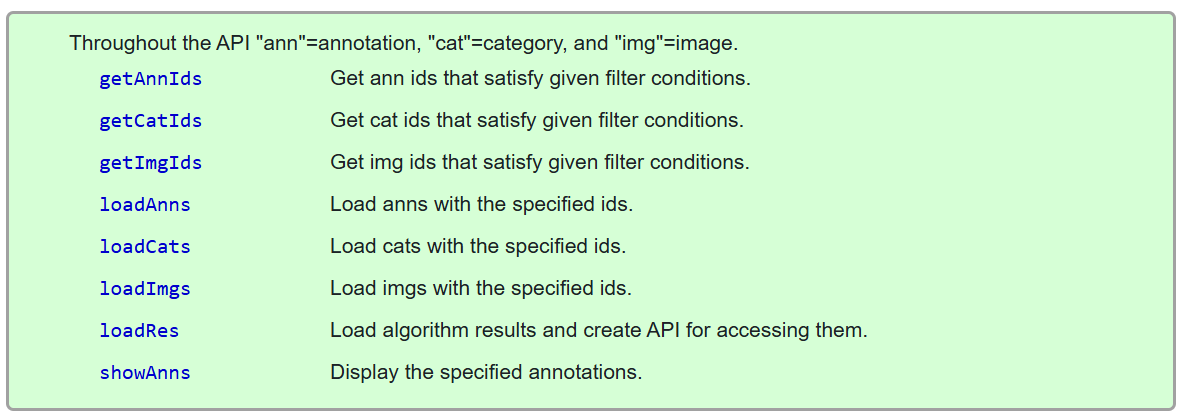
pycocotools COCO API에서 자주 쓰는 메서드들에 대한 정리:
getAnnIdsgetCatIdsgetImgIdsloadAnnsloadCatsloadImgsloadResshowAnns
2025.12.16 - [ML] - MS COCO (Microsoft의 Common Object in Context) Dataset
MS COCO (Microsoft의 Common Object in Context) Dataset
COCO 데이터셋은 여러 종류의 task 에 대한 모델을 훈련시킬 수 있음: 다음의 task들로 구분됨.1. Object Detection (객체 탐지)목적: 이미지 안에 있는 객체의 location 과 class (=category)를 추출 : things만annotat
ds31x.tistory.com
0) 설치 (가장 기본)
pip install pycocotools
# (Windows라면) pip install pycocotools-windows  를 쓰는 경우도 있음
1) COCO 객체 만들기 (annotation json 로딩)
COCO는 annotation JSON(예: instances_val2017.json)을 읽어 인덱스를 만든 뒤, 각종 조회 함수를 제공.
from pycocotools.coco import COCO

ANN_PATH = "coco/annotations/instances_val2017.json"
coco = COCO(ANN_PATH)

# coco 내부에 기본 테이블이 만들어짐:
# coco.anns   : ann_id -> annotation dict
# coco.imgs   : img_id -> image dict
# coco.cats   : cat_id -> category dict
2) 용어 정리 (ann / cat / img)
- img (image): 이미지 1장에 대한 메타정보 (file_name, width, height 등)
- cat (category): 클래스(예: person, car, dog…)
- ann (annotation): 한 이미지 안의 한 객체(박스/마스크/클래스 등).
image_id,category_id를 통해 img / cat 과 연결됨
3) getCatIds / loadCats : category 조회
(A) 카테고리 이름으로 cat_id 찾기
cat_ids = coco.getCatIds(catNms=["person", "dog"])  # 이름으로 필터
print(cat_ids)
(B) cat_id로 category dict 로드
cats = coco.loadCats(cat_ids)
for c in cats:
    print(f"{c['id']=}, {c['name']=}, {c.get('supercategory')=}")
보통 workflow:
(이름 =>cat_id)getCatIds=> (정보)loadCats
4) getImgIds / loadImgs : image 조회
(A) 특정 카테고리가 포함된 이미지들 찾기
person_cat_id = coco.getCatIds(catNms=["person"])[0] # list로 반환되어 [0]
img_ids = coco.getImgIds(catIds=[person_cat_id])     # person이 등장하는 이미지 id들
print(len(img_ids), img_ids[:5])
(B) img_id로 image dict 로드
imgs = coco.loadImgs(img_ids[:3])
for img in imgs:
    print(f"{img['id']=}, {img['file_name']=}, (w,h)=({img['width']},{img['height']})")
보통 workflow:
(조건 => img_id) getImgIds => (메타) loadImgs
5) getAnnIds / loadAnns : annotation 조회
getAnnIds는 필터 조건에 맞는 ann_id 목록을 반환.
그 다음 loadAnns로 실제 annotation dict들을 가져옴.
(A) 특정 이미지 한 장의 ann들 가져오기
img_id = img_ids[0]  # 예시로 person 포함 이미지 하나
ann_ids = coco.getAnnIds(imgIds=[img_id])  # 이 이미지에 달린 annotation id들
anns = coco.loadAnns(ann_ids)

print(f"{img_id=}, ann_count={len(anns)}")
print("keys:", anns[0].keys())  # annotation dict 구조 확인
(B) 특정 이미지 + 특정 카테고리(person)로 더 좁히기
ann_ids_person = coco.getAnnIds(imgIds=[img_id], catIds=[person_cat_id])
anns_person = coco.loadAnns(ann_ids_person)
print(f"person anns in this img: {len(anns_person)}")
(C) iscrowd 필터 예시
iscrowd=False 는 crowd=1 annotation을 제외하겠다 는 참/거짓 조건 필터
ann_ids_noncrowd = coco.getAnnIds(imgIds=[img_id], catIds=[person_cat_id], iscrowd=False)
anns_noncrowd = coco.loadAnns(ann_ids_noncrowd)
print(f"non-crowd person anns: {len(anns_noncrowd)}")
COCO에서
iscrowd = 0: 일반 instance annotationiscrowd = 1: 군중(crowd) 영역 annotation
6) showAnns : annotation 시각화
showAnns는 matplotlib 현재 axes에 annotation을 그림.
import os
import matplotlib.pyplot as plt
from PIL import Image

IMG_DIR = "coco/val2017"  # 이미지 폴더

img_info = coco.loadImgs([img_id])[0]
img_path = os.path.join(IMG_DIR, img_info["file_name"])
I = Image.open(img_path).convert("RGB")

plt.figure(figsize=(8, 6))
plt.imshow(I)
plt.axis("off")

# person anns만 표시
coco.showAnns(anns_person)

plt.show()
2023.07.20 - [Python/matplotlib] - [matplotlib]: Figure and Axes
[matplotlib]: Figure and Axes
Figure and AxesFigure의 instance는 matplotlib가 그리는 그림 하나당 하나가 할당되며, 그림이 그려질 canvas 영역을 제공한다.Figure는 1개 이상의 Axes를 가질 수 있음.Axes의 instance는 Figure가 제공하는 전체 can
ds31x.tistory.com
7) loadRes : 모델 결과(result)를 COCO API로 로드.
loadRes는 “모델이 낸 예측 결과 JSON”을 COCO 포맷으로 읽어서 evaluation/조회/시각화에 사용가능하게 함.
2025.12.16 - [ML] - Object Detection 태스크에 대한 모델 평가를 COCO API로 하기
Object Detection 태스크에 대한 모델 평가를 COCO API로 하기
COCO Detection 평가 튜토리얼loadRes : 델이 출력한 예측 결과(JSON)를 COCO annotation 형식으로 감싸, 정답(GT)과 동일한 COCO API로 접근할 수 있게 만드는 함수COCOeval: COCO 형식의 정답(GT)과 예측(DT)을 IoU(또
ds31x.tistory.com
(A) Detection 결과 format (대표)
보통 result JSON(list)은 다음과 같은 형태임:
# results = [
#   {"image_id": 123, "category_id": 1, "bbox": [x,y,w,h], "score": 0.87},
#   ...
# ]
(B) 파일로 저장 하고 loadRes
import json

pred_path = "pred_instances_val2017.json"

# 예시: anns_person에서 bbox만 가져와 '가짜 예측'을 만들어봄(실습용)
fake_results = []
for a in anns_person[:5]:
    fake_results.append({
        "image_id": a["image_id"],
        "category_id": a["category_id"],
        "bbox": a["bbox"],      # [x,y,w,h]
        "score": 0.99
    })

with open(pred_path, "w") as f:
    json.dump(fake_results, f)

coco_pred = coco.loadRes(pred_path)  # <-- 결과를 COCO API로 감싸는 핵심
(C) 결과를 “annotation처럼” 조회/시각화하기
coco_pred는 예측 결과를 coco_pred.anns 형태로 들고 있어서, 비슷한 방식으로 사용.
pred_ann_ids = coco_pred.getAnnIds(imgIds=[img_id])
pred_anns = coco_pred.loadAnns(pred_ann_ids)

plt.figure(figsize=(8, 6))
plt.imshow(I); plt.axis("off")
coco_pred.showAnns(pred_anns)
plt.show()
핵심: loadRes로 만든 coco_pred는 “예측 결과용 COCO 객체”임.
GT(정답)인coco와 API 사용 방법이 거의 유사함.
8) image 한 장 으로 보는 예제 코드
from pycocotools.coco import COCO
import os
import matplotlib.pyplot as plt
from PIL import Image

coco = COCO("coco/annotations/instances_val2017.json")

# 1) cat_id 찾기
person_cat_id = coco.getCatIds(catNms=["person"])[0]

# 2) person 포함 이미지 id들
img_ids = coco.getImgIds(catIds=[person_cat_id])
img_id = img_ids[0]

# 3) 해당 이미지의 person annotation들
ann_ids = coco.getAnnIds(imgIds=[img_id], catIds=[person_cat_id], iscrowd=False)
anns = coco.loadAnns(ann_ids)

# 4) 이미지 로드 + 시각화
img_info = coco.loadImgs([img_id])[0]
img_path = os.path.join("coco/val2017", img_info["file_name"])
I = Image.open(img_path).convert("RGB")

plt.figure(figsize=(8, 6))
plt.imshow(I); plt.axis("off")
coco.showAnns(anns)
plt.show()
같이보면 좋은 자료들
2025.12.16 - [ML] - MS COCO (Microsoft의 Common Object in Context) Dataset
MS COCO (Microsoft의 Common Object in Context) Dataset
COCO 데이터셋은 여러 종류의 task 에 대한 모델을 훈련시킬 수 있음: 다음의 task들로 구분됨.1. Object Detection (객체 탐지)목적: 이미지 안에 있는 객체의 location 과 class (=category)를 추출 : things만annotat
ds31x.tistory.com
https://github.com/cocodataset/cocoapi/blob/master/PythonAPI/pycocoDemo.ipynb
cocoapi/PythonAPI/pycocoDemo.ipynb at master · cocodataset/cocoapi
COCO API - Dataset @ http://cocodataset.org/ . Contribute to cocodataset/cocoapi development by creating an account on GitHub.
github.com
COCO - Common Objects in Context
cocodataset.org
'ML' 카테고리의 다른 글
| torchvision.datasets.CocoDetection 간단 소개. (0) | 2025.12.16 |
|---|---|
| Object Detection 태스크에 대한 모델 평가를 COCO API로 하기 (0) | 2025.12.16 |
| MS COCO (Microsoft의 Common Object in Context) Dataset (1) | 2025.12.16 |
| Detection Task에서 collate_fn의 입·출력 구조와 default_collate의 한계 (0) | 2025.12.15 |
| [PyTorch] tensor의 vectorized operation (0) | 2025.12.04 |


