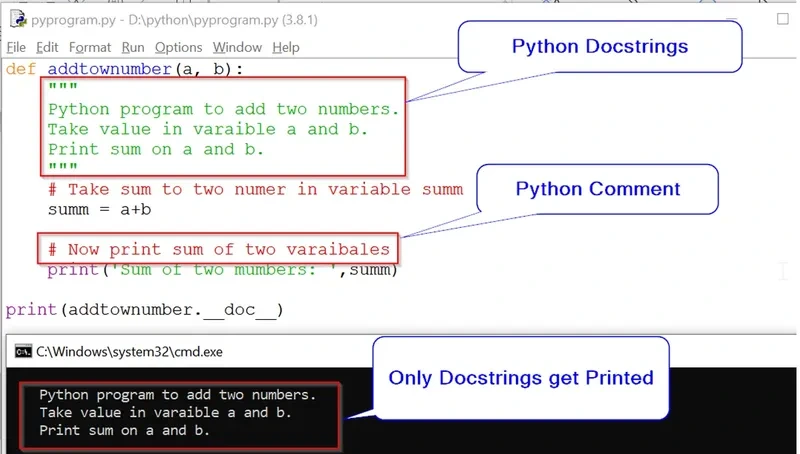
Python의 docstring은
- 함수, 클래스, 모듈 등에 대한 내부 문서화 목적으로 사용되는
- 실행 시간에 접근 가능한 문자열 리터럴로,
- API 명세 및 자동 문서 생성 도구(Sphinx 등)의 기반이 되는 구조화된 설명임.
1. Docstring이란?
docstring은 문서화 문자열 리터럴(documentation string literal)임.
- 함수, 클래스, 모듈의 설명을 작성할 수 있는 Python 고유의 문법임
- docstring은 runtime에도 확인 가능함 (일반 주석과 차이)
""" ... """또는''' ... '''로 감싼 문자열 리터럴을 사용.
일반 주석(
#)과 달리,
실행 중 참조할 수 있는 객체 임.
def add(x, y):
    """두 수를 더한 결과를 반환합니다."""
    return x + y
literal이란? https://dsaint31.tistory.com/462
[Basic] Literal
Literal소스 코드 상에서 고정된 값 을 가리킴. (또는 고정된 값을 나타내는 표기법 을 의미함.)Programming language에서 data의 값을 지정(specifying data values)하는 방법은 다음 중의 하나임.1. Literal을 사용
dsaint31.tistory.com
관련 PEP:
PEP 257 – Docstring Conventions
https://peps.python.org/pep-0257/
PEP 257 – Docstring Conventions | peps.python.org
This PEP documents the semantics and conventions associated with Python docstrings.
peps.python.org
PEP 8 – Style Guide for Python Code
https://peps.python.org/pep-0008/
PEP 8 – Style Guide for Python Code | peps.python.org
This document gives coding conventions for the Python code comprising the standard library in the main Python distribution. Please see the companion informational PEP describing style guidelines for the C code in the C implementation of Python.
peps.python.org
2. 작성되는 위치
| 위치 | 설명 문서화 대상 예시 |
| 모듈 | 파일 상단의 설명 |
| 클래스 | 클래스의 목적 및 속성 설명 |
| 함수 | 함수의 인자, 반환값 설명 |
| 메서드 | 클래스 내부 함수 설명 |
"""math_utils.py - 수학 관련 유틸 함수 모음"""

class Calculator:
    """간단한 계산기 클래스"""

    def multiply(self, x, y):
        """x와 y를 곱한 값을 반환합니다."""
        return x * y
3. 좋은 docstring의 내용
- 설명대상에 대한 요약 내용을 기재하고, 좀 더 상세한 설명이 이후 추가되는 형식으로 작성.
- 상세 설명 이후에 간단한 사용 예제 를 기재할 것.
- 명령형 문장 사용하고
- 함수의 인자, 반환값, 예외 명시할 것.
코드 문법에 대한 설명이 아니며,
대상을 사용할 개발자를 위한 설명서임을 명심할 것.
설계의도 및 사용법 등의 내용이 필요함.
참고: PEP 257 – Section Structure
https://peps.python.org/pep-0257/#multi-line-docstrings
PEP 257 – Docstring Conventions | peps.python.org
This PEP documents the semantics and conventions associated with Python docstrings.
peps.python.org
4. 확인하는 방법
4-1. code 상에서 attribute로 접근하기.
import math_utils
print(math_utils.__doc__)
print(math_utils.Calculator.__doc__)
print(math_utils.Calculator.multiply.__doc__)
4-2. help() 함수 이용하기
help(math_utils.Calculator)4-3. 터미널 등에서 pydoc 명령어 통해.
pydoc math_utils5. 주요 추천 포맷 3가지
Python 커뮤니티에서 가장 널리 쓰이는 3가지 스타일은 다음과 같음:
5-1. Google Style
Google Python Style Guide – Docstrings
https://google.github.io/styleguide/pyguide.html#38-comments-and-docstrings
styleguide
Style guides for Google-originated open-source projects
google.github.io
- 매개변수, 반환값, 예외 등을
Args:,Returns:,Raises:같은 단일 키워드 블록으로 명시. - 각 항목은 들여쓰기를 이용해 설명하며, 간결하고 읽기 쉬운 구조를 지향
def divide(x, y):
    """
    두 수를 나눈 값을 반환합니다.

    Args:
        x (float): 분자
        y (float): 분모

    Returns:
        float: 나눈 결과

    Raises:
        ZeroDivisionError: y가 0일 경우
    """
    return x / y
5-2. NumPy/SciPy Style
NumPy Docstring Standard
https://numpydoc.readthedocs.io/en/latest/format.html
- 각 섹션을
Parameters,Returns,Examples등 제목(heading) 스타일로 명확히 구분 - 항목마다 타입과 설명을 나란히 표기
- 이 때, 줄바꿈과 줄맞춤을 활용하여 시각적으로 가독성이 높도록 작성.
def square(x):
    """
    제곱 계산

    Parameters
    ----------
    x : int or float
        제곱할 값

    Returns
    -------
    int or float
        제곱 결과
    """
    return x * x
5-3. reStructuredText (Sphinx 기본)
Sphinx reStructuredText Docstring Format
https://www.sphinx-doc.org/en/master/usage/restructuredtext/domains.html#info-field-lists
:param name:,:type name:과 같은 접두어(prefix) 기반의 필드 지시어(directive)를 사용.- 필드를 상세하게 기술할 수 있으나, 문법이 가장 엄격하고 형식이 복잡한 편임.
- 이 후 자동 문서화 툴에서 사용되기 때문에 작성이 가장 힘들지만 만들어놓으면 매우 편해짐.
- 자동 문서화 도구(Sphinx 등) 에서 활용되므로 작성은 까다롭지만, 한 번 작성해두면 유지보수와 문서화가 매우 수월해짐.
def subtract(a, b):
    """
    뺄셈을 수행합니다.

    :param a: 피감수
    :type a: int
    :param b: 감수
    :type b: int
    :return: 차이
    :rtype: int
    """
    return a - b
같이 보면 좋은 자료들
https://dsaint31.tistory.com/509
[Python] Comments and Docstrings
Comment (주석)Python에서의 comment는 주석이라고 불리며, Python Interpreter가 아닌 사람을 위해 작성되는 것임. Comment는 해당 code들이 무엇을 위해 존재하는지 등을 기재하여 개발자가 보다 쉽게 코드를
dsaint31.tistory.com
https://www.sphinx-doc.org/en/master/
'Python' 카테고리의 다른 글
| match statement-Structural Pattern Matching-match/case (3) | 2025.08.11 |
|---|---|
| rounding 종류: C, Java, Python - Banker's Rounding (4) | 2025.08.09 |
| webbrowser 모듈 사용법 (2) | 2025.08.07 |
| show Naver map-Python (3) | 2025.08.07 |
| OpenWeatherMap API 사용하기 - 위도경도 검색 부터 날씨 조회: (2) | 2025.08.06 |


