1. 개요
OpenWeatherMap은 전 세계 날씨 정보를 제공하는 서비스임
- Geocoding API로 도시명을 위도·경도 좌표로 변환 가능.
- Current Weather Data API와 5 Day Weather Forecast API를 활용해 현재 날씨와 5일 예보까지 확인할 수 있음
API는 JSON 형식으로 응답을 수행함.
2025.08.06 - [Python] - Python에서 JSON 다루기-json모듈
Python에서 JSON 다루기-json모듈
1. JSON이란?JSON (JavaScript Object Notation)은 경량의 데이터 교환 형식.데이터 교환 형식은 다른 이름으로 Serialized Data라고도 불리며, JSON은 그 중에서 Text Serialization 방식. JavaScript에서 시작되었지만 현
ds31x.tistory.com
이 문서에서는 도시명 검색부터 실제 날씨 정보 조회까지를 다룸.
2. API 키 발급받기
2-1. 회원가입
- OpenWeatherMap 웹사이트에 접속
- "Sign Up" 버튼을 클릭하여 무료 계정 생성
- 이메일 인증 완료
2-2. API 키 생성
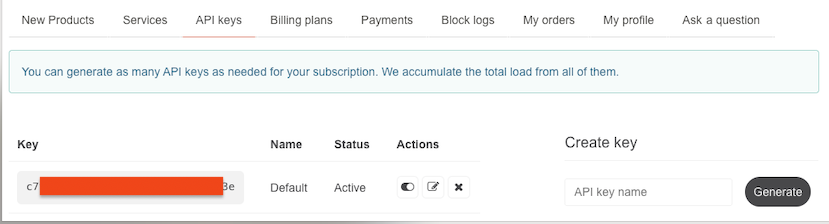
- 로그인 후 계정 메뉴에서 "My API keys" 선택
- 기본 API 키가 이미 생성되어 있거나, "Generate" 버튼으로 새로 생성
- API 키는 보통 몇 시간 내에 활성화됨.

참고: 무료 계정은
분당 60회,
월 100만 회까지 API 호출이 가능.
3. Geocoding API : 위도, 경도 얻기
OpenWeatherMap API는 다양한 언어를 지원함.
주요 지원언어는 다음과 같음:
- 아시아: 한국어 (kr), 일본어 (ja), 중국어 (zh_cn), 베트남어 (vi)
- 유럽: 영어 (en), 프랑스어 (fr), 독일어 (de), 스페인어 (es), 이탈리아어 (it), 러시아어 (ru), 체코어 (cz), 그리스어 (el), 헝가리어 (hu), 라트비아어 (la), 리투아니아어 (lt), 마케도니아어 (mk), 슬로바키아어 (sk), 슬로베니아어 (sl), 갈리시아어 (gl)
- 기타: 아랍어 (ar), 페르시아어 (fa)
때문에 한글을 이용한 query가 가능함.
3-1. API 엔드포인트
https://api.openweathermap.org/geo/1.0/direct3-2. 주요 매개변수
q: 검색할 위치명 (도시,주/도,국가코드)appid: 발급받은 API 키limit: 반환할 결과 개수 (기본값: 5)
주의할 점은 주/도 는 미국에서만 필요할 뿐, 한국에선 입력해도 아무 의미가 없음.
- "Portland"의 경우, state정보를 주지 않으면, 2개의 위도 및 경도가 반환됨.
- 오레곤 주와 메이 주의 Portland의 정보가 모두 반환됨.
OpenWeatherMap의 공식 문서에 따르면
"searching by states available only for the USA locations"
즉, 주/도 코드 기능은 미국에서만 사용 가능하고,
"This option is not available for locations outside of the USA"
미국 외의 국가에서는 이 옵션을 사용할 수 없다고 명시되어 있음.
순서는 인구수가 많거나 보다 유명한 도시임.
참고로 "Sprinfield"라는 이름의 도시는 미국에만 30개 이상이라고 함.
3-3. 응답 형식 예.
[
  {
    "name": "Seoul",
    "lat": 37.5666791,
    "lon": 126.9782914,
    "country": "KR",
    "state": "Seoul"
  }
]name: 도시명 (영어 또는 현지 언어)lat: 위도 (latitude)lon: 경도 (longitude)country: ISO 3166-1 alpha-2 국가코드 (2자리 알파벳)state: 주/도명 (미국의 경우)
참고: 국가코드 (ISO 3166-1) 설명:
ISO 3166-1은 국제표준화기구(ISO)가 제정한 국가와 영토의 명칭에 대한 코드 체계임.
주요 형태는 다음과 같음:
Alpha-2(2자리):KR,US,JP,CN등 - 가장 널리 사용Alpha-3(3자리):KOR,USA,JPN,CHN등 - 시각적 연상 용이Numeric(3자리):410(한국),840(미국) 등 - 문자 체계 독립적
주요 국가코드 예시:
KR: 한국, JP: 일본, CN: 중국, US: 미국, GB: 영국, DE: 독일, FR: 프랑스4. 위도/경도 얻기 Python 구현 예제
4-1. 기본 구현
import requests

def get_coordinates(city_name, state_code="", country_code="", api_key="", limit=5):
    """
    도시명으로부터 위도·경도를 얻는 함수

    Args:
        city_name (str): 도시명
        state_code (str): 주/도 코드 (선택사항)
        country_code (str): 국가 코드 (예: 'KR', 'US')
        api_key (str): OpenWeatherMap API 키
        limit (int): 반환할 결과 개수 (기본값: 5)

    Returns:
        list: 위치 정보 리스트 또는 빈 리스트
    """
    # 검색 쿼리 구성
    query_parts = [city_name]
    if state_code:
        query_parts.append(state_code)
    if country_code:
        query_parts.append(country_code)

    query = ",".join(query_parts)
    url = f"https://api.openweathermap.org/geo/1.0/direct?q={query}&limit={limit}&appid={api_key}"

    response = requests.get(url)

    if response.status_code == 200:
        data = response.json()

        if data:  # 결과가 있는지 확인
            locations = []
            for i, location in enumerate(data):
                location_info = {
                    'index': i,
                    'name': location['name'],
                    'lat': location['lat'],
                    'lon': location['lon'],
                    'country': location['country'],
                    'state': location.get('state', ''),  # state가 없을 수도 있음
                }
                locations.append(location_info)
                print(f"{i}: {location['name']}, {location.get('state', '')}, {location['country']} ({location['lat']}, {location['lon']})")

            return locations
        else:
            print(f"'{query}'에 대한 결과를 찾을 수 없습니다.")
            return []
    else:
        print(f"API 호출 실패: {response.status_code}")
        return []

def get_single_coordinate(city_name, index=0, **kwargs):
    """
    여러 결과 중 특정 인덱스의 좌표만 반환하는 함수
    """
    locations = get_coordinates(city_name, **kwargs)
    if locations and index < len(locations):
        location = locations[index]
        return location['lat'], location['lon']
    return None, None
4-2. 사용 예제
# API 키 설정 (본인의 키로 교체하세요)
API_KEY = "your_api_key_here"

# 1. 단일 결과 검색 (첫 번째 결과만 사용)
lat, lon = get_single_coordinate("서울", country_code="KR", api_key=API_KEY)
if lat and lon:
    print(f"서울 좌표: {lat}, {lon}")

# 2. 여러 결과 검색 및 선택
print("\n=== Portland 검색 (여러 결과) ===")
locations = get_coordinates("Portland", country_code="US", api_key=API_KEY)
# 출력 예시:
# 0: Portland, Oregon, US (45.5202471, -122.6741949)
# 1: Portland, Maine, US (43.6610277, -70.2548596)

# 특정 인덱스 선택
if locations:
    # 오레곤주 포틀랜드 선택 (인덱스 0)
    oregon_portland = locations[0]
    print(f"선택된 도시: {oregon_portland['name']}, {oregon_portland['state']}")

    # 또는 메인주 포틀랜드 선택 (인덱스 1)
    if len(locations) > 1:
        maine_portland = locations[1]
        print(f"다른 옵션: {maine_portland['name']}, {maine_portland['state']}")

# 3. 결과 개수 제한
limited_results = get_coordinates("London", limit=2, api_key=API_KEY)
print(f"\n런던 검색 결과: {len(limited_results)}개")

# 4. 배치 처리 예제
cities = ["서울", "도쿄", "베이징"]
all_coordinates = {}

for city in cities:
    locations = get_coordinates(city, country_code="KR" if city == "서울" else "JP" if city == "도쿄" else "CN", api_key=API_KEY)
    if locations:
        all_coordinates[city] = locations[0]  # 첫 번째 결과 사용

print(f"\n수집된 좌표: {all_coordinates}")
5. 날씨 데이터 활용하기
위도·경도를 얻었다면, 이제 실제 날씨 정보를 가져올 수 있음.
OpenWeatherMap은 다양한 날씨 API를 제공.
이 문서에서는 Current Weather Data API와 5 Day Weather Forecast API를 사용을 소개함.
5-1. API 엔드포인트 정리
| API | 엔드포인트 | 설명 |
| Geocoding | https://api.openweathermap.org/geo/1.0/direct |
도시명 → 위도·경도 변환 |
| 현재 날씨 | https://api.openweathermap.org/data/2.5/weather |
현재 날씨 정보 |
| 5일 예보 | https://api.openweathermap.org/data/2.5/forecast |
5일 예보 (3시간 간격) |
5-2. 유용한 매개변수
units=metric: 섭씨온도, m/s 단위 사용lang=kr: 날씨 설명을 한국어로 표시cnt=10: 예보에서 반환할 데이터 개수 제한 (forecast API)
# 한국어 날씨 설명과 섭씨온도로 조회
url = f"https://api.openweathermap.org/data/2.5/weather?lat={lat}&lon={lon}&appid={api_key}&units=metric&lang=kr"
OpenWeatherMap API에서 지원하는 units는 다음과 같음:
"standard": 온도(Kelvin), 풍속(m/s) - 과학적 용도."metric": 온도(섭씨), 풍속(m/s) - 한국, 유럽 등."imperial": 온도(화씨), 풍속(mph) - 미국, 영국
기압은 hPa(헥토파스칼), 누적강수량은 mm , 시간당강수량은 mm/h, 습도는 %를 사용.
중요:
강수량과 강설량은 해당 현상이 있을 때만 API 응답에 포함됨
강수량과 강설량 응답 데이터
- Current Weather API:
rain.1h(1시간 강우량),snow.1h(1시간 강설량) - 단위가 mm/h로 시간당 강수량임. - Forecast API:
rain.3h(3시간 강우량),snow.3h(3시간 강설량) - 단위 mm로 누적 강수량임. - 비가 오지 않으면
rain필드 자체가 응답에서 제외됨 - 눈이 오지 않으면
snow필드 자체가 응답에서 제외됨
5-3. 현재 날씨 조회
def get_current_weather(lat, lon, api_key):
    """
    위도·경도로 현재 날씨 정보를 가져오는 함수
    """
    url = f"https://api.openweathermap.org/data/2.5/weather?lat={lat}&lon={lon}&appid={api_key}&units=metric&lang=kr"

    response = requests.get(url)
    if response.status_code == 200:
        data = response.json()

        # 강수량 정보 (옵셔널)
        rain_1h = data.get('rain', {}).get('1h', 0)  # 1시간 강우량
        snow_1h = data.get('snow', {}).get('1h', 0)  # 1시간 강설량

        weather_info = {
            'location': data['name'],
            'description': data['weather'][0]['description'],
            'temperature': data['main']['temp'],
            'feels_like': data['main']['feels_like'],
            'humidity': data['main']['humidity'],
            'pressure': data['main']['pressure'],
            'wind_speed': data.get('wind', {}).get('speed', 0),
            'rain_1h': rain_1h,      # 1시간 강우량 (mm/h)
            'snow_1h': snow_1h,      # 1시간 강설량 (mm/h)
            'country': data['sys']['country']
        }

        return weather_info
    else:
        print(f"날씨 데이터 조회 실패: {response.status_code}")
        return None
5-4. 5일 날씨 예보 조회
def get_weather_forecast(lat, lon, api_key):
    """
    위도·경도로 5일 날씨 예보를 가져오는 함수 (3시간 간격)
    """
    url = f"https://api.openweathermap.org/data/2.5/forecast?lat={lat}&lon={lon}&appid={api_key}&units=metric&lang=kr"

    response = requests.get(url)
    if response.status_code == 200:
        data = response.json()

        forecasts = []
        for item in data['list']:
            # 강수량 정보 (옵셔널)
            rain_3h = item.get('rain', {}).get('3h', 0)  # 3시간 강우량
            snow_3h = item.get('snow', {}).get('3h', 0)  # 3시간 강설량

            forecast = {
                'datetime': item['dt_txt'],
                'temperature': item['main']['temp'],
                'description': item['weather'][0]['description'],
                'humidity': item['main']['humidity'],
                'wind_speed': item.get('wind', {}).get('speed', 0),
                'rain_3h': rain_3h,      # 3시간 강우량 (mm)
                'snow_3h': snow_3h       # 3시간 강설량 (mm)
            }
            forecasts.append(forecast)

        return forecasts
    else:
        print(f"예보 데이터 조회 실패: {response.status_code}")
        return None
5-5. 통합 사용 예제
import requests

# API 키와 검색할 도시
API_KEY = "your_api_key_here"
city_name = "서울"

# 1단계: 도시명으로 위도·경도 얻기
lat, lon = get_single_coordinate(city_name, country_code="KR", api_key=API_KEY)

if lat and lon:
    print(f"{city_name}의 좌표: {lat}, {lon}")

    # 2단계: 현재 날씨 조회
    current_weather = get_current_weather(lat, lon, API_KEY)
    if current_weather:
        print(f"\n=== 현재 날씨 ===")
        print(f"위치: {current_weather['location']}")
        print(f"날씨: {current_weather['description']}")
        print(f"기온: {current_weather['temperature']:.1f}°C")
        print(f"체감온도: {current_weather['feels_like']:.1f}°C")
        print(f"습도: {current_weather['humidity']}%")
        print(f"바람: {current_weather['wind_speed']:.1f}m/s")

        # 강수량 정보 표시 (있을 경우에만)
        if current_weather['rain_1h'] > 0:
            print(f"강우량: {current_weather['rain_1h']:.1f}mm/h")
        if current_weather['snow_1h'] > 0:
            print(f"강설량: {current_weather['snow_1h']:.1f}mm/h")

    # 3단계: 5일 예보 조회 (처음 5개만 표시)
    forecasts = get_weather_forecast(lat, lon, API_KEY)
    if forecasts:
        print(f"\n=== 날씨 예보 ===")
        for i, forecast in enumerate(forecasts[:5]):
            forecast_info = f"{forecast['datetime']}: {forecast['temperature']:.1f}°C, {forecast['description']}"

            # 강수 예보 정보 추가
            precipitation = []
            if forecast['rain_3h'] > 0:
                precipitation.append(f"강우 {forecast['rain_3h']:.1f}mm")
            if forecast['snow_3h'] > 0:
                precipitation.append(f"강설 {forecast['snow_3h']:.1f}mm")

            if precipitation:
                forecast_info += f" ({', '.join(precipitation)})"

            print(forecast_info)
else:
    print(f"{city_name}에 대한 위치 정보를 찾을 수 없습니다.")

# 여러 결과가 예상되는 경우의 처리
print(f"\n=== 여러 결과 처리 예제 ===")
locations = get_coordinates("Paris", api_key=API_KEY, limit=3)
for location in locations:
    print(f"- {location['name']}, {location['country']} ({location['lat']}, {location['lon']})")
6. 고급 활용
6-1. 여러 결과 처리 및 사용자 선택
def interactive_location_selection(city_name, api_key):
    """
    여러 검색 결과 중 사용자가 선택할 수 있는 함수
    """
    locations = get_coordinates(city_name, api_key=api_key, limit=5)

    if not locations:
        return None, None

    if len(locations) == 1:
        # 결과가 하나만 있으면 자동 선택
        location = locations[0]
        print(f"자동 선택: {location['name']}, {location['state']}, {location['country']}")
        return location['lat'], location['lon']

    # 여러 결과가 있으면 사용자에게 선택 요청
    print(f"\n'{city_name}' 검색 결과:")
    for i, location in enumerate(locations):
        state_info = f", {location['state']}" if location['state'] else ""
        print(f"{i+1}. {location['name']}{state_info}, {location['country']}")

    try:
        choice = int(input("선택하세요 (번호 입력): ")) - 1
        if 0 <= choice < len(locations):
            selected = locations[choice]
            return selected['lat'], selected['lon']
        else:
            print("잘못된 선택입니다.")
            return None, None
    except ValueError:
        print("숫자를 입력하세요.")
        return None, None

# 사용 예시
lat, lon = interactive_location_selection("Springfield", API_KEY)
6-2. 배치 처리
여러 도시의 좌표를 한 번에 처리할 때:
def batch_geocoding(city_list, api_key):
    """
    여러 도시를 일괄 처리하는 함수
    """
    results = {}

    for city_info in city_list:
        if isinstance(city_info, str):
            # 문자열인 경우
            city_name = city_info
            country_code = ""
        else:
            # 딕셔너리인 경우
            city_name = city_info.get('name')
            country_code = city_info.get('country', '')

        locations = get_coordinates(city_name, country_code=country_code, api_key=api_key, limit=1)
        if locations:
            results[city_name] = {
                'lat': locations[0]['lat'],
                'lon': locations[0]['lon'],
                'full_name': f"{locations[0]['name']}, {locations[0]['country']}"
            }

    return results

# 사용 예시
cities = [
    {"name": "서울", "country": "KR"},
    {"name": "도쿄", "country": "JP"},
    {"name": "베이징", "country": "CN"},
    "파리"  # 국가 코드 없이
]

coordinates = batch_geocoding(cities, API_KEY)
for city, info in coordinates.items():
    print(f"{city}: {info['full_name']} ({info['lat']}, {info['lon']})")
6-3. 캐싱 활용
동일한 위치를 반복 조회할 경우 결과를 캐싱하여 API 호출 절약:
import functools

@functools.lru_cache(maxsize=1000)
def cached_get_coordinates(city_name, state_code="", country_code="", api_key="", limit=5):
    return tuple(get_coordinates(city_name, state_code, country_code, api_key, limit))
참고 문서
OpenWeatherMap Geocoding API 공식 문서 : https://openweathermap.org/api/geocoding-api
Geocoding API - OpenWeatherMap
We use cookies to personalize content and to analyze our traffic. Please decide if you are willing to accept cookies from our website.
openweathermap.org
Current Weather Data API 문서 (state_code 제한 설명): https://openweathermap.org/current
Current weather data - OpenWeatherMap
openweathermap.org
Geocoding API 상세 가이드: https://docs.openweather.co.uk/api/geocoding-api
Geocoding API - OpenWeather
We use cookies to personalize content and to analyze our traffic. Please decide if you are willing to accept cookies from our website.
docs.openweather.co.uk
OpenWeatherMap API 전체 가이드: https://openweathermap.org/guide
OpenWeatherMap API guide - OpenWeatherMap
Fast weather data access We provide reliable, easy-to-use weather products, supporting millions of developers around the clock. Our solutions are designed to fit a wide range of applications, from simple projects to complex enterprise systems. A spectrum o
openweathermap.org
'Python' 카테고리의 다른 글
| webbrowser 모듈 사용법 (2) | 2025.08.07 |
|---|---|
| show Naver map-Python (3) | 2025.08.07 |
| Python에서 JSON 다루기-json모듈 (2) | 2025.08.06 |
| pyperclip-Python에서 clipboard사용하기 (3) | 2025.08.06 |
| urllib.parse.quote, urllib.parse.urlencode (3) | 2025.08.06 |


