Randomly-applied Transforms (확률적 적용 변환)
이 설명은 PyTorch torchvision의 확률 기반 변환(Probabilistic Transforms) 들을 소개함.
Illustration of transforms — Torchvision main documentation
Shortcuts
docs.pytorch.org
관련 gist:
https://gist.github.com/dsaint31x/7bb7a7d36c949c140d2b2dfeffeebb81
dl_randomly_applied-torchvision-transforms-v2.ipynb
dl_randomly_applied-torchvision-transforms-v2.ipynb - dl_randomly_applied-torchvision-transforms-v2.ipynb
gist.github.com
핵심 개념
"확률 p에 따라 랜덤하게 적용되는 변환들"
- 매번 변환을 호출할 때마다 독립적으로 확률
p에 따라 적용 여부가 결정됨 - 동일한 변환 인스턴스라도 호출할 때마다 다른 결과 가능
동작 방식
# 동일한 transform 인스턴스를 여러 번 호출
img = load_image("sample.jpg")
transform = RandomHorizontalFlip(p=0.5)

result1 = transform(img)  # 50% 확률로 원본 또는 반전
result2 = transform(img)  # 또 다시 50% 확률로 원본 또는 반전
result3 = transform(img)  # 매번 독립적으로 확률 적용

# result1, result2, result3는 모두 다를 수 있음!- 이전 결과와 무관하게 매번 새로운 랜덤 확률 적용
- 같은 입력이라도 호출마다 다른 결과 가능
Prerequisites
colab에서 다음의 코드들을 수행시켜서 이미지를 다운로드하고 아래의 예제 코드를 수행할 수 있도록 함:
# torchvision v2 transforms에서 랜덤 변환들을 import
# v2는 v1보다 빠르고 더 많은 기능(bounding box, mask, video 등)을 지원
from torchvision.transforms.v2 import (
    RandomHorizontalFlip,    # 지정 확률로 이미지를 좌우 반전
    RandomVerticalFlip,      # 지정 확률로 이미지를 상하 반전
    RandomApply,            # 변환 그룹을 지정 확률로 일괄 적용/건너뛰기
    RandomCrop,
)

# 재현 가능한 결과를 위해 PyTorch 랜덤 시드 고정
# 모든 랜덤 변환들이 동일한 패턴으로 작동하게 됨
import torch; torch.manual_seed(0)

# torchvision 라이브러리 import 및 버전 확인
# 버전에 따라 사용 가능한 기능이 다를 수 있음
import torchvision; torchvision.__version__

img_path       = "assets/astronaut.jpg"
img_url        = "https://raw.githubusercontent.com/pytorch/vision/main/gallery/assets/astronaut.jpg"

!mkdir -p assets
!curl -o {img_path} {img_url}

from torchvision.io import decode_image

original_img = decode_image(img_path)
print(f" {type(original_img) = }\n \
{original_img.dtype = }\n \
{original_img.shape = }")
다음은 이미지 출력을 위한 plot 함수임:
# https://github.com/pytorch/vision/tree/main/gallery/
# 위의 torchvision관련 예제들의 display를 위한 plot함수를 그대로 가져옴.

import matplotlib.pyplot as plt
import torch
from torchvision.utils import draw_bounding_boxes, draw_segmentation_masks
from torchvision import tv_tensors
from torchvision.transforms.v2 import functional as F


def plot(imgs, row_title=None, **imshow_kwargs):
    if not isinstance(imgs[0], list):
        # Make a 2d grid even if there's just 1 row
        imgs = [imgs]

    num_rows = len(imgs)
    num_cols = len(imgs[0])
    _, axs = plt.subplots(nrows=num_rows, ncols=num_cols, squeeze=False)
    for row_idx, row in enumerate(imgs):
        for col_idx, img in enumerate(row):
            boxes = None
            masks = None
            if isinstance(img, tuple):
                img, target = img
                if isinstance(target, dict):
                    boxes = target.get("boxes")
                    masks = target.get("masks")
                elif isinstance(target, tv_tensors.BoundingBoxes):
                    boxes = target
                else:
                    raise ValueError(f"Unexpected target type: {type(target)}")
            img = F.to_image(img)
            if img.dtype.is_floating_point and img.min() < 0:
                # Poor man's re-normalization for the colors to be OK-ish. This
                # is useful for images coming out of Normalize()
                img -= img.min()
                img /= img.max()

            img = F.to_dtype(img, torch.uint8, scale=True)
            if boxes is not None:
                img = draw_bounding_boxes(img, boxes, colors="yellow", width=3)
            if masks is not None:
                img = draw_segmentation_masks(img, masks.to(torch.bool), colors=["green"] * masks.shape[0], alpha=.65)

            ax = axs[row_idx, col_idx]
            ax.imshow(img.permute(1, 2, 0).numpy(), **imshow_kwargs)
            ax.set(xticklabels=[], yticklabels=[], xticks=[], yticks=[])

    if row_title is not None:
        for row_idx in range(num_rows):
            axs[row_idx, 0].set(ylabel=row_title[row_idx])

    plt.tight_layout()
RandomHorizontalFlip
역할:
- 이미지를 지정된 확률로 수평(좌우)으로 뒤집는 랜덤 변환
- 좌우 대칭성을 활용한 데이터 증강 기법
- 원본 이미지와 좌우 반전된 이미지를 랜덤하게 생성
- 기하학적 변환을 통한 모델의 일반화 성능 향상
사용 용도:
- 데이터셋 크기를 효과적으로 2배로 확장하는 데이터 증강
- 좌우 방향성에 불변한 특징 학습 (예: 동물, 사물 인식)
- 오버피팅 방지 및 모델 일반화 성능 개선
- 제한된 데이터셋에서 학습 데이터 다양성 증대
- 자연 이미지에서 방향성 편향 제거
- 의료 영상, 위성 이미지 등에서 방향 불변성 학습
- 실시간 데이터 증강을 통한 메모리 효율성
주요 파라미터:
p(float): 수평 뒤집기가 적용될 확률0.5: 50% 확률로 뒤집기 적용 (기본값, 가장 일반적)0.0: 항상 원본 이미지 유지 (변환 비활성화)1.0: 항상 뒤집기 적용- 0.0~1.0 사이 값으로 증강 강도 조절 가능
변환 공식:
- 픽셀 좌표 변환:
x_new = width - 1 - x_old - y 좌표는 변화 없음:
y_new = y_old - 이미지 매트릭스의 열(column) 순서 역순 배치
- 메타데이터 (bounding box 등)도 함께 변환
특징:
- Random 변환: 매 호출마다 확률적으로 적용 여부 결정
- Non-destructive: 정보 손실 없는 가역적 변환
- 방향성 중립: 좌우 방향에 대한 편향 제거
- 계산 효율성: 단순한 인덱싱 연산으로 빠른 처리
- 호환성: 모든 이미지 포맷 및 텐서 타입 지원
- Stochastic: 동일 입력도 실행마다 다른 결과 가능
사용 예시0:
hflipper = RandomHorizontalFlip(p=0.5)
transformed_imgs = [hflipper(original_img) for _ in range(4)]
plot([original_img] + transformed_imgs)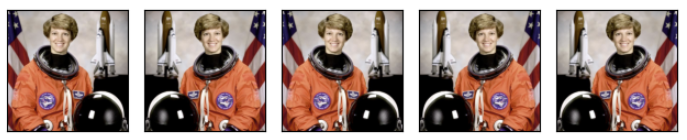
사용 예시1:
# 학습용 파이프라인
train_transform = transforms.Compose([
    RandomHorizontalFlip(p=0.5),
    ToTensor(),
    Normalize(mean=[0.485, 0.456, 0.406], std=[0.229, 0.224, 0.225])
])
관련: v2.functional.horizontal_flip
[PyTorch] Geometry-Others-Torchvision.transforms.v2.functional
torchvision.transforms.v2.functional 모듈에서 제공하는이미지 데이터에 다양한 기하학적 및 픽셀 변환을 적용할 수 있는 함수들을 소개함. 관련 gisthttps://gist.github.com/dsaint31x/8249e5a86fb93c64bf2df31c57009afd dl_G
ds31x.tistory.com
RandomVerticalFlip
역할:
- 이미지를 지정된 확률로 수직(상하)으로 뒤집는 랜덤 변환
- 상하 대칭성을 활용한 데이터 증강 기법
- 원본 이미지와 상하 반전된 이미지를 랜덤하게 생성
- 기하학적 변환을 통한 모델의 일반화 성능 향상
사용 용도:
- 특정 도메인에서 상하 방향성 불변성 학습 (예: 의료 영상, 위성 이미지)
- 자연 현상이나 패턴에서 방향 편향 제거
- 텍스처나 패턴 인식에서 방향성 중립적 특징 학습
- 제한된 데이터셋에서 학습 데이터 다양성 증대
- 오버피팅 방지 및 모델 일반화 성능 개선
- 의료 영상 (X-ray, MRI, CT 스캔) 분석에서 방향 불변성 확보
- 현미경 이미지, 세포 이미지 분석에서 회전 불변성 훈련
- 주의: 텍스트나 얼굴 이미지 등 상하 방향성이 중요한 데이터에는 부적절
주요 파라미터:
p(float): 수직 뒤집기가 적용될 확률0.5: 50% 확률로 뒤집기 적용 (기본값)0.0: 항상 원본 이미지 유지 (변환 비활성화)1.0: 항상 뒤집기 적용- 0.0~1.0 사이 값으로 증강 강도 조절 가능
- 도메인 특성에 따라 확률 조정 필요
변환 공식:
- 픽셀 좌표 변환:
y_new = height - 1 - y_old - x 좌표는 변화 없음:
x_new = x_old - 이미지 매트릭스의 행(row) 순서 역순 배치
- 메타데이터 (bounding box 등)도 함께 변환
특징:
- Random 변환: 매 호출마다 확률적으로 적용 여부 결정
- Non-destructive: 정보 손실 없는 가역적 변환
- 도메인 의존성: 수평 뒤집기보다 제한적 적용 범위
- 계산 효율성: 단순한 인덱싱 연산으로 빠른 처리
- 호환성: 모든 이미지 포맷 및 텐서 타입 지원
- Stochastic: 동일 입력도 실행마다 다른 결과 가능
- 방향성 고려: 자연스럽지 않은 결과 가능성 (텍스트, 얼굴 등)
사용 예시0:
vflipper = RandomVerticalFlip(p=0.3)  # 낮은 확률로 적용
transformed_imgs = [vflipper(original_img) for _ in range(4)]
plot([original_img] + transformed_imgs)
사용 예시0:
# 의료 영상용 파이프라인
medical_transform = transforms.Compose([
    RandomVerticalFlip(p=0.2),  # 제한적 적용
    RandomHorizontalFlip(p=0.5),
    ToTensor(),
    Normalize(mean=[0.5], std=[0.5])
])
관련: v2.functional.vertical_flip
[PyTorch] Geometry-Others-Torchvision.transforms.v2.functional
torchvision.transforms.v2.functional 모듈에서 제공하는이미지 데이터에 다양한 기하학적 및 픽셀 변환을 적용할 수 있는 함수들을 소개함. 관련 gisthttps://gist.github.com/dsaint31x/8249e5a86fb93c64bf2df31c57009afd dl_G
ds31x.tistory.com
RandomApply
역할:
- 여러 변환(transformations)들을 하나의 그룹으로 묶어 지정된 확률로 전체 그룹을 적용하거나 건너뛰는 컨테이너 변환
- 복합적인 데이터 증강 파이프라인을 확률적으로 제어
- 전체 변환 시퀀스를 단위로 하는 조건부 적용
- 여러 변환의 조합 효과를 일괄적으로 관리
사용 용도:
- 강한 데이터 증강을 선택적으로 적용하여 오버피팅 방지
- 복잡한 변환 조합의 적용 빈도 제어 (예: 색상 왜곡 + 블러 조합)
- 학습 초기에는 약한 증강, 후기에는 강한 증강 적용 전략
- 특정 변환 그룹이 특정 데이터에만 유효할 때 조건부 적용
- 계산 비용이 높은 변환들을 선택적으로 적용하여 효율성 향상
- 모델이 원본 이미지와 변환된 이미지 모두에 적응하도록 균형 조절
- 데이터 증강 강도를 동적으로 조절하는 커리큘럼 학습
주요 파라미터:
transforms(Sequence[Callable] | ModuleList): 적용할 변환들의 리스트list또는tuple: 일반적인 사용법torch.nn.ModuleList: TorchScript 호환성을 위한 권장 방식- 순서대로 연속 적용됨 (Compose와 유사)
p(float): 전체 변환 그룹이 적용될 확률0.5: 50% 확률로 전체 그룹 적용 (기본값)0.0: 항상 원본 유지 (그룹 비활성화)1.0: 항상 전체 그룹 적용
변환 로직:
- 확률
p에 따라 전체 변환 그룹의 적용 여부 결정 - 적용 시: 모든 변환을 순서대로 연속 실행
- 비적용 시: 원본 이미지 그대로 반환
- 개별 변환의 랜덤성은 각 변환 내부에서 독립적으로 처리
특징:
- Group-level randomness: 개별 변환이 아닌 그룹 단위로 확률 적용
- All-or-nothing: 그룹 내 모든 변환이 함께 적용되거나 모두 건너뜀
- Compositional: 내부 변환들의 순차적 조합 효과
- TorchScript 호환: ModuleList 사용 시 스크립팅 가능
- Nested structure: 다른 RandomApply 내부에 중첩 사용 가능
- Performance control: 계산 비용 높은 변환의 선택적 적용
사용 예시0:
applier = RandomApply(
    transforms=[RandomCrop(size=(64, 64))],
    p=0.5,
    )
transformed_imgs = [applier(original_img) for _ in range(4)]
plot([original_img] + transformed_imgs)
사용 예시1:
# 기본 사용법
color_jitter_group = RandomApply([
    transforms.ColorJitter(brightness=0.4, contrast=0.4, saturation=0.4, hue=0.1),
    transforms.GaussianBlur(kernel_size=3)
], p=0.3)

# TorchScript 호환 버전
scripted_transforms = RandomApply(
    torch.nn.ModuleList([
        transforms.ColorJitter(brightness=0.2),
        transforms.RandomGrayscale(p=0.2),
        ]),
    p=0.5,
    )

# 복합 파이프라인
train_transform = transforms.Compose([
    transforms.RandomResizedCrop(224),
    transforms.RandomHorizontalFlip(p=0.5),
    RandomApply([
        transforms.ColorJitter(0.4, 0.4, 0.4, 0.1),
        transforms.RandomApply([transforms.GaussianBlur(3)], p=0.5)
    ], p=0.8),
    transforms.ToTensor(),
    transforms.Normalize([0.485, 0.456, 0.406], [0.229, 0.224, 0.225])
])
관련: Compose, RandomChoice, RandomOrder
2025.06.16 - [Python] - [PyTorch] Composition-torchvision.transforms.v2
[PyTorch] Composition-torchvision.transforms.v2
Transform Composition은여러 개의 개별 변환들을 전략적으로 조합한 Pipeline을 만들어서더 다양하고 효과적인 데이터 증강을 수행 가능케 함.v2에서는 다음과 같은 조합 방식을 제공.Compose(순차적 적용
ds31x.tistory.com
같이보면 좋은 자료들
https://docs.pytorch.org/vision/main/auto_examples/transforms/plot_transforms_illustrations.html#
Illustration of transforms — Torchvision main documentation
Shortcuts
docs.pytorch.org
'Python' 카테고리의 다른 글
| [PyTorch] torchvision.transforms.v2 - Summary (작성중) (2) | 2025.06.16 |
|---|---|
| [PyTorch] Composition-torchvision.transforms.v2 (0) | 2025.06.16 |
| [PyTorch] Augmentation-torchvision.transforms.v2 (1) | 2025.06.15 |
| [PyTorch] Photometric-torchvision.transforms.v2 (0) | 2025.06.15 |
| [PyTorch] Geometric-torchvision.transforms.v2 (1) | 2025.06.15 |


