torchvision.transforms.v2에서 제공하는 Data Augmentation은 다음 네 가지가 있음.
- 주로 이미지 분류 모델의 일반화 성능 향상을 목표로 함.
- 이 문서에서는 각 기법의 특징과 차이를 간략히 정리해 봄.
Illustration of transforms — Torchvision main documentation
Shortcuts
docs.pytorch.org
관련 gist
https://gist.github.com/dsaint31x/7e276cb8b3013c224d324e7cd5f0298b
dl_augmentation-torchvision-transforms-v2.ipynb
dl_augmentation-torchvision-transforms-v2.ipynb. GitHub Gist: instantly share code, notes, and snippets.
gist.github.com
0. Prerequisites
colab에서 다음의 코드들을 수행시켜서 이미지를 다운로드하고 아래의 예제 코드를 수행할 수 있도록 함:
from torchvision.transforms.v2 import (
    # 학습 기반 자동 증강
    AutoAugment,            # 특정 데이터셋에서 학습된 최적 정책 사용
    AutoAugmentPolicy,      # IMAGENET, CIFAR10, SVHN 정책 enum

    # 랜덤 증강 기법들
    RandAugment,            # N개 변환 랜덤 선택 + magnitude로 강도 조절
    TrivialAugmentWide,     # 매번 하나의 변환만 랜덤 선택 (간단함)

    # 혼합 증강
    AugMix,                 # 여러 증강 체인을 혼합하여 견고성 향상
)
import torch; torch.manual_seed(0)  # 랜덤 시드 고정 (재현가능한 결과)

img_path = "assets/astronaut.jpg"
img_url = "https://raw.githubusercontent.com/pytorch/vision/main/gallery/assets/astronaut.jpg"

!mkdir -p assets/coco/images
!curl -o assets/astronaut.jpg {img_url}

from torchvision.io import decode_image

original_img = decode_image(img_path)

print(f" {type(original_img) = }\n \
{original_img.dtype = }\n \
{original_img.shape = }")
다음은 이미지 출력을 위한 plot 함수임:
# https://github.com/pytorch/vision/tree/main/gallery/
# 위의 torchvision관련 예제들의 display를 위한 plot함수를 그대로 가져옴.

import matplotlib.pyplot as plt
import torch
from torchvision.utils import draw_bounding_boxes, draw_segmentation_masks
from torchvision import tv_tensors
from torchvision.transforms.v2 import functional as F


def plot(imgs, row_title=None, **imshow_kwargs):
    if not isinstance(imgs[0], list):
        # Make a 2d grid even if there's just 1 row
        imgs = [imgs]

    num_rows = len(imgs)
    num_cols = len(imgs[0])
    _, axs = plt.subplots(nrows=num_rows, ncols=num_cols, squeeze=False)
    for row_idx, row in enumerate(imgs):
        for col_idx, img in enumerate(row):
            boxes = None
            masks = None
            if isinstance(img, tuple):
                img, target = img
                if isinstance(target, dict):
                    boxes = target.get("boxes")
                    masks = target.get("masks")
                elif isinstance(target, tv_tensors.BoundingBoxes):
                    boxes = target
                else:
                    raise ValueError(f"Unexpected target type: {type(target)}")
            img = F.to_image(img)
            if img.dtype.is_floating_point and img.min() < 0:
                # Poor man's re-normalization for the colors to be OK-ish. This
                # is useful for images coming out of Normalize()
                img -= img.min()
                img /= img.max()

            img = F.to_dtype(img, torch.uint8, scale=True)
            if boxes is not None:
                img = draw_bounding_boxes(img, boxes, colors="yellow", width=3)
            if masks is not None:
                img = draw_segmentation_masks(img, masks.to(torch.bool), colors=["green"] * masks.shape[0], alpha=.65)

            ax = axs[row_idx, col_idx]
            ax.imshow(img.permute(1, 2, 0).numpy(), **imshow_kwargs)
            ax.set(xticklabels=[], yticklabels=[], xticks=[], yticks=[])

    if row_title is not None:
        for row_idx in range(num_rows):
            axs[row_idx, 0].set(ylabel=row_title[row_idx])

    plt.tight_layout()
1. AutoAugment (Cubuk et al., 2019)
사전 학습 등을 통해 탐색된 최적의 Data Augmentation Policy 기반으로
정해진 Transform의 조합들에서 무작위 선택을 통해 변환을 적용하는 Data Augmentation
- 사전 학습에 사용된 데이터 셋에 따라 3가지의 Policy로 구분됨.
- 각 Policy는 복수의 Augmentation Operation 조합(=Transform객체들의 조합)들로 구성됨.
- 이 조합들은 원래 각 데이터셋에서 강화학습 등 탐색 방법을 통해 사전에 최적화된 것들임.
AutoAugment — Torchvision main documentation
Shortcuts
docs.pytorch.org
해당 Policy를 구하기 위해 사전 학습에서 적용된 방법은 다음과 같음:
- reinforcement learning(강화학습) 알고리즘을 사용해서,
- 특정 데이터셋 (예: CIFAR10, SVHN, ImageNet)에 대해,
- 어떤 증강 연산(=Transform객체)을 어떤 순서로, 어떤 강도, 어떤 확률로 적용하는 게 성능이 좋은지를 탐색.
- 이 과정에서 만들어진 최적의 Transform 조합들을 고정된 형태로 저장해놓고,
- 이후 torchvision 등에서
AutoAugmentPolicy.CIFAR10,AutoAugmentPolicy.IMAGENET등의 형태로 제공
원본 논문: https://arxiv.org/pdf/1805.09501
정의:
- 사전 정의된(또는 데이터셋 기반으로 학습된) 복수의 증강 정책 세트 중 하나를 무작위로 선택하여 적용.
AutoAugment의 IMAGENET policy는 아래와 같은 augmentation set들을 다수 포함하고 있음.
- 각 set은 2개의 transform 연산으로 구성되어 있음.
- 각각 적용 확률과 강도를 다음과 같이 함께 지정 (아래 예는 일부임):
augmentation_set_01 = [
    ("Posterize", probability=0.4, magnitude=8),
    ("Rotate", probability=0.6, magnitude=9),
    ]
augmentation_set_02 = [
    ("Solarize", probability=0.6, magnitude=5),
    ("AutoContrast", probability=0.6, magnitude=None),
    ]
augmentation_set_03 = [
    ("Equalize", probability=0.8, magnitude=None),
    ("Invert", probability=0.2, magnitude=None),
]- 위와 같은 augmentation set이 60개 이상 존재.
- 학습 중 매번 이들 중 하나가 random하게 선택되어 적용됨.
특징:
- 각 정책은 여러 증강 연산의 조합.
policy=인자를 통해IMAGENET,CIFAR10,SVHN중 선택 가능.- 각 정책은 해당하는 데이터셋에서의 사전 학습을 통해 얻어진 최적의 tranform들의 조합들을 사용 (논문 기반).
- 사용되는 transform 종류, 순서, 확률, 강도까지 모두 사전 학습에서 설정됨.
- 즉, 고정된 방식임.
장점:
- 실험적으로 매우 효과적인 data augmentation의 transform 조합을 제공.
- 데이터셋 특화된 정책에 따른 고성능 Transform 조합 제공.
단점:
- Policy에 따라 조합이 고정됨.
- 변경 등의 사용자가 조작을 위한 유연성이 부족함.
사용 예제:
policies = [
    AutoAugmentPolicy.CIFAR10,
    AutoAugmentPolicy.IMAGENET,
    AutoAugmentPolicy.SVHN,
    ]
augmenters = [
    AutoAugment(policy)
    for policy in policies
    ]
imgs = [
    [augmenter(original_img) for _ in range(4)]
    for augmenter in augmenters
]
row_title = [
    str(policy).split('.')[-1]
    for policy in policies
    ]
plot([[original_img] + row for row in imgs], row_title=row_title)

2. RandAugment (Cubuk et al., 2020)
간단하지만 강력한 고정 개수의 transform 목록에서 N개를 무작위 선택하여 고정강도로 적용하는 Random Augmentation.
- 사전 학습의 결과를 활용하지 않음.
RandAugment — Torchvision main documentation
Shortcuts
docs.pytorch.org
관련 논문: https://arxiv.org/abs/1909.13719
정의:
- 사전 정의된 증강 연산 목록 중 N개를 무작위로 선택하여 고정 강도(M)로 적용.
특징:
num_ops: 몇 개의 연산을 사용할지magnitude: 강도 (0~10)- AutoAugment와 달리 사전에 특정 데이터셋에 맞춰 Transforms의 조합을 사전 탐색한 것이 아님.
- 사용되는 transform(연산) 종류는 고정된 풀에서 무작위 선택됨
장점:
- 하이퍼파라미터 튜닝만으로 다양한 조합 생성.
- 간단한 구조에 비해 좋은 성능.
- 다양한 실험에 유리한 유연성.
단점:
- 데이터셋 특화된 정책이 아님
- 즉, 특정 데이터셋에 대해 증명된 최적 조합은 아니므로
- 성능 최적화 수준이
AutoAugment보다 낮을 수 있음.
사용 예제:
augmenter = RandAugment()
imgs = [augmenter(original_img) for _ in range(4)]
plot([original_img] + imgs)
3. TrivialAugmentWide (Müller et al., 2021)
하이퍼 파라미터가 없는 가장 단순한 Auto Stochastic Data Augmentation.
TrivialAugmentWide — Torchvision main documentation
Shortcuts
docs.pytorch.org
관련논문: https://arxiv.org/abs/2103.10158
정의:
- 사전 정의된 data augmentation을 위한 transform(연산) 목록에서 하나만 무작위 선택 후 무작위 강도로 적용.
특징:
- 하이퍼파라미터 없음 (하이퍼파라미터 튜닝 불필요)
- 매우 간단하지만 실제 성능이 나쁘지 않음.
- transform(연산) 종류와 강도 모두 무작위
장점:
- 완전히 trivial하게 적용 가능
- 구현과 사용이 매우 간단
단점:
- 사용자 제어가 거의 불가능
- 통제된 일관된 실험이 어려움.
사용 예제:
augmenter = TrivialAugmentWide()
imgs = [augmenter(original_img) for _ in range(4)]
plot([original_img] + imgs)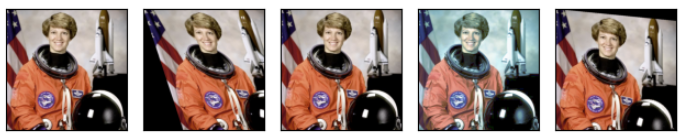
4. v2.AugMix (Hendrycks et al., 2020)
여러 augmented image들을 혼합(MixUp) + regularization (JS divergence)
AugMix — Torchvision main documentation
Shortcuts
docs.pytorch.org
관련논문: https://arxiv.org/abs/1912.02781
정의:
- 여러 개의 증강된 이미지를 만들고,
- 이를 혼합하여 최종 이미지를 구성: 같은 원본 이미지에서 여러 개의 이미지를 만들고 이를 Mix Up.
- 동시에 Jensen-Shannon divergence (JS-divergence) regularization을 통해 일관성 유지.
- 때문에
AugMix를 쓰면 consistency regularization을 loss 함수에 별도로 구현해야 함.
특징:
- 원본 이미지 기반으로 복수의 증강 이미지 생성
- 이들을 해당 원본 이미지와 섞어 새로운 이미지 생성: Weighted Average.
- 일반화 성능뿐만 아니라 adversarial robustness(적대적 공격에도 강함) 향상에 도움
장점:
- robustness 향상에 탁월
- 여러 증강을 동시에 반영하므로 classification에서 일반화 증가에 효과적
단점:
- 구현이 상대적으로 복잡하고 연산량 많음.
사용 예제:
augmenter = AugMix()
imgs = [augmenter(original_img) for _ in range(4)]
plot([original_img] + imgs)
5. 요약 비교표:
| Transform | 구성 방식 | 하이퍼파라미터 | 특징 요약 |
AutoAugment |
사전 탐색된 정책(policy)을 무작위로 선택 | policy |
데이터셋 특화 조합 사용 가능 |
RandAugment |
사전 탐색 없이 랜덤 연산 N개 + 고정 magnitude 적용 |
num_ops, magnitude |
단순하면서도 유연한 조합 생성 |
TrivialAugmentWide |
무작위 연산 1개 + 무작위 강도 적용 | 없음 | 매우 간단, 제어 불가능 |
AugMix |
다중 증강 이미지 혼합 + regularization | 내부 설정으로 구성됨 | 일반화 + adversarial robust 성능 개선 |
'Python' 카테고리의 다른 글
| [PyTorch] Composition-torchvision.transforms.v2 (0) | 2025.06.16 |
|---|---|
| [PyTorch] Randomly-applied-torchvision.transforms.v2 (0) | 2025.06.15 |
| [PyTorch] Photometric-torchvision.transforms.v2 (0) | 2025.06.15 |
| [PyTorch] Geometric-torchvision.transforms.v2 (1) | 2025.06.15 |
| [PyTorch] Color-Torchvision.transforms.v2.functional (3) | 2025.06.14 |


