Geometric Image Transformation (기하학적 영상 변환)은
영상의 shape(모양), size(크기), orientation(방향) 또는 position(위치)과 같은
Geometric Properties(기하학적 속성)을 변경하는 과정
https://dsaint31.me/mkdocs_site/DIP/cv2/ch02/dip_geometric_transformation/?h=geomet
BME
Geometric Transformations of Images Goals Learn to apply different geometric transformation to images like translation, rotation, affine transformation etc. You will see these functions: cv2.getPerspectiveTransform Transformations Transformation 이란? T
dsaint31.me
관련 gist: https://gist.github.com/dsaint31x/0c203785594f75d5c958b3de6612362c
dl_geometric-torchvision-transforms-v2.ipynb
dl_geometric-torchvision-transforms-v2.ipynb. GitHub Gist: instantly share code, notes, and snippets.
gist.github.com
시작하기 앞서
colab에서 다음의 코드들을 수행시켜서 이미지를 다운로드하고 아래의 예제 코드를 수행할 수 있도록 함:
from torchvision.transforms.v2 import (
 Pad,                    # 이미지 가장자리에 패딩 추가 (크기 증가)
 Resize,                 # 이미지 크기 변경 (해상도 조정)
 CenterCrop,             # 이미지 중앙 부분을 지정 크기로 자르기
 FiveCrop,               # 네 모서리와 중앙에서 5개 영역 자르기 (TTA용)
 RandomPerspective,      # 랜덤 원근 변환 (3D 회전/기울임 효과)
 RandomRotation,         # 랜덤 회전 변환 (회전 불변성 학습)
 RandomAffine,           # 랜덤 어핀 변환 (회전+평행이동+크기조정+전단)
 ElasticTransform,       # 탄성 변환 (국소적 비선형 변형, 의료영상용)
 RandomCrop,             # 랜덤 위치에서 지정 크기로 자르기
 RandomResizedCrop,      # 랜덤 크기+종횡비로 자른 후 리사이즈 (ImageNet 표준)
)

img_path = "assets/astronaut.jpg"
img_url = "https://raw.githubusercontent.com/pytorch/vision/main/gallery/assets/astronaut.jpg"

!mkdir -p assets
!curl -o {img_path} {img_url}

from torchvision.io import decode_image

original_img = decode_image(img_path)
print(f" {type(original_img) = }\n \
{original_img.dtype = }\n \
{original_img.shape = }")
다음은 이미지 출력을 위한 plot 함수임:
# https://github.com/pytorch/vision/tree/main/gallery/
# 위의 torchvision관련 예제들의 display를 위한 plot함수를 그대로 가져옴.

import matplotlib.pyplot as plt
import torch
from torchvision.utils import draw_bounding_boxes, draw_segmentation_masks
from torchvision import tv_tensors
from torchvision.transforms.v2 import functional as F


def plot(imgs, row_title=None, **imshow_kwargs):
    if not isinstance(imgs[0], list):
        # Make a 2d grid even if there's just 1 row
        imgs = [imgs]

    num_rows = len(imgs)
    num_cols = len(imgs[0])
    _, axs = plt.subplots(nrows=num_rows, ncols=num_cols, squeeze=False)
    for row_idx, row in enumerate(imgs):
        for col_idx, img in enumerate(row):
            boxes = None
            masks = None
            if isinstance(img, tuple):
                img, target = img
                if isinstance(target, dict):
                    boxes = target.get("boxes")
                    masks = target.get("masks")
                elif isinstance(target, tv_tensors.BoundingBoxes):
                    boxes = target
                else:
                    raise ValueError(f"Unexpected target type: {type(target)}")
            img = F.to_image(img)
            if img.dtype.is_floating_point and img.min() < 0:
                # Poor man's re-normalization for the colors to be OK-ish. This
                # is useful for images coming out of Normalize()
                img -= img.min()
                img /= img.max()

            img = F.to_dtype(img, torch.uint8, scale=True)
            if boxes is not None:
                img = draw_bounding_boxes(img, boxes, colors="yellow", width=3)
            if masks is not None:
                img = draw_segmentation_masks(img, masks.to(torch.bool), colors=["green"] * masks.shape[0], alpha=.65)

            ax = axs[row_idx, col_idx]
            ax.imshow(img.permute(1, 2, 0).numpy(), **imshow_kwargs)
            ax.set(xticklabels=[], yticklabels=[], xticks=[], yticks=[])

    if row_title is not None:
        for row_idx in range(num_rows):
            axs[row_idx, 0].set(ylabel=row_title[row_idx])

    plt.tight_layout()
Pad
역할:
- 입력 이미지의 가장자리에 padding.
- 입력 이미지 크기를 늘림
사용 용도:
- 이미지의 크기를 일정하게 맞추거나,
- Convolutional Neural Network에서 경계 픽셀의 정보를 더 많이 활용하기 위해 사용됨.
주요 파라미터:
img(Tensor): 변환을 적용할 입력 이미지 Tensor 객체.padding(int, tuple 또는 list): 추가할 패딩의 크기를 정의.int: 네 방향(좌, 상, 우, 하)에 동일한 크기의 padding을 추가.tuple또는listwith 2 elements:- 좌/우, 상/하 방향에 동일한 크기의 padding을 추가.
[padding_left_right, padding_top_bottom].
tuple또는listwith 4 elements:- 좌, 상, 우, 하 각 방향에 지정된 크기의 padding을 추가.
[padding_left, padding_top, padding_right, padding_bottom].
fill(int, float 또는 tuple/list of int/float):- 패딩 영역을 채울 numerical values.
- 이미지의 channel 수와 일치하는 값 또는 값들의 리스트를 사용할 수 있음.
- 기본값: 0.
padding_mode(str): 패딩을 채우는 방식.- 'constant': fill 값으로 padding.
- 'edge': 이미지의 가장자리 픽셀 값으로 padding.
- 'reflect': 이미지의 가장자리를 기준으로 반사된 값으로 padding (맨 가장자리 픽셀은 포함되지 않음).
- 'symmetric': 이미지의 가장자리를 기준으로 대칭된 값으로 padding (맨 가장자리 픽셀도 포함).
- 기본값:'constant'
사용 예시:
padded_imgs = [
    Pad(padding=padding)(original_img)
    for padding in (3, 10, 30, 50)
    ]
plot([original_img] + padded_imgs)
[PyTorch] Geometry-Others-Torchvision.transforms.v2.functional
torchvision.transforms.v2.functional 모듈에서 제공하는이미지 데이터에 다양한 기하학적 및 픽셀 변환을 적용할 수 있는 함수들을 소개함. 관련 gisthttps://gist.github.com/dsaint31x/8249e5a86fb93c64bf2df31c57009afd dl_G
ds31x.tistory.com
Resize
https://pytorch.org/vision/main/generated/torchvision.transforms.v2.Resize.html
역할:
- 입력 이미지의 크기를 지정된 크기로 변경
- DIP에선 scaling이라고도 불림.
- 이미지의 aspect ratio(종횡비)를 유지하거나 변경하여 크기 조정
사용 용도:
- 딥러닝 모델의 입력 크기에 맞게 이미지 크기를 통일할 때
- 메모리 사용량을 줄이기 위해 이미지를 축소할 때
- Data Augmentation의 일환으로 다양한 크기의 이미지를 생성할 때
- 이미지 전처리 파이프라인에서 표준화된 입력 크기를 만들 때
주요 파라미터:
size(int, sequence of int): 출력 이미지의 크기를 정의int: 이미지의 짧은 쪽을 해당 크기로 조정하고 aspect ratio 유지sequence of int(height, width): 정확한 출력 크기 지정[H, W]
interpolation(InterpolationMode): 크기 조정 시 사용할 보간 방법InterpolationMode.NEAREST: 최근접 이웃 보간 (기본값)InterpolationMode.BILINEAR: 양선형 보간InterpolationMode.BICUBIC: 양3차 보간InterpolationMode.BOX: 박스 필터InterpolationMode.HAMMING: 해밍 윈도우InterpolationMode.LANCZOS: 란초스 보간
max_size(int, optional): 이미지의 긴 쪽의 최대 크기 제한size가 int일 때만 사용 가능- 종횡비를 유지하면서 긴 쪽이 이 값을 초과하지 않도록 조정
antialias(bool, optional): 안티앨리어싱 적용 여부- 이미지를 축소할 때 계단 현상(aliasing)을 줄이기 위해 사용
- 기본값:
None(자동 결정)
사용 예시:
resized_imgs = [
    Resize(size=size)(original_img)
    for size in (30, 50, 100, original_img.shape[-1])
    ]
plot([original_img] + resized_imgs)
resize — Torchvision main documentation
Shortcuts
docs.pytorch.org
CenterCrop
https://pytorch.org/vision/main/generated/torchvision.transforms.v2.CenterCrop.html
역할:
- 입력 이미지의 중앙 부분을 지정된 크기로 자르기(crop)
- 이미지의 중심을 기준으로 정사각형 또는 직사각형 영역을 추출
사용 용도:
- 이미지의 중요한 중앙 부분만을 추출하여 모델 입력으로 사용할 때
- 이미지 크기를 줄이면서 핵심 내용을 유지하고 싶을 때
- 데이터 전처리에서 일정한 크기의 이미지를 만들 때
- 불필요한 배경이나 가장자리 부분을 제거할 때
Resize와 함께 사용하여 이미지를 표준화된 크기로 만들 때
주요 파라미터:
size(int, sequence of int): 자를 영역의 크기를 정의int: 정사각형으로 자르기[size, size]sequence of int(height, width): 직사각형으로 자르기[H, W]- 지정된 크기가 원본 이미지보다 클 경우, 원본 이미지 크기가 유지됨
사용 예시:
center_crops = [
    CenterCrop(size=size)(original_img)
    for size in (30, 50, 100, original_img.shape[-1])
    ]
plot([original_img] + center_crops)
[PyTorch] Cropping-torchvision.transforms.v2.functional
torchvision.transforms.v2.functional 모듈은,이미지 tensor 객체를 입력으로 받아해당 이미지에 직접 적용할 수 있는 다양한 이미지 변환 함수들을 제공함.제공되는 함수들은torchvision.transfroms.v2 의 Transform
ds31x.tistory.com
FiveCrop
https://pytorch.org/vision/main/generated/torchvision.transforms.v2.FiveCrop.html
역할:
- 입력 이미지를 5개의 영역으로 자르기(crop)
- 네 모서리(좌상, 우상, 좌하, 우하)와 중앙에서 지정된 크기로 추출
- 하나의 이미지에서 5개의 서로 다른 crop된 이미지들을 생성
- TTA (Test Time Augmentation)에서 많이 사용되는 기법
사용 용도:
- 이미지의 다양한 부분을 동시에 분석하고 싶을 때
- 이미지 분류에서 여러 영역의 정보를 종합하여 최종 예측을 수행할 때
주요 파라미터:
size(int, sequence of int): 각 crop 영역의 크기를 정의int: 정사각형으로 자르기[size, size]sequence of int(height, width): 직사각형으로 자르기[H, W]- 지정된 크기는 원본 이미지보다 작아야 함
출력 형태:
- 튜플 형태로 5개의 이미지를 반환:
(top_left, top_right, bottom_left, bottom_right, center) - 각 이미지는 동일한 크기를 가짐
사용 예시:
(top_left, top_right, bottom_left, bottom_right, center) = FiveCrop(size=(100, 100))(original_img)
plot([original_img] + [top_left, top_right, bottom_left, bottom_right, center])
[PyTorch] Cropping-torchvision.transforms.v2.functional
torchvision.transforms.v2.functional 모듈은,이미지 tensor 객체를 입력으로 받아해당 이미지에 직접 적용할 수 있는 다양한 이미지 변환 함수들을 제공함.제공되는 함수들은torchvision.transfroms.v2 의 Transform
ds31x.tistory.com
RandomPerspective
https://pytorch.org/vision/main/generated/torchvision.transforms.v2.RandomPerspective.html
역할:
- 입력 이미지에 원근 변환(perspective transformation)을 랜덤하게 적용: 직선 만 유지(평행 깨짐)
- 이미지를 3D 공간에서 회전하거나 기울인 것처럼 보이게 만드는 기하학적 변환
- 이미지의 네 모서리 좌표를 랜덤하게 이동시켜 원근감 효과 생성
사용 용도:
- Data Augmentation을 통해 모델의 일반화 성능 향상
- 다양한 시점에서 촬영된 이미지에 대한 robustness 향상
- 카메라 각도나 시점 변화에 대한 불변성(invariance)을 학습시킬 때
- 실제 환경에서 발생할 수 있는 원근 왜곡에 대한 적응력 향상
- 문서 이미지, 간판, 책 등의 인식에서 촬영 각도 변화 시뮬레이션
주요 파라미터:
distortion_scale(float): 원근 왜곡의 강도를 제어- 0.0: 변환 없음
- 1.0: 최대 왜곡 (각 모서리가 이미지 크기의 절반까지 이동 가능)
- 기본값: 0.5
p(float): 변환을 적용할 확률- 0.0 ~ 1.0 사이의 값
- 기본값: 0.5
interpolation(InterpolationMode): 변환 시 사용할 보간 방법InterpolationMode.NEAREST: 최근접 이웃 보간InterpolationMode.BILINEAR: 양선형 보간 (기본값)InterpolationMode.BICUBIC: 양3차 보간
fill(int, float, tuple, list): 변환으로 생긴 빈 영역을 채울 값- 단일 값 또는 채널별 값 지정 가능
- 기본값: 0
사용 예시:
perspective_transformer = RandomPerspective(
    distortion_scale=0.6,
    p=1.0,
    )
perspective_imgs = [perspective_transformer(original_img) for _ in range(4)]

plot([original_img] + perspective_imgs)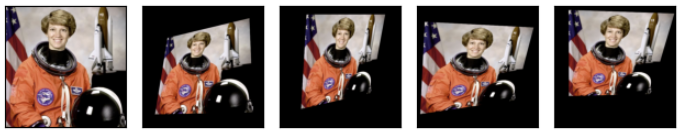
[PyTorch] Geometry-Others-Torchvision.transforms.v2.functional
torchvision.transforms.v2.functional 모듈에서 제공하는이미지 데이터에 다양한 기하학적 및 픽셀 변환을 적용할 수 있는 함수들을 소개함. 관련 gisthttps://gist.github.com/dsaint31x/8249e5a86fb93c64bf2df31c57009afd dl_G
ds31x.tistory.com
BME
Geometric Transformations of Images Goals Learn to apply different geometric transformation to images like translation, rotation, affine transformation etc. You will see these functions: cv2.getPerspectiveTransform Transformations Transformation 이란? T
dsaint31.me
RandomRotation
https://pytorch.org/vision/main/generated/torchvision.transforms.v2.RandomRotation.html
역할:
- 입력 이미지를 지정된 각도 범위 내에서 랜덤하게 회전시키는 변환
- 이미지의 중심 또는 지정된 점을 기준으로 회전 수행
- 회전으로 인해 생기는 빈 영역을 지정된 값으로 채움
사용 용도:
- Data Augmentation을 통해 회전에 대한 불변성(rotation invariance) 학습
- 모델의 일반화 성능 향상 및 over-fitting 방지
- 다양한 방향으로 촬영된 이미지에 대한 견고성 향상
- 의료 영상, 위성 이미지, 자연 이미지 등에서 방향성에 무관한 특징 학습
- 실제 환경에서 발생할 수 있는 카메라 기울어짐이나 객체 회전 시뮬레이션
주요 파라미터:
degrees(float, int, sequence): 회전 각도의 범위를 정의 (단위: 도)float또는int: 대칭 범위[-degrees, +degrees]sequence of float/int: 비대칭 범위[min_degree, max_degree]- 양수: 시계 방향, 음수: 반시계 방향
interpolation(InterpolationMode): 회전 시 사용할 보간 방법InterpolationMode.NEAREST: 최근접 이웃 보간InterpolationMode.BILINEAR: 양선형 보간 (기본값)InterpolationMode.BICUBIC: 양3차 보간
expand(bool): 회전된 이미지 전체를 포함하도록 캔버스 크기를 확장할지 여부False: 원본 이미지 크기 유지 (기본값)True: 회전된 이미지가 잘리지 않도록 캔버스 확장
center(sequence of int, optional): 회전 중심점의 좌표[x, y]- 기본값:
None(이미지 중심)
- 기본값:
fill(int, float, tuple, list): 회전으로 생긴 빈 영역을 채울 값- 단일 값 또는 채널별 값 지정 가능
- 기본값: 0
사용 예시:
rotater = RandomRotation(degrees=(0, 180))
rotated_imgs = [rotater(original_img) for _ in range(4)]
plot([original_img] + rotated_imgs)
[PyTorch] Geometry-Others-Torchvision.transforms.v2.functional
torchvision.transforms.v2.functional 모듈에서 제공하는이미지 데이터에 다양한 기하학적 및 픽셀 변환을 적용할 수 있는 함수들을 소개함. 관련 gisthttps://gist.github.com/dsaint31x/8249e5a86fb93c64bf2df31c57009afd dl_G
ds31x.tistory.com
RandomAffine
https://pytorch.org/vision/main/generated/torchvision.transforms.v2.RandomAffine.html
역할:
- 입력 이미지에 affine transformation을 랜덤하게 적용
- 회전(rotation), 평행이동(translation), 크기 조정(scaling), 전단(shearing) 변환을 조합하여 수행
- 평행선을 유지하면서 이미지를 기하학적으로 변형
사용 용도:
- Data Augmentation을 통한 모델의 일반화 성능 향상
- 다양한 기하학적 변형에 대한 견고성(robustness) 학습
- 실제 환경에서 발생할 수 있는 카메라 움직임, 객체 변형 시뮬레이션
- 의료 영상, 문서 이미지, 자연 이미지 등에서 변형에 불변한 특징 학습
- over-fitting 방지 및 모델의 일반화 능력 향상
주요 파라미터:
degrees(float, int, sequence): 회전 각도의 범위 (단위: 도)float또는int: 대칭 범위[-degrees, +degrees]sequence: 비대칭 범위[min_degree, max_degree]- 기본값: 0 (회전 없음)
translate(sequence of float, optional): 평행이동 범위[a, b]- 이미지 크기에 대한 비율로 지정 (0.0 ~ 1.0)
- 수평 이동:
[-a*width, +a*width] - 수직 이동:
[-b*height, +b*height] - 기본값:
None(평행이동 없음)
scale(sequence of float, optional): 크기 조정 범위[min_scale, max_scale]- 원본 크기에 대한 배율로 지정
- 예:
[0.8, 1.2]는 80%~120% 크기로 조정 - 기본값:
None(크기 조정 없음)
shear(float, int, sequence, optional): 전단 변환 각도 범위float또는int: 수평 전단만 적용[-shear, +shear]sequence with 2 elements: 수평 전단 범위[min_shear_x, max_shear_x]sequence with 4 elements: 수평, 수직 전단 범위[min_shear_x, max_shear_x, min_shear_y, max_shear_y]- 기본값:
None(전단 없음)
interpolation(InterpolationMode): 변환 시 사용할 보간 방법InterpolationMode.NEAREST: 최근접 이웃 보간InterpolationMode.BILINEAR: 양선형 보간 (기본값)InterpolationMode.BICUBIC: 양3차 보간
fill(int, float, tuple, list): 변환으로 생긴 빈 영역을 채울 값- 단일 값 또는 채널별 값 지정 가능
- 기본값: 0
center(sequence of float, optional): 변환 중심점의 좌표[x, y]- 기본값:
None(이미지 중심)
- 기본값:
사용 예시:
affine_transfomer = RandomAffine(
    degrees=(30, 70),
    translate=(0.1, 0.3),
    scale=(0.5, 0.75),
    )
affine_imgs = [affine_transfomer(original_img) for _ in range(4)]
plot([original_img] + affine_imgs)
[PyTorch] Geometry-Others-Torchvision.transforms.v2.functional
torchvision.transforms.v2.functional 모듈에서 제공하는이미지 데이터에 다양한 기하학적 및 픽셀 변환을 적용할 수 있는 함수들을 소개함. 관련 gisthttps://gist.github.com/dsaint31x/8249e5a86fb93c64bf2df31c57009afd dl_G
ds31x.tistory.com
BME
Geometric Transformations of Images Goals Learn to apply different geometric transformation to images like translation, rotation, affine transformation etc. You will see these functions: cv2.getPerspectiveTransform Transformations Transformation 이란? T
dsaint31.me
ElasticTransform
https://pytorch.org/vision/main/generated/torchvision.transforms.v2.ElasticTransform.html
역할:
- 입력 이미지에 탄성 변환(elastic transformation)을 적용
- 이미지의 각 픽셀을 국소적으로 비선형 변형시켜 자연스러운 왜곡 효과 생성
- 랜덤한 변위 필드(displacement field)를 생성하여 이미지를 부드럽게 변형
사용 용도:
- 의료 영상 분석에서 조직의 자연스러운 변형 시뮬레이션 (MRI, CT 스캔 등): 생체 조직의 탄성 변형을 모방한 현실적인 데이터 생성
- Data augmentation 을 통한 모델의 일반화 성능 향상
- 필기체 인식에서 손글씨의 자연스러운 변형 학습
- 객체 인식에서 비강체(non-rigid) 변형에 대한 견고성 향상
- 세포 이미지, 현미경 이미지 등 생물학적 샘플의 변형 모델링
주요 파라미터:
alpha(float, sequence of float): 변형의 강도를 제어- 큰 값일수록 더 강한 변형 적용
float: 수평/수직 방향에 동일한 강도 적용sequence of float:[alpha_x, alpha_y]방향별 강도 지정- 일반적인 범위: 1~100
sigma(float, sequence of float): 변형의 부드러움을 제어 (가우시안 필터의 표준편차)- 큰 값일수록 더 부드럽고 큰 영역의 변형
- 작은 값일수록 더 국소적이고 세밀한 변형
float: 수평/수직 방향에 동일한 부드러움 적용sequence of float:[sigma_x, sigma_y]방향별 부드러움 지정- 일반적인 범위: 1~10
interpolation(InterpolationMode): 변환 시 사용할 보간 방법InterpolationMode.NEAREST: 최근접 이웃 보간InterpolationMode.BILINEAR: 양선형 보간 (기본값)InterpolationMode.BICUBIC: 양3차 보간
fill(int, float, tuple, list): 변환으로 생긴 빈 영역을 채울 값- 단일 값 또는 채널별 값 지정 가능
- 기본값: 0
사용 예시:
elastic_transformer = ElasticTransform(alpha=250.0)
transformed_imgs = [elastic_transformer(original_img) for _ in range(2)]
plot([original_img] + transformed_imgs)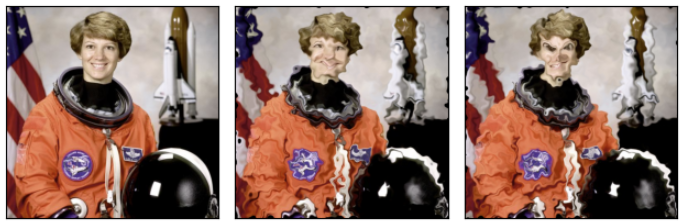
관련: v2.functional.elastic_transform
[PyTorch] Geometry-Others-Torchvision.transforms.v2.functional
torchvision.transforms.v2.functional 모듈에서 제공하는이미지 데이터에 다양한 기하학적 및 픽셀 변환을 적용할 수 있는 함수들을 소개함. 관련 gisthttps://gist.github.com/dsaint31x/8249e5a86fb93c64bf2df31c57009afd dl_G
ds31x.tistory.com
RandomCrop
https://pytorch.org/vision/main/generated/torchvision.transforms.v2.RandomCrop.html
역할:
- 입력 이미지에서 랜덤한 위치에서 지정된 크기로 자르기(crop)
- 이미지의 임의의 부분을 추출하여 다양성을 증가시키는 변환
- 매번 실행할 때마다 다른 위치에서 crop을 수행
사용 용도:
- 데이터 증강(Data Augmentation)의 핵심 기법으로 모델의 일반화 성능 향상
- 이미지의 다양한 부분을 학습하여 위치에 대한 불변성(translation invariance) 학습
- over-fitting 방지 및 모델의 견고성 향상
- 큰 이미지에서 작은 패치를 추출하여 메모리 효율성 증대
- 객체의 다양한 부분을 학습하여 부분 가림(occlusion)에 대한 내성 향상
주요 파라미터:
size(int, sequence of int): 자를 영역의 크기를 정의int: 정사각형으로 자르기[size, size]sequence of int(height, width): 직사각형으로 자르기[H, W]
padding(int, sequence of int, optional): 자르기 전에 추가할 패딩int: 네 방향에 동일한 크기의 paddingsequence with 2 elements:[padding_left_right, padding_top_bottom]sequence with 4 elements:[padding_left, padding_top, padding_right, padding_bottom]- 기본값:
None(패딩 없음)
pad_if_needed(bool): 이미지가 crop 크기보다 작을 때 자동으로 padding 추가 여부True: 필요시 자동 패딩False: 패딩 없음 (기본값)
fill(int, float, tuple, list): 패딩 영역을 채울 값- 단일 값 또는 채널별 값 지정 가능
- 기본값: 0
padding_mode(str): 패딩을 채우는 방식'constant': fill 값으로 패딩 (기본값)'edge': 이미지의 가장자리 픽셀 값으로 패딩'reflect': 이미지의 가장자리를 기준으로 반사된 값으로 패딩 (가장자리 픽셀 제외)'symmetric': 이미지의 가장자리를 기준으로 대칭된 값으로 패딩 (가장자리 픽셀 포함)
사용 예시:
cropper = RandomCrop(size=(128, 128))
crops = [cropper(original_img) for _ in range(4)]
plot([original_img] + crops)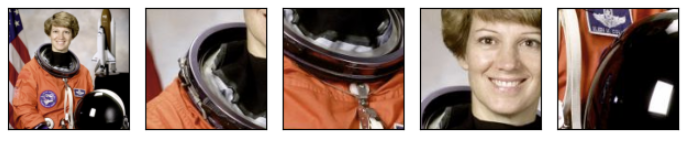
[PyTorch] Cropping-torchvision.transforms.v2.functional
torchvision.transforms.v2.functional 모듈은,이미지 tensor 객체를 입력으로 받아해당 이미지에 직접 적용할 수 있는 다양한 이미지 변환 함수들을 제공함.제공되는 함수들은torchvision.transfroms.v2 의 Transform
ds31x.tistory.com
RandomResizedCrop
https://pytorch.org/vision/main/generated/torchvision.transforms.v2.RandomResizedCrop.html
역할:
- 입력 이미지에서 랜덤한 크기(scale)와 종횡비(ratio)로 영역을 자른 후 지정된 크기(size)로 리사이즈
- 스케일과 종횡비를 동시에 변화시켜 강력한 Data Augmentation제공
- ImageNet과 같은 대규모 데이터셋에서 표준적으로 사용되는 핵심 변환
사용 용도:
- Data Augmentation을 통한 모델의 일반화(generalization) 성능 향상 및 over-fitting 방지
- 다양한 스케일과 종횡비에 대한 불변성(scale and aspect ratio invariance) 학습
- 객체의 크기와 형태 변화에 견고한 모델 훈련
- 이미지 분류, 객체 검출 등에서 표준 전처리 기법으로 활용
주요 파라미터:
size(int, sequence of int): 최종 출력 이미지의 크기int: 정사각형으로 리사이즈[size, size]sequence of int(height, width): 직사각형으로 리사이즈[H, W]
scale(sequence of float): crop할 영역의 크기 비율 범위[min_scale, max_scale]- 원본 이미지 면적에 대한 비율로 지정
- 예:
(0.08, 1.0)은 원본의 8%~100% 크기로 crop - 기본값:
(0.08, 1.0)
ratio(sequence of float): crop할 영역의 aspect ratio범위[min_ratio, max_ratio]- 가로/세로 비율로 지정
- 예:
(3./4., 4./3.)은 0.75~1.33 종횡비로 crop - 기본값:
(3./4., 4./3.)
interpolation(InterpolationMode): 리사이즈 시 사용할 보간 방법InterpolationMode.NEAREST: 최근접 이웃 보간InterpolationMode.BILINEAR: 양선형 보간 (기본값)InterpolationMode.BICUBIC: 양3차 보간
antialias(bool, optional): 안티앨리어싱 적용 여부- 이미지를 축소할 때 계단 현상 방지
- 기본값:
None(자동 결정)
동작 과정:
- 원본 이미지 크기 확인
- crop 면적 비율 (scale) 무작위 선택
- aspection ratio, 종횡비 (ratio) 무작위 선택
- crop 영역 크기 계산: 선택된 scale과 ratio 기반으로
- crop 위치 무작위 선택
- 이미지 crop 수행
- 지정된 크기 size로 resize: 이 과정에 interpolation이 이루어짐.
- 결과 이미지 출력
사용 예시:
resize_cropper = RandomResizedCrop(size=(32, 32))
resized_crops = [resize_cropper(original_img) for _ in range(4)]
plot([original_img] + resized_crops)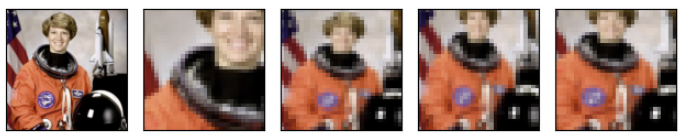
관련: v2.functional.resized_crop
[PyTorch] Cropping-torchvision.transforms.v2.functional
torchvision.transforms.v2.functional 모듈은,이미지 tensor 객체를 입력으로 받아해당 이미지에 직접 적용할 수 있는 다양한 이미지 변환 함수들을 제공함.제공되는 함수들은torchvision.transfroms.v2 의 Transform
ds31x.tistory.com
같이보면 좋은 자료
https://dsaint31.me/mkdocs_site/DIP/cv2/ch02/dip_geometric_transformation/
BME
Geometric Transformations of Images Goals Learn to apply different geometric transformation to images like translation, rotation, affine transformation etc. You will see these functions: cv2.getPerspectiveTransform Transformations Transformation 이란? T
dsaint31.me
2025.06.16 - [Python] - [PyTorch] torchvision.transforms.v2 - Summary (작성중)
[PyTorch] torchvision.transforms.v2 - Summary (작성중)
다음의 공식문서를 기반으로 정리한 것임.https://docs.pytorch.org/vision/main/auto_examples/transforms/plot_transforms_illustrations.html#sphx-glr-auto-examples-transforms-plot-transforms-illustrations-py Illustration of transforms — Torch
ds31x.tistory.com
'Python' 카테고리의 다른 글
| [PyTorch] Augmentation-torchvision.transforms.v2 (1) | 2025.06.15 |
|---|---|
| [PyTorch] Photometric-torchvision.transforms.v2 (0) | 2025.06.15 |
| [PyTorch] Color-Torchvision.transforms.v2.functional (3) | 2025.06.14 |
| [PyTorch] Miscellanceous-Torchvision.transforms.v2.functional (0) | 2025.06.11 |
| [DL] CutMix and MixUp - Data Augmentation (0) | 2025.06.11 |


