728x90
반응형
DataFrame 인스턴스에서 index를 새로 만들거나 다른 columns 를 index로 지정하는데 사용된다.
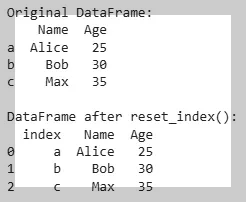
reset_index
DataFrame 인스턴스에서 기존 index 대신하는 새로운 index를 만든다.
drop파라메터의 값을True로 지정한 경우, 기존의index는 삭제됨 (default는False임) :False인 경우, 이전의 index가 column으로 추가됨.
inplace파라메터의 값을True로 지정한 경우, 기존의 객체를 변경한다.- default는
False임.
set_index
DataFrame 인스턴스에서 특정 column을 index로 지정한다.
keys파라메터의 값으로 새롭게 index로 지정할 columns의 이름들을 지정한다.drop파라메터는 새롭게 index로 지정된 column을 현재 DataFrame에서 column에서 제거할지를 지정함. (default는True임)append파라메터는 기존의 index를 column으로 새로 추가할지를 지정함 (default는False임)inplace는 현재 원본인 기존 DataFrame 인스턴스를 변경할지를 지정함 (default는False임)
Examples
다음은 Test할 DataFrame 인스턴스를 생성하는 code snippet임.
import pandas as pd

test_df = pd.DataFrame(
    [
        [100, 'a', 'ㄱ'],
        [200, 'b', 'ㄴ'],
        [300, 'c', 'ㄷ'],
    ],
    columns=['c0', 'c1', 'c2']
)
test_df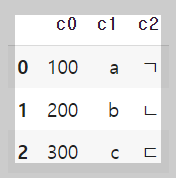
다음을 수행하면 새로운 index가 추가되고 기존의 index를 columns 로 추가됨.
new_df = test_df.reset_index()
new_df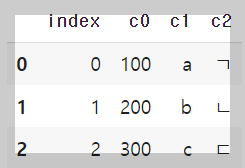
다음을 수행하면 새로운 index가 추가되고 기존의 index를 제거함. (이 경우 기존 DataFrame 인스턴스와 같음.)
new_df = test_df.reset_index(drop='True') #기존 index가 column으로 추가되지 않음.
new_df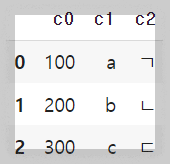
다음을 수행하면 새로운 index로 column c2가 추가되고 c2를 columns에서 제거함.
new_df = test_df.set_index('c2')
new_df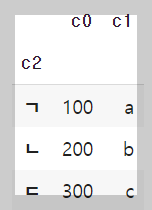
다음을 수행하면 새로운 index로 c1과 c2의 조합이 추가되고 c1과 c2를 columns에 남겨둠.
new_df = test_df.set_index(['c1','c2'], drop=False)
new_df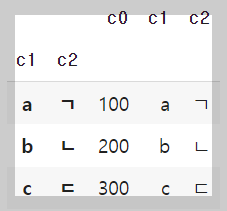
https://gist.github.com/dsaint31x/dcbc86cbf6d2c3552c207be0fab553d9
py_pandas_index.ipynb
py_pandas_index.ipynb. GitHub Gist: instantly share code, notes, and snippets.
gist.github.com
728x90
'Python > pandas' 카테고리의 다른 글
| [pandas] merge 예제. (0) | 2024.01.12 |
|---|---|
| [pandas] DataFrame 합치기 : pd.concat()함수 와 .merge() 메서드 (0) | 2024.01.12 |
| [Term] ETL Tools (0) | 2024.01.10 |
| [pandas] dropna : missing value 처리 (삭제) (0) | 2024.01.09 |
| [pandas] Column (or rows) 제거하기 (0) | 2024.01.09 |


