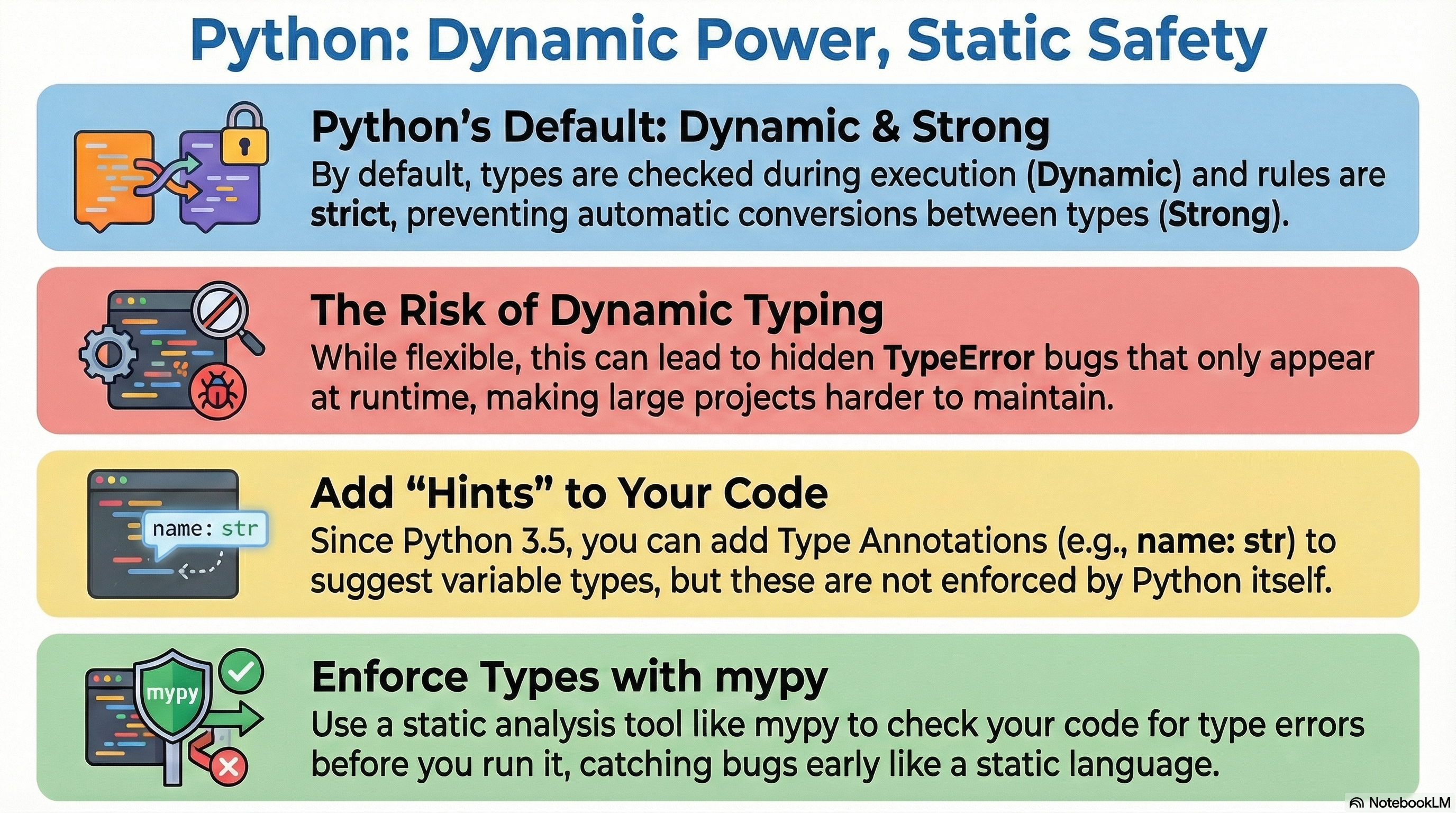
Python은 Dynamically typed language이기 때문에 variable은 여러 type object를 가리킬 수 있다.
- 이는 매우 높은 유연성을 제공해주고, 작은 규모의 소스코드에서는 잘 동작한다.
(특히 type에 대해 자유롭다보니 언어의 진입장벽을 낮춰주는 효과도 있다.) - 하지만, object의 implici type conversion이 제한되는 strong typing language 이므로
- runtime에서 TypeError가 발생할 확률이 커지기 때문에 대규모의 프로젝트에서는 버그가 많아진다는 단점을 가진다.
때문에, 안정성을 중시하는 software를 개발하는 입장에서는
compile 단계에서 type check를 통해 문제점을 사전에 해결할 수 있는 static language가 보다 선호되는 경우가 많다.
이같은 단점을 보완하기 위해 Python 3.5부터는 Type Annotation 을 제공하기 시작했다.
Type Annotation
Type annotation을 변수에 적용한 단순한 예는 다음과 같음.
var_int: int = 11
var_float: float = 3.14
var_str: str = 'ABCD'
var_list: list = [0, 1, 2, 3]
다음과 같이 parameter의 type에 대해서도 적용가능함.
def product(a: int, b: int) -> int:
    return a*b
하지만, annotation이라는 용어에서 알 수 있듯이
- 어떤 type으로 해당 parameter에 대한 argument를 입력할지를 알려주기는 하지만,
- static language에서처럼 compile error등으로 강제하진 못한다.
참고: annotation(어노테이션)이란?
1. 일반적인 의미:
- 주석, 메모, 설명을 덧붙이는 것
- 문서나 텍스트에 부가적인 정보를 추가하는 행위
2. 프로그래밍에서의 의미:
- 코드에 메타데이터를 추가하는 방법
- 컴파일러나 런타임에 추가 정보를 제공
즉, 다음과 같이 다른 type으로 parameter의 값을 지정하더라도
python에서 문제없는 지정이라면 아무 문제 없이 돌아간다. (즉, 일종의 권고안에 불과하다.)
def product(a: int, b: int) -> int:
    return a*b

ret_v = product(10.0, 2.0)
최근 변화로 인한 typing 모듈사용법 변경 정리 (Python 3.9+ 부터)
Python 3.9 미만 버전에서는
from typing import List, Tuple, Dict, Set등을 사용해야 했지만,
현재는list, tuple, dict, set등으로 처리할 수 있음
(즉, 단순한 경우엔 굳이typing모듈에 필요없음)
generic을 이용한 변경 (Python 3.9+)
# 이전 버전
from typing import List, Dict
def func(items: List[str]) -> Dict[str, int]: ...

# 현재 버전 (3.9+)
def func(items: list[str]) -> dict[str, int]: ...
typing모듈이 필요한 경우는
- 하나의 variable 또는 parameter에 여러가지 type을 허용하고자 하는 경우:
typing.Union을 이용. (Python 3.10 미만버전) None이 지정가능한 parameter의 경우:typing.Optional(Python 3.10 미만버전)- 하나의 variable 또는 parameter에 호출이 될 수 있는 function이 지정되도록 하는 경우:
typing.Callable을 이용. collections.abc.Callable을 사용하는 것이 보다 권장됨. - 재할당이 안 되는 경우:
typing.Final
Python 3.10+에서는
Union과Optional대신에|operator만으로도 처리가 가능함.var_real_number : int | float
# ------------------
# typing.Union -> |
# 이전 방식
from typing import Union
def func(x: Union[str, int]) -> None: ...

# 현재 방식 (3.10+)
def func(x: str | int) -> None: ...

# ------------------
# typing.Optional -> | None
# 이전 방식
from typing import Optional
def func(x: Optional[str]) -> None: ...

# 현재 방식 (3.10+)
def func(x: str | None) -> None: ...

# ------------------
# typing.Callable -> | collections.abc.callable
def function_name(param1: int, param2: str) -> bool:
    # 함수 내용
    return True  # 또는 False
# 이전 방식
from typing import Callable
def process_data(func: Callable[[int, str], bool]) -> None:
    pass
# 현재 방식 (3.9+)
from collections.abc import Callable
def process_data(func: Callable[[int, str], bool]) -> None:
    pass

# ------------------
# typing.Final
from typing import Final

MAX_SIZE: Final = 100
# MAX_SIZE: Final[int] = 100 #명시적으로 타입도 지정가능.
# 타입 체커에서만 경고, 런타임에서는 재할당 가능
typing 모듈의 Union, Optional, Callable, Final
Union
다음의 함수의 parameter r은 int 또는 float의 argument가 할당될 수 있음.
from typing import Union

def ds_squared(
    r: Union[int,float]
) -> Union[int,float]:
    return r**2
앞서 설명한대로, 3.10 이상의 파이썬을 사용하는 경우 |(vertical bar)로 대체 가능함.
Callable
Callable[[int], str]는 int type의 single parameter를 가지며, 반환값이 str이다.
특이한 경우로 Callable[... , str]인 경우 어떤 형태의 parameter도 가능함을 의미.
주의할 것은 ...은 parameters로는 사용가능하나, return value에 대해서 사용할 수 없다는 점임.
참고: ...과 Any와의 차이
- ... : 입력 파라미터의 갯수와 타입이 제한되지 않음을 의미. 갯수지정의 문제로 returne value에선 사용 불가.
- Any: 반환값이나 파라미터가 어떤 타입도 될 수 있음을 의미. return value에 대해 지정가능.
from typing import Callable
# from collections.abc import Callable  # 3.9+ 권장: collections.abc 사용


# Example 1: Callable[[int], str]
def process_number(func: Callable[[int], str], number: int) -> str:
    return func(number)

def number_to_string(n: int) -> str:
    return f"The number is {n}"

result = process_number(number_to_string, 42)
print(result)  # 출력: The number is 42

# Example 2: Callable[..., str]
def process_anything(func: Callable[..., str], *args, **kwargs) -> str:
    return func(*args, **kwargs)

def greeting(name: str, age: int) -> str:
    return f"Hello {name}, you are {age} years old."

result = process_anything(greeting, "Alice", 30)
print(result)  # 출력: Hello Alice, you are 30 years old.
Python 3.9+ 에서는 collections.abc.Callable을 대신 사용하기를 권함
Optional
Optional을 통해 None인 경우를 허용하면서 None이 아닌 경우 어떤 타입인지를 square bracket으로 지정할 수 있음.
def ds_power(
    base : int|float,
    exp : Optional[float] = None,
) -> int|float:
    if exp == None:
        return base**2
    else:
        return base**exp
앞서 설명한대로, 3.10 이상의 파이썬을 사용하는 경우 | None 으로 대체 가능함.
def ds_power(
    base: int | float,
    exp: float | None = None,
) -> int | float:
    if exp is None:
        return base ** 2
    return base ** exp
Final
from typing import Final

PROTOCOL: Final[str] = 'https'Final의 역할:Final은 변수의 값이 프로그램 실행 도중 변경되지 않아야 함을 나타냄.- 타입 힌트로만 동작하므로, 실제로 값을 변경하려 하면 런타임 에러는 발생하지 않지만,
정적 타입 검사 도구(mypy)는 이를 감지.
Final[str]:- 이 변수는 문자열(
str) 타입이어야 하며, 값이 변경되지 않아야 함을 의미.
- 이 변수는 문자열(
PROTOCOL변수:PROTOCOL은https라는 값을 가지며, 이후 코드에서 이 값을 변경하면 타입 검사 도구가 경고를 발생시킴.
Typing모듈과 Static analyzer (mypy)
static language처럼 type check를 하고 싶다면,
- type annotation을 typing모듈을 사용하여 보다 명시적으로 처리하고,
- mypy또는 pyright(Microsoft)와 같은 thrid-party static analyzer를 이용하면 된다.
- Python 3.5+ 부터 사용가능.
여기선 mypy 의 경우만 살펴본다 .
(별도 설치 필요함)
static analyzer는 코드를 실행하지 않고 분석하는 도구를 총칭함.
static type checker는 static analyzer의 하위카테고리로 타입 관련 오류만 찾는 도구를 가리킴.
typing 모듈은 보다 명시적이고 구체적으로 type을 지정해줄 수 있다.
다음은 int를 component로 갖는 Vector를 지정하는 방식임.
from typing import TypeAlias

Vector: TypeAlias = list[int] # Python 3.10+ TypeAlias로 좀 더 명확해짐.
# type Vector = list[int] # Python 3.12+, soft keyword 인 type 가 추가됨(import문 필요없음)

def scale(scalar: int, vector: Vector) -> Vector:
    return [scalar * num for num in vector]

new_vector = scale(3,[3,2,1])
만약, 다음과 같이 int가 아닌 float argument가 주어지고
이를 test.py로 저장한 후 mypy test.py로 체크하면 type이 틀렸다고 알려줌.
from typing import TypeAlias

Vector: TypeAlias = list[int]

def scale(scalar: int, vector: Vector) -> Vector:
    return [scalar * num for num in vector]

new_vector = scale(1.7,[3,2,1])
mypy로 체크한 결과는 다음과 같음.
$ mypy test.py
test.py:9: error: Argument 1 to "scale" has incompatible type "float"; expected "int"  [arg-type]
Found 1 error in 1 file (checked 1 source file)
python -m mypy --strict test.py로 수행해도 됨.
위의 예에서는 명시적으로 TypeAlias를 이용했지만 다음과 같이 사용할 수도 있다.
Vector = list[int]
# import typing
# Vector = typing.List[int] # python 3.8까지는 이 방법만 가능.

def scale(scalar: int, vector: Vector) -> Vector:
    return [scalar * num for num in vector]

new_vector = scale(1,[3,2,1])
list, set, dict 등에서 위와 같이 square bracket(대가로)을 통해 item들의 type을 지정가능하다.
typeguard 모듈(3rd party module)를 이용한 type check
typeguard 모듈의 @typechecked 데코레이터를 이용하여 보다 엄격하게 TypeError를 발생시킬 수 있다.
이 경우 유연성은 부족하지만, 디버깅에서 어느 type으로 인한 것인지가 명확해진다.
(당연히 설치를 해야함. built-in module아님)
from typing import Tuple
from typeguard import typechecked

@typechecked
def calculate_area(dimensions: Tuple[int, int]) -> int:
    width, height = dimensions
    return width * height

my_dimensions = (10, 20)
area = calculate_area(my_dimensions)
print(area)

my_wrong_dimensions = (10, "20")
area = calculate_area(my_wrong_dimensions)  # This will raise a TypeError
print(area)- 위의 code snippet에서 @typechecked를 제거하면 TypeError없이 동작한다.
- @typechecked가 붙을 경우 엄격한 type check가 이루어지고 TypeError가 발생함.
참고자료
https://docs.python.org/3/library/typing.html
typing — Support for type hints
Source code: Lib/typing.py This module provides runtime support for type hints. For the original specification of the typing system, see PEP 484. For a simplified introduction to type hints, see PE...
docs.python.org
https://www.sourcetrail.com/python/python-strong-type/
Solved: strong type in Python - SourceTrail
Are you looking to improve your website's typography? If so, you're in luck! Strong type is a powerful tool that can help you improve your website's readability and overall user experience. In this article, we'll explore the basics of strong type and how y
www.sourcetrail.com
https://dsaint31.tistory.com/515
[Python] (Data) Type: Summary
1. Type 이란?Programming에서 사용되는 모든 value 혹은 object 들의 종류 (category) 를 (data) type이라고 부름.수학에서 숫자의 종류(type)를 실수, 정수, 자연수 등으로 나누는 것을 생각하면 쉽다.Programming에
dsaint31.tistory.com
'Python' 카테고리의 다른 글
| [Python] IPython shell 에서 shell cmds 사용하기. (0) | 2023.09.19 |
|---|---|
| [Python] else: break checker (0) | 2023.09.18 |
| [Python] functools.partial (0) | 2023.08.25 |
| [Python] instance methods, class methods, and static methods (0) | 2023.08.20 |
| [Python] Class로 수행시간 측정 decorator 만들기 (0) | 2023.08.18 |


