IPython 에서 지원하는 shell commands
Python interactive shell에서 OS등이 지원하는 shell commands를 사용하지 못하는 것과 달리,
IPython shell에서는 많이 사용되는 shell commands는 다음과 같이 지원함.
In [17]: pwd
Out[17]: '/home/dsaint31'

In [18]: ls
lectures@    Mambaforge.sh*  Miniconda3-latest-Linux-x86_64.sh*  test/
mambaforge/  miniconda3/     pdfsizeopt/

In [19]: cd pdfsizeopt/
/home/dsaint31/pdfsizeopt

In [20]: ls
pdfsizeopt_libexec/  pdfsizeopt_libexec_linux.tar.gz  pdfsizeopt.single*

In [21]: mkdir test

In [22]: ls
pdfsizeopt_libexec/  pdfsizeopt_libexec_linux.tar.gz  pdfsizeopt.single*  test/

In [23]: mv pdfsizeopt_libexec_linux.tar.gz ./test/

In [24]: ls
pdfsizeopt_libexec/  pdfsizeopt.single*  test/

In [25]: cd test
/home/dsaint31/pdfsizeopt/test

In [26]: ls
pdfsizeopt_libexec_linux.tar.gz

In [27]:
In [숫자]:- 사용자의 input을 대기하는 prompt라고 볼 수 있다.
- square bracket 안의 숫자는 실행된 순서를 나타내는 번호이다.
- 위에서 지원되는 shell command를 shell-like magic command라고도 부름.
위의 예제는 automagic이 ON상태에서 동작된다: automagic 기능이라고도 불림.
(magic commands가 % prefix 없이 수행가능한 상태)
만약 automagic이 OFF 상태라면 % prefix를 붙여야 함.
%automagic on: 켜기%augomagic off: 끄기- 그냥 %automagic 이라고만 입력하면 toggle 모드로 동작함.
IPython 에서의 magic command는
Jupyter NoteBook에서도 사용가능.
IPython이 제공하는 shell-like magic commands 는 다음과 같음.
%cat, %cp, %cd, %env, %ls, %man, %mkdir, %more, %mv, %pwd, %rm, %rmdir
| magic | desc. |
| %cat <file_path> | file_path 출력. (concatenation도 가능함.) |
| %cp | copy |
| %cd <path> | change directory |
| %env | 현재 세션의 환경 변수(environment variables)를 확인하거나 설정. %env VAR : 확인, %env VAR=value : 설정. |
| %ls | ls 명령과 동일 |
| %man | Linux/Unix의 man (manual) 명령을 Jupyter 셀 안에서 실행 |
| %mkdir | 디렉토리 생성 |
| %more | pager |
| %mv | mv 명령과 동일 |
| %pwd | print working directory |
| %rm | rm 명령과 동일 |
| %rmdir | 빈 디렉토리 삭제 |
| %echo | 메시지 또는 환경변수 값 출력. |
위의 magic command로 디렉토리등을 이동해야 working directory가 실제적으로 바뀜.
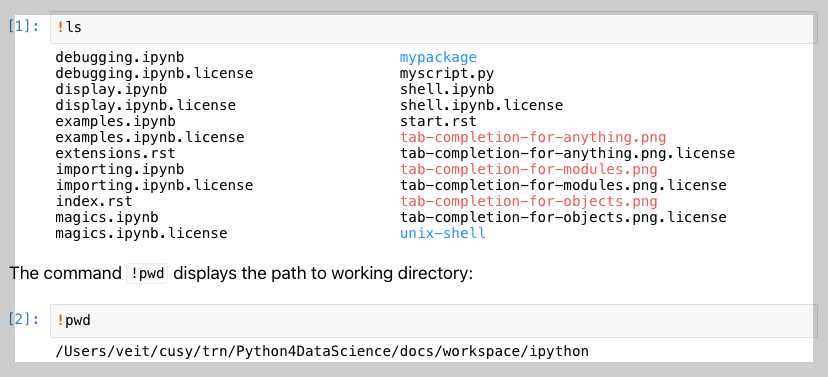
magic command 외의 host의 shell commands실행하기
위에서 살펴본 commands 외에
OS에서 지원하는 shell commands를 실행하려면 prefix로 !를 붙여주면 된다.
- 이 같이 실행되는 shell commands는 temporary subshell에서 실행됨.
- 때문에 current working directory 변경을 하는데 사용할 수 없음: 주의!
In [27]: !hostname -I
172.30.205.73

In [28]:- 해당 시스템의 ip 주소를 확인하는 명령어임.
Python과 Shell commands 간의 변수 교환
Shell commands의 결과를 변수로 받아서 Python에서 사용할 수도 있고,
Python의 변수를 curly bracket을 이용하여 shell commands에 넘겨줄 수 도 있다.
In [38]: c = !ls

In [39]: print(c)
['pdfsizeopt_libexec', 'pdfsizeopt.single', 'test']

In [40]: c = "Hello, IPython!"

In [41]: !echo {c}
Hello, IPython!

In [42]:
shell commands의 결과는 IPython.utils.text.SList 객체로 반환됨.
다음의 주요속성을 가짐:
| attribute/method | 의미 | 예시 |
.s |
공백으로 연결된 문자열 (space-joined) | 'file1.txt file2.py data.csv' |
.n |
줄바꿈으로 연결된 문자열 (newline-joined) | 'file1.txt\nfile2.py\ndata.csv' |
.p |
각 항목을 pathlib.Path 객체로 변환한 리스트 | [PosixPath('file1.txt'), PosixPath('file2.py'), PosixPath('data.csv')] |
grep(pattern) |
정규식 또는 문자열 패턴을 포함한 항목만 필터링 |
files.grep("py") -> 'test.py', 'utils.py' |
fields(*idx) |
각 줄을 공백 기준으로 split한 뒤 지정된 필드(열) 추출 | lines.fields(0,1) -> 각 줄의 0번째, 1번째 단어 추출 |
map(func) |
각 항목에 함수를 적용 | files.map(str.upper) |
읽어보면 좋은 자료
2025.07.24 - [Python] - Magic commands-Jupyter NoteBook
Magic commands-Jupyter NoteBook
주요 Magic Commands 정리이 문서는 Jupyter Notebook에서 자주 사용되는 라인 매직(Line Magics)과 셀 매직(Cell Magics)을 소개함. shell-like magic commands는 다음을 참고2023.09.19 - [Python] - [Python] IPython shell 에서 shel
ds31x.tistory.com
2024.09.04 - [개발환경] - [Py] IPython, Jupyter Notebook, and Colab
[Py] IPython, Jupyter Notebook, and Colab
IPython: IPython은 파이썬의 대화형 인터프리터로, 파이썬 표준 인터프리터보다 향상된 기능을 제공함. 다음과 같은 기능을 제공:Code auto-completionAccess to shell commands: 시스템의 명령어를 보다 편하게
ds31x.tistory.com
https://dsaint31.me/mkdocs_site/OS/linux_cmds/#_13
BME
명령어 (Linux) 이 문서는 Linux의 bash(Bourne Again SHell)에서 사용되는 기본적인 명령어를 소개합니다. Bash는 Linux의 Terminal과 사용되는 Shell임. Linux의 기본적인 명령어를 실행하고, 간단한 스크립트 (.sh
dsaint31.me
https://swcarpentry.github.io/shell-novice/
The Unix Shell: Summary and Setup
Summary and Setup The Unix shell has been around longer than most of its users have been alive. It has survived because it’s a powerful tool that allows users to perform complex and powerful tasks, often with just a few keystrokes or lines of code. It he
swcarpentry.github.io
https://jakevdp.github.io/PythonDataScienceHandbook/01.05-ipython-and-shell-commands.html
IPython and Shell Commands | Python Data Science Handbook
Quick Introduction to the Shell¶ A full intro to using the shell/terminal/command-line is well beyond the scope of this chapter, but for the uninitiated we will offer a quick introduction here. The shell is a way to interact textually with your computer.
jakevdp.github.io
2025.07.21 - [Python] - Jupyter NoteBook-vscode 확장 중심
Jupyter NoteBook-vscode 확장 중심
https://youtu.be/suAkMeWJ1yE?si=YR3b_4aLnYiWCHGd0. Jupyter NoteBook이란?Jupyter Notebook은 코드, 문서, 시각화를 하나의 문서에 통합하여 대화형으로 작업할 수 있는 웹 기반 개발 환경으로, REPL Shell을 개선한 IPython
ds31x.tistory.com
2025.07.17 - [Python] - ipynb 파일 (IPython NoteBook)
ipynb 파일 (IPython NoteBook)
.ipynb는 "IPython Notebook"의 약자임..ipynb 이란:ipynb는 IPython Notebook 의 약자임..ipynb는 IPython 프로젝트의 일부로 개발된 "IPython Notebook"의 파일 형식으로 개발됨.i = Interactivepy = Pythonnb = NotebookJupyter Noteboo
ds31x.tistory.com
'Python' 카테고리의 다른 글
| [Colab] colab에서 ipynb 공유하기 (0) | 2023.09.26 |
|---|---|
| [Python] sys 모듈 (0) | 2023.09.25 |
| [Python] else: break checker (0) | 2023.09.18 |
| [Python] Type Annotation (ortype hint): 파이썬에서 변수 및 함수에 type 지정. (0) | 2023.08.30 |
| [Python] functools.partial (0) | 2023.08.25 |


