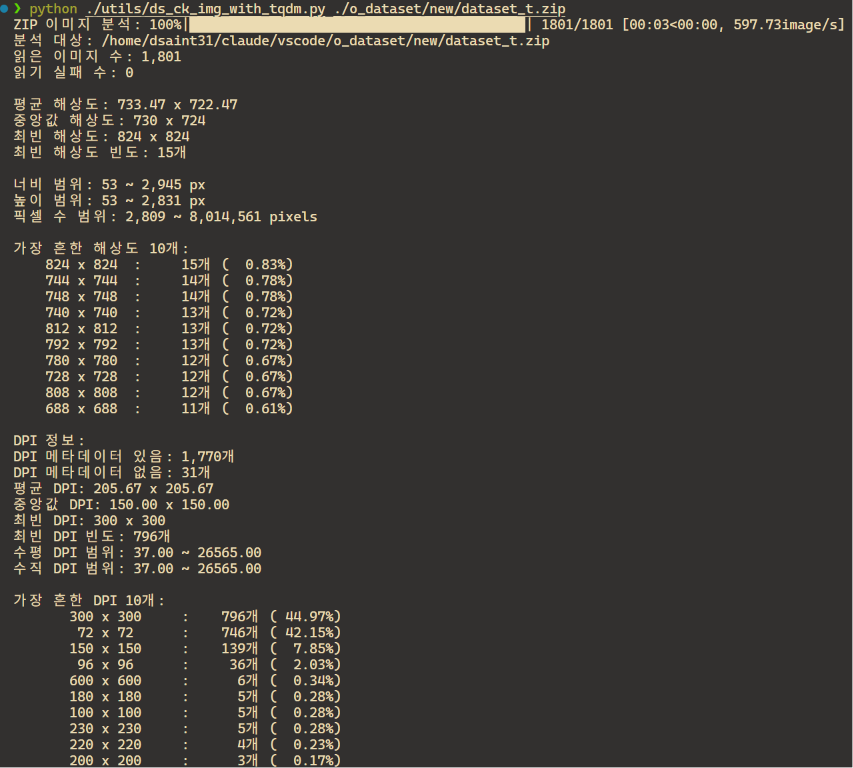
명세
아래 명세에 따라 Python 스크립트 ds_ck_img_with_tqdm.py 하나를 작성할 것.
1. 목적
디렉터리(재귀 탐색) 또는 ZIP 파일 내부의 이미지들을 스캔하여
해상도(width×height)와 DPI 통계를 계산하고, 읽기 쉬운 리포트를 출력하는 CLI 도구.
2. 실행 환경 및 의존성
- Python 3.10+ (
from __future__ import annotations사용,X | Y타입 힌트 표기) - 필수: Pillow
- 선택: tqdm — 설치되어 있지 않아도 동작해야 함.
import 실패 시 stderr로 설치 안내 메시지를 출력하고 진행률 표시 없이 진행. - 그 외에는 표준 라이브러리만 사용 (argparse, zipfile, statistics, collections.Counter 등)
2023.08.30 - [Python] - [Python] Type Annotation (ortype hint): 파이썬에서 변수 및 함수에 type 지정.
[Python] Type Annotation (ortype hint): 파이썬에서 변수 및 함수에 type 지정.
Python은 Dynamically typed language이기 때문에 variable은 여러 type object를 가리킬 수 있다.이는 매우 높은 유연성을 제공해주고, 작은 규모의 소스코드에서는 잘 동작한다. (특히 type에 대해 자유롭다보
ds31x.tistory.com
3. CLI 인터페이스
python ds_ck_img_with_tqdm.py <path> [--password PW]path: 이미지 디렉터리 또는 ZIP 파일 경로 (자동 판별)- 디렉터리 → 재귀 분석
.zip파일 → 압축 해제 없이 내부 분석- 둘 다 아니면 ValueError
--password: 암호화된 ZIP의 비밀번호 (str로 받아 내부에서 UTF-8 bytes로 인코딩)
2025.08.12 - [Python] - CLI Program에서의 arguments - argparse모듈
CLI Program에서의 arguments - argparse모듈
0. CLI(Command Line Interface) Program (=CLI 명령어)에서 사용되는 arguments 대한 주요 용어Command: 실행할 프로그램/스크립트 이름.POSIX 공식 용어로는 utility 임. 예) python, git, lsArgument: 명령 뒤에 오는 모든
ds31x.tistory.com
4. 대상 이미지 확장자
.jpg .jpeg .png .bmp .gif .tif .tiff .webp (대소문자 무시)
https://dsaint31.tistory.com/402
[DIP] Image Format (summary)
Digital Image 들의 대표적인 encoding 방식들은 다음과 같음:더보기encoding 과 decoding에 대한 일반적 정의:https://dsaint31.me/mkdocs_site/CE/ch01/code_for_character/#code-encoding BMECodes for Characters Code 란 특정 형태의 i
dsaint31.tistory.com
5. 함수 구성 (공개 API)
각 함수는 독립적으로 import하여 사용할 수 있어야 한다. docstring은 한국어로 작성.
extract_dpi(image: Image.Image) -> tuple[float, float] | None- 우선순위 1:
image.info["dpi"]— 스칼라(Real)면 (v, v)로, 시퀀스면 (x, y)로 해석 - 우선순위 2: EXIF 태그 282(XResolution), 283(YResolution), 296(ResolutionUnit)
- ResolutionUnit == 2 (inch): 그대로 반환
- ResolutionUnit == 3 (cm): ×2.54로 inch 환산
- 그 외 단위는 None
- 값 검증: float 변환 가능해야 하고, 0 이하·NaN·무한대는 무효 처리
(Fraction, IFDRational 등도 float()로 처리되도록 헬퍼 함수 사용)
- 우선순위 1:
analyze_image_directory(root_dir, recursive=True) -> dictrglob/glob으로 이미지 파일 수집, 경로 소문자 기준 정렬- 경로 없음 → FileNotFoundError, 디렉터리 아님 → NotADirectoryError
analyze_image_zip(zip_path, password=None) -> dict- 압축 해제 없이
ZipFile.read()+BytesIO로 메모리에서 직접 열기 - 디렉터리 엔트리 제외, 파일명 소문자 기준 정렬
- 손상된 ZIP(BadZipFile) → ValueError로 변환하여 raise
- 비밀번호 오류 등 RuntimeError도 개별 파일 실패로 처리
- 압축 해제 없이
summarize_resolutions(resolutions, dpis, dpi_missing_count, failed_files, source) -> dict- 통계 계산 전담 (순수 함수). 읽은 이미지가 0개면 ValueError
- 반환 dict 키:
source,image_count,failed_count- 해상도:
mean_resolution,median_resolution(width/height 각각 독립 계산),mode_resolutions(동률 시 모두, 정렬),mode_frequency,width_range,height_range,pixel_count_range,resolution_counts(Counter) - DPI:
mean_dpi,median_dpi,mode_dpis(소수 2자리 반올림 후 집계),mode_dpi_frequency,x_dpi_range,y_dpi_range,dpi_counts,dpi_count,dpi_missing_count - DPI가 하나도 없으면 해당 키들은 None / [] / 0 / 빈 Counter로 채움
failed_files: (파일명, 오류 메시지) 튜플 리스트
print_resolution_report(result: dict) -> None- 한국어 리포트를 stdout에 출력:
분석 대상, 읽은/실패 이미지 수, 평균·중앙값·최빈 해상도,
너비·높이·픽셀 수 범위, 가장 흔한 해상도 Top 10(개수·백분율),
DPI 통계(있을 때만 상세: 평균·중앙값·최빈·범위·Top 10),
읽지 못한 파일 목록 - 숫자는 천 단위 콤마(
:,), 백분율은 소수 2자리로 정렬 출력
- 한국어 리포트를 stdout에 출력:
main(path, password=None)+if __name__ == "__main__":블록 (argparse)
EXIF와 IFD: Pillow로 이미지 메타데이터 읽기
이 글에서는 IFD의 구조를 정리하고, Pillow로 각 IFD의 정보를 읽는 방법을 다룸.EXIF (EXchangeable Image File format) 는 디지털 카메라가 촬영 조건과 위치 등의 정보를 이미지 파일에 함께 기록하는 metadat
ds31x.tistory.com
6. 진행률 표시
- tqdm이 있으면:
desc지정("이미지 분석"/"ZIP 이미지 분석"),unit="image",file=sys.stderr,dynamic_ncols=True,disable=False(비TTY에서도 강제 표시),leave=True,mininterval=0.1 - 진행률 래핑은 헬퍼 함수 하나(
_show_progress)로 통일
2026.05.23 - [Python] - tqdm 간단 사용법
tqdm 간단 사용법
1. tqdm 소개tqdm은 Python 반복문에 진행률 표시줄(progress bar)을 붙여주는 라이브러리임. 공식 문서와 GitHub 저장소는 다음과 같음.공식 문서: https://tqdm.github.io/GitHub: https://github.com/tqdm/tqdmtqdm의 핵심
ds31x.tistory.com
7. 오류 처리 원칙
- 개별 이미지 읽기 실패(UnidentifiedImageError, OSError, ValueError 등)는
전체 분석을 중단하지 않고failed_files에 수집하여 리포트에 표시 - 진행률·안내 메시지는 stderr, 분석 리포트는 stdout으로 분리
(stdout 리다이렉트 시 리포트만 저장되도록)
https://dsaint31.tistory.com/526
[Python] Exception 처리
1. Exception 발생 시 기본 동작Python에서 무엇인가가 잘못된 경우, python interpreter는 exception을 발생시킴.Exception : 동작을 중단시키는 에러를 가르킴.Exception handling : Exception 처리라고도 불리며, 발생
dsaint31.tistory.com
8. 코드 스타일
- 타입 힌트 전체 적용, docstring·주석·사용자 메시지는 한국어
- 통계 계산(summarize)과 I/O(디렉터리/ZIP 순회, 출력)를 분리한 구조 유지
https://dsaint31.tistory.com/509
[Python] Comments and Docstrings
Comment (주석)Python에서의 comment는 주석이라고 불리며, Python Interpreter가 아닌 사람을 위해 작성되는 것임. Comment는 해당 code들이 무엇을 위해 존재하는지 등을 기재하여 개발자가 보다 쉽게 코드를
dsaint31.tistory.com
구현물
https://github.com/dsaint31x/ds_ck_imgs
GitHub - dsaint31x/ds_ck_imgs: CLI tool to analyze image resolution and DPI statistics in a directory or ZIP archive (without ex
CLI tool to analyze image resolution and DPI statistics in a directory or ZIP archive (without extraction), with `tqdm` progress bar. - dsaint31x/ds_ck_imgs
github.com
같이보면 좋은 자료들
[Python] PIL, Pillow, OpenCV, and Scikit-image
PIL, Pillow, OpenCV, and Scikit-imagePython에서 이미지를 다룰 때 이용되는 주요 패키지들은 다음과 같음.1.PIL (Python Imaging Library)PIL은 1995년에 처음 개발(Fredrik Lundh)된 Python의 최초 이미지 처리 라이브러리
ds31x.tistory.com
'Python' 카테고리의 다른 글
| EXIF와 IFD: Pillow로 이미지 메타데이터 읽기 (0) | 2026.07.25 |
|---|---|
| [Ex] 구구단 (0) | 2026.06.12 |
| [Ex] 기본 Python CLI프로그램 구조 (0) | 2026.06.12 |
| Entry Point - Python 과 C (0) | 2026.06.12 |
| Lock and GIL (0) | 2026.06.01 |

