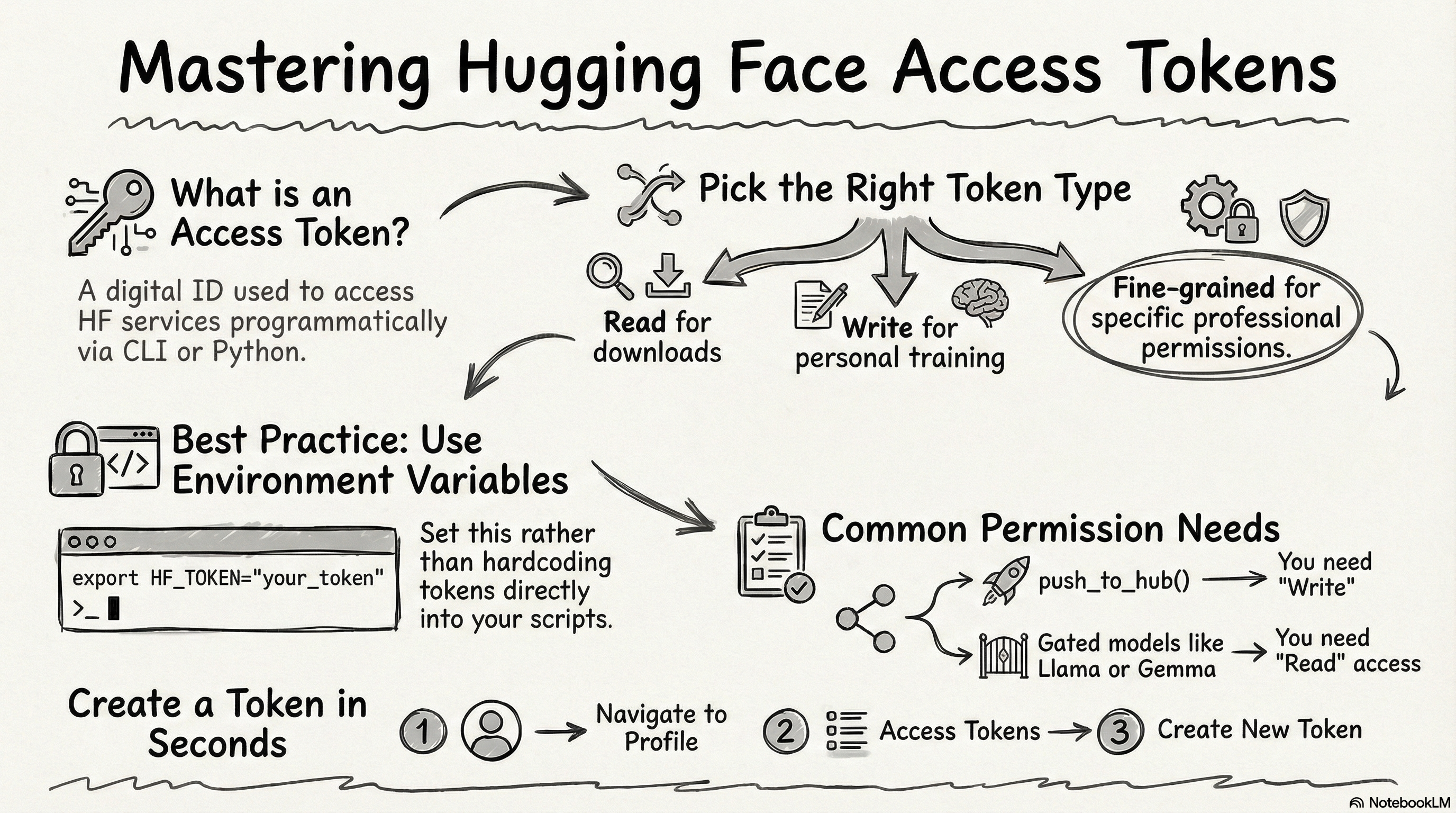
Access Token이란?
Hugging Face Access Token은
- Hugging Face의 다양한 서비스에
- 프로그래밍 방식으로 접근하기 위한 인증(Authentication) 수단임.
즉,
- CLI(Command Line Interface)나 Python 코드에서
- Hugging Face Hub에 접근할 때,
- 사용자 인증을 위해 Access Token이 필요함.
Access Token이 필요한 경우
| 상황 | 설명 |
| 모델/데이터셋 업로드 | push_to_hub() 등으로 저장소에 파일 업로드 시 |
| 비공개 저장소 접근 | Private repository의 모델이나 데이터셋 다운로드 시 |
| Gated 모델 사용 | Llama, Gemma 등 접근 승인이 필요한 모델 다운로드 시 |
| Inference API 호출 | Serverless Inference API를 통한 모델 추론 시 |
| CLI 로그인 | hf auth login (과거 huggingface-cli login) 명령어 실행 시 |
Token 사용 방법
아래의 Token 생성하고 나서 다음의 url 과 함께 보길 권함:
HF Start
Hugging Face Hub와 주요 라이브러리 구조, 인증 방법(hf auth login)을 소개
ds31x.github.io
Token을 생성한 후, 다음 방법 중 하나로 사용할 수 있음:
1. CLI 로그인:
hf auth login
# 프롬프트에서 토큰 입력
2. 환경 변수 설정:
export HF_TOKEN="hf_xxxxxxxxxxxxx"- 가장 추천하는 방식임.
3. 코드에서 직접 사용:
from huggingface_hub import login
login(token="hf_xxxxxxxxxxxxx")- 이같이 고정하는 것은 좋지 못함.
- 환경변수 사용을 활용할 것.
Token Type Comparison
| Type | Desc. |
| Fine-grained | 세부 권한을 직접 세밀하게 설정 가능. |
| Read | 읽기 전용 (다운로드만 가능) |
| Write | 읽기 + 쓰기 모든 권한이 자동 포함됨. |
Token 타입을 고를 때, 필요한 용도별 최소 권한을 설정할 수 있는 Fine-grained 가 가장 적절함
Tutorial: Token 만들기
오른쪽 상단의 자신의 profile 아이콘(아래 그림의 1)을 클릭하면 나오는 드롭다운 메뉴에서 ProfileAccess Token 클릭( 아래 그림 2)

이후 뜨는 Access Tokens의 화면에서 오른쪽 상단의 +Create new token 을 클릭

일반적으로 Fine-grained 가 가장 실무에서 적절하지만,
학습 등의 개인 이용의 경우엔 간단하게 Read / Write로 만들어도 된다.
학습용이라면, Write 로 Token 생성하면 제일 간편하다.
단, 너무 많은 권한을 가지는 것이라 실무에선 사용하지 않는게 좋다.

Write 토큰에서 해당 토큰의 이름 (아래 그림에서 class)을 입력하고 Create token 을 클릭

참고: Fine-grained 각 permission 설정
설정시 아래의 표와 각 Permission에 대한 설명 참고 할 것:
| 용도 | 필요 권한 |
| 모델 다운로드만 | Read access to repos |
| 모델 업로드 | Write access to repos |
| Gated 모델 사용 (예: Llama) | Read access to public gated repos |
| 추론 API 사용 | Make calls to Inference Providers |
| 조직 저장소 작업 | Org permissions 해당 항목 |
1. User Permissions (사용자 권한)
Repositories (저장소)
| 권한 | 설명 |
| Read access to contents of all repos under your personal namespace | 본인 네임스페이스의 모든 저장소 내용 읽기 |
| View access requests for all gated repos under your personal namespace | 본인의 Gated 저장소에 대한 접근 요청 목록 확인 |
| Read access to contents of all public gated repos you can access | 접근 승인된 공개 Gated 저장소 내용 읽기 |
| Write access to contents/settings of all repos under your personal namespace | 본인 저장소에 파일 업로드/수정 및 설정 변경 (모델 업로드 시 필수) |
Inference (추론)
| 권한 | 설명 |
| Make calls to Inference Providers | Severless Inference API 호출 (무료/유료 추론 서비스 이용) |
| Make calls to your Inference Endpoints | 본인이 배포한 전용 Inference Endpoint 호출 |
| Manage your Inference Endpoints | Inference Endpoint 생성/삭제/설정 변경 |
Webhooks (웹훅)
| 권한 | 설명 |
| Access webhooks data | 웹훅 이벤트 데이터 조회 |
| Create and manage webhooks | 웹훅 생성/수정/삭제 (저장소 이벤트 알림 설정) |
Collections (컬렉션)
Hugging Face의 Collections는 관련된 모델, 데이터셋, Spaces, 논문 등을 하나의 그룹으로 묶어 정리하는 기능임.
일종의 "플레이리스트" 또는 "북마크 폴더"라고 생각하면 됨.
참고로, 단순히 다른 사람의 공개 Collection을 보는 것은 권한 없이도 가능
| 권한 | 설명 |
| Read access to all collections under your personal namespace | 본인의 컬렉션(모델/데이터셋 모음) 조회 |
| Write access to all collections under your personal namespace | 컬렉션 생성/수정/삭제 |
Discussions & Posts (토론 및 게시물)
| 권한 | 설명 |
| Interact with discussions / Open PRs on repos under your personal namespace | 본인 repository에서 토론 참여 및 PR 생성 |
| Interact with discussions / Open PRs on external repos | 타인의 repository에서 토론 참여 및 PR 생성 |
| Interact with posts | HF 커뮤니티 게시물 작성/댓글 |
PR: Pull Request (git repsoitory의 용어로, 저장소에 수정사항을 반영해달라는 요청을 의미.
Billing (결제)
| 권한 | 설명 |
| Read access to your billing usage and know if a payment method is set | 결제 사용량 조회 및 결제 수단 등록 여부 확인 |
Jobs (작업)
| 권한 | 설명 |
| Start and manage Jobs on your behalf | HF Spaces Jobs 또는 학습 작업 시작/관리 |
2. Repositories Permissions (특정 저장소 권한)
특정 repository 대해 사용자/조직 수준 권한을 덮어쓰는 설정.
| 권한 | 설명 |
| Read access to contents of selected repos | 선택한 특정 repository 읽기 |
| View access requests for selected gated repos | 선택한 특정 Gated Repositry의 접근 요청 확인 |
| Interact with discussions / Open pull requests on selected repos | 선택한 특정 repository 에서 토론/PR 참여 |
| Write access to contents/settings of selected repos | 선택한 특정 repository 에 쓰기 권한 |
3. Org Permissions (조직 권한)
소속된 Organization(조직)의 resource에 접근하는 권한.
Repositories (저장소)
| 권한 | 설명 |
| Read access to contents of all repos in selected organizations | 선택한 조직의 모든 repository 읽기 |
| View access requests for gated repos in selected organizations | 조직의 Gated repository 접근 요청 확인 |
| Interact with discussions / Open pull requests on repos in selected organizations | 조직 repository에서 토론/PR 참여 |
| Write access to contents/settings of all repos in selected organizations | 조직 repository에 쓰기 권한 |
Inference (추론)
| 권한 | 설명 |
| Make calls to Inference Providers on behalf of the selected organizations | 조직 명의로 Inference API 호출 |
| Make calls to the organization's Inference Endpoints | 조직의 Inference Endpoint 호출 |
| Manage the organization's Inference Endpoints | 조직의 Inference Endpoint 관리 |
Org Settings (조직 설정)
| 권한 | 설명 |
| Read access to organizations settings | 조직 설정 조회 |
| Write access to organizations settings / member management | 조직 설정 변경 및 멤버 관리 |
Collections (컬렉션)
| 권한 | 설명 |
| Read access to all collections in selected organizations | 조직 컬렉션 조회 |
| Write access to all collections in selected organizations | 조직 컬렉션 생성/수정/삭제 |
Resource Groups (리소스 그룹)
| 권한 | 설명 |
| Write access to resource groups in selected organizations | 조직의 리소스 그룹 관리 (Enterprise 기능) |
같이 보면 좋은 자료들
https://ds31x.github.io/wiki/hf/hf_start/
HF Start
Hugging Face Hub와 주요 라이브러리 구조, 인증 방법(hf auth login)을 소개
ds31x.github.io
2026.01.14 - [utils/git and github] - PAT를 통한 authentication for GitHub
PAT를 통한 authentication for GitHub
PAT란Personal Access Token의 약어로,기존의 GitHub 계정 password 대신에 사용되는 긴 문자열 Token임.HTTPS 프로토콜로 git push / pull 할 때,password 자리에 PAT를 넣으면 인증이 됨.현재 보안 문제로 password 를 통
ds31x.tistory.com
'ML' 카테고리의 다른 글
| Hugging Face 캐시 디렉터리 구조 정리 (1) | 2026.03.18 |
|---|---|
| RL: non-associative setting vs associative setting (0) | 2026.03.06 |
| HF-TrainingArgument (0) | 2026.02.21 |
| JAX (Just After eXecution)소개 (0) | 2026.01.16 |
| Deployment 가능한 HF Custom (Vision) Model 만들기 (0) | 2025.12.18 |
