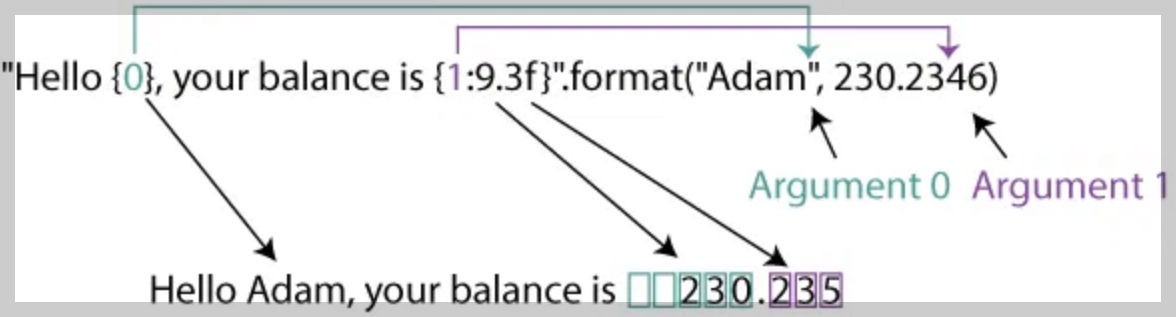
str.format() 메소드(format method)를 이용한 string formatting (Python 2.6+).
신규 코드 작성의 경우, f-string을 이용하는 경우가 보다 더 권장됨.
https://dsaint31.tistory.com/532
[Python] f-String
Python : f-StringPython 3.6 이후 도입됨.기존의 중괄호 {}과 format 메소드를 사용하여 문자열 포매팅을 설정하는 방식(Python 2.6 이후)과 유사하지만, 더 직관적으로 문자열을 포맷팅할 수 있는 기능으로
dsaint31.tistory.com
1. str.format()
str.format() 메소드는
- 문자열 내 중괄호(
{}, placeholder)를 특정 값으로 치환하여 새로운 문자열을 생성하는 방식 - Python 2.6부터 사용 가능
기존 percent formatting 방식보다 가독성과 유연성이 높고, OOP에 익숙한 프로그래머들에게 보다 친숙한 방식
2. 위치 기반 포맷(Position Index Based Formatting)의 사용
text = "로봇은 {}년에 출시되었으며, 가격은 {}원입니다. 제품명은 {}입니다.".format("2024", 125000, "박스")
print(text)
# 출력: '로봇은 2024년에 출시되었으며, 가격은 125000원입니다. 제품명은 박스입니다.'{}는format메소드에 전달된 argument의 순서(position index)를 기준으로 치환됨.- 중괄호에 인덱스를 생략하면 format 메소드에 전달된 순서대로 자동 대응함.
- implicit indexing.
{1} {0} {2}처럼 중괄호 내 position index를 재지정하여 출력 순서를 자유롭게 구성 가능함.- explicit indexing.
text = "{2}이(가) 출시된 연도는 {0}이며, 가격은 {1}원입니다.".format("2024", 125000, "박스")
print(text)
# 박스이(가) 출시된 연도는 2024이며, 가격은 125000원입니다.
3. 이름 기반 포맷(Name-Based Formatting)의 사용
- 중괄호에 identifier를 지정하고,
format메서드 호출 시 keyword argument 를 전달하는 포맷 방식임.
text = "제품명: {name}, 가격: {price}".format(name="로봇", price=125000)
print(text)
# 출력: '제품명: 로봇, 가격: 125000'
4. 언패킹(Unpacking)에 의한 인자 전달
4-1. List/Tuple Unpacking: *
my_list = ["로봇", 125, "박스"]
text = "제품: {}, 가격: {}, 포장: {}".format(*my_list)
4-2. Dictionary Unpacking: **
my_dict = {"toy": "로봇", "price": 3500}
text = "제품: {toy}, 가격: {price}".format(**my_dict)
5. Indexing and Key Access
format메서드의 argument가 list, tuple, dictionary등의 composite structure일 경우엔- indexing 및 key를 통한 내부 요소 접근 가능.
data = ["박스", [24, 31]]
text = "{0}, 내부값: {1[0]}".format(*data)
print(text)
# 출력: '박스, 내부값: 24'

item_info = {"toy": "로봇", "price": 3500}
text = "장난감: {0[toy]}, 가격: {0[price]}".format(item_info)
print(text)
# 출력: '장난감: 로봇, 가격: 3500'
6. 형식 지정자(Format Specifier)의 구성
- 중괄호 내에서 index(or key) 뒤에 colon
:기호 이후에 등장하는 구성요소 - 출력 형식(format style)을 세부 조정하는 명령어 세트.
6-1. 실수 출력(Float Format: f)
text = "{:.2f}".format(3.14159)
print(text)
# 출력: '3.14'- 소수점 이하 자리수를 지정하여 출력하는 방식
- decimal precision format.
6-2. 정수 출력(Integer Format: d)
text = "{:d}".format(123)
print(text)
# 출력: '123'- 정수를 출력
- 10진수(decimal integer)
6-3. Precision Specification: .precision
text = "{:.4f}".format(3.141592)
print(text)
# 출력: '3.1416'- 소수점 이하 자리수(precision)를 제한.
- 단
f가 아닌 문자열s인 경우 문자열의 최대길이를 지정함.
6-4. Field Width
text = "{:9.2f}".format(3.14)
print(text)
# 출력: ' 3.14'- 출력될 최소 자리수(width)를 지정
- 부족한 자리는 padding character (or fill character)로 채우는 방식임.
- fill character 는 기본이 공백문자이나, 지정 가능함.
6-5. Alignment and Fill Character
- Left align :
<- 좌측 배치 후 빈 칸 채움
- Right align :
>- 우측 배치 (기본값)
- Center align :
^- 가운데 정렬 후 여백 분배
"{:<10}".format("Hi")     # 'Hi        '
"{:*>10}".format("Hi")    # '********Hi'
"{:^10}".format("Hi")     # '   Hi     '
fill character
- fill character는 위의 정렬 기호 앞에 위치
- 지정안할 경우, 공백문자(space)가 기본 사용됨.
6-6. Sign Handling: +
"{:+}".format(5)   # '+5'
"{:+}".format(-5) # '-5'- Positive Number에도
+기호를 출력하도록 지시. d,f,e,g등의 numeric type에만 동작함.
같이 보면 좋은 자료들
2024.09.04 - [Python] - [Py] Python에서 string formatting.
[Py] Python에서 string formatting.
Python에서 문자열에서 변수의 값을 출력하는 방법(string formatting)에는다음과 같은 세 가지 주요 방법이 있음:% 포맷팅 (%-formatting):공식 명칭: Percent formatting도입 버전: Python 초기 버전부터 사용 가
ds31x.tistory.com
2025.07.31 - [Python] - percent(%) formatting
percent(%) formatting
Percent formattingOld Style String Formatting이라고도 불림.파이썬에서 string 내에 variable의 값을 삽입하기 위해 % 연산자를 사용하는 방식.C 언어에서와 매우 유사하기 때문에 "printf-style formatting"이라고도
ds31x.tistory.com
https://dsaint31.tistory.com/532
[Python] f-String
Python : f-StringPython 3.6 이후 도입됨.기존의 중괄호 {}과 format 메소드를 사용하여 문자열 포매팅을 설정하는 방식(Python 2.6 이후)과 유사하지만, 더 직관적으로 문자열을 포맷팅할 수 있는 기능으로
dsaint31.tistory.com
'Python' 카테고리의 다른 글
| pyperclip-Python에서 clipboard사용하기 (3) | 2025.08.06 |
|---|---|
| urllib.parse.quote, urllib.parse.urlencode (3) | 2025.08.06 |
| percent(%) formatting (2) | 2025.07.31 |
| list의 sort() 메서드 와 sorted() 내장 함수 (3) | 2025.07.30 |
| Compound Statement란? (3) | 2025.07.27 |


