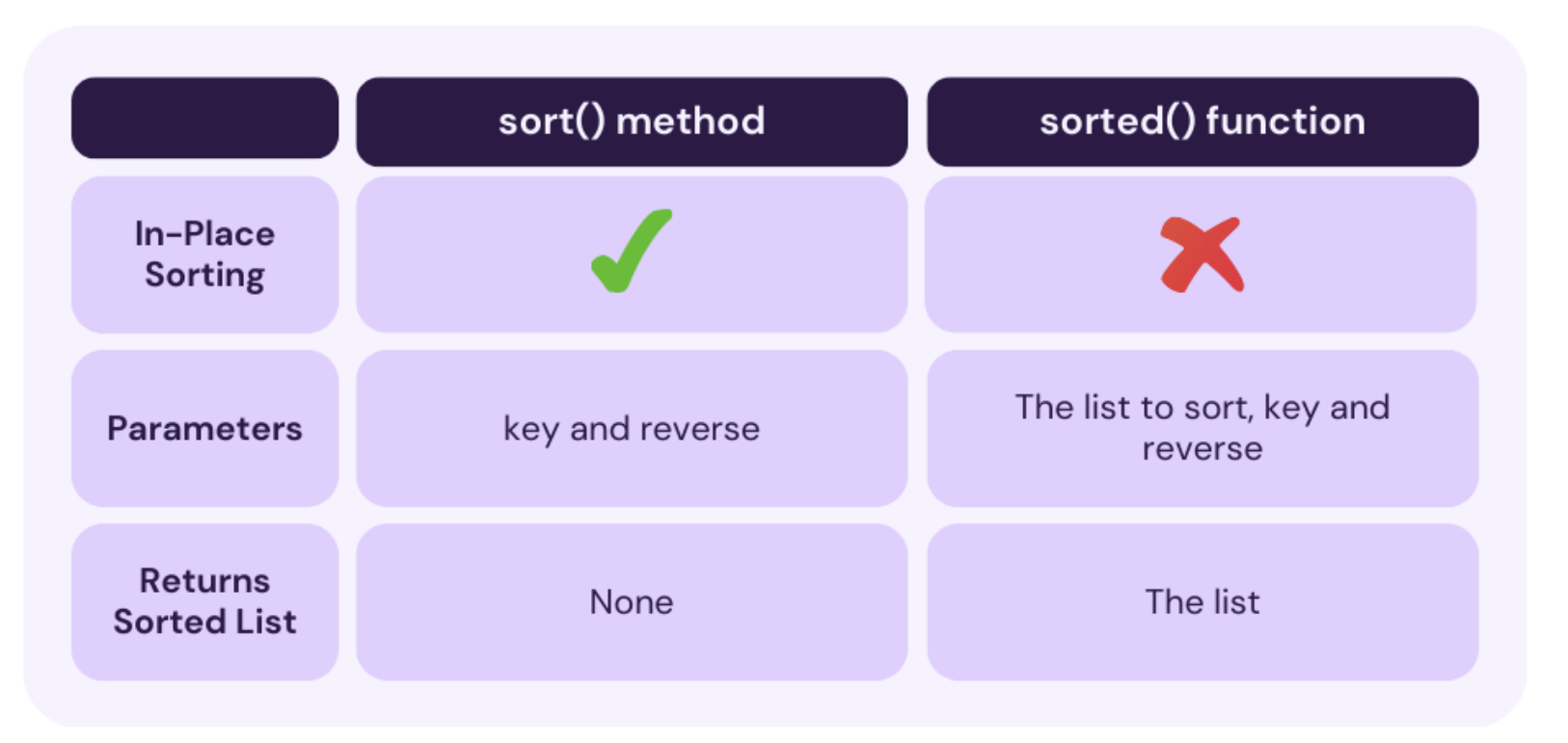
list.sort() 메서드: list를 in-place sorting을 수행함.
- 이 메서드는 원본 리스트를 직접 수정: in-place sorting
- 때문에 정렬된 새 리스트를 반환하지 않음:
None반환
기본 사용법: sort in ascending order
sort() 메서드를 argument 없이 호출하면
리스트의 요소들을 오름차순(ascending order) 으로 정렬:
my_numbers = [3, 1, 4, 1, 5, 9, 2, 6]
my_numbers.sort()
print(my_numbers)

# 출력: [1, 1, 2, 3, 4, 5, 6, 9]
str문자는 lexicographical order(사전식 순서)로 sort(정렬)
- 첫번째 요소가 다를 경우, 보다 “작은” 첫번째 요소를 가진 객체가 먼저 놓임.
- 첫번째 요소가 같을 경우, 두번째 요소를 비교하는 식으로 요소가 다를 때까지 왼쪽에서 오른쪽으로 진행.
- 두 객체 비교에서 더 짧은 객체가 다른 객체의 prefix인 경우, 이 더 짧은 객체가 먼저 놓임.
my_strings = ["banana", "apple", "cherry", "date"]
my_strings.sort()
print(my_strings)

# 출력: ['apple', 'banana', 'cherry', 'date']
주의:
list.sort()는None을 반환 (in-place sorting).- 때문에 반환값을 원래의
list객체를 가리키는 변수에 할당시,None이 되어버림.
data = [5, 2, 8]
data = data.sort() # data는 None이 됩니다.
print(data)   # 출력: None
내림차순 정렬: reverse=True
리스트를 내림차순(descending order) 으로 정렬하려면,
reverse=True 인자를 넘기면 됨.
my_numbers = [3, 1, 4, 1, 5, 9, 2, 6]
my_numbers.sort(reverse=True)
print(my_numbers)

# 출력: [9, 6, 5, 4, 3, 2, 1, 1]
다음은 문자열을 item으로 가지는 list객체에서의 sorting 을 보여주는 예제.
my_strings = ["banana", "apple", "cherry", "date"]
my_strings.sort(reverse=True)
print(my_strings)

# 출력: ['date', 'cherry', 'banana', 'apple']
Custom Sorting: key parameter 이용
key parameter에
- item별로 정렬에 사용할 key를 반환하는 function 객체를 할당하여 전달하면,
- 리스트의 각 item이 각각 해당 함수에 argument로 넘겨져 반환되는 key값을 기준으로 정렬이 이루어짐.
이는 복잡한 객체나 특정 규칙에 따라 정렬할 때 사용됨.
Example 1: 문자열 길이로 정렬
words = ["apple", "banana", "kiwi", "grapefruit"]
words.sort(key=len) # 각 문자열의 길이를 기준으로 정렬합니다.
print(words)

# 출력: ['kiwi', 'apple', 'banana', 'grapefruit']
Example 2: 대소문자 무시하고 정렬
문자열을 소문자로 변환하여 비교함으로써 대소문자를 무시한 정렬을 할 수 있음.
words = ["banana", "Orange", "Kiwi", "apple"]
words.sort(key=str.lower) # 각 문자열을 소문자로 변환한 값을 기준으로 정렬합니다.
print(words)

# 출력: ['apple', 'banana', 'Kiwi', 'Orange'] (원본 문자열의 대소문자는 유지됩니다.)
Example 3: Custom Class 리스트 정렬
Custom Class (사용자 정의 클래스) 인스턴스로 구성된 리스트를 특정 속성 기준으로 정렬할 때 lambda 함수를 key로 자주 사용함.
class Product:
    def **init**(self, name, price):
        [self.name](http://self.name/) = name
        self.price = price
    def __repr__(self):
        return f"Product('{self.name}', ${self.price})"

products = [
    Product("Laptop", 1200),
    Product("Mouse", 25),
    Product("Keyboard", 75),
]

# -----------
# 가격을 기준으로 오름차순 정렬
products.sort(key=lambda p: p.price)
print(products)

# 출력: [Product('Mouse', $25), Product('Keyboard', $75), Product('Laptop', $1200)]

# -----------
# 이름을 기준으로 내림차순 정렬
products.sort(key=lambda p: [p.name](http://p.name/), reverse=True)
print(products)

# 출력: [Product('Mouse', $25), Product('Keyboard', $75), Product('Laptop', $1200)]
참고:
lambda p: p.name은Product객체p가 주어졌을 때p.name값을 반환하는 익명 함수.
2023.07.07 - [Python] - [Python] lambda expression and map, filter, reduce.
[Python] lambda expression and map, filter, reduce.
Lambda expression (or Lambda Function, Anonymous Function)Python 에서 lambda function (or lambda expression)은 anonymous function(익명함수)를 만드는데 사용됨.function 형태로 code구현의 재사용을 해야하긴 하지만, def문을 이
ds31x.tistory.com
참고: stable sort (안정 정렬)
list.sort() 메서드는 안정 정렬(stable sort) 알고리즘을 사용함.
이는 정렬 기준으로 사용되는 값이 동일한 요소들의 상대적인 순서가 정렬 후에도 그대로 유지됨을 의미함.
employees = [
    (101, "Alice",   50000),
    (102, "Bob",     60000),
    (103, "Charlie", 50000), # Alice와 동일한 연봉
]

# 연봉(세 번째 요소)을 기준으로 정렬
# (101, "Alice", 50000)과 (103, "Charlie", 50000)의
# 연봉은 같지만, 원래 리스트에서
# Alice가 Charlie보다 먼저 나왔으므로,
# 정렬 후에도 순서가 유지됨.
employees.sort(key=lambda emp: emp[2])
print(employees)

# 출력: [(101, 'Alice', 50000), (103, 'Charlie', 50000), (102, 'Bob', 60000)]
sorted() 함수의 차이점
list.sort() 메서드와 유사한 기능을 수행하는 built-in 함수 sorted() 도 존재함.
sorted() 함수는 list 외의 모든 iterable 객체에서도 동작함.
list,tuple,dict,set,str객체들 모두iterable객체임.sorted()함수는 인자로 넘겨진iterable객체를 바탕으로 sorting을 수행하고,list객체로 반환됨.
example:
original_list = [3, 1, 4]

# sorted() 함수 사용: 원본은 그대로 두고 새로운 정렬된 리스트 반환
new_sorted_list = sorted(original_list)
print(new_sorted_list)  # 출력: [1, 3, 4]
print(original_list)    # 출력: [3, 1, 4] (원본 유지)

# list.sort() 메서드 사용: 원본 리스트 자체를 변경
original_list.sort()
print(original_list)    # 출력: [1, 3, 4]
같이 보면 좋은 자료들
https://ds31x.tistory.com/47#%EC%88%9C%EC%84%9C-%EB%B0%8F-%EC%A0%95%EB%A0%AC-%EA%B4%80%EB%A0%A8
[Python] List's methods
Methods of List일반적으로 object에 대해 method를 호출할 경우,해당 object의 관련 attribute의 값이 바뀌고 None을 반환하는 경우가 많다.(단, NumPy나 Pandas 등의 경우, 해당 object의 값을 바꾸면서 바뀐 object
ds31x.tistory.com
'Python' 카테고리의 다른 글
| str.format() 메서드 - string formatting (2) | 2025.08.01 |
|---|---|
| percent(%) formatting (2) | 2025.07.31 |
| Compound Statement란? (3) | 2025.07.27 |
| Magic commands-Jupyter NoteBook&IPython (1) | 2025.07.24 |
| Jupyter NoteBook-vscode 확장 중심 (4) | 2025.07.21 |


