관련 공식 문서
OpenCV 공식 튜토리얼:
https://docs.opencv.org/4.x/dc/dbb/tutorial_py_calibration.html
OpenCV: Camera Calibration
Goal In this section, we will learn about types of distortion caused by cameras how to find the intrinsic and extrinsic properties of a camera how to undistort images based off these properties Basics Some pinhole cameras introduce significant distortion t
docs.opencv.org
OpenCV API 문서:
https://docs.opencv.org/4.x/d9/d0c/group__calib3d.html
OpenCV: Camera Calibration and 3D Reconstruction
The functions in this section use a so-called pinhole camera model. The view of a scene is obtained by projecting a scene's 3D point \(P_w\) into the image plane using a perspective transformation which forms the corresponding pixel \(p\). Both \(P_w\) and
docs.opencv.org
OpenCV 레거시 튜토리얼:
https://opencv24-python-tutorials.readthedocs.io/
함수 개요 (공식 정의)
cv.getOptimalNewCameraMatrix()
- free scaling parameter
alpha를 기반으로 camera matrix $K$ refine(정제)하는 함수. - Returns the new camera matrix based on the free scaling parameter (공식 문서)
Signature
newcameramtx, roi = cv.getOptimalNewCameraMatrix(
    mtx,           # camera matrix (3x3)
    dist,          # distortion coef. (k1,k2,p1,p2,k3)
    (w,h),         # 이미지 크기 (width, height)
    1,             # alpha: Free scaling parameter (0~1)
    (w,h)          # 새 이미지 크기 (보통 원본과 동일)
)- cv.calibrateCamera 로 얻어진 mtx $K$와 dist를 인자로 넣어줌.
Free Scaling Parameter: alpha**
공식 문서에서의 정의는 다음과 같음:
Free scaling parameter between 0 (when all the pixels in the undistorted image are valid) and 1 (when all the source image pixels are retained in the undistorted image)
즉, [0.0, 1.0] 사이의 값을 가짐.
Alpha = 0:
If the scaling parameter alpha=0,
- it returns undistorted image with minimum unwanted pixels.
- So it may even remove some pixels at image corners
undistorted image를 구하고 나서 일종의 Zoom in 및 중점을 이동시켜서 결과 이미지에 최대한 검은색인 외곽부분이 없도록 만듬.
때문에 결과 이미지의 모든 pixel이 유효하지만, 수정 전의 픽셀 중 상당부분이 crop 될 수 있음.
Alpha = 1:
If alpha=1, all pixels are retained with some extra black images
undistorted image를 구하고, 원본 이미지의 모든 픽셀이 undistorted image에 포함되도록 zoom out 및 중점 이동을 수행.
극단적인 경우라면 다음과 같이 나오게 됨:
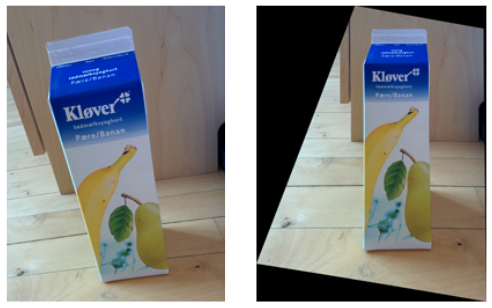
참고: StackOverflow의 의견 종합:
By specifying a free scale parameter >0, we are actually asking the algorithm to zoom out a bit so that the border pixels also get included. This results in a larger field of view and a smaller focal length"
"When called with alpha = 1, all original regions of the distorted image are also included in the rectified image. The new camera matrix is determined in such a way that the corner points of the distorted image are mapped to the corner points of the rectified imag
roi (Region of Interest) 반환값**
free scaling parameter가 0보다 큰 경우엔,
전체 이미지에서 alpha=0 수준으로 유효한 이미지들로 나온 이미지를 얻을 수 있게 roi가 지정되어 나오게 됨.
alpha=0인 경우엔 undisroted image의 전 영역이 roi로 나옴.
OpenCV 공식 튜토리얼 예제:
다음은 cv.undistort() 함수와 같이 사용하는 예제임:
# 공식 문서 예제 (https://docs.opencv.org/4.x/dc/dbb/tutorial_py_calibration.html)
img = cv.imread('left12.jpg')
h, w = img.shape[:2]
newcameramtx, roi = cv.getOptimalNewCameraMatrix(mtx, dist, (w,h), 1, (w,h))

# undistort
dst = cv.undistort(img, mtx, dist, None, newcameramtx)

# crop the image
x, y, w, h = roi
dst = dst[y:y+h, x:x+w]
cv.imwrite('calibresult.png', dst)
주의할 점
alpha = 0 사용 시기:
- "minimum unwanted pixels"이 필요한 경우
- 깔끔한 결과물이 우선인 애플리케이션
alpha = 1 사용 시기:
- "all pixels are retained"이 필요한 경우
- 정보 손실을 최소화해야 하는 애플리케이션
같이 보면 좋은 자료들
2024.09.22 - [Python] - [CV] cv2.calibrateCamera
[CV] cv2.calibrateCamera
cv2.calibrateCamerahttps://docs.opencv.org/4.x/d9/d0c/group__calib3d.html#ga3207604e4b1a1758aa66acb6ed5aa65d OpenCV: Camera Calibration and 3D ReconstructionThe functions in this section use a so-called pinhole camera model. The view of a scene is obtained
ds31x.tistory.com
https://gist.github.com/dsaint31x/5c5dfe8e2a57bd6ffe8560d6a2f3b86b
dip_camera_calibration.ipynb
dip_camera_calibration.ipynb. GitHub Gist: instantly share code, notes, and snippets.
gist.github.com
2025.07.04 - [Python] - cv.undistort()와 cv.initUndistortRectifyMap() + cv.remap()
cv.undistort()와 cv.initUndistortRectifyMap() + cv.remap()
OpenCV는cv.calibrateCamera() 를 통해 얻은camera matrix와 distortion coefficients를 이용하여undistorted image를 생성하는 방법으로다음 2가지를 지원함:cv.undistort()cv.initUndistortRectifyMap() + cv.remap()관련 gist URLhttps://g
ds31x.tistory.com
'Python' 카테고리의 다른 글
| [Py] String Interning (0) | 2025.07.07 |
|---|---|
| cv.undistort()와 cv.initUndistortRectifyMap() + cv.remap() (0) | 2025.07.04 |
| Pillow에서 Custom Kernel Filter 사용 (0) | 2025.07.02 |
| Pillow 사용법 - Basic 04 - ImageFilter (2) | 2025.07.01 |
| Pillow 사용법 - Basic 02 - copy, ImageDraw (0) | 2025.07.01 |


