torchvision.transforms.v2.functional 모듈에서 제공하는
이미지 데이터 간 데이터 타입 변환(Conversion)에 적용할 수 있는 함수들을 소개함.
관련 gist 파일
https://gist.github.com/dsaint31x/e7ecca469cf41dbd12afaa7b40f45f0e
dl_Conversion-torchvision.transforms.v2.functional.ipynb
dl_Conversion-torchvision.transforms.v2.functional.ipynb - dl_conversion-torchvision-transforms-v2-functional.ipynb
gist.github.com
0. Prerequisites
torchvision.transforms.v2.functional 모듈은,
- 이미지 tensor 객체를 입력으로 받아
- 해당 이미지에 직접 적용할 수 있는 다양한 이미지 변환 함수들을 제공함.
제공되는 함수들은
torchvision.transfroms.v2 의 Transform 클래스들과 달리,
- 상태(state)를 가지지 않으며, 입력 텐서(이미지 등)를 인자로 직접 받아 변환된 텐서를 즉시 반환함.
- 간단하고 직접적이며, 변환을 한 번만 적용하거나 사용자 정의 변환 함수 내에서 다른 함수들을 조합할 때 유용
- 여러 변환을 순차적으로 적용하는 복잡한 파이프라인을 구축할 경우,
- 각 함수 호출마다 반복적인 인자 전달이 필요하여 다소 불편할 수 있음.
colab에서 다음의 코드들을 수행시켜서 이미지를 다운로드하고 아래의 예제 코드를 수행할 수 있도로 함:
from torchvision.transforms.v2.functional import (
    crop,
    resized_crop,
    center_crop,
    five_crop,
    ten_crop,
)

img_path = "assets/astronaut.jpg"
img_url = "https://raw.githubusercontent.com/pytorch/vision/main/gallery/assets/astronaut.jpg"

!mkdir -p assets/coco/images
!curl -o assets/astronaut.jpg {img_url}

from torchvision.io import decode_image

original_img = decode_image(img_path)

print(f" {type(original_img) = }\n \
{original_img.dtype = }\n \
{original_img.shape = }")
다음은 이미지 출력을 위한 plot 함수임:
# https://github.com/pytorch/vision/tree/main/gallery/
# 위의 torchvision관련 예제들의 display를 위한 plot함수를 그대로 가져옴.

import matplotlib.pyplot as plt
import torch
from torchvision.utils import draw_bounding_boxes, draw_segmentation_masks
from torchvision import tv_tensors
from torchvision.transforms.v2 import functional as F


def plot(imgs, row_title=None, **imshow_kwargs):
    if not isinstance(imgs[0], list):
        # Make a 2d grid even if there's just 1 row
        imgs = [imgs]

    num_rows = len(imgs)
    num_cols = len(imgs[0])
    _, axs = plt.subplots(nrows=num_rows, ncols=num_cols, squeeze=False)
    for row_idx, row in enumerate(imgs):
        for col_idx, img in enumerate(row):
            boxes = None
            masks = None
            if isinstance(img, tuple):
                img, target = img
                if isinstance(target, dict):
                    boxes = target.get("boxes")
                    masks = target.get("masks")
                elif isinstance(target, tv_tensors.BoundingBoxes):
                    boxes = target
                else:
                    raise ValueError(f"Unexpected target type: {type(target)}")
            img = F.to_image(img)
            if img.dtype.is_floating_point and img.min() < 0:
                # Poor man's re-normalization for the colors to be OK-ish. This
                # is useful for images coming out of Normalize()
                img -= img.min()
                img /= img.max()

            img = F.to_dtype(img, torch.uint8, scale=True)
            if boxes is not None:
                img = draw_bounding_boxes(img, boxes, colors="yellow", width=3)
            if masks is not None:
                img = draw_segmentation_masks(img, masks.to(torch.bool), colors=["green"] * masks.shape[0], alpha=.65)

            ax = axs[row_idx, col_idx]
            ax.imshow(img.permute(1, 2, 0).numpy(), **imshow_kwargs)
            ax.set(xticklabels=[], yticklabels=[], xticks=[], yticks=[])

    if row_title is not None:
        for row_idx in range(num_rows):
            axs[row_idx, 0].set(ylabel=row_title[row_idx])

    plt.tight_layout()
1. to_pil_image(pic, mode=None)
- 역할:
- torch Tensor 또는 numpy ndarray를
- PIL Image로 변환.
- 사용 시점:
- Tensor 형태로 처리된 이미지를
- PIL Image로 변환하여 저장하거나 시각화할 때 사용.
- 주요 파라미터:
pic(torch Tensor 또는 numpy ndarray): 변환할 Tensor 또는 ndarray.mode(str, optional): 생성될 PIL Image의 모드.None이면 입력 형태에 따라 자동으로 결정.
# Torch Tensor를 PIL Image로 변환
pil_from_tensor = to_pil_image(original_img)

# 결과 확인
print(f"{type(original_img)    = }")
print(f"{type(pil_from_tensor) = }")

# Result
# type(original_img)    = <class 'torch.Tensor'>
# type(pil_from_tensor) = <class 'PIL.Image.Image'>
2. to_image(inpt)
- 역할:
- 다양한 입력 형식(PIL Image, numpy ndarray, torch Tensor)을
- torchvision의 내부 이미지 Tensor 형식(CHW,
dtype=uint8/float32등)으로 변환. - 입력 이미지 데이터를
Tensor형태로 통일시키는 데 사용됨.
- 사용 시점:
- 다른 torchvision 변환 함수들을 적용하기 전에
- 입력 형식을 표준화해야 할 때 사용.
- 주요 파라미터:
inpt(PIL Image, numpy ndarray, torch Tensor): 변환할 입력 데이터.
import numpy as np

# PIL Image를 torchvision Tensor로 변환
img_tv_from_pil = to_image(pil_from_tensor)
# img_tv_from_pil = to_image(np.array(pil_from_tensor))

# 결과 확인
print(f"Original PIL Image type:          {type(pil_from_tensor)}")
print(f"Image Tensor from PIL (to_image): {type(img_tv_from_pil)}")
print(f"Image Tensor shape:               {img_tv_from_pil.shape}")
print(f"Image Tensor dtype:               {img_tv_from_pil.dtype}") # 보통 uint8

# Result
# Original PIL Image type:          <class 'PIL.Image.Image'>
# Image Tensor from PIL (to_image): <class 'torchvision.tv_tensors._image.Image'>
# Image Tensor shape:               torch.Size([3, 512, 512])
# Image Tensor dtype:               torch.uint8
3. pil_to_tensor(pic)
- 역할:
- PIL Image를 torch Tensor (CHW 형식, dtype=uint8)로 변환.
- 사용 시점:
- PIL Image로 로드된 이미지를 Tensor 형태로 변환
- PyTorch 모델의 입력으로 사용하거나
- 다른 Tensor 기반 연산을 적용하고자 할 때 사용.
- 주요 파라미터:
- pic (PIL Image): 변환할 PIL Image 객체.
tensor_from_pil_explicit = pil_to_tensor(pil_from_tensor)

# 결과 확인
print(f"Original PIL Image type:         {type(pil_from_tensor)}")
print(f"Tensor from PIL (pil_to_tensor): {type(tensor_from_pil_explicit)}")
print(f"Tensor shape:                    {tensor_from_pil_explicit.shape}")
print(f"Tensor dtype:                    {tensor_from_pil_explicit.dtype}") # 항상 uint8

# Result
# Original PIL Image type:         <class 'PIL.Image.Image'>
# Tensor from PIL (pil_to_tensor): <class 'torch.Tensor'>
# Tensor shape:                    torch.Size([3, 512, 512])
# Tensor dtype:                    torch.uint8
3. to_dtype(inpt, dtype, scale=False)
- 역할:
- 입력 Tensor의 데이터 타입을 변경.
- 필요에 따라 값의 범위를 [0.0,1.0]으로 scaling을 적용할 수도 있음.
- 참고: PIL image 를 input으로 사용하진 못함.
- 사용 시점:
- 모델 입력 요구사항에 맞게 이미지 Tensor의 데이터 타입을 변경하거나,
- 데이터 타입 변환 시 값 범위를 조정해야 할 때 사용됨.
- torch.uint8 에서 scale=True면 [0,255] / torch.float32 에서 scale=Treu면 [0.0,1.0]
- 주요 파라미터:
inpt(torch Tensor): 데이터 타입을 변경할 입력 Tensor.dtype(torch.dtype): 변환하고자 하는 데이터 타입.scale(bool): 데이터 타입 변경 시 값의 스케일링을 적용할지 여부.uint8(0-255)에서float32(0.0-1.0)으로 변환 시True로 설정하여 해당scaling을 할 수 있음.False가 기본값.
4. convert_bounding_box_format(bboxes, old_format, new_format)
- 역할:
- Bounding box 의 좌표 형식을 다른 형식으로 변환.
- 특히
tv_tensors.BoundingBoxes객체를 입력으로 사용할 경우, 객체 자체에 저장된 형식 정보를 활용하여 변환을 수행. - 예:
xyxy(xmin, ymin, xmax, ymax) 형식을cxcywh(center_x, center_y, width, height) 형식으로 변환.
- 사용 시점:
- 객체 감지 작업에서 모델이나 라이브러리 요구사항에 맞게 Bounding box 형식을 맞출 때 사용됨.
- 입력이
tv_tensors.BoundingBoxes객체일 경우,- 객체 생성 시
canvas_size에 이미지 크기를 명시하여 - 정규화/비정규화와 같은 크기 정보가 필요한 변환을 올바르게 수행할 수 있음.
- 객체 생성 시
- 입력이 일반 PyTorch의 Tensor인 경우,
old_format인자를 명시하여 변환을 수행.
- 주요 파라미터:
bboxes(Tensor또는tv_tensors.BoundingBoxes): 변환할 바운딩 박스 Tensor 또는 객체.old_format(str, optional): 현재 바운딩 박스의 형식'xyxy''xywh''cxcywh''ycxcwh'- 참고: 입력이
tv_tensors.BoundingBoxes객체인 경우 이 인자는 전달해서는 안 됨.
new_format(str): 변환하고자 하는 바운딩 박스의 형식'xyxy','xywh','cxcywh','ycxcwh'.
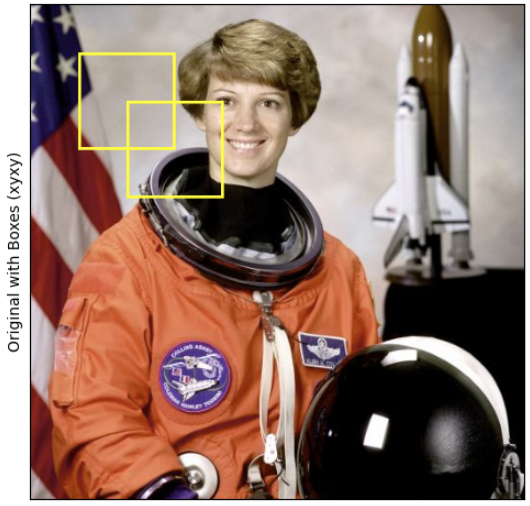
tv_tensors.BoundingBoxes 의 경우 (권장):
# convert_bounding_box_format 함수 예제
from torchvision.tv_tensors import BoundingBoxes

# 예시 바운딩 박스 (xyxy 형식)
boxes_xyxy = torch.tensor([[50, 50, 150, 150], [100, 100, 200, 200]], dtype=torch.float32)
image_size = (original_img.shape[-2], original_img.shape[-1]) # (height, width)

# tv_tensors.BoundingBoxes 객체 생성 (image_size 포함)
boxes_xyxy = BoundingBoxes(
    boxes_xyxy,
    format="xyxy",
    canvas_size=image_size,
    )


# xyxy 형식을 cxcywh 형식으로 변환
boxes_cxcywh = convert_bounding_box_format(
    boxes_xyxy,
    # old_format='xyxy',
    new_format='cxcywh',
    )

# 결과 확인
print(f"Original boxes (xyxy):    {boxes_xyxy}")
print(f"Converted boxes (cxcywh): {boxes_cxcywh}")
print(f"{type(boxes_xyxy)   = }")
print(f"{type(boxes_cxcywh) = }")

# Result
# Original boxes (xyxy):    BoundingBoxes([[ 50.,  50., 150., 150.],
#               [100., 100., 200., 200.]], format=BoundingBoxFormat.XYXY, canvas_size=(512, 512))
# Converted boxes (cxcywh): BoundingBoxes([[100., 100., 100., 100.],
#               [150., 150., 100., 100.]], format=BoundingBoxFormat.CXCYWH, canvas_size=(512, 512))
# type(boxes_xyxy)   = <class 'torchvision.tv_tensors._bounding_boxes.BoundingBoxes'>
# type(boxes_cxcywh) = <class 'torchvision.tv_tensors._bounding_boxes.BoundingBoxes'>
PyTorch의 Tensor로 된 Bounding Box의 경우:
# 예시 바운딩 박스 (일반 Tensor, xyxy 형식)
boxes_xyxy_tensor = torch.tensor([[50, 50, 150, 150], [100, 100, 200, 200]], dtype=torch.float32)

# xyxy 형식을 cxcywh 형식으로 변환 (Tensor 입력)
# image_size 인자는 필요 없습니다.
boxes_cxcywh_tensor = convert_bounding_box_format(
    boxes_xyxy_tensor,
    old_format='xyxy',
    new_format='cxcywh'
)

# 결과 확인
print(f"Original Tensor boxes (xyxy): {boxes_xyxy_tensor}")
print(f"Converted Tensor boxes (cxcywh): {boxes_cxcywh_tensor}")

# Result
# Original Tensor boxes (xyxy): tensor([[ 50.,  50., 150., 150.],
#        [100., 100., 200., 200.]])
# Converted Tensor boxes (cxcywh): tensor([[100., 100., 100., 100.],
#        [150., 150., 100., 100.]])
5. to_tensor(pic) (Deprecated)
- 역할:
- PIL Image 또는 numpy ndarray를 torch Tensor (CHW 형식)로 변환.
- 참고: 이 함수는 더 이상 권장되지 않음.
- 대신
to_image()와to_dtype()의 조합을 대신 사용하는 것이 권장됨.
- 사용 시점:
- 하위 호환성을 위해 존재
- 새 코드를 작성할 때는
to_image()와to_dtype()조합을 사용할 것.
- 주요 파라미터:
- pic (PIL Image 또는 numpy ndarray): 변환할 입력.
PIL Image로부터:
# PIL Image를 Tensor로 변환 (Deprecated 함수 사용)
tensor_from_pil = to_tensor(pil_from_tensor)

# 결과 확인
print(f"Original PIL Image type:     {type(pil_from_tensor)}")
print(f"Tensor from PIL (to_tensor): {type(tensor_from_pil)}")
print(f"Tensor shape: {tensor_from_pil.shape}")
print(f"Tensor dtype: {tensor_from_pil.dtype}")

# Result
# Original PIL Image type:     <class 'PIL.Image.Image'>
# Tensor from PIL (to_tensor): <class 'torch.Tensor'>
# Tensor shape: torch.Size([3, 512, 512])
# Tensor dtype: torch.float32
numpy의 ndarray로부터:
# 예시 Numpy Array 생성 및 변환
# original_img 텐서를 numpy array로 변환하여 예제로 사용합니다.
img_np = original_img.permute(1, 2, 0).numpy() # HWC 형식 (matplotlib에 적합)

# Numpy Array를 Tensor로 변환 (Deprecated 함수 사용)
tensor_from_np = to_tensor(img_np)

# 결과 확인
print(f"\nOriginal Numpy Array type:     {type(img_np)}")
print(f"Tensor from Numpy (to_tensor): {type(tensor_from_np)}")
print(f"Tensor shape: {tensor_from_np.shape}")
print(f"Tensor dtype: {tensor_from_np.dtype}")

# Result
# Original Numpy Array type:     <class 'numpy.ndarray'>
# Tensor from Numpy (to_tensor): <class 'torch.Tensor'>
# Tensor shape: torch.Size([3, 512, 512])
# Tensor dtype: torch.float32
6. convert_image_dtype(image, dtype, scale=False) (Deprecated)
- 역할:
- 이미지 Tensor의 데이터 타입을 변경.
- 필요에 따라 값의 범위를 바꾸기 위해 scaling을 적용할 수 있음.
- 참고:
- 이 함수는 더 이상 권장되지 않음.
- 대신
to_dtype()를 사용하는 것이 권장됨.
- 사용 시점:
- 하위 호환성을 위해 존재하며,
- 새 코드를 작성할 때는
to_dtype()를 사용할 것.
- 주요 파라미터:
image(torch Tensor): 데이터 타입을 변경할 이미지 Tensor.dtype(torch.dtype): 변환하고자 하는 데이터 타입.scale(bool): 데이터 타입 변경 시 값의 스케일링을 적용할지 여부.False가 기본값임.- 0.21.0+cu124 에선 scale파라미터를 지원 안함 (자동으로 적용).
# original_img는 uint8 타입이라고 가정합니다.
print(f"Original image dtype:     {original_img.dtype}")
print(f"Original image min value: {original_img.min()}")
print(f"Original image max value: {original_img.max()}")

# uint8에서 float32로 변환 (Deprecated 함수 사용, 스케일링 적용)
converted_img_float32 = convert_image_dtype(
    original_img,
    dtype=torch.float32,
    # scale=True, # 현재는 scale파라미터 지원 안함.
    )

# 결과 확인
print(f"Converted image dtype (float32, scaled): {converted_img_float32.dtype}")
print(f"Converted image min value: {converted_img_float32.min()}")
print(f"Converted image max value: {converted_img_float32.max()}")

# Result
# Original image dtype:     torch.uint8
# Original image min value: 0
# Original image max value: 255
# Converted image dtype (float32, scaled): torch.float32
# Converted image min value: 0.0
# Converted image max value: 1.0
같이 보면 좋은 자료들
https://docs.pytorch.org/vision/main/transforms.html#conversion
Transforming and augmenting images — Torchvision main documentation
Shortcuts
docs.pytorch.org
'Python' 카테고리의 다른 글
| [PyTorch] Miscellanceous-Torchvision.transforms.v2.functional (0) | 2025.06.11 |
|---|---|
| [DL] CutMix and MixUp - Data Augmentation (0) | 2025.06.11 |
| [PyTorch] Geometry-Others-Torchvision.transforms.v2.functional (1) | 2025.06.10 |
| [PyTorch] Resize and Crop-torchvision.transforms.v2.functional (0) | 2025.06.10 |
| [Py] PyInstaller 사용하기-GUI App. (4) | 2025.06.08 |


