1. 팩토리 함수(Factory Function)란?
팩토리 함수는 객체(여기엔 클래스도 포함) 생성(클래스의 경우엔 정의) 과정을 추상화하여 객체(또는 클래스)를 생성하는 함수 를 가리킴.
즉, 객체를 직접 생성(=생성자 호출)하는 대신 함수를 호출하여 객체(또는 클래스)를 생성(또는 정의)하는 방식으로 다음과 같은 장점이 있음:
- 객체 생성 로직의 캡슐화.
- 생성 과정의 세부 사항 은닉.
- 동일한 인터페이스로 다양한 유형의 객체 생성.
- 코드의 재사용성 향상.
Factory Function은 다음의 2가지 주요 형태로 나뉨:
- Class Factory: 아래에 설명할
namedtuple처럼 새로운 클래스(or DataType)를 동적으로 생성하여 반환 - Object Factory: Instance Factory 라고도 불리며, 입력값에 따라 특정 클래스의 인스턴스를 생성하여 반환.
Python에서 namedtuple은 대표적인 팩토리 함수의 예시.
팩토리 함수는
객체를 직접 생성하는 것(생성자)이 아니라
새로운 클래스를 동적으로 생성해서 반환
2. namedtuple 팩토리 함수
namedtuple은
- Python의
collections모듈에서 제공하는 팩토리 함수로, - 이름이 있는 필드를 가진
tuple의 서브클래스를 동적으로 생성: named tuple이라고 부름.
2023.10.06 - [Python] - [Python] tuple
[Python] tuple
tuple Tuple은 immutable list라고 자주 불릴 정도로 list와 유사하다.더보기2024.02.03 - [Python] - [Python] mutable and immutable: Mutability [Python] mutable and immutable: MutabilityMutabilityPython에서 Data Types를 구분짓는 중요
ds31x.tistory.com
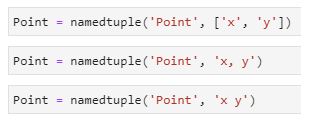
2-1. 기본 문법
collections.namedtuple(
    typename,     # 생성될 클래스의 이름 (문자열)
    field_names,  # 필드 이름들 (문자열 리스트 또는 공백/콤마로 구분된 문자열)
    *,
    rename=False, # 유효하지 않은 필드 이름을 자동으로 변경할지 여부 (기본값: False)
    defaults=None,# 필드의 기본값 (Python 3.7+)
    module=None,  # 클래스의 `__module__` 속성 값 (기본값: 호출자의 모듈 이름)
)
2-2. 반환값
namedtuple은 지정된 이름과 필드를 가진 새로운 tuple의 서브클래스를 반환: 반환된 객체를 named tuple이라고도 부름.- 반환된 객체를 나중에 인스턴스 생성을 위한 생성자로 사용가능.
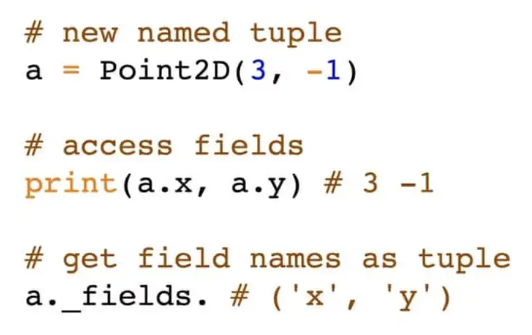
3. namedtuple 사용 튜토리얼
3-1. 기본 사용법
from collections import namedtuple

# 1. namedtuple 클래스 생성
Person = namedtuple('Person', ['name', 'age', 'job'])

# 2. 생성된 클래스의 인스턴스 만들기
john = Person('John Doe', 30, 'Developer')

# 3. 인덱스와 이름으로 접근하기
print(john[0])     # 'John Doe' (일반 tuple처럼 인덱스로 접근)
print(john.name)   # 'John Doe' (필드 이름으로 접근)
print(john.age)    # 30 (나이 값)
print(john.job)    # 'Developer' (직업 정보)

# 4. 반복 가능한 객체로 사용하기
for value in john:
    print(value)

# 5. 언패킹하기
name, age, job = john
print(f"{name}는 {age}살이고 {job}의 직업.")
3-2. 다양한 필드 이름 지정 방법
# 리스트로 필드 지정
Point1 = namedtuple('Point', ['x', 'y', 'z'])

# 공백으로 구분된 문자열로 필드 지정
Point2 = namedtuple('Point', 'x y z')

# 콤마로 구분된 문자열로 필드 지정
Point3 = namedtuple('Point', 'x, y, z')

# 모두 동일한 결과 생성
p1 = Point1(1, 2, 3)
p2 = Point2(1, 2, 3)
p3 = Point3(1, 2, 3)

print(p1)  # Point(x=1, y=2, z=3)
print(p2)  # Point(x=1, y=2, z=3)
print(p3)  # Point(x=1, y=2, z=3)
3-3. rename 매개변수 사용하기
Python 식별자 규칙에 맞지 않는 필드 이름이나 예약어 처리 시 rename=True 사용.
# Python 예약어와 유효하지 않은 식별자가 있는 경우
# class, def, 1stField 등은 유효한 식별자가 아닙니다
Fields = namedtuple('Fields', ['class', 'def', '1stField'], rename=True)

# 자동 이름 변경:
# class -> _0, def -> _1, 1stField -> _2
f = Fields('Math', 'function', 'First')
print(f)     # Fields(_0='Math', _1='function', _2='First')
print(f._0)  # 'Math'
print(f._1)  # 'function'
3-4. defaults 매개변수 사용하기 (Python 3.7+)
# 기본값 설정
Employee = namedtuple('Employee', ['name', 'id', 'dept', 'salary'], defaults=[0, 'N/A'])
# 마지막 두 필드 기본값 적용: dept=0, salary='N/A'

# 기본값 있는 필드 생략 가능
emp1 = Employee('John', 1001)  # dept와 salary는 기본값 사용
print(emp1)  # Employee(name='John', id=1001, dept=0, salary='N/A')

# 모든 값 명시적 제공 가능
emp2 = Employee('Jane', 1002, 'HR', 50000)
print(emp2)  # Employee(name='Jane', id=1002, dept='HR', salary=50000)

# 클래스 기본값 정보 확인
print(Employee._field_defaults)  # {'dept': 0, 'salary': 'N/A'}
3-5. 유용한 메서드들
Point = namedtuple('Point', 'x y z')
p = Point(1, 2, 3)

# 1. _make(): 반복 가능 객체로부터 새 인스턴스 생성
data = [4, 5, 6]
p2 = Point._make(data)
print(p2)  # Point(x=4, y=5, z=6)

# 2. _asdict(): OrderedDict로 변환 (Python 3.1+)
p_dict = p._asdict()
print(p_dict)  # OrderedDict([('x', 1), ('y', 2), ('z', 3)])

# 3. _replace(): 필드 값 변경한 새 인스턴스 생성
p3 = p._replace(y=20, z=30)
print(p)   # Point(x=1, y=2, z=3) - 원본은 변경되지 않음
print(p3)  # Point(x=1, y=20, z=30)

# 4. _fields: 필드 이름 튜플
print(p._fields)  # ('x', 'y', 'z')
3-6. class 처럼 method 상속과 확장
namedtuple로 생성된 클래스는 일반 클래스처럼 상속이나 메서드 추가 가능.
class PointWithMethods(namedtuple('Point', 'x y z')):
    # 새 메서드 추가 방법
    def distance_from_origin(self):
        return (self.x ** 2 + self.y ** 2 + self.z ** 2) ** 0.5

    # 특수 메서드 재정의 예시
    def __str__(self):
        return f"Point({self.x}, {self.y}, {self.z}) - 원점과의 거리: {self.distance_from_origin():.2f}"

p = PointWithMethods(3, 4, 5)
print(p.distance_from_origin())  # 7.0710678118654755
print(p)  # Point(3, 4, 5) - 원점과의 거리: 7.07
4. 실제 사용 사례
4-1. PyAutoGUI 에서 여러 데이터 타입으로 사용.
PyAutoGUI에서 사용하는 주요 named tuple 종류:
- Point - 좌표 (x, y)
- Size - 크기 (width, height)
- Box - 사각형 영역 (left, top, width, height)
- Rect - 사각형 (left, top, right, bottom)
2025.07.14 - [Python] - pyautogui 기본 사용법
pyautogui 기본 사용법
1. PyAutoGUI란?PyAutoGUI는마우스 이동 및 클릭,Keyboard 입력,스크린 캡처 및 단순한 화면 인식 등 다양한 기능을 제공하여반복적인 컴퓨터 작업을 자동화할 수 있는 Python 기반의 강력한 Automation Library
ds31x.tistory.com
4-2. CSV 데이터 처리
import csv
from collections import namedtuple

# CSV 데이터의 namedtuple 변환
def read_csv_as_namedtuples(file_path):
    with open(file_path, 'r') as f:
        reader = csv.reader(f)
        header = next(reader)           # 첫 번째 행의 헤더 처리
        header = map(str.strip, header) # filed명의 앞뒤의 공백 제거.
        Row = namedtuple('Row', header)
        return [Row(*row) for row in reader]

# 사용 예시
# 예: users.csv 파일에 name,age,email 열이 있는 경우
# users = read_csv_as_namedtuples('users.csv')
# for user in users:
#     print(f"{user.name}의 이메일은 {user.email}입니다.")
4-3. 데이터베이스 결과 처리
import sqlite3
from collections import namedtuple

def query_as_namedtuples(db_path, query):
    conn = sqlite3.connect(db_path)
    cursor = conn.cursor()
    cursor.execute(query)

    # 결과 컬럼 이름 추출
    column_names = [desc[0] for desc in cursor.description]
    Row = namedtuple('Row', column_names)

    # 결과의 namedtuple 변환
    results = [Row(*row) for row in cursor.fetchall()]

    conn.close()
    return results

# 사용 예시
# results = query_as_namedtuples('example.db', 'SELECT id, name, age FROM users')
# for user in results:
#     print(f"ID: {user.id}, 이름: {user.name}, 나이: {user.age}")
4-4. coordinate와 shape 처리
from collections import namedtuple
import math

Point2D = namedtuple('Point2D', 'x y')

class Circle(namedtuple('CircleBase', 'center radius')):
    @property
    def area(self):
        return math.pi * self.radius ** 2

    @property
    def circumference(self):
        return 2 * math.pi * self.radius

    def contains_point(self, point):
        return math.sqrt((point.x - self.center.x)**2 +
                        (point.y - self.center.y)**2) <= self.radius

# 사용 예시
center = Point2D(0, 0)
circle = Circle(center=center, radius=5)
print(f"원의 면적: {circle.area:.2f}")
print(f"원의 둘레: {circle.circumference:.2f}")

test_point = Point2D(3, 4)
if circle.contains_point(test_point):
    print(f"점 {test_point}는 원 내부 위치.")
else:
    print(f"점 {test_point}는 원 외부 위치.")
5. 고급 기법: 동적 namedtuple 생성
런타임에 필드를 dynamic(동적)으로 결정해야 하는 경우 사용 가능한 기법.
def create_record_type(schema):
    """
    스키마 딕셔너리에서 동적으로 namedtuple 타입을 생성

    schema: {필드명: 설명} 형태의 딕셔너리
    """
    field_names = list(schema.keys())
    RecordType = namedtuple('Record', field_names)

    # docstring 추가
    field_docs = '\n'.join(f'    {name}: {desc}' for name, desc in schema.items())
    RecordType.__doc__ = f'Record with fields:\n{field_docs}'

    return RecordType

# 사용 예시
user_schema = {
    'id': '사용자 고유 식별자',
    'username': '사용자 로그인 이름',
    'email': '이메일 주소',
    'active': '계정 활성화 상태'
}

UserRecord = create_record_type(user_schema)
print(UserRecord.__doc__)

user = UserRecord(1, 'john_doe', 'john@example.com', True)
print(user)
6. namedtuple vs 다른 데이터 구조 비교
6-1. namedtuple vs 일반 tuple
tuple은 index로만 내부 item에 접근하는 것과 달리, namedtuple은 attribute 명으로 접근할 수 있음: 가독성 향상.
# 일반 tuple
person_tuple = ('John Doe', 30, 'Developer')
print(person_tuple[0])  # 'John Doe' - 인덱스만으로 접근

# namedtuple
Person = namedtuple('Person', 'name age job')
person_named = Person('John Doe', 30, 'Developer')
print(person_named.name)  # 'John Doe' - 이름으로 접근

# 가독성 비교
age = person_tuple[1]  # 인덱스만으로 데이터 속성 불명확
age = person_named.age  # 명확한 age 데이터 속성 인식
6-2. namedtuple vs dict
dict와 namedtuple은 매우 유사하나, dict는 mutable하며 메모리를 좀 더 많이 차지함.
# dict
person_dict = {'name': 'John Doe', 'age': 30, 'job': 'Developer'}
print(person_dict['name'])  # 'John Doe'

# namedtuple
Person = namedtuple('Person', 'name age job')
person_named = Person('John Doe', 30, 'Developer')
print(person_named.name)  # 'John Doe'

# 차이점
person_dict['age'] = 31  # dict의 변경 가능성
# person_named.age = 31  # namedtuple의 불변성으로 인한 오류 발생

# 메모리 사용량 비교
import sys
print(f"딕셔너리 크기: {sys.getsizeof(person_dict)} 바이트")
print(f"namedtuple 크기: {sys.getsizeof(person_named)} 바이트")
# namedtuple의 일반적 메모리 사용량 우위
6-3. namedtuple vs class
custom class와도 namedtuple은 유사한데, 가장 큰 차이점을 든다면 __eq__ 메서드 에 대한 차이임:
기본적으로 custom class는 id값으로 비교하는 것과 달리, namedtuple은 __eq__ 메서드가 이미 값을 비교하도록 구현되어 있음.
물론 custom class에도 overriding으로 구현하면 똑같이 동작가능함(미리 구현되어 있다는 편의성의 차이)
# 일반 클래스
class PersonClass:
    def __init__(self, name, age, job):
        self.name = name
        self.age = age
        self.job = job

# namedtuple
Person = namedtuple('Person', 'name age job')

# 인스턴스 생성
person_class = PersonClass('John Doe', 30, 'Developer')
person_named = Person('John Doe', 30, 'Developer')

# 접근 방식은 유사
print(person_class.name)  # 'John Doe'
print(person_named.name)  # 'John Doe'

# 주요 차이점 비교
person_class.age = 31  # 클래스 인스턴스의 변경 가능성
# person_named.age = 31  # 오류! namedtuple은 불변

# 비교 동작이 다름
p1 = PersonClass('John Doe', 30, 'Developer')
p2 = PersonClass('John Doe', 30, 'Developer')
print(p1 == p2)  # False (기본적 객체 ID 비교 결과)

n1 = Person('John Doe', 30, 'Developer')
n2 = Person('John Doe', 30, 'Developer')
print(n1 == n2)  # True (값 비교 결과)
7. 정리: namedtuple 팩토리 함수의 장점과 한계
7-1. 장점:
- 필드 이름 접근을 통한 가독성 향상
- 일반 tuple의 모든 기능 유지 (인덱싱, 언패킹 등의 기능)
- 메모리 효율성 (딕셔너리보다 적은 메모리 사용량)
- 불변성으로 인한 데이터 안전성 확보: immutable dict라고 간주?
- 값 기반 동등성 비교 (같은 값이면 같은 객체로 간주하는 특성)
- 간결한 클래스 정의 방식
7-2. 한계:
- 불변성 (필요에 따른 단점 가능성)
- 메서드 추가 시 상속 필요성
- 속성 검증 로직 구현의 어려움
- 디폴트 값 설정 옵션의 Python 3.7 이상 제한
8. 마무리
namedtuple팩토리 함수는 간결하면서도 명확한 데이터 구조를 만들 수 있는 강력한 도구.- 특히 불변성이 필요하고 필드 이름을 통한 접근이 중요한 경우에 적합.
- 간단한 데이터 모델링, 반환 값 패키징, 다중 값 반환 등 다양한 상황에서의 유용한 활용 방안.
그러나 복잡한 비즈니스 로직, 상태 변경 필요 시,
또는 고급 데이터 검증 필요 시에는
일반 class(클래스)나 데이터 클래스(dataclasses모듈)의 고려 필요성.
같이보면 좋은 자료들
2025.04.04 - [Python] - [Py] collections 모듈 (summary) - 작성중
[Py] collections 모듈 (summary) - 작성중
Python의 collections 모듈은 파이썬의 built-in 자료구조를 확장한 special container 클래스들을 제공함.1. Counter요소의 개수를 세는 dictionary의 subclass.해시 가능한 객체의 카운트를 저장함.from collections impor
ds31x.tistory.com
'Python' 카테고리의 다른 글
| [OpenCV] macOS에서 Qt 지원하도록 빌드. (0) | 2025.04.05 |
|---|---|
| [Py] collections.ChainMap (0) | 2025.04.04 |
| [Py] collections.OrderedDict (0) | 2025.04.04 |
| [Py] collections 모듈 (summary) - 작성중 (0) | 2025.04.04 |
| [Py] print 함수 (0) | 2025.04.02 |


