pytest 란?
pytest는
Python 생태계에서
가장 널리 사용되는 test framework.
간결한 문법으로 단위 테스트(unit test)부터 통합 테스트(integration test)까지 다양한 수준의 테스트를 작성할 수 있음.
표준 라이브러리인 unittest와 달리,
pytest는 별도의 클래스 상속 없이 일반 함수 형태로 테스트를 작성할 수 있음.assert구문만으로도 풍부한 실패 메시지(failure message)를 자동 생성.fixture,parametrize, 플러그인(plugin) 시스템 등 강력한 기능을 제공- 이를 통해 테스트 코드의 재사용성과 유지보수성을 크게 향상
2024.09.24 - [Python] - [Py] assert 구문 (statement)
[Py] assert 구문 (statement)
디버깅에서 assert는 프로그램의 특정 조건이 참인지 확인하는 데 사용되는 statement(구문).assert는주어진 조건이 참(True)일 때는 아무런 영향을 미치지 않지만,조건이 거짓(False)일 경우 프로그램을
ds31x.tistory.com
공식 사이트:
https://docs.pytest.org/en/stable/example/simple.html
Basic patterns and examples - pytest documentation
docs.pytest.org
install
설치 명령어는 다음과 같음:
pip install -U pytest
# conda install -c conda-forge pytest
설치 및 버전 확인은 다음과 같음:
pytest --version- -V : --version
simple example
구성
예제 프로젝트 폴더를 다음과 같이 구성:
simple_project/
├─ calc.py
└─ test_calc.py
calc.py 는 다음과 같음:
def add(a, b):
    return a + b

def div(a, b):
    return a / b
pytest 에서 사용하는 test module 은 test_ 의 prefix를 이름에 가짐.
이 예제에선 test_calc.py 임.
from calc import add

def test_add():
    print("test")
    assert add(2, 3) == 5
pytest는
기본적으로test_*.py또는*_test.py패턴의 파일을
자동으로 탐색(discovery)하여 test module로 인식함
test module 내에서
test_로 시작하는 함수는 test function,Test로 시작하는 클래스는 test class 로 인식
테스트하기 (test function으로)
이를 다음과 같이 테스트할 수 있음:
pytest- 위의 명령은
pytest가test_*.py또는*_test.py형태의 파일을 찾고, - 거기서
test_로 시작하는 테스트 함수를 찾아 실행시킴.
이는 전체 테스트를 실행시키며 다음과 같은 결과를 보임:

다음은 좀 더 자세한 로그를 볼 수 있음:
pytest -v- -v : --verbose
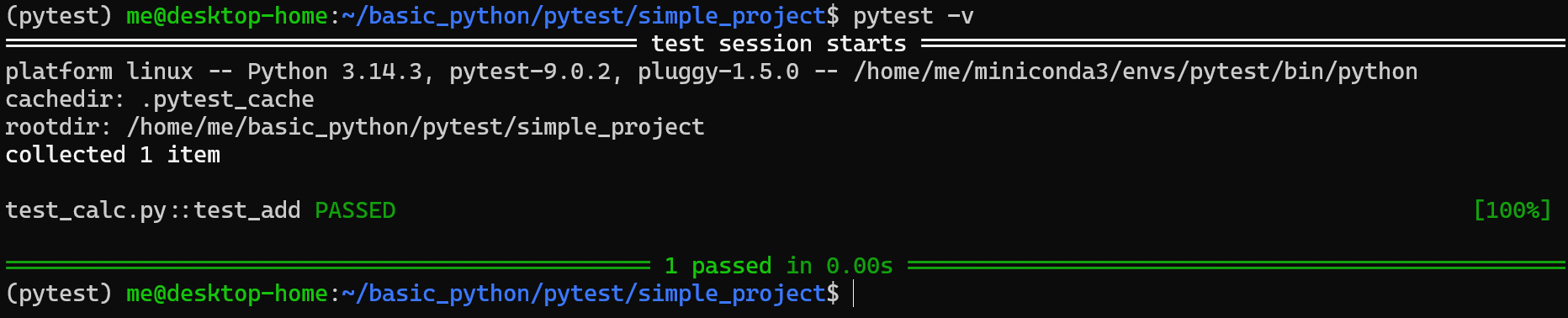
특정 파일만 테스트하려면 다음과 같이 인자로 대상 파일을 넘겨주면 됨:
pytest test_calc.py -v
특정 테스트 모듈에서 특정 테스트 함수만 실행도 가능함:
pytest test_calc.py::test_add -v
실패한 부분만 더 자세히 보려면 다음의 옵션을 사용:
pytest -vv- -vv : --verbose --verbose
- verbosity를 증가시키는 옵션.
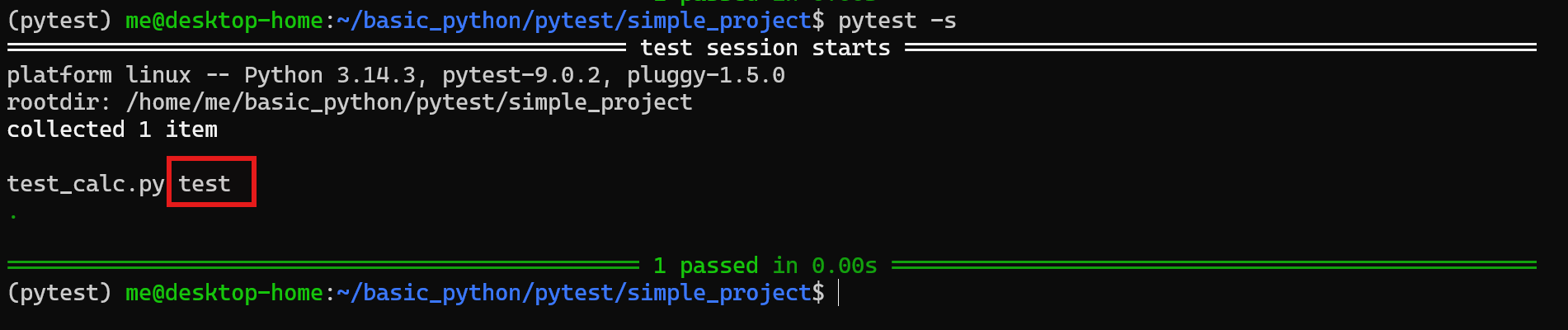
print출력을 보려면:
# -s : Shortcut for --capture=no
pytest -s- pytest는
test_prefix를 가진 테스트 함수 내의print함수를 통한 출력을 바로 터미널에 보여주지 않음. - 해당 출력이 내부에서 capture가 이루어짐: pytest가 기본적으로 stdout과 stderr를 캡처
- 단,
-s를 사용할 경우, 해당 capture를 즉시 터미널로 보냄: 출력 캡처를 비활성화 - capture supression 으로 이해하면 됨.
특정 키워드가 포함된 테스트만 실행하려면:
pytest -k add- -k : --keyword 로 keyword expression
- 이는 이름에
add가 포함된 테스트만 실행함.- 테스트 함수 이름에 해당 키워드가 포함된 경우
- 테스트 클래스 이름에 해당 키워드가 포함된 경우
- 경우에 따라 수집된 node id 문자열의 일부에 해당 해당 키워드가 포함된 경우
- 테스트 본문 안의 코드나 주석을 grep처럼 검색하는 것은 아님.
특정 디렉토리만 실행하려면:
pytest test/- 지정한 디렉토리 아래의 테스트만 대상으로 실행
- 해당 디렉토리 내에 pytest가 인식할 수 있는 형태의 테스트 파일과 테스트 함수들이 있어야 함:
- test_*.py 또는
- *_test.py 형식의 파일
테스트 실패 메시지 확인
다음과 같이 test_calc.py를 수정하여 테스트 실패 경우를 확인해보자.
from calc import add

def test_add():
    print("test")
    assert add(2, 3) == 6
이후 다음으로 테스트 실행:
pytest -vv- pytest는 일반
assert를 확장해서 객체나 코드의 내부 상태를 런타임(runtime)에 동적으로 분석할 수 있게 해 줌. - 이는
unitest의 전용메서드를 사용해야하는 경우와 차이점을 가지는 부분임.

여러 테스트를 하나의 테스트 모듈 에 넣기
테스트 파일(=test module) 하나에 여러 테스트를 수행할 수 있음:
다음을 test_calc_multi.py라고 저장하면 여러 테스트가 하나의 test module을 통해 수행가능.
import pytest
from calc import add, div

def test_add_positive():
    assert add(2, 3) == 5

def test_add_negative():
    assert add(-2, -3) == -5

def test_div():
    assert div(10, 2) == 5

def test_div_zero():
    with pytest.raises(ZeroDivisionError):
        div(10, 0)
다음으로 해당하는 여러 테스트를 수행함:
pytest -v
결과는 다음과 같음:
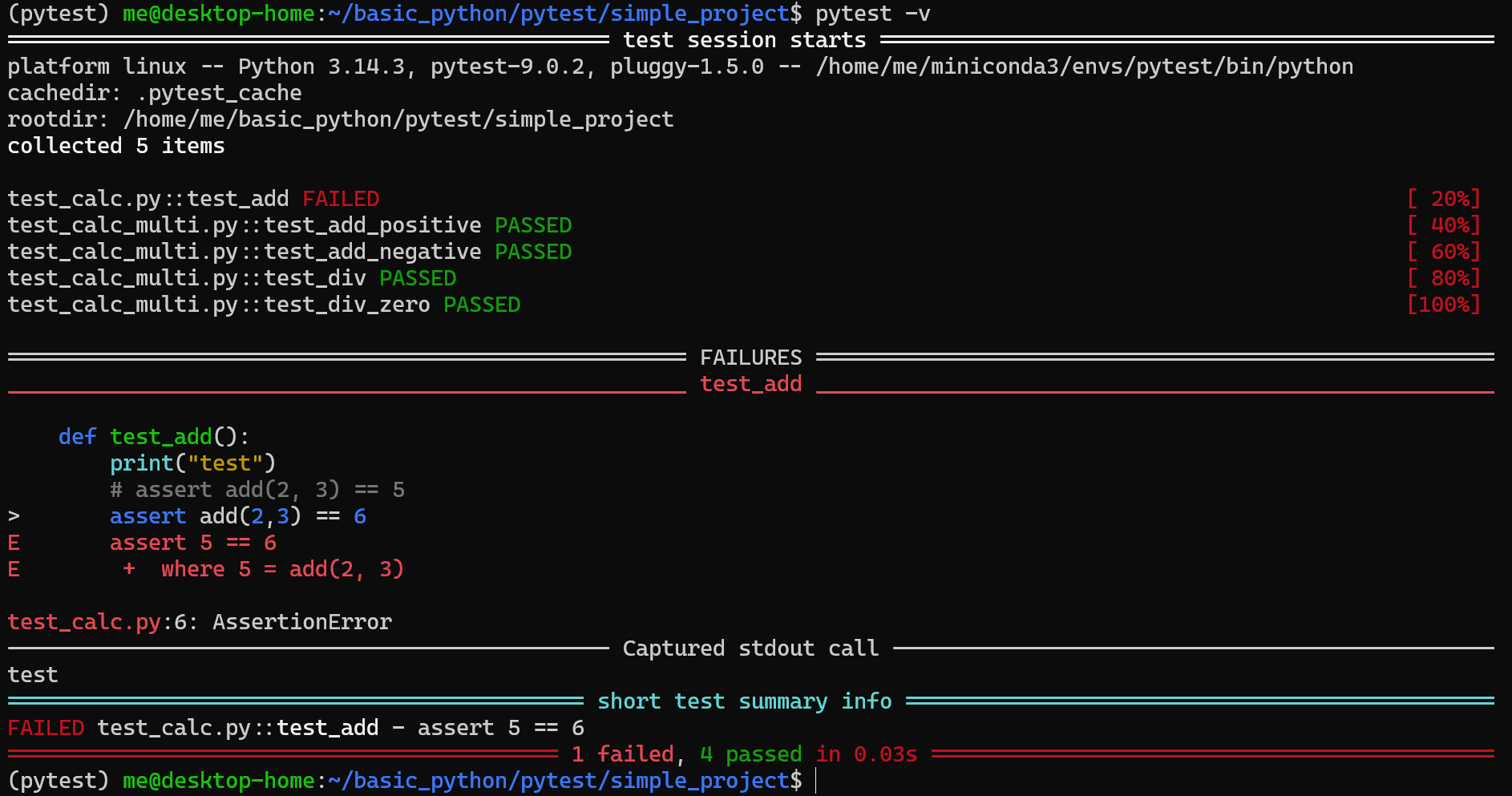
- pytest는 각 테스트를 독립적으로 실행.
- 어떤 테스트가 실패했는지 개별적으로 출력함.
예외 발생 등의 테스트
어떤 함수가 특정 상황에서 예외를 일으키도록 구현되어야 하는 경우가 있음.
pytest는 pytest.raises()를 제공함.
다음은 test_calc.py에서 calc모듈의 div함수가 ZeroDivisionError를 발생시키는지를 테스트:
import pytest
from calc import div

def test_div_zero():
    with pytest.raises(ZeroDivisionError):
div(10, 0)- 이 코드는
div(10, 0)호출 시ZeroDivisionError가 반드시 발생해야 함을 검증
실행은 다음 명령어로:
pytest -v결과는 앞서 여러 테스트 함수를 하나의 테스트모듈에 넣은 경우에서 확인했었음
Test Class 사용하기
앞서의 예에선 test module에서 test function을 위주로 사용함(사실 이것으로도 충분한 경우가 많음).
하지만 pytest에선 function이 아닌 test class도 사용할 수 있음.
다음의 test module 인 test_pytest_cls.py 는 add 함수에 대한 테스트를 TestAdd라는 class 안에 그룹화하는 방식을 보여줌:
from calc import add

class TestAdd:
    def test_case_1(self):
        assert add(1, 2) == 3

    def test_case_2(self):
        assert add(10, 20) == 30
결과는 다음과 같음:
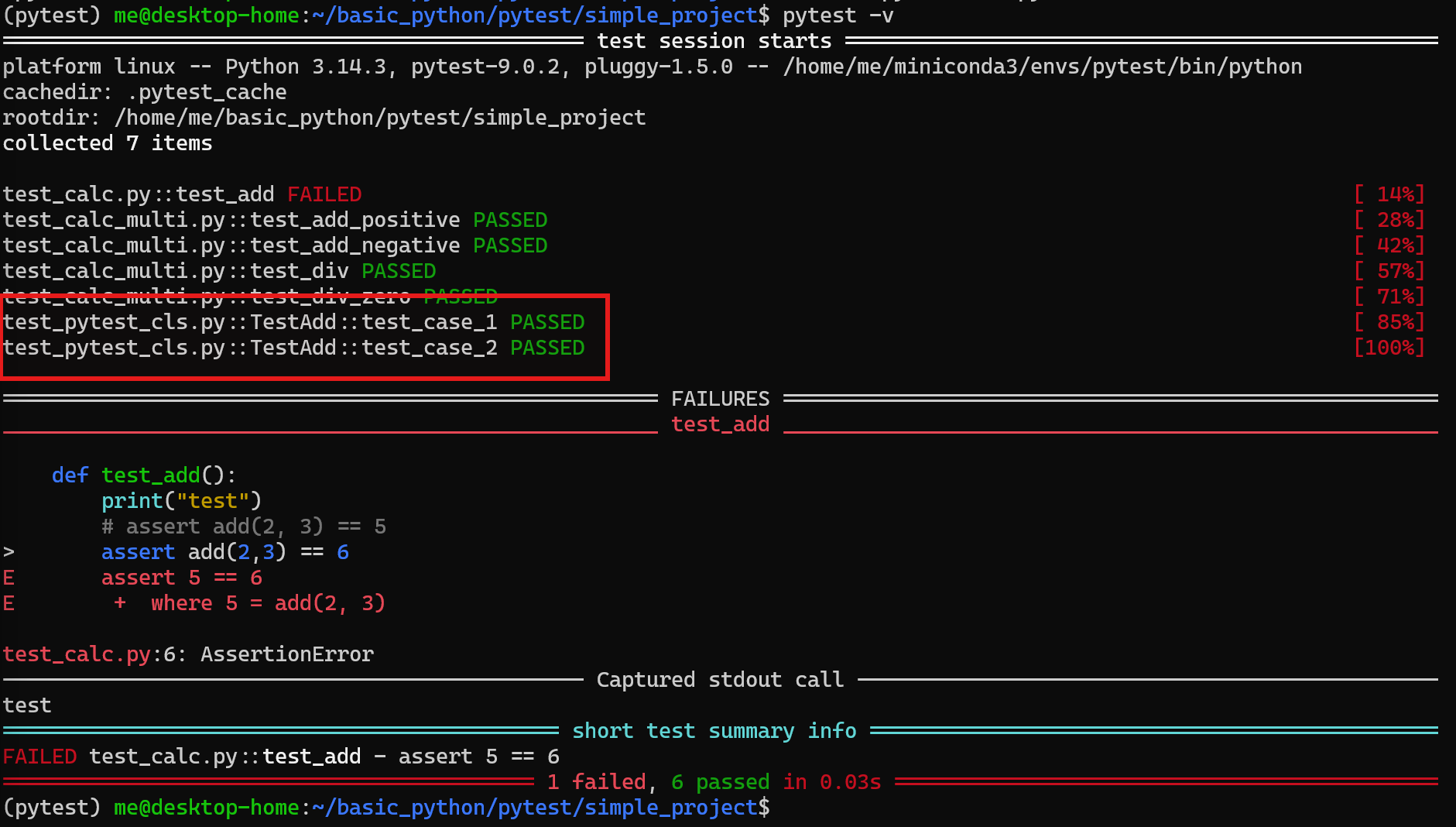
pytest는 기본적으로 이름이 Test로 시작하는 class와 test_ prefix로 시작하는 method를 테스트 대상으로 찾아서 실행함.
fixture
pytest에서 fixture는 다음에 해당:
- 테스트 함수가 실행되기 전에 필요한
- 사전 조건(precondition)이나
- 공유 자원(shared resource)을 준비하고,
- 테스트 완료 후 정리(teardown)까지 담당하는 재사용 가능한 구성 요소
@pytest.fixture 데코레이터(decorator)로 정의하며,
대상 테스트 함수의 매개변수(parameter) 이름으로 선언하는 것만으로 자동 주입(dependency injection)됨.
fixture는
일반적으로 고정 장치, 설비, 미리 준비된 구성물 을 가리킴.
pytest에서의 fixture는
테스트를 실행하기 전에
미리 준비해두는 테스트용 환경, 데이터, 객체, 설정 으로
테스트 코드가
매번 같은 조건에서 실행되도록 만들어주는
준비물
pytest에서 fixture의 장점은 다음과 같음:
- 중복 준비 코드 제거
- 테스트 가독성 향상
- 공통 데이터 재사용
- 복잡한 객체 생성 로직 분리
fixture의 lifecycle(생명주기) 제어
scope parameter(function, class, module, package, session)를 통해 fixture의 생명 주기(lifecycle)를 제어함.
function: 테스트 함수마다 새로 실행- 가장 짧은 lifecycle로 테스트간의 격리가 가장 강함
- pytest에서 기본값임
class: 각 테스트 class마다 한 번 실행되며, 그 class 안의 테스트들이 공유함- 같은 class 내부 테스트끼리만 공유
module: 파일 단위로 한 번 실행- 같은 .py 파일 내부 테스트끼리 공유
- 같은 .py 파일 안 테스트들이 같은 DB 연결, 같은 mock server, 같은 큰 테스트 데이터셋을 공유할 때 많이 사용됨.
package: 각 package 단위로 한 번 실행됨- 같은 package 범위에서 공유.
session: 전체 테스트 세션에서 한 번 실행- 테스트 실행 전체에서 하나만 공유
- 아주 비싼 초기화 작업을 전체 테스트에서 한 번만 하고 싶을 때 사용.
데이터베이스 연결(database connection)처럼 비용이 큰 자원을 여러 테스트에서 효율적으로 공유가능함.
참고 사항
- fixture는 무조건 미리 다 만들어지는 것이 아니라, 요청될 때 생성되며,
- setup은 처음 생성될 때 이루어짐.
- 그리고 yield 뒤 코드로 이루어지는 teardown(정리)은 지정된 scope가 끝나는 시점에 실행됨.
fixture 간단 예제
다음과 같이 사용자 정보에 대한 함수가 있다고 가정하자.
user_utils.py가 테스트 대상 모듈이고 다음의 함수를 가짐:
def get_full_name(user):
    return f"{user['first_name']} {user['last_name']}"
이를 테스트하는 파일은 test_user_utils.py이고 내용은 다음과 같음:
import pytest
from user_utils import get_full_name

@pytest.fixture
def user():
    return {
        "first_name": "ManYong",
        "last_name": "Kim"
    }

# user가 바로 fixture임.
def test_get_full_name(user):
assert get_full_name(user) == "ManYong Kim"user가 바로 fixture임.- 테스트 함수 인자로 fixture의 이름만 적으면
pytest가 자동으로 주입함.
teardown 사용하기: yield
import pytest

@pytest.fixture
def temp_file():
    f = open("sample.txt", "w", encoding="utf-8")
    f.write("hello")
    f.close()

    yield "sample.txt"

    import os
os.remove("sample.txt")temp_filefixture 를 사용하기 위한 사전준비 단계는yield이전임.temp_filefixture 를 사용 후의 teardown(정리) 단계는yield이후의 코드임.
즉 다음의 단계로 실행됨.
pytest의yieldfixture는yield이전 코드로 setup이 이루어짐.yield로 반환된 값을 테스트 함수에 전달- 이후 테스트가 완료된 후
yield이후 코드를 teardown으로 실행함.
테스트 도중 예외(exception)가 발생하더라도 yield 이후의 teardown 코드는 반드시 실행되므로,
자원 정리(resource cleanup)가 보장됨.
conftest.py 파일 - 공통 fixture 지원을 위한 설정 모듈
여러 테스트 파일에서 공통 fixture를 쓰고 싶다면 conftest.py 를 사용.
pytest는 이 이름의 파일을 자동으로 인식함.
pytest에서 conftest.py는
여러 test file들이 공유할 테스트 설정과 fixture를 모아두는 파일
을 가리키며
configuration for tests
라고 생각하면 됨.
가장 간단한 일반적인 구조는 다음과 같음:
my_project/
├─ calc.py
├─ conftest.py
├─ test_calc.py
└─ test_user_utils.py
공통 fixture를 가진 conftest.py는 다음과 같음:
import pytest

@pytest.fixture
def sample_numbers():
    return 10, 20
다음이 이를 사용하는 테스트 모듈 test_calc.py 임.
from calc import add

def test_add(sample_numbers):
    a, b = sample_numbers
    assert add(a, b) == 30
import conftest는 쓰지 않아도 동작함.
lifecycle별 예제
function scope
import pytest

@pytest.fixture(scope="function")
def data():
    print("\nSETUP function")
    yield []
    print("\nTEARDOWN function")

def test_one(data):
    data.append(1)
    assert data == [1]

def test_two(data):
assert data == []- 각 테스트 함수별로 새 fixture가 만들어지므로
test_two에서data는 빈 리스트임.
class scope
import pytest

class TestNumbers:
    @pytest.fixture(scope="class")
    def data(self):
        print("\nSETUP class")
        yield []
        print("\nTEARDOWN class")

    def test_one(self, data):
        data.append(1)
        assert data == [1]

    def test_two(self, data):
        data.append(2)
assert data == [1, 2]- 여기서는
test_one과test_two가 같은data를 공유. - 이유는 class scope가 해당 class에 대해 한 번만 생성되기 때문
module scope
import pytest

@pytest.fixture(scope="module")
def counter():
    print("\nSETUP module")
    value = {"n": 0}
    yield value
    print("\nTEARDOWN module")

def test_one(counter):
    counter["n"] += 1
    assert counter["n"] == 1

def test_two(counter):
    counter["n"] += 1
assert counter["n"] == 2- 두 테스트가 같은 파일(=같은 test module) 안에 있으면 같은 fixture 인스턴스를 공유
- 때문에 위의 예에선
n값이 누적됨.
package scope
다음은 conftest.py를 패키지 디렉터리에 두고 scope="package" fixture를 만드는 예임
tests/
└─ a/
   ├─ conftest.py
   ├─ test_db.py
   └─ test_db2.py
a 라는 패키지에서 공유되는 package fixture 는 conftest.py에서 다음과 같이 생성.
# tests/a/conftest.py

import pytest

class DB:
    pass

@pytest.fixture(scope="package")
def db():
    print("\n[SETUP] package db 생성")
    obj = DB()
    yield obj
    print("\n[TEARDOWN] package db 종료")
다음은 test module들임.
# tests/a/test_db.py

def test_a1(db):
    print("test_a1 실행")
    assert db is not None
# tests/a/test_db2.py
def test_a2(db):
print("test_a2 실행")
assert db is not None실행은 해당 패키지의 디렉토리를 지정하는 다음의 방식으로 이루어짐:
pytest -s -v tests/asession scope
아래에서 app은 전체 테스트 실행 동안 한 번만 생성됨.
때문에 여러 파일이 요청해도 같은 session fixture를 공유하게 됨.
# conftest.py
import pytest

@pytest.fixture(scope="session")
def app():
    print("\nSETUP session")
    yield {"connected": True}
    print("\nTEARDOWN session")
# test_a.py
def test_a(app):
assert app["connected"] is True# test_b.py
def test_b(app):
assert app["connected"] is True
parameterize - 동일 함수에 여러 입력값 조합으로 반복 테스트
@pytest.mark.parametrize는
하나의 테스트 함수를 여러 입력값 조합으로 반복 실행할 수 있도록 해주는
pytest의 내장 데코레이터(built-in decorator)로 pytest의 parameterize 를 가능하게 함.
- 데코레이터의 첫 번째 인자로 parameter 이름(문자열)을,
- 두 번째 인자로 해당 값들의 list 를 지정하면,
pytest가 각 조합을 독립적인 테스트 케이스로 자동 생성하여 처리.
parameterize 는 built-in marker임 (아래의 marker를 참고할 것)
이를 통해
중복 코드 없이 경계값(boundary value), 정상값(normal value), 예외값(edge case) 등
다양한 시나리오를 체계적으로 검증할 수 있음.
import pytest
from calc import add

@pytest.mark.parametrize(
    "a, b, expected",
    [
        (1, 2, 3),
        (10, 20, 30),
        (-1, -2, -3),
    ]
)
def test_add(a, b, expected):
assert add(a, b) == expected- 테스트 대상인
calc모듈의add함수는 3차례 별도록 실행됨.
parameterize는
fixture와 조합하여 사용할 수도 있음.
다음은 parameterize와 fixture를 조합 하는 방식임: @pytest.fixture에서 params를 지정함
# conftest.py
import pytest

@pytest.fixture(params=[
    (1,  2,  3),
    (0,  0,  0),
    (-1, 1,  0),
])
def add_cases(request):
    return request.param  # 각 튜플이 순서대로 주입됨
# test_calc.py
from calc import add
def test_add(add_cases):
a, b, expected = add_cases
assert add(a, b) == expectedmarker: 테스트 그룹을 나누는 metadata를 부여하는 label.
marker는
테스트 함수에 메타데이터(metadata)를 부여하는 pytest의 레이블(label) 시스템
@pytest.mark.<name>형태의 데코레이터를 사용.
다시 한번 강조하지만, 앞서 설명한 parameterize도 marker의 일종임.
pytest는 built-in marker로 다음을 제공:
skip:@pytest.mark.skip이 주어진 경우 무조건 skip.
skipif:@pytest.mark.skipif(condition, reason=...)인 경우,- condition이
True일 때만 조건부 skip.
xfail:@pytest.mark.xfail은 해당 테스트가 실패할 것으로 예상(expected failure) 됨을 명시하며,- 실제로 실패하면
XFAIL, 예상과 달리 통과하면XPASS로 보고.
parametrize:@pytest.mark.parametrize(argnames, argvalues)는- 하나의 테스트 함수를 여러 입력값 조합으로 자동 반복 실행하여 독립적인 테스트 케이스로 생성
참고로,
built-in marker는
테스트 실행 제어(execution control) 가 목적임.
또는 pytest.ini 또는 pyproject.toml의 설정파일을 통해
사용자 정의 마커(custom marker) 도 등록가능
- custom marker를 활용하면
pytest -m <name>명령으로 특정 마커가 붙은 테스트만 선택적으로 실행하거나 제외가능.
# pyproject.toml
[tool.pytest.ini_options]
markers = [
    "slow: 오래 걸리는 테스트",
    "api: 외부 API 관련 테스트"
]
pytest는 다음의 설정 파일 형식을 지원:
pyproject.tomlpytest.initox.inisetup.cfg
이름과 확장자 모두 유지해야 자동 탐색이 되니 주의할 것.
pytest 설정파일: pyproject.toml
앞서 말한대로 여러 설정파일 형식을 pytest는 지원하나, 여기선 pyproject.toml 만 다룬다.
자세한건 다음을 참고: ref. 설정관련 공식문서
일반적인 pyproject.toml은 다음과 같은 내용을 가짐:
[tool.pytest.ini_options]
testpaths = ["tests"]
python_files = ["test_*.py", "*_test.py"]
addopts = "-v"testpaths: 테스트 디렉터리를tests로 지정python_files: 테스트 파일 패턴 지정addopts: 기본 실행 옵션 추가
이 경우, 다음과 같은 프로젝트 구조를 가짐:
project_root/
├─ pyproject.toml
├─ src/
│  └─ mypkg/
│     ├─ __init__.py
│     └─ calc.py
└─ tests/
   ├─ conftest.py
   └─ test_calc.py
참고로 이 구조는 pytest의 good integration practices 문서가 권장하는 방식임.
2026.04.10 - [CE] - TOML 파일: 설정파일 형식
TOML 파일: 설정파일 형식
OverviewTOML(Tom's Obvious, Minimal Language)은 설정 파일(configuration file)을 위해 설계된 문서 형식임.단순함과 명확함을 최우선으로 설계됨대표 사용처:Python의 pyproject.toml,Rust의 Cargo.toml,각종 CLI 도구 설정
ds31x.tistory.com
pytest.approx - 부동소수점 비교
소수 계산은 정확히 일치하지 않을 수 있기 때문에
pytest는 pytest.approx를 제공함
import pytest

def test_float_compare():
    assert 0.1 + 0.2 == pytest.approx(0.3)
monkeypatch : 테스트 환경의 임시 교체
monkeypatch
기존 코드를 직접 고치지 않고,
실행 중에 특정 함수나 속성을 임시로 교체 하는 기법:
정식 수정이 아니라,
임시로 끼워 맞춘 수정을 가리키며,
약간은 비공식적이고, 빠르고, 때로는 위험한 수정이라는 뉘앙스를 가짐.
pytest에서 monkeypatch는
테스트 실행 중 객체의 속성(attribute), 함수, 환경 변수(environment variable), 딕셔너리(dictionary) 항목 등을
임시로 교체(patch)할 수 있는 pytest 내장 fixture 임.
- 테스트가 종료되면 모든 변경 사항이 자동으로 원상 복구(undo)되므로, 테스트 간 독립성(isolation)이 보장됨.
- 외부 API 호출, 파일 시스템 접근, 환경 변수 의존 등 실제 부작용(side effect)을 유발하는 코드를 테스트할 때 특히 유용하며, 테스트 환경을 안전하고 결정론적(deterministic)으로 유지하는데 사용됨.
| Method | Description |
monkeypatch.setattr(obj, name, value) |
객체의 속성/메서드 교체 |
monkeypatch.delattr(obj, name) |
객체의 속성 삭제 |
monkeypatch.setenv(name, value) |
환경 변수 설정 |
monkeypatch.delenv(name) |
환경 변수 삭제 |
monkeypatch.setitem(mapping, key, value) |
딕셔너리 항목 교체 |
monkeypatch 예제
1. 함수 교체
테스트 대상
# src/weather.py
import requests

def get_temperature(city: str) -> float:
    response = requests.get(f"https://api.weather.com/{city}")
    return response.json()["temp"]
테스트 모듈
# test_weather.py
from weather import get_temperature

def test_get_temperature(monkeypatch):
    def mock_get(url):
        class FakeResponse:
            def json(self):
                return {"temp": 22.5}
        return FakeResponse()

    monkeypatch.setattr("requests.get", mock_get)  # requests.get을 mock으로 임시 교체!
    assert get_temperature("Seoul") == 22.5
2. 환경 변수 교체
테스트 대상
# src/config.py
import os

def get_api_key() -> str:
    return os.environ["API_KEY"]
테스트 모듈
# test_config.py
from config import get_api_key

def test_get_api_key(monkeypatch):
    monkeypatch.setenv("API_KEY", "test-secret-key")
    assert get_api_key() == "test-secret-key"
3. 딕셔너리 항목 교체
# test_dict.py
CONFIG = {"mode": "production", "timeout": 30}

def test_config(monkeypatch):
    monkeypatch.setitem(CONFIG, "mode", "test")
    assert CONFIG["mode"] == "test"
# 테스트 종료 후 CONFIG["mode"]는 "production"으로 자동 복구
같이 보면 좋은 자료들
2025.08.18 - [Python] - Exceptions and Debugging Tools
Exceptions and Debugging Tools
ExceptionException은 Error를 포함하는 개념임.파이썬에선 BaseException 클래스가 프로그래밍에서의 예외(Exception)를 추상화하고 있음이의 서브클래스인 Exception 클래스는 프로그래머가 처리할 수 있는
ds31x.tistory.com
'Python' 카테고리의 다른 글
| [VSCode] # %% : Code Cell Marker (1) | 2026.04.19 |
|---|---|
| Namespace, Scope, Frame, and Context (0) | 2026.04.12 |
| Windows Python install manager 설치하기 (0) | 2026.03.17 |
| py 와 python 의 차이: Python Launcher, PIM, and Python (0) | 2026.03.16 |
| Python Install Manager(PIM) 간단 사용법 (0) | 2026.03.16 |


