필요성:
oh-my-posh 등의 prompt engine (or prompt customizing tool)을 제대로 적용하려면, 다양한 icon등을 제공하는 font가 필요함.
주로 많이 사용되고 있는 font는 Nerd font이며, 개인적으로 사용하고 있는 것은 CaskaydiaCove Nerd Font Mono임.
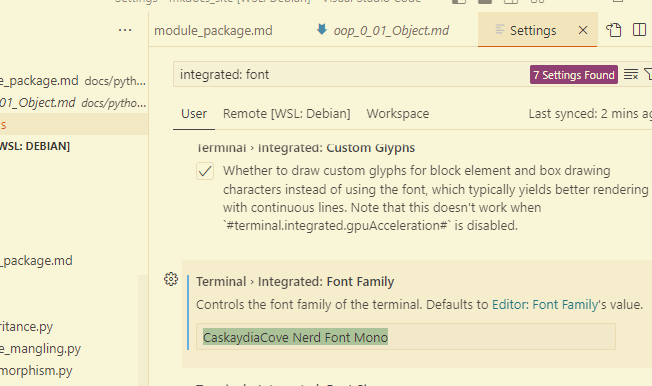
- 아래 그림에서 입력된 font name이 이를 반영함:
- 실제 oh-my-posh에서 권장하는 font도 Nerd font임.
oh-my-posh 설치 관련 document에 OS 및 shell 별로 terminal에 적용시키는 방법은 나와있지만,
VSCode 등에 내장된 terminal에 대한 부분은 조금 찾아봐야 한다.
문제는 아래 설정이 없으면 VSCode의 integrated terminal에선 font가 깨지게 된다.
설정:
VSCode에서 Integrated Terminal (CTRL+`로 toggle되는 터미널)에서 Font를 바꾸려면 다음으로 처리.
CTRL(or cmd)+,입력시Settings가 열림.- 상단의 검색창에
Integrated: Font Family라고 입력하고 enter Terminal > Integrated: Font Family항목에 Nerd Font 중 사용할 font를 입력.
(미리 OS상에서 해당 font를 추가해두어야 함)- 개인적으로는 CaskaydiaCove Nerd Font Mono 를 선호함.
- Prompt Customizing Tool에서는 고정 폭(Monospace) font를 써야 정상적으로 동작함.
참고사이트:
https://ohmyposh.dev/docs/installation/fonts
Fonts | Oh My Posh
Nerd Fonts
ohmyposh.dev
2025.01.17 - [utils] - [summary] vscode
[summary] vscode
소개 및 설치vscode 소개 (visual studio 와 비교)https://ds31x.blogspot.com/2023/07/env-visual-studio-code-and-visual-studio.html?view=classic [Env] Visual Studio Code and Visual StudioVisual Studio Code (vscode)는 IDE임을 강조하는 Visual St
ds31x.tistory.com
'개발환경' 카테고리의 다른 글
| [Env] PowerShell v7.3.5 (0) | 2023.06.28 |
|---|---|
| [Env] xterm: Font (0) | 2023.06.26 |
| [Env] Environment Variable (환경변수) (1) | 2023.06.20 |
| [Shell] env and Shebang line (0) | 2023.06.20 |
| [Env] Oh-My-Posh (1) | 2023.06.20 |


