axes.hist()
Matplotlib에서 Axes 객체를 통해 히스토그램을 그리는 메서드.
pyplot.hist()과 큰 차이는 없음- 개인적 선호가 oos 이지만 script도 충분함: 문헌에서는 보다 세밀한 제어 등을 강점으로 애기하지만... 사용자 나름인 듯.
기본 구문
axes.hist(
    x,
    bins=None,
    range=None,
    density=False,
    weights=None,
    cumulative=False,
    bottom=None,
    histtype='bar',
    align='mid',
    orientation='vertical',
    rwidth=None,
    log=False,
    color=None,
    label=None,
    stacked=False,
    **kwargs,
    )
주요 매개변수 설명
- x : 입력 데이터. array 또는 sequence of arrays
- bins:
int: 균등한 간격의 구간 수array: 구간 경계를 직접 지정 (예: [0, 1, 2, 3])str:'auto','sturges','fd','doane','scott','rice','sqrt'중 하나- 데이터가 정규 분포에 가깝다면: 'scott', 'sturges'
- 이상치가 많거나 비정규 분포라면: 'fd', 'doane'
- 대용량 데이터셋의 경우: 'fd', 'scott'
- 빠른 시각화를 위해서는: 'sqrt', 'rice'
- range:
- 히스토그램의 독립변수 축의
(최소값, 최대값)튜플 - 히스토그램이 나타낼 데이터 범위에 해당함.
- 히스토그램의 독립변수 축의
- density:
True면 확률 밀도 함수로 Normalization - weights: 각 데이터 포인트의 가중치
- cumulative:
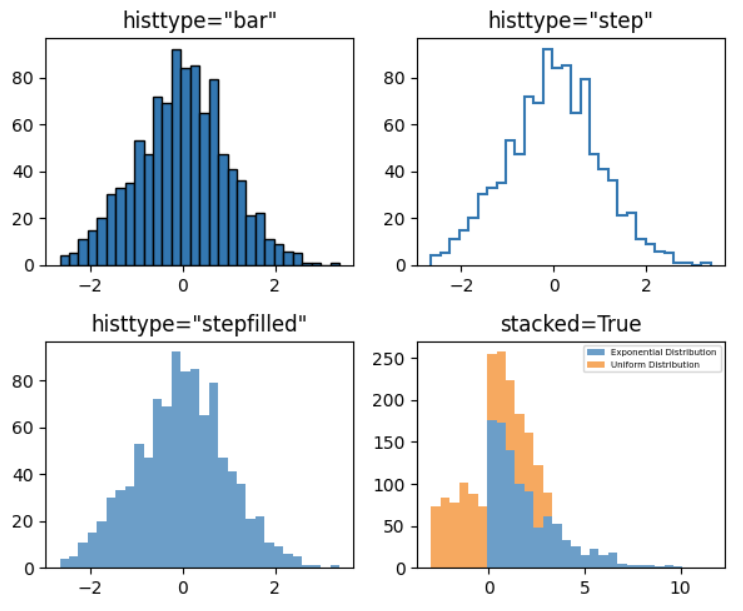
True면 누적 히스토그램 그리기 - histtype: 다음 중 선택.
'bar','barstacked','step','stepfilled'
- align: 막대 정렬 방식 (
'left','mid','right') - orientation:
'vertical'또는'horizontal' - rwidth: 막대의 상대적 너비 (
0~1사이) - log:
True면 y축을 로그 스케일로 표시 - color: 막대 색상
- label: 범례에 표시될 레이블
- edgecolor: 막대 테두리 색상
- linewidth: 막대 테두리 선 두께
- zorder: 그래픽 요소의 z-index
- stacked: 여러 데이터셋을 쌓아서 표시할지 여부
참고: bins 설정 상세
- 'auto':
- matplotlib의 기본 설정으로, 현재는
'sturges'방법 또는'fd'방법 중 고름 (3.8기준).
- # of sample instances < 1000:
'sturges' - 그 외:
`fd`
- # of sample instances < 1000:
- 데이터 크기와 특성에 따라 자동으로 결정.
- matplotlib의 기본 설정으로, 현재는
- 'sturges':
- 가장 간단한 규칙 중 하나로, bin 수 = log₂(n) + 1 (n은 데이터 포인트 수)
- 정규 분포 데이터에 적합. 단, 데이터가 많을 경우 bin이 너무 적게 생성되는 단점을 가짐.
- 'fd' (Freedman-Diaconis):
- bin 너비 = 2 × IQR × n^(-1/3) (IQR: 사분위 범위, n: 데이터 포인트 수)
- 이상치에 강건하며, 큰 데이터셋에 유리하며 정규분포가 아닐 때 사용됨.
- 'doane':
- Sturges의 규칙을 확장한 것으로, 데이터가 정규분포가 아닐 때 보다 효과적.
- 왜도(skewness)를 고려하여 bin 수를 조정.
- 'scott':
- bin 너비 = 3.5 × σ × n^(-1/3) (σ: 표준편차, n: 데이터 포인트 수)
- 정규 분포 데이터에 최적화.
- 'rice':
- bin 수 = 2 × n^(1/3) (n은 데이터 포인트 수)
- 데이터 크기에 기반한 간단한 규칙.
- 'sqrt':
- bin 수 = √n (n은 데이터 포인트 수)
- 가장 간단한 방법 중 하나로, 데이터 크기의 제곱근을 bin 수로 사용.
반환값
axes.hist() 함수는 다음 세 가지 값을 반환함:
- n: 각 구간의 히스토그램 값(빈도) 배열
- bins: 구간 경계 배열
- patches: 막대 객체의 list 또는 nested list.
Object Oriented Style 의 예제
import matplotlib.pyplot as plt
import numpy as np

# 데이터 생성
data = np.random.randn(1000)

# Figure와 Axes 객체 생성
fig, ax = plt.subplots(figsize=(5, 3))

# axes.hist() 메서드를 사용해 히스토그램 그리기
n, bins, patches = ax.hist(
    data,
    bins=30,
    edgecolor='black',
    linewidth=0.8,
    color='skyblue',
    alpha=0.7
)

# 그래프 꾸미기
ax.set_title('oos histogram')
ax.set_xlabel('value')
ax.set_ylabel('frequency')
ax.grid(alpha=0.3)

plt.tight_layout()
plt.show()
그 외 보다 자세한 예제는 다음을 참고:
https://gist.github.com/dsaint31x/17fd93a4e346f53669eedac1e2a7ee9a
matplotlib_hist.ipynb
matplotlib_hist.ipynb. GitHub Gist: instantly share code, notes, and snippets.
gist.github.com
다음은 pandas의 DataFrame 객체를 이용한 경우임.
df["total"].hist(
    bins = 10,
    orientation='horizontal',
    color="skyblue",
    edgecolor="red",
    linewidth=2,
)
https://gist.github.com/dsaint31x/43f6c696183687dbed381f637dff3134
pandas_df_hist.ipynb
pandas_df_hist.ipynb. GitHub Gist: instantly share code, notes, and snippets.
gist.github.com
같이 보면 좋은 자료들
2024.06.03 - [Python/matplotlib] - [matplotlib] Object Oriented Style Tutorial
[matplotlib] Object Oriented Style Tutorial
Matplotlib Object Oriented Style Tutorial1. IntroductionMatplotlib은 Python의 2D plotting library로, 다양한 그래프와 플롯을 생성하는 데 사용됨.2024.03.04 - [Python/matplotlib] - [matplotlib] matplotlib란 [matplotlib] matplotlib란Matp
ds31x.tistory.com
2024.04.13 - [Python] - [DL] Pandas 로 csv 읽기: read_csv
[DL] Pandas 로 csv 읽기: read_csv
pd.read_csv comma-separated values (csv)파일을 읽어서 pandas의 DataFrame 인스턴스로 변환해줌. URL을 통해서도 쉽게 DataFrame을 얻을 수 있음. import pandas as pd # ---------------------- # original data: boston house price data.
ds31x.tistory.com
'Python > matplotlib' 카테고리의 다른 글
| [matplotlib] plt.ion 과 plt.ioff 를 통한 대화형으로 그래프 그리기 (0) | 2025.03.24 |
|---|---|
| [matplotlib] Canvas, Render, and Event : Backend 구성 Layers (2) | 2024.06.11 |
| [matplotlib] Summary : 작성중 (2) | 2024.06.03 |
| [matplotlib] Object Oriented Style Tutorial (2) | 2024.06.03 |
| [matplotlib] Tutorial: Scripting Style (0) | 2024.06.03 |


