728x90
반응형
git push
Local repository의 commit을
remote repository에 동기화.
- 현재 상태에서 다른 사람이
push를 안 한 경우에만 가능. - 만일 다른 이가
push를 했다면, 해당 작업 내용을 local repository로 동기화(pull)하고, 현재 변경 내용과merge수행 후push해야 함.- 다른 이의 업데이트 내용을
pull할 경우,
"해당 remote repository로 업데이트된 내용"이 "현재 local의 내용"과 Conflict(충돌)하지 않을 경우,
자동으로merge가 이루어짐. - Conflict 발생시, 문제가 되는 부분 수정 후 merge 해야함.
- 다른 이의 업데이트 내용을
- 때문에
push를 하기 전, 반드시pull을 다시 수행하여 동기화 하는 습관을 가져야 함.
명령어
git push -u origin main-ulocal repository를 최초로 remote repository로 연결시 사용하는 것으로 최초 한번만 해줌. (이후 생략)-u는--set-upstream-to의 축약형.
위 명령어의 정확한 의미는
origin이라는 별칭의 remote repository에main라는 이름을 가지는 local repository의 branch를 전송하라는 것으로,- 이 명령이 수행되면 remote repository에
master라는 이름의 branch가 생김.
이후로는 git push만 해주어도 이미 local repository의 branch와 origin의 master branch가 연결되었으므로 업로드를 통한 동기화가 수행됨.
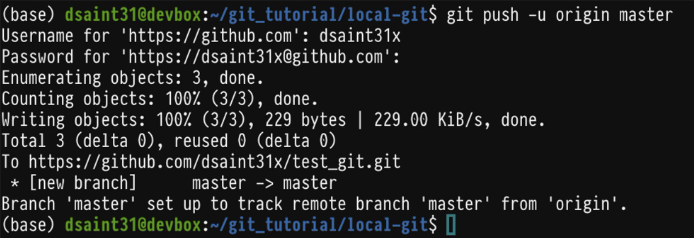
만일 remote repository에 다른 이름의 branch로 만들어야 하는 경우엔 다음과 같이 수행.
git push -u origin main:new_branch_nameoriginremote repository 의미하는 단축이름mainremote repository의 main branch로 이 브랜치를 원격저장소에 올림.
같이 읽어보면 좋은 자료들
2024.05.20 - [utils/git and github] - [Git] Git Summary (작성중)
[Git] Git Summary (작성중)
git이란2024.05.20 - [utils/git and github] - Git : 소개 git 설치 후 해줘야 하는 작업들[Git] git 설치 후 우선 해줘야 하는 작업들 (tistory.com)local repository 초기화2024.05.20 - [utils/git and github] - [Git] init : local repo
ds31x.tistory.com
728x90
'utils > git and github' 카테고리의 다른 글
| [Git] remote, remote add, remote show: 원격저장소와 연결 (0) | 2024.05.26 |
|---|---|
| [Git] pull and fetch (0) | 2024.05.26 |
| [Git] Tutorial: 3-way merge, fast forward, and rebase (0) | 2024.05.26 |
| [Git] merge mode: merge and rebase. (0) | 2024.05.26 |
| [Git] merge: branch를 합침 (0) | 2024.05.26 |


